

Elephas
AI AssistantsUpdated November 13, 2026
Private desktop AI for Mac and Windows that answers questions from your own documents with page-level citations and hides personal details first.
We may earn a commission when you sign up through our links. It does not affect our reviews.
What is Elephas?
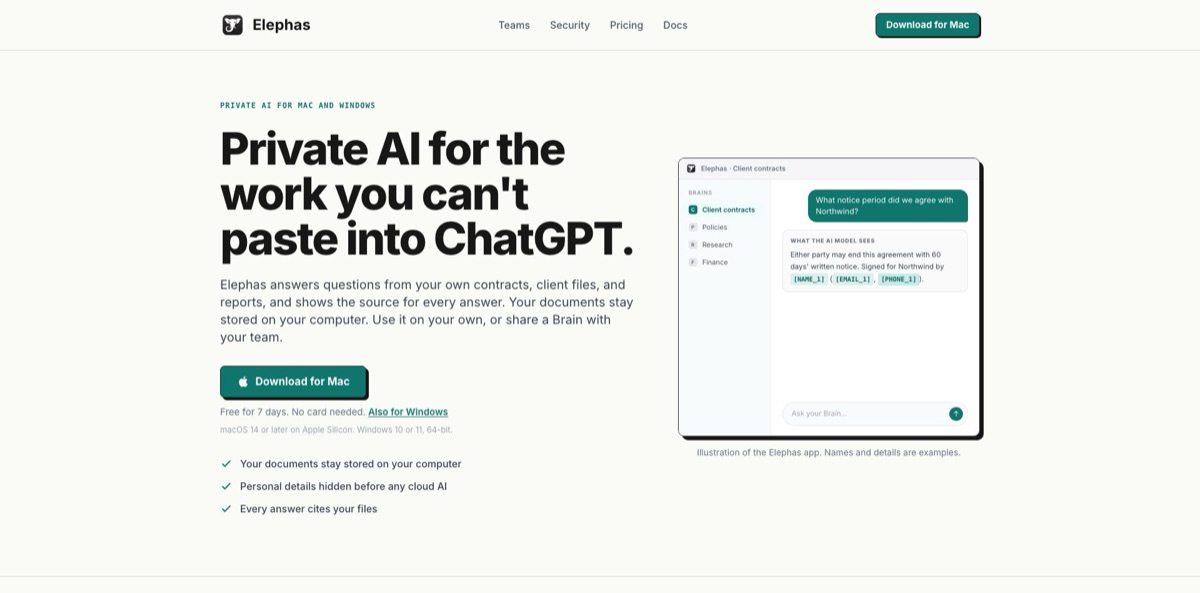
Elephas is a desktop app for Mac and Windows that indexes your own files on your computer and answers questions from them, citing the page, slide or sheet behind each claim. It started life as an AI writing assistant that worked across Mac apps, but the current version drops writing tools and integrations to do one job: private question answering over contracts, reports, research and client files. Documents stay stored locally, and before a question goes to a cloud model, the app swaps names, email addresses and phone numbers for placeholders. You choose where answers are generated: the bundled Elephas AI, your own API key, or a local Qwen model. The weak spots are a narrow platform list (Apple Silicon Macs, x64 Windows, no mobile) and very little independent feedback on the rebuilt app. It suits lawyers, accountants, consultants and researchers who cannot paste client material into a public chatbot.
How to start using Elephas?
Download the installer from the official site. On a Mac you need Apple Silicon (M1 or later) and macOS 14 Sonoma or newer, and the download is about 130 MB. On Windows, the Download for Windows button leads to the Microsoft Store listing, and you need a 64-bit PC running Windows 10 version 22H2 or Windows 11. Intel Macs and Windows on ARM are not supported. The first launch pulls roughly 50 MB of on-device components for search, language detection, OCR and personal-detail protection. You do not need an account just to install.
Your first real task is building a Brain, which is simply a collection of documents you want to question. Click New Brain on Home (⌘B on Mac, Ctrl+B on Windows), name it after one client, matter or research project, then drag files in or use Add Files with its Files, Folder and Web Page options. Each file moves from Waiting to Ready, and you can ask as soon as the first one is ready while the rest keep indexing in the background. One Brain per client or subject gives sharper answers than a single giant library.
Click Ask This Brain and type a question in the words your documents use. The first time, Elephas asks you to click Start Free Trial and sign in through your browser; your question is kept and answered when you return. Then open Settings › AI to decide where answers are generated. Elephas AI is the default, but you can add your own provider key or download a Local AI model sized to your computer’s memory. Inside each Brain, add Protected Names for client names, matter numbers or project code names that the detector would not recognise, and use Choose Brains & files when you already know which documents hold the answer.
Before you rely on an answer, click its numbered citations. Each one opens the exact passage with its page, slide, sheet, paragraph or line range, and the Sources panel shows what was searched and what was used. Under every cloud answer, the details hidden row lists what was replaced before the question left your computer. After a large import, check the Brain’s Error tab for files that could not be read, such as password-protected Office files, Apple Pages documents or saved emails, and convert those to PDF.
Who is it for?
Solo and small-firm attorneys
You need fast answers from contracts, pleadings and discovery sets, but uploading client files to a public chatbot is a professional risk. Elephas keeps the files on your machine, understands page references and Bates numbers, and can run on a local model for the most sensitive matters.
Accountants and tax advisers
Engagement letters, workpapers and spreadsheets pile up per client, and finding one figure means opening a dozen files. Elephas reads every Excel sheet, including hidden ones, with headers kept next to their values, so you can pull a payment schedule into a sortable table with a source on each cell.
Management consultants
Proposals, interview notes and decks from past engagements hold reusable answers nobody can find. A Brain per engagement lets you compare two vendor proposals or build a project timeline from meeting notes, with every line traceable to the document it came from.
Academic researchers
You sit on hundreds of PDFs, scanned papers and notes in several languages. On-device OCR reads scans, and cross-language search finds a passage in a German paper when you ask in English, though scanned pages are only read as English text.
Small firms of 2 to 200 people
Staff already paste confidential documents into chatbots because it is faster than reading them. Team Brains give everyone a sanctioned place to ask, with end-to-end encrypted sync, per-Brain roles, private chats and an owner-set AI policy, and no IT project to run.
Former Elephas writing users
If you bought Elephas for Super Command and system-wide writing help, the new app will disappoint you, because those tools are gone. Your earlier app keeps working, so treat the new one as a separate document tool rather than an upgrade.
Elephas pricing
Elephas charges per person, not per document or per question. Every plan includes local indexing, Brains, cited answers and a monthly allowance of Elephas AI that resets each month and does not roll over. When the allowance runs out, Elephas AI pauses with no overage charge, and on the individual plans you can keep asking through your own API key or Local AI. Indexing, search and opening citations never use the allowance. Prices are listed in US dollars with taxes shown at checkout, and annual billing saves about 20%.
It includes $1 of Elephas AI usage spread across the week with a daily share, plus your own API key and Local AI for the full 7 days. Each account gets one trial, and nothing is charged when it ends.
One computer, private Brains, answers with sources, personal-detail hiding, included Elephas AI usage, and the option to use your own API key or an on-computer model.
The same features as Personal with double the included AI usage, up to 3 computers, and optional end-to-end encrypted Personal Sync between them.
Shared Team Brains with manager, contributor and reader roles, private chats for every member, one AI policy with usage caps, pooled AI usage and encrypted team sync. The owner counts as one seat, there is no minimum team size, and personal API keys are not available on Team.
Custom. A contract plan for larger organisations that need single sign-on, custom terms or more than a few hundred seats, arranged by contacting the company.
The earlier Elephas Mac app is no longer sold on the website. A version of it without the writing tools is still listed on the Mac App Store with its own subscriptions, and licences for the earlier app do not carry over to the new one.
Elephas key features
Local document Brains take PDFs (including scans), Word, PowerPoint, Excel, CSV, Markdown, RTF, HTML, EPUB, images of text and web pages by address. Elephas indexes each file twice on your computer, once for meaning and once for exact words. Files can be up to 200 MB, and a single folder import can hold 25,000 files across eight levels of subfolders. The exact-word index means invoice numbers, case numbers and part codes are matched literally instead of guessed.
Answers come with checkable citations
Each numbered citation opens the quoted passage with its page, slide, sheet, paragraph or line range, and the Sources panel shows everything that was searched. Ask for a list or a comparison and you get an interactive table you can sort and filter, with a grey pill on each value that opens its source. When you add a newer version of a file, older answers keep pointing at the exact version they used.
Three routes decide where answers are generated
Elephas AI runs on open-source models in the company’s own cloud, and prompts are not stored or used for training. Your own key works with OpenAI, Anthropic, Gemini, Groq, Mistral, xAI, DeepSeek, OpenRouter, Together AI or any OpenAI-compatible endpoint, with requests going straight to that provider. Local AI downloads a Qwen model of about 1.2 GB to 5.3 GB once and sends nothing anywhere, at the cost of simpler answers.
Personal details are hidden before cloud AI sees them
Detection runs on your computer, replaces names, email addresses and phone numbers with placeholders, and restores them in the answer. Protected Names cover client names, matter numbers and code names the detector would miss, and if a question touches a document in a language Elephas cannot protect, nothing is sent.
Cross-language search lets you ask in English about a German contract and get the passage cited in its original language, with no language setting to manage. The homepage lists English, German, Spanish, French, Japanese and Chinese, and the help center adds Hindi and Tamil. Scanned pages and images are read as English, so OCR on foreign-language scans is weaker.
Team Brains run on end-to-end encrypted sync
Owners invite people by email, assign manager, contributor or reader access per Brain, approve each new computer and review an audit log of membership and policy changes. Elephas servers see names, roles and devices but not Brain names, file names, contents or chats. Removing a member rotates the team keys and clears team documents from their computer.
Elephas Pros & Cons
Pros
Elephas gives a clear, documented answer to the first question client-facing professionals ask: where do my files go? Documents and the search index stay on your computer, the cloud only receives your question plus a few matching passages with personal details masked, and you can switch to a fully local model for the most sensitive Brains. Citations open the exact page or sheet, so answers are quick to verify. File coverage is broad, including scanned PDFs and hidden Excel sheets, and Windows support plus encrypted team sharing make it workable for a whole small firm. Use it for confidential lookups, comparisons and timelines where showing the source matters more than polished prose.
Cons
The rebuild removed what many people originally bought Elephas for: system-wide writing tools, Super Command, app integrations and the iPhone app. Nothing migrates from the earlier app, so you add your files again. Hardware support is narrow, with no Intel Macs, Windows on ARM, Linux or mobile. The company states it holds no security certifications, Team lacks single sign-on and a web admin console, and synced data cannot be recovered if you lose every device. Local models give simpler answers. Most public reviews describe the older app, so independent feedback on this version is thin. Run the 7-day trial on real files before you commit a team.
Use Elephas if you want…
- Ask questions across confidential contracts without uploading them.
- Check every AI answer against the exact source page.
- Hide client names before anything reaches a cloud model.
- Keep questions on your computer with a local model.
- Compare two versions of an agreement side by side.
- Search German or Japanese documents by asking in English.
- Give your small firm one shared, encrypted knowledge base.
- Pull figures from scattered spreadsheets into a sourced table.
Elephas alternatives




Elephas Reviews
Super Brains are the standout: you load reports and notes once and keep querying them, which saves real search time, although the feature set takes a while to learn and the interface can feel complicated.
Building a local knowledge base on the Mac is easy, but indexing a large batch of PDFs was slow, and the iOS companion of the earlier version was little more than an extra keyboard.
Running it against a local model through Ollama is convenient, yet the bundled AI credits ran out fast, and people comfortable with setup can find free tools that cover similar ground.
Answers from Super Brain documents lacked context because there was no control over how files were chunked; the developer replied that a chunking option was on the way.
Works well with ChatGPT and Claude keys plus LM Studio for offline use, but updates felt slower than rivals such as AnythingLLM or TypingMind, and the lifetime licence seemed overpriced.
FAQ
Is there a free version of Elephas?
There is no free plan. You get a 7-day trial on one computer with no card required, including $1 of Elephas AI usage plus your own API key and Local AI, and nothing is charged when it ends.
Does Elephas still include writing tools?
No. The new app only answers questions from your documents, with no writing tools and no app integrations. The earlier Mac app keeps working for existing customers, but the version still listed on the App Store does not include the writing tools.
Does Elephas upload my documents to the cloud?
Your documents and search index stay on your computer in an encrypted database. With Elephas AI or your own key, only your question and the selected passages are sent, with personal details hidden, while Local AI sends nothing, though sign-in and plan checks still need the internet.
Which AI models can I use with Elephas?
Elephas AI uses one model chosen by the company. With your own key you can connect OpenAI, Anthropic, Gemini, Groq, Mistral, xAI, DeepSeek, OpenRouter, Together AI or any OpenAI-compatible endpoint, and Local AI offers Qwen 2B, 4B and 9B; Team plans cannot use personal keys.
Does Elephas run on Windows, Intel Macs or iPhone?
It runs on Apple Silicon Macs with macOS 14 or later and on 64-bit Windows 10 (22H2) or Windows 11 through the Microsoft Store. Intel Macs, Windows on ARM, Linux, iPhone and iPad are not supported.
Which languages does Elephas understand?
The homepage lists English, German, Spanish, French, Japanese and Chinese for search and personal-detail hiding, and the help center also lists Hindi and Tamil for search. Scanned pages and images are read as English.
Is Elephas certified for compliance?
The company says it holds no security certifications today and is not a substitute for your own regulatory obligations. Larger organisations can ask for a security review under the Enterprise contract.
How do I cancel my Elephas subscription?
The pricing page asks you to contact support to change or cancel a plan, and the help center has a cancellation guide. Your Brains, files and past chats stay on your computer after the plan ends.
Similar tools
 FreedomGPTMulti-model AI app that puts hundreds of chat, image and video models, including its own censor-free Liberty models, behind one credit balance.
 MagaiPaid AI workspace that puts ChatGPT, Claude, Gemini, Grok and dozens of image and video models in one chat, with memory and
 MetaviewAI recruiting platform with an interview notetaker, sourcing agent, application review and voice screening that sync notes and decisions to your ATS.