

Final Round AI
AI AssistantsUpdated October 26, 2026
Desktop interview copilot that listens to live calls and shows private answer suggestions, plus AI practice interviews and automatic debriefs.
We may earn a commission when you sign up through our links. It does not affect our reviews.
What is Final Round AI?
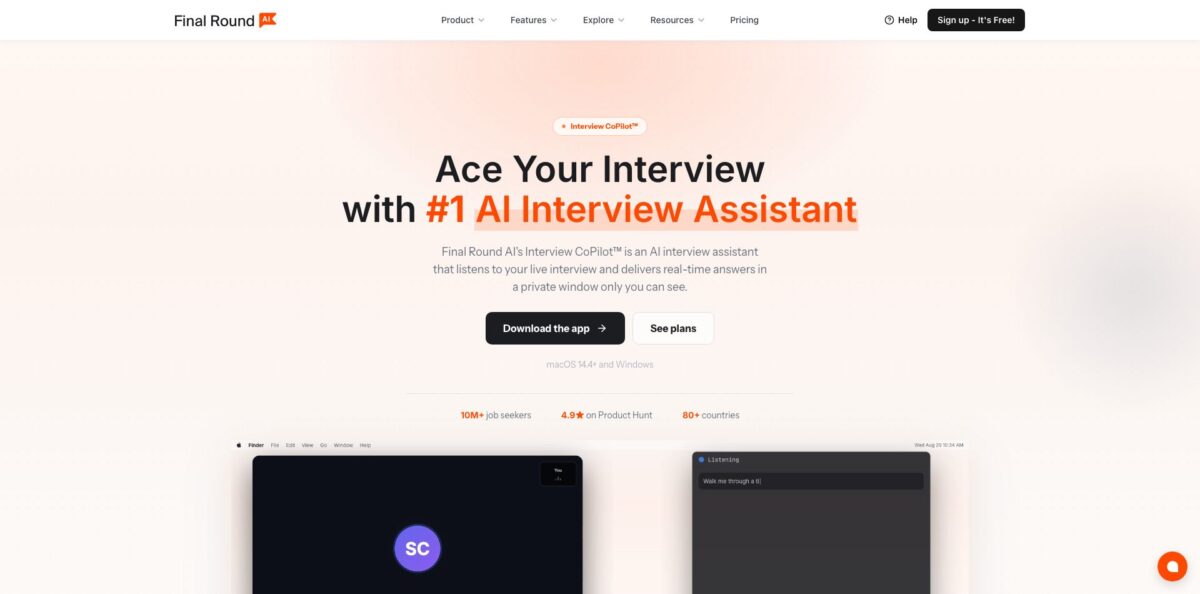
Final Round AI is a desktop app for macOS and Windows built around Interview CoPilot, a real-time assistant that transcribes both sides of a video or phone interview, detects when a question has been asked, and streams a short first-person answer into a floating window only you can see. Answers are shaped by a “Goal” you set up beforehand: the role, company, job description, your resume and any prep notes. Around that live layer sit practice interviews with an AI interviewer, Screen Help for coding and system design prompts, and an automatic debrief after every session. The weak spot is not technical. Stealth Mode is marketed as hiding the assistant from screen shares, and many employers treat undisclosed real-time AI help in a live interview as misrepresentation. It suits candidates who want structured rehearsal and are clear on each employer’s rules before using the live mode.
How to start using Final Round AI?
Download the desktop app from the official site and sign in with Google, email, LinkedIn, Microsoft or Facebook. On macOS, capturing system audio from the same computer requires macOS 14.4 or newer. The first-run screens ask for microphone, system audio and screen permissions, which the live and screen-reading features depend on. You can pick “Maybe Later” at the subscription prompt and set up your workspace on the free plan, because only practice and live sessions need a paid plan.
Next, create a Goal. Click New goal in the sidebar, fill in Role and Company, and paste the posting into the Job description box (it takes text, not a file). Then open Library, stay on the Resumes tab and use Upload a file to add a text-based PDF or DOCX of up to 10 MB. Scanned resumes without selectable text get rejected. Each file shows a “Preparing…” chip until it is ready, and the Copilot cannot use it before the chip disappears.
The goal’s Prep tab is where you decide what each new session inherits. It holds Next focus, Goal brief, Knowledge sources and Response defaults, where you set answer language, coding language and a playbook. Click Start Practice here to rehearse against the AI interviewer. For a real call, the orange Go Live button opens Preflight, which checks your microphone and meeting audio and lets you choose This computer or Phone or in person as the audio source. Phone mode needs a one-time voice sample so the app can tell your voice from the interviewer’s.
When the session ends, press End and confirm. Closing the window does not stop a session. The debrief appears automatically in History and on the goal’s Sessions tab, with strengths, gaps and suggested next steps. Read it before your next round, because the Goal carries that context forward into the following session.
Run at least two practice sessions on the same Goal before anything high-stakes, so you learn how fast answers stream and how the debrief scores you.
Who is it for?
Nervous first-time job seekers
Graduates who freeze on behavioral questions can rehearse STAR-style answers with an AI interviewer that asks follow-ups. The debrief points to the exact moments where structure fell apart. That turns vague anxiety into a short list of things to fix.
Software engineers in interview loops
Coding, system design and recruiter screens all run in one practice session without switching modes. Screen Help reads a problem on screen and writes a worked solution you can study afterward. You get repetition on the formats big tech loops actually use.
Career switchers
Moving from, say, operations into product management means explaining a non-linear story. Uploading your resume and the target job description lets practice questions reflect the role you want, not the one you had. The debrief shows where your narrative still sounds unconvincing.
Non-native English speakers
Final Round AI says it supports 143 languages and accents, and answer language is set per session. Rehearsing out loud in the interview language builds fluency on typical questions. Expect to adapt suggestions so they still sound like you.
Laid-off professionals running many processes
One Goal per job keeps resumes, notes and debriefs separate across a dozen parallel applications. Context carries from round to round inside each Goal. That cuts the prep you repeat for every new company.
Candidates weighing live assistance
If you are considering the live copilot, check each employer’s interview rules first. Some companies explicitly ban AI help during interviews and treat it as grounds for rejection. Use it only where it is clearly permitted.
Final Round AI pricing
Final Round AI uses a single paid feature set sold on different billing cycles. The free plan covers setup: Goals, resume and materials, job description parsing and a basic interview report. Live Interview CoPilot, practice interviews, Stealth Mode and the full question bank all require a subscription, and there is no free trial for live sessions. Longer commitments cut the monthly rate sharply, and the plans page says signed-in users may see an extra discount. Prices below were listed on the official plans page in USD on October 18, 2026.
Basic AI interview report and interview prep management. Enough to organize Goals and materials before you pay.
Unlimited Interview Copilot, Stealth Mode, advanced AI interview reports, all interview types including coding and HireVue, a question bank of 10,000+ questions and standard AI models.
Same features as Monthly, which works out to about $250 every three months.
Same features plus priority support, or $300 per year in total.
Adds premium AI models, early access to new features and priority support with a stated response time under one hour.
Refund terms deserve a careful read. The Terms of Use updated on October 8, 2026 describe a 72-hour money-back guarantee that excludes accounts with substantial use (two or more sessions longer than 30 minutes each), and refunds paid through Stripe are reduced by processing fees. The FAQ on the plans page still says monthly plans are non-refundable, so check the Refund Policy before checkout.
Final Round AI key features
Live Interview CoPilot
The desktop app listens to the call, detects behavioral, coding, system design, case and domain questions, and streams a first-person answer prompt within seconds. It works with Zoom, Google Meet, Teams, Webex, HackerRank, CoderPad and phone calls placed on speaker. An Answer anyway button forces a suggestion if a question is missed.
Practice Interview
The former AI Mock Interview now lives inside the app and covers eight scenarios: General, Coding, System Design, Behavioral, Product Case, Data / ML, Salary Negotiation and Recruiter Screen. Questions draw on the same Goal, resume and materials as live sessions. This is the part of the product that most reviewers praise without reservation.
Interview Debrief
After every live or practice session the app writes a plain-language summary of what worked, what needs work and one next step, plus saved technical solutions. Debriefs feed back into the Goal, so later sessions start with that context. You get a record of progress rather than a pile of disconnected practice runs.
Screen Help
When a prompt lives on screen, such as a coding task, diagram, error or spreadsheet, Auto-capture or the Solve screen button reads it and writes a full worked solution in a side panel. Long-form solutions are saved to the debrief. For practice, this is a quick way to compare your approach with a reference solution.
Goals and Library
Each Goal holds one role at one company with its job description, while the Library stores resumes and extra materials reused across Goals. Older resumes uploaded on the website stay in the web AI Drive and must be downloaded and re-uploaded, since nothing syncs automatically. The separate resume builder page now redirects to the Interview CoPilot page, so resume work centers on supplying context rather than generating documents.
Stealth Mode
On by default, it keeps CoPilot windows out of screen shares and recordings in supported meeting apps, and the homepage promotes it as “100% undetectable.” This is the most contested feature: it exists to conceal the assistant from the interviewer.
Final Round AI Pros & Cons
Pros
The practice loop is well designed. You define the job once, rehearse against an AI interviewer that knows the job description and your resume, and get a written debrief without pressing a button. Eight practice scenarios cover most formats you will meet, including salary negotiation and recruiter screens that many prep tools skip. The help center is unusually detailed, naming every screen and button, which makes setup predictable. Phone and in-person audio modes, Screen Help for technical prompts and per-session answer language make the app flexible across interview types. Annual billing brings the cost down to $25 per month. Build a Goal for your next real interview and run practice sessions until the debrief stops flagging the same gaps.
Cons
The live copilot raises the biggest questions. Employers increasingly classify real-time interview assistants as cheating tools, and press reports describe Google and Deloitte UK bringing back in-person rounds partly in response. Using Stealth Mode in a remote interview without permission can lead to rejection or a rescinded offer if discovered. The terms also make you responsible for any legally required consent to record or transcribe the other person. On the practical side, Trustpilot reviewers report slow answers in live calls, a pricey $150 monthly plan and frustrating refund disputes after the move away from the browser version. Read each employer’s AI policy and the refund rules before you pay.
Use Final Round AI if you want…
- Rehearse job interviews with an AI interviewer.
- Practice coding and system design questions out loud.
- Get a written debrief after every practice session.
- Tailor practice questions to a specific job description.
- Organize prep for many parallel job applications.
- Prepare for salary negotiation and recruiter screens.
- Practice answering in your target interview language.
- Study worked solutions to on-screen technical prompts.
Final Round AI alternatives

Final Round AI Reviews
Mock interviews feel realistic and the instant feedback helps with confidence, though users note the subscription is expensive and responses sometimes lag.
Helpful for phone screens and general preparation, but less dependable in live interviews, and a billing sync problem led to a duplicate charge that was hard to get refunded.
The Windows app felt slow and answers scrolled past before there was time to read them, while support replies came from a generic chatbot.
Real-time transcription keeps up with the conversation and the personalized suggestions help anxious candidates stay articulate, but there is little control over answer length.
The tool became less reliable after the browser version was dropped, and the yearly plan refund request was turned down.
FAQ
Is Final Round AI free?
There is a free plan for setting up Goals, uploading your resume and preparing materials. Live Interview CoPilot and practice sessions require a paid plan, and there is no free trial for live sessions.
How much does Final Round AI cost per month?
On October 18, 2026 the plans page listed $150 for Monthly, $83.33 per month billed quarterly, $25 per month billed annually and $41.67 per month billed annually for Premium MAX.
Can the interviewer see Final Round AI during screen sharing?
The company says Stealth Mode, on by default, keeps CoPilot windows out of screen shares and recordings in supported apps such as Zoom, Meet and Teams. Whether you are allowed to use it is a separate question that depends on the employer’s interview rules.
Is using an interview copilot considered cheating?
Many employers and recruiting vendors classify undisclosed real-time AI help in a live interview as cheating or misrepresentation, and some companies have returned to in-person rounds for this reason. Practice interviews and debriefs are ordinary preparation and raise no such concern.
Which platforms and interview types does it support?
It works with Zoom, Google Meet, Teams, Webex, HackerRank, CoderPad and phone calls on speaker, and covers behavioral, coding, system design, case and domain questions in one session.
Does Final Round AI work on mobile or in the browser?
The current product is a desktop app for macOS 14.4 or newer and Windows. The help center describes the website and the older desktop version as running on a different engine, with no sync of files or reports to the new app.
What happens to my resume and interview data?
Uploaded resumes, transcripts and recordings are covered by the Terms of Use and Privacy Policy, and the help center explains how to erase what the AI remembers or delete your account. You are responsible for any legally required permission to record or transcribe the interviewer.
Can I get a refund?
The Terms of Use describe a 72-hour money-back guarantee that excludes substantial use, defined as two or more sessions longer than 30 minutes, with Stripe processing fees deducted. Check the current Refund Policy before buying, as the plans page FAQ is stricter about monthly plans.
Similar tools
 FreedomGPTMulti-model AI app that puts hundreds of chat, image and video models, including its own censor-free Liberty models, behind one credit balance.
 ElephasPrivate desktop AI for Mac and Windows that answers questions from your own documents with page-level citations and hides personal details first.
 MagaiPaid AI workspace that puts ChatGPT, Claude, Gemini, Grok and dozens of image and video models in one chat, with memory and