

FLORA
Art GenerationUpdated November 18, 2026
Node-based AI canvas where creative teams chain 50+ image, video, audio and text models into reusable workflows, with a built-in agent.
We may earn a commission when you sign up through our links. It does not affect our reviews.
What is FLORA?
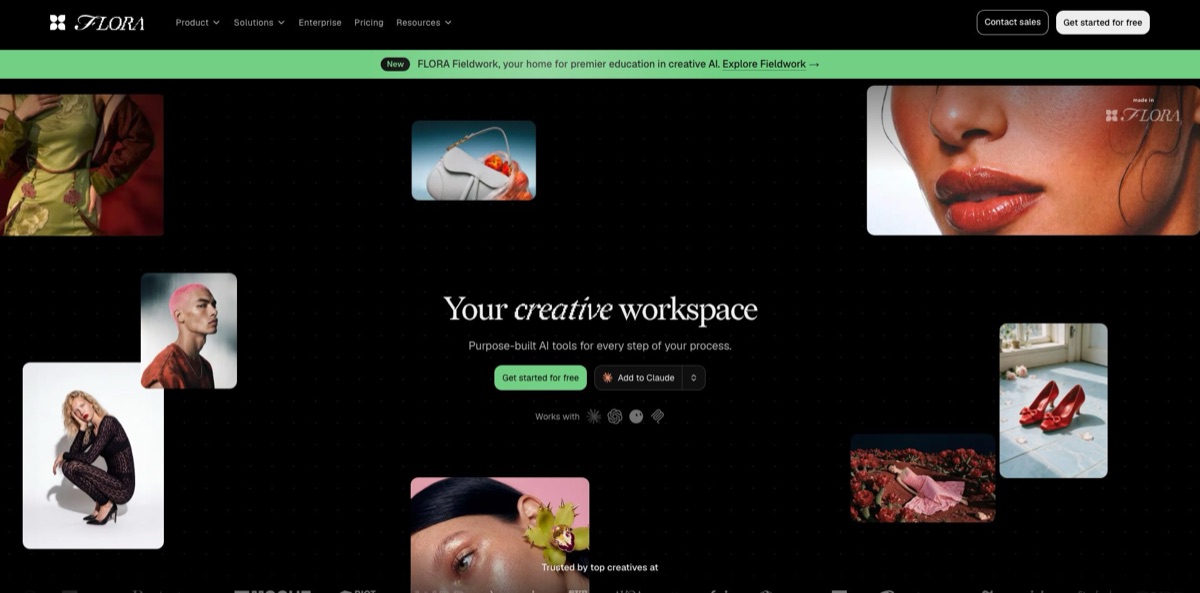
FLORA is a browser-based node canvas from Flora Fauna AI that puts 50+ text, image, video, audio and 3D models from Google, OpenAI, Black Forest Labs, Kling, Runway, ByteDance and others into one workspace. You drop nodes on an infinite canvas, wire a prompt into an image model, feed that image into a video model and keep every branch visible, so concepting does not scatter across five subscriptions and a downloads folder. A built-in agent called FAUNA can build and run those chains from a chat, and finished pipelines can be saved as reusable Techniques. The weak spots are a real learning curve and metered dollar pricing that gets hard to predict once video enters the mix. It suits agencies, brand teams and designers who iterate on visuals together; hobbyists after one-click images will find simpler tools.
How to start using FLORA?
Go to flora.ai, click Get started for free and sign in with Google or an email address (you may need to verify the email). No card is needed for the Free plan, which gives you one seat, three active projects and text and image models. Video models start on the paid Starter plan, so keep the first session to images.
Your first real job is a short chain. Double-click the canvas to spawn a node, choose an Image node and type a prompt, or connect a Text node so its output becomes the prompt. Press Enter or click the round Generate arrow; hovering over it shows the cost before you run. When an image works, drag its + handle to a second image node for a variation, or on a paid plan to a video node as the first frame. If wiring feels slow, press Cmd + / (Ctrl + / on Windows) to open FAUNA and describe the whole workflow in plain words.
The settings worth finding early sit in Preferences and Settings. Turn on Preferences → Show generation costs in dollars to replace the flower-shaped usage meter with the exact price on every model and Run button. In FAUNA, stay in Assist mode at first: it lists the nodes it plans to run and the estimated usage before anything is spent, while Auto mode runs everything without asking. On paid plans, Settings → People & Seats → Usage this period shows the included budget, the reset date and any overage.
Double-click a finished generation to open it full screen and copy its seed for later reruns. Click Share in the top right to copy a link, protect that link with a passphrase or publish the project to the Community page. For delivery, wire outputs into an Export node to download PNG, JPG, MP4, MOV or GIF files, or send them to Google Drive, Dropbox or Shopify. If the pipeline is worth repeating, Build Technique packages it as one reusable node.
Who is it for?
Agency creative teams
Pitches demand dozens of directions in days, and juggling separate image and video tools slows everyone down. FLORA keeps every model on one canvas with real-time cursors and comments pinned to nodes, so a creative director reviews branches in place. Usage History splits cost by project and member, which makes client billing traceable.
Brand and in-house design teams
Keeping a product, character or style consistent across many assets is the hard part of AI imagery. Elements turn up to 8 reference images into one reusable reference, and Pro adds shared assets and shared elements across the workspace. Campaign variants start from the same locked subject instead of from scratch.
Fashion and e-commerce teams
Turning sketches into renders, recoloring a garment across a catalog and dressing models in new looks are daily chores. Fashion Studio, included in every plan, packs those tools into a three-panel interface with auto-detected garment editing and no node wiring. Results can go straight to a Shopify store’s Files library through the Export node.
Motion and video designers
Storyboards, animatics and product spins usually mean exporting frames between apps. Image nodes feed video models such as Kling, Veo, Seedance and Sora 2, and the Timeline Editor trims, sequences and captions clips into a finished cut on the canvas. Watch the bill, because video is where per-run costs climb.
Developers and agent users
You want image and video generation inside Claude, ChatGPT, Cursor or your own code. FLORA MCP plus an API with a TypeScript SDK and CLI, all from Starter, let an agent quote a price, run a model or a Technique and drop results on a canvas a designer can open.
FLORA pricing
Since May 2026, plans are priced in dollars rather than credits. Each paid seat has a fixed monthly fee and adds the same amount of usage, in dollars, to a pool the whole workspace shares. Every generation deducts the model’s published rate: the model pricing page lists Nano Banana 2 at about $0.08 per default 1K image (up to $0.20 at 4K), Kling 3.0 Pro at about $0.71 for a 5-second 1080p clip and Veo 3.1 at $3.84 for an 8-second 720p clip. Failed generations are free, FAUNA chat never touches the budget, quarterly billing takes 10% off the seat price and annual billing takes 20%. Self-serve workspaces go up to 8 seats.
One seat, 3 active projects, text and image models only, the full canvas and layer editor, Techniques and FAUNA. You get up to 17 complimentary generations, capped at $2.50 of usage. Images carry a FLORA watermark, there is no personal asset library, and API or MCP generation is limited to the $2.50 every new workspace receives.
Includes $18 of usage per seat, all text, image and video models, unlimited projects, real-time collaboration, batch generations, the Action node, API and MCP access, editable project sharing and 30 days of generation history.
Includes $50 of usage per seat, everything in Starter, shared team assets and shared elements, per-member usage caps, in-app usage analytics, full generation history and App Mode for the whole team.
Includes $200 of usage per seat, everything in Pro and 3 custom ElevenLabs voices per organization.
Custom. For teams of 9 or more, with SSO and SAML, dedicated support, bespoke onboarding and training, and an automatic CopySight IP risk check on generated images and videos.
Included usage resets monthly and does not roll over. When it runs out, you either upgrade or switch on Overage, an opt-in mode with a maximum you set, charged at the same rates; on self-serve plans the card is charged during the cycle as unpaid overage builds up, not at renewal. At published rates, one Starter seat’s $18 covers roughly 220 default Nano Banana 2 images or four Veo 3.1 clips.
FLORA key features
Node-based infinite canvas: every text, image, video, audio, 3D and document step is a node you connect by dragging a handle, so a prompt can feed an image and that image can drive a video. Select a chain and click Run all to execute up to 50 nodes in dependency order, or run a single node up to 20 times for variations. You see the whole path at once and can branch anywhere without losing earlier directions.
FAUNA agent: an assistant inside the canvas that reads selected nodes, adds and wires new ones, picks models, writes prompts and runs generations from a chat. Assist mode shows the planned nodes and estimated cost before running, and Create works as a chat without a canvas, with editors such as Mark it up and Compare. FAUNA messages never draw on your usage budget.
Techniques and Technique Builder: Techniques are pre-built multi-step workflows from FLORA and guest creators, such as Character Lock or Logo to Brand Identity, that run as one node with defined inputs and outputs. Each shows its usage cost and estimated time before you run it. Build Technique packages your own canvas into a reusable node that your workspace can drop onto any canvas or run as a simple app.
Elements for consistency: you supply up to 8 images of one subject, a category and optional guidelines, and FLORA produces an Element Preview that keeps the features that matter, such as a face and hair rather than an outfit. Reusing that Element keeps a product or character steadier across generations. The docs say plainly that it improves consistency without guaranteeing it, so check every batch.
Batch production: the Batch node works like a “for each” loop, sending a collection of images, videos or text through the same downstream model, while Batch Generate runs one prompt per row of a table. Paired with Elements, it turns one approved concept into a full set of formats. The MCP docs describe agent batches of 20 to 500 assets, fired in chunks of 20.
Studios, editors and export: Fashion Studio covers sketch-to-render, recoloring and try-ons with auto-detected garment edits, the layer-based Image Editor combines text, shapes and 3D models, and the Timeline Editor cuts clips into a finished video. The Deck node lays out slides you can present or download as PDF, PowerPoint or PNG, and the Export node sends files to Google Drive, Dropbox or Shopify.
API, MCP and data terms: from Starter, FLORA MCP connects Claude, ChatGPT, Codex, Cursor and other clients, and the API with its TypeScript SDK and CLI runs Techniques and generations from code at the same rates as the app. FLORA states that uploads and prompts are not used to train models and that you own your outputs on every plan; Enterprise adds SSO, a DPA and SOC 2 documentation.
FLORA Pros & Cons
Pros
FLORA replaces a stack of separate subscriptions with one canvas where Nano Banana, FLUX, GPT Image, Kling, Veo, Seedance and dozens of other models sit side by side. Because each step is a node, you can compare models on the same prompt, branch from any result and hand the whole chain to a colleague who sees exactly how an image was made. Dollar pricing is unusually open once you switch costs on: every run has a published rate, failed runs are free, and Usage History splits spend by project and member. Techniques, Elements and the API turn one-off experiments into repeatable production. Start with a featured Technique close to your job and study how its nodes are wired.
Cons
The node canvas takes time to learn, and both Product Hunt reviewers and independent testers mention the curve even with FAUNA doing some of the wiring. Costs vary widely by model, so the same idea can cost a few cents as an image and several dollars as a Veo 3.1 clip, and the default flower meter hides the exact amount until you change a preference. Included usage does not roll over, overage is charged mid-cycle, and the May 2026 move to per-seat pools frustrated some studios that liked the older unlimited-seat setup. The Free plan has no video, watermarks images and runs out after about 17 generations. Set per-member caps and a max overage before inviting the team.
Use FLORA if you want…
- Compare dozens of image and video models on one canvas.
- Turn one approved concept into hundreds of on-brand assets.
- Build reusable multi-step workflows your whole team can run.
- Keep products and characters consistent with reusable Elements.
- Describe a workflow in chat and let FAUNA build it.
- Bill clients from per-project generation cost history.
- Generate images and video from Claude, ChatGPT or Cursor.
- Render fashion sketches and recolor garments without node wiring.
FLORA alternatives
 KreaRead review →
 LovartRead review →
 Leonardo.aiRead review →
 RunwayRead review →
 OpenArtRead review →
 Adobe FireflyRead review →
FLORA Reviews
A paying subscriber in a Reddit thread about everyday AI tools says FLORA gets used more and more because one project can generate an image, change its camera angle, upscale and crop it without switching tabs, and Nano Banana there sticks to exact dimensions and clean transparent backgrounds.
Product Hunt reviewers, with a 4.7 average from only three reviews, praise fast and intuitive iteration, a clean interface and high-quality output, while one notes the platform takes time to learn properly and another wants a built-in photo enhancer for final exports.
In r/generativeAI, a user weighing the Starter plan worried that its included usage would run out quickly when iterating heavily on art direction with premium image models such as GPT Image 2.
A studio co-founder who dropped Weavy for FLORA liked the earlier single payment with unlimited seats and per-seat budgets, and says the May 2026 per-seat pricing fits poorly when usage swings between team members; comments under FLORA’s own pricing announcement also asked for clearer spend visibility.
An agency creative director who used FLORA on client projects credits it with ending subscription fatigue and making workflows reusable across clients, but finds metered usage hard to budget for fixed-price work, video costs quick to escalate and the free tier barely a trial.
FAQ
Is FLORA free to use?
Yes. The Free plan costs $0 and includes one seat, 3 active projects, text and image models and up to 17 complimentary generations capped at $2.50 of usage. Video models, watermark-free images and API or MCP access start on the $18 Starter plan.
Does FLORA train AI models on my uploads?
No. FLORA says your uploaded files, prompts and metadata are not used to train or fine-tune models by FLORA or its model partners, and it works under no-training agreements with its API vendors.
Who owns the images and videos I create?
You do. FLORA states that you own all generated outputs on every plan, with no commercial limits tied to tiers, and neither FLORA nor its partners claim rights to them.
Can I use FLORA from Claude, ChatGPT or Cursor?
Yes, through FLORA MCP, which also supports Claude Code, Codex, VS Code and other MCP clients. Ongoing MCP and API generation needs Starter or higher, though every new workspace gets $2.50 of usage to try it, and agent runs draw from the same budget at the same rates.
What happens when my monthly usage runs out?
You can upgrade, or turn on Overage in Settings → People & Seats, set a maximum for the period and keep generating at the same published rates. Otherwise you wait until the budget resets on your billing date.
Does unused usage roll over to the next month?
No. The included monthly budget resets every cycle. Extra balance from migrated credits, referrals, promotions or support grants does carry over.
Can I cancel or downgrade anytime?
Yes. Upgrades apply immediately, downgrades take effect at the end of the current billing cycle, and after canceling you keep access until the period ends.
Is there a student or education discount?
Yes. FLORA offers education pricing through flora.ai/edu, so check that page for current eligibility and terms.
Similar tools
 Pixel DojoSubscription AI studio with 80+ image and 60+ video models, consistent characters, LoRA training and an agent that builds ads and short
 ArtbreederBrowser-based AI art studio for mixing, breeding and editing images with gene sliders, prompts, collages and a remix-friendly community.
 mnml.aiAI rendering studio for architects and designers that turns sketches, photos and SketchUp, Revit or Rhino views into photoreal renders and short