

FLUX
Image GenerationUpdated November 17, 2026
Black Forest Labs' image models that generate and edit pictures with bounding-box layout control, via a pay-as-you-go API, Playground and open weights.
We may earn a commission when you sign up through our links. It does not affect our reviews.
What is FLUX?
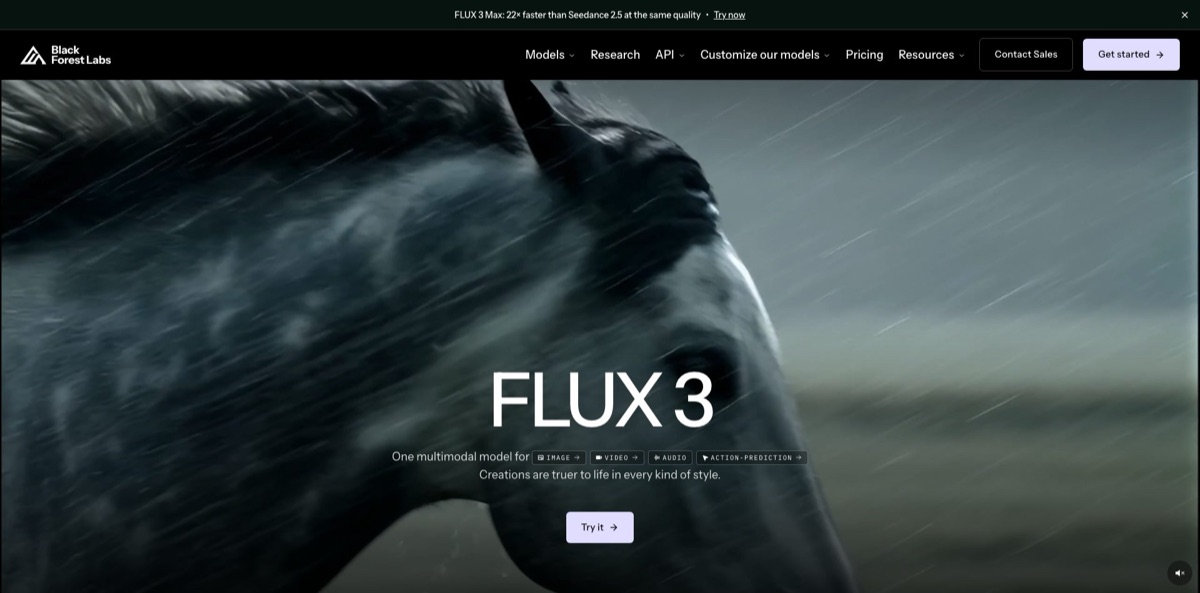
FLUX is the family of image and video models built by Black Forest Labs and sold three ways: a pay-as-you-go API, a browser Playground and downloadable open weights. The current flagship, FLUX 3 Image, generates and edits pictures through a single endpoint, accepts up to ten reference images and lets you place each element with bounding boxes, while the 5.6B-parameter FLUX 3 Image Klein runs on consumer GPUs. Older FLUX.2 and FLUX.1 models stay on the API for existing pipelines. Its main strength is control: you can move, recolor or replace one object while the rest of the image stays unchanged. The weak spots are a credit-only model with no free tier listed, strict moderation and community complaints about human anatomy in Klein. Pick it if you build products or need precise layouts rather than casual one-off art.
How to start using FLUX?
Create an account at dashboard.bfl.ai and confirm your email. The dashboard sets up a Default Organization for team members and billing, plus a Default Project where API keys and usage are tracked. Nothing renders on an empty balance, so open API, then Credits, click Add Credits and pay through Stripe. One credit equals $0.01, the docs suggest starting with $10 to $20, and credits do not expire, so a small test balance is never wasted.
For a first real scenario, open the Playground, which now lives at dashboard.bfl.ai/playground after the old playground.bfl.ai was retired on August 31, 2026. Choose FLUX 3 Image, describe the subject, setting, light and framing, and generate. Then upload a product photo and write an edit instruction, such as swapping the background or changing the color of one item. Playground generations cost exactly the same as API calls, so whatever you spend here is a realistic preview of production costs.
The screen worth learning is the bounding-box layout. You drag out a box for every element that matters, describe what goes in it and add one scene line that ties everything together; the canvas is a 0 to 1000 grid whatever the aspect ratio. If drawing boxes feels slow, an LLM agent can plan the layout from a single sentence and you only move the boxes you dislike. The same boxes target later edits, so you can recolor a wetsuit or swap a subject while everything else stays untouched. Grounding is on by default and searches the web to get real things right; switch it off for faster, prompt-only results.
When a result works, click API Code on the generation to copy Python, JavaScript or cURL with your exact parameters. Create a key under API, then Keys (it is shown only once), send the request with the x-key header and poll the returned polling_url until the status reads Ready, or use webhooks instead. Download outputs straight away, because delivery URLs expire after 10 minutes, and compare the cost field in each response with your budget. Before a launch, enable auto top-up so jobs do not fail with a 402 error when the balance hits zero.
Who is it for?
Product developers and SaaS teams
You want image generation inside your app without renting and babysitting GPUs. The FLUX API bills per image with no seats or subscriptions, returns the cost of every request and offers EU and US regional endpoints, so you can budget per feature and keep traffic in one region.
Designers and art directors
Your daily frustration is prompts that ignore where things should go. FLUX 3 Image takes bounding boxes for headlines, products and people, then edits one box at a time, which turns poster layouts and ad variants into a repeatable process instead of a lottery.
E-commerce and fashion teams
You need the same product in dozens of scenes, plus endless clean-up work. Multi-reference editing keeps a product or character consistent across up to ten references, and dedicated FLUX Tools cover virtual try-on, object erase, deblur and outpainting at per-megapixel prices.
Open-weight and ComfyUI users
You prefer running models locally and training your own LoRAs. FLUX 3 Image Klein and FLUX.2 [klein] ship weights on Hugging Face with ComfyUI workflows, and Klein’s quantized builds bring the hardware requirement down to ordinary RTX cards.
Agencies and studios
You produce assets for named clients and need licensing clarity before you invoice. API usage includes commercial rights, and the Professional weights tier covers up to 3 client domains if you want to self-host a fine-tuned model.
FLUX pricing
Black Forest Labs sells FLUX on pure pay-as-you-go credits: no subscriptions, no seat fees, 1 credit equals $0.01, and prices are identical in the Playground and the API. The official pricing page lists no free tier, so you buy credits through Stripe, and they never expire or reset at month end. Images are billed by resolution tier or by megapixel and video by output second. Failed API calls are not charged, and on FLUX 3 Image neither are rejected requests or outputs withheld by moderation.
Text-to-image and editing cost the same, and reference images and prompts are included in the per-image rate.
This is the cheapest way to get current-generation editing and layout control.
FLUX.2: [pro] costs $0.03 for the first megapixel plus $0.015 per extra megapixel, [max] $0.07 plus $0.03, [flex] $0.05 per megapixel, and [klein] starts at $0.014 (4B) or $0.015 (9B) for the first megapixel. Reference images add per-megapixel charges on this family.
FLUX.1 (previous generation): FLUX 1.1 [pro] is $0.04 per image, FLUX 1.1 [pro] Ultra $0.06, FLUX.1 Kontext [pro] $0.04 and Kontext [max] $0.08.
Erase and Deblur start at $0.03, Virtual Try-On at $0.0375 and Outpainting [fast] at $0.045 for the first megapixel; FLUX.1 Fill [pro] is $0.05 per image.
Audio is included and clips run up to 20 seconds.
Tier prices are not shown on the public pricing page; Builder and Platform are bought in the dashboard, Professional through sales.
Custom. Volume discounts, SLAs, dedicated support and private endpoints, with enterprise agreements available from 200K generations per month.
FLUX key features
Bounding-box layouts
You append a JSON list of boxes to the FLUX 3 Image prompt, each with coordinates on a 0 to 1000 grid, an id and a short description. The model renders every element inside its box instead of guessing composition from one long sentence. Posters, packaging mockups and ad layouts match the brief far more often on the first or second attempt.
Pixel-exact local edits
Mark the element you want to change, then recolor, replace, move, resize or remove it, with several elements handled in one request. Everything outside the edited boxes stays as it was, which is what product shots and brand assets need. Since the October 22 update, an edit can also keep the exact size of the input image with match_input.
Up to ten references per request
You cite each image by its position in the prompt and say what it contributes: the scene, an object, a style or a character. This is how you drop the same sneaker into a new campaign or keep a mascot consistent across a series. On FLUX 3 Image, extra references do not raise the per-image price.
Native 4K and flexible sizes
FLUX 3 Image goes from 768 × 768 previews to 4K output of about 16 megapixels at 15 aspect ratios, and custom width and height reach panoramas up to 8:1. Web grounding pulls in real-world references for things like current posters or landmarks.
Open weights you can fine-tune
FLUX 3 Image Klein ships as a fast distilled model and a Base model for LoRA training, with FP8, INT8 and NVFP4 builds; Black Forest Labs says the INT8 build runs on RTX cards with as little as 8GB of VRAM. Diffusers, ComfyUI and AI Toolkit support it on day one. You keep data on your own hardware when compliance demands it.
FLUX Tools for production chores
Separate endpoints handle mask-based object erase, outpainting in fast or high mode, deblur, inpainting and virtual try-on from a person image plus garment references. Each is priced per megapixel, so batch clean-ups stay predictable. These cover jobs that a general prompt-based editor handles less reliably.
Video, MCP and agent skills
The same FLUX 3 family produces video with synchronized audio, up to 20 seconds per clip, with keyframes and a cheap draft mode. An official MCP server and Agent Skills let coding agents call FLUX directly.
FLUX Pros & Cons
Pros
FLUX gives you more control over composition than most prompt-only generators. Bounding boxes, ten-image references and local edits that leave untouched pixels alone make it practical for layouts, product photography and repeated client revisions. Pricing is transparent down to the megapixel, with no seats or subscriptions, credits that never expire and no charge for failed jobs. You also get a genuine choice of deployment: a hosted API with commercial rights included, EU or US endpoints, or open weights on your own GPUs, backed by SOC 2 Type II and ISO 27001 for procurement checklists. Start with Klein for drafts and keep FLUX 3 Image for finals to hold costs down.
Cons
There is no free plan on the official pricing page, so every experiment costs credits, and the 4K tier of FLUX 3 Image at $0.607 per image adds up quickly. Moderation is strict, and users argue that safety filtering hurts results with people; FLUX 3 Image Klein drew many reports of distorted anatomy and wrong fingers right after launch. The standard API terms let Black Forest Labs use your inputs and outputs to train its models, which some companies will not accept without an enterprise agreement. Licensing for self-hosting also varies by checkpoint, from Apache 2.0 to non-commercial. Read the license of each model before shipping anything built on local weights.
Use FLUX if you want…
- Place every element of an image with bounding boxes.
- Edit one object while the rest stays untouched.
- Combine up to ten reference images in one request.
- Pay per image without subscriptions or seat fees.
- Generate print-ready images at native 4K resolution.
- Run open-weight image models on your own GPU.
- Train LoRAs on your brand style or products.
- Add image generation to an app through a REST API.
- Call FLUX from Claude or Cursor through MCP.
FLUX alternatives
 MidjourneyRead review →
 Nano BananaRead review →
 ChatGPTRead review →
 IdeogramRead review →
 Adobe FireflyRead review →
 RecraftRead review →
 Leonardo.aiRead review →
 KreaRead review →
FLUX Reviews
Developers praise the bounding-box interface of FLUX 3 Image as far more steerable than chat-style prompting, though some would rather compare several models in one place than visit each lab’s own sandbox.
A buyer who loaded $10 of credits called the first image, a Paris scene with an accordion, not bad, but other commenters quickly spotted melted coins, a wrong accordion keyboard, an inaccurate setting and the familiar glossy studio lighting on people.
Early FLUX 3 Image Klein testers like its editing and its very low price per image, yet many report poor anatomy and extra fingers in portraits, blaming heavy safety filtering; a few say results improve once the prompt upsampler is used.
Open-weight fans welcome a strong European rival to Google’s Nano Banana Pro that they can run themselves, but criticize the non-commercial licenses on bigger checkpoints and the plastic-skin look FLUX outputs are known for.
FAQ
Is there a free plan for FLUX?
The official pricing page lists no free tier. You add credits in the dashboard at $0.01 per credit, and the same balance pays for both the Playground and the API.
Can I use FLUX images commercially?
Yes, through the API: Black Forest Labs states that all API usage includes full commercial rights with no separate license. For self-hosted weights it depends on the model: FLUX.2 [klein] 4B is Apache 2.0, the FLUX Kommunity License on FLUX 3 Image Klein allows free commercial use for individuals and companies under $5M in annual revenue, and FLUX.2 [dev] and [klein] 9B need a paid license for commercial use.
Does Black Forest Labs train on my prompts and images?
Under the standard FLUX API Service Terms, in both the EU and non-EU versions, you grant the company a license to use your inputs and outputs, including to train its models. Enterprise customers can negotiate tailored terms, and the enterprise page advertises zero data retention along with SOC 2 Type II, ISO 27001 and GDPR compliance.
Can I run FLUX locally?
Yes, for the open-weight models. FLUX 3 Image Klein runs on consumer GPUs down to an RTX 3090, or on 8GB cards with the INT8 build, and FLUX.2 [klein] needs as little as 13GB of VRAM; the full FLUX 3 Image model is self-hostable only under a commercial weights license from sales.
What happens when I run out of credits?
API requests return a 402 Payment Required error and Playground generations stop until you add more. Auto top-up can recharge your saved card whenever the balance falls below a threshold you set, with a minimum of $5.
Which tools does FLUX integrate with?
Beyond the REST API with Python, TypeScript and cURL examples, there is an official MCP server for Claude, Cursor, Codex and Windsurf, plus ComfyUI and Hugging Face Diffusers support for open weights. Enterprises can also use FLUX through Microsoft Azure AI Foundry.
Does FLUX understand prompts in other languages?
The docs include a multi-language prompting guide for writing FLUX.2 prompts in your native language, and FLUX 3 renders text in several languages. FLUX 3 Video also generates multilingual dialogue with lip sync.
Are flux1.ai and similar “Flux AI” sites official?
No. The official products live at bfl.ai, dashboard.bfl.ai and docs.bfl.ai; many third-party sites wrap or resell FLUX models under similar names with their own plans and prices.
Similar tools
 RunComfyCloud ComfyUI platform with per-second GPU billing, 200+ ready workflows, hosted image and video models, LoRA training and a serverless API.
 ImgGen AIBrowser-based AI image generator and photo editing suite with background removal, 8K upscaling, restoration and an API on one credit balance.
 Bulk Image GenerationBatch AI image generator that turns a prompt list or one brief into up to 100 images per run, with five models,