
Fotor Image Generator
Image GenerationUpdated October 5, 2026
Fotor uses advanced AI to transform text prompts into high-quality, professional images, digital art, and realistic visuals instantly.
We may earn a commission when you sign up through our links. It does not affect our reviews.
What is Fotor Image Generator?
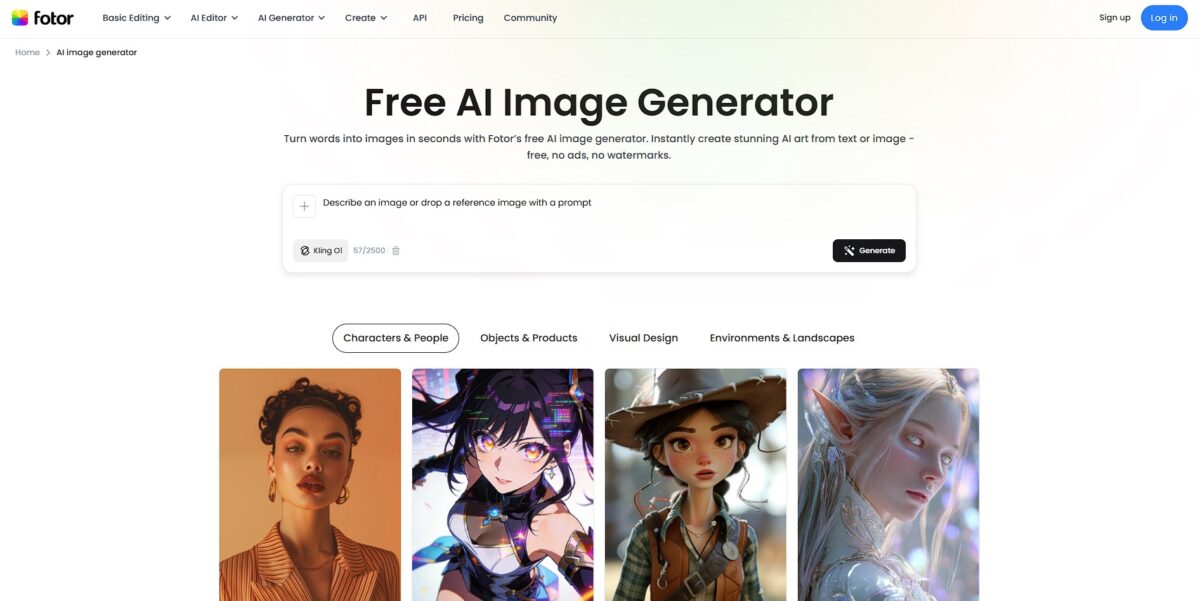
Fotor Image Generator serves as a browser-based creative hub that bridges the gap between basic photo editing and generative art. It lets you generate anything from 3D characters to sharp marketing banners using integrated models like Flux and Seedream. The workflow is built for speed: you can generate an image, swap its background, and upscale the result to 4K without leaving the tab. That makes it accessible, since creators can produce ready-to-publish assets without touching a single layer or adjustment mask. While it lacks the granular control of a professional RAW pipeline, it handles text rendering within images surprisingly well for social media graphics. Stick to Fotor for rapid-fire content creation when your priority is an intuitive UI over deep technical customization.
How to start using Fotor Image Generator?
Open the Fotor website and locate the AI Image Generator under the AI tools menu. You can jump straight in without a complex setup, though a Google sign-in is usually required to actually see your results. The browser-based interface loads quickly, which is a relief if you hate heavy desktop software: no installation, and you reach the canvas in seconds.
Takeaway: A Google account is the fastest entry point.Enter your text prompt into the description box. Instead of general terms, specify the lighting like “volumetric fog” or the lens type like “85mm” to guide the diffusion model effectively. The tool includes a prompt enhancer that adds descriptive weight to your basic ideas, helping avoid the flat, lifeless renders common in beginner AI art. It also saves you from burning daily credits on underwhelming, generic outputs.
Takeaway: Be specific about materials and light to get a usable image on the first try.Select your generation model and aspect ratio before hitting the button. You can choose between standard artistic models or specific ones like Flux for better text rendering on posters. You can generate up to four variations at once and compare different interpretations of the same prompt, so you find the right composition without re-typing your instructions multiple times.
Takeaway: Pick the 16:9 ratio if you are building YouTube thumbnails or blog headers.Refine your result using the built-in editor or the negative prompt settings. If a generation is almost perfect but contains an unwanted element, like a red roof or an extra limb, the negative prompt helps filter those out in the next iteration. You can then push the final image into the graphic designer to add readable typography or remove backgrounds. A raw AI export becomes a finished marketing asset within the same tab.
Takeaway: Hit the “Edit” button to upscale or retouch instead of starting a new generation.
Who is it for?
Solo E-commerce Sellers
Stop struggling with expensive studio photography or messy flat-lays. You can upload a simple phone photo and generate professional on-model pictures or lifestyle scenes in seconds. I noticed the “AI Virtual Model” feature handles ethnicity and age presets well to match your specific target market. You save 80% on shoot costs while maintaining a consistent visual identity.
Social Media Managers
Skip the generic stock photo search for every OOTD or quote post. The tool generates Instagram-ready visuals and catchy captions from text prompts, automatically optimizing the color palette and lighting. It struggles with complex spatial logic compared to top-tier models, but it’s faster for bulk content. Your feed stays active without needing advanced design skills.
Small Business Marketers
Create flyers, banners, and promo posters without hiring a designer. The integration of image generation into a full design suite lets you add readable typography and brand logos directly to AI-generated art. I noticed the 4K upscaler is a life-saver for making generated drafts sharp enough for physical prints. It closes the gap between a “cool AI image” and a usable marketing asset.
Indie Authors and Storytellers
Bring your characters to life by specifying age, hairstyle, and attire details. The “AI Human Generator” allows for precise control over gender and temperament, which is better than rolling the dice with random prompt seeds. It’s less ideal for maintaining the exact same character face across different poses, though. Still, you get a shared visual reference for your readers or D&D group.
Web Designers and Prototypers
Generate unique patterns, digital art, or background textures for UI mockups instantly. You can adjust aspect ratios to fit wide hero banners or vertical mobile screens without awkward cropping later. It delivers clear multilingual text, so you won’t get the unreadable “AI soup” on your website headers, and the early mood-boarding phase of a project moves faster.
Fotor Image Generator pricing
Fotor splits its utility into three tiers that move from casual testing to heavy-duty asset production. The pricing structure favors long-term commitments, offering a massive discount if you pay for the year upfront. While the free tier is generous with tools, it locks your final images behind watermarks and low-resolution exports, which forces a quick decision between a hobbyist trial and a professional workflow.
Fotor Basic costs $0 but functions as a sandbox for exploring filters and simple edits. You get limited credits for AI generation, meaning you can’t rely on it for consistent project work. In practice, you can’t use the most advanced models without hitting a paywall.
Fotor Pro runs $8.99 monthly or roughly $3.33 when billed annually. This plan removes watermarks and unlocks the full set of AI portrait tools for retouchers. It includes 100 credits per month, which works well for occasional social media posts. That makes it a cheap entry point for creators who need clean, high-definition exports without a massive overhead.
Fotor Pro+ targets power users at $19.99 monthly or about $7.49 on the annual plan. It bumps your credit allowance to 300 and adds 10GB of storage. The real value is the batch processing, which lets you swap backgrounds on hundreds of product photos simultaneously. For e-commerce sellers managing large inventories, that saves hours.
Fotor Image Generator key features
Multi-Model Sandbox Access
You can toggle between different engines like Mochi or Seedream depending on whether you need a quick sketch or a detailed 3D render. The interface lets you swap these without reloading your entire prompt. This matters because different models handle spatial logic better than others for specific concepts.
Integrated AI Post-Processing
Generate an image and immediately push it into the “Magic Eraser” or upscaler to fix artifacts without leaving the workspace. Most standalone tools leave you with a 1024px file and no way to remove that one weird extra finger. This matters because it saves you from bouncing between three different apps to get a usable asset.
Text-to-Image with Prompt Enhancer
Type a vague idea and use the built-in optimizer to add technical lighting and stylistic depth. It helps when you know you want “cyberpunk” but can’t remember the terms for volumetric fog or neon diffusion. That gets you from a casual thought to a professional-looking result.
Local Style Presets
Apply specific aesthetic filters like “Anime,” “Oil Painting,” or “3D” to force a consistent look across a batch of generations. While flexible, some presets can feel a bit canned compared to manual prompting. Non-designers can still maintain a visual brand without learning complex keyword weights.
Browser-Based Conversational Editing
Use the AI Agent Sisi to describe changes like “make the sky darker” or “add a cat” rather than re-typing the whole prompt. It functions like a lite version of a design partner who actually listens to your revisions. You get less of the trial-and-error fatigue common in static generators.
Fotor Image Generator Pros & Cons
Pros
Fotor bundles its image generator with an established photo editor, allowing you to fix lighting or add text without switching apps. You can choose from specific artistic styles like 3D or oil painting to bypass generic outputs. For beginners, the style presets act as prompt training wheels, so you avoid staring at a blank text box when you need a quick social media asset.
Cons
The free tier feels restrictive because many advanced models and high-resolution exports require a paid subscription. You might find the queue times frustrating during peak hours compared to dedicated desktop generators. The trade-off for having so many features in one sidebar is a cluttered workspace that can overwhelm a focused creative session. That adds friction when you just want to generate and download a single file quickly.
Use Fotor Image Generator if you want…
- Convert text prompts into detailed digital artwork instantly
- Generate professional AI headshots and business profiles effortlessly
- Create unique social media graphics using diverse art styles
- Remove unwanted backgrounds with one-click AI precision
- Upscale low-resolution images to crystal-clear 4K quality
- Expand photo boundaries using advanced AI outpainting technology
- Enhance portraits automatically with smart retouching tools
- Produce high-quality marketing assets without complex design software
Fotor Image Generator alternatives



Fotor Image Generator Reviews
Fotor is my go-to site for image editing to clean up graphics before using them in videos, especially since many effects are free.
I love how it balances simplicity with capability; I can enhance photos quickly without needing deep editing skills or complicated software.
The AI background remover is a lifesaver that saves me 30 minutes per photo compared to manually tracing hair with a brush.
FAQ
Which AI models does Fotor use for image generation?
Fotor integrates multiple powerful AI models including Nano Banana, Seedream 4.0, Flux.1 Kontext, and others to provide various artistic and realistic outputs.
Can I use a reference image to guide the AI?
Yes, Fotor supports image-to-image generation, allowing you to upload a reference photo to maintain specific styles, character features, or compositions.
What aspect ratios are supported?
The tool offers a wide range of aspect ratios including 1:1, 16:9, 9:16, 4:3, 3:4, and 21:9 to fit different social media and print requirements.
Can I edit the images after they are generated?
Yes, Fotor includes a built-in AI editor where you can use tools like Magic Eraser, AI Inpainting, and Background Remover to refine your creations.
Is it possible to upscale generated images to 4K?
Every generated image can be enhanced using the integrated AI Image Upscaler to reach 2K or 4K resolution for professional quality.
Can Fotor generate text within images?
Specific models like Nano Banana Pro support typography, allowing users to specify text and font styles using double quotes in their prompts.
Does Fotor provide commercial usage rights for AI images?
Yes, images generated through Fotor generally come with full commercial usage rights, making them suitable for marketing, website banners, and products.
What are AI generation credits?
Fotor uses a credit system where each image generation costs between 1 to 10 credits depending on the complexity of the selected AI model.
Similar tools
 BannerbearTemplate-based API for generating on-brand images, PDFs, animations and videos at scale from your data via REST, Zapier, Airtable or AI agents.
 Generated PhotosLibrary of 2.6M+ AI-generated faces plus face and full-body human generators for model-release-free people images in design, ads and research.
 VheerBrowser-based AI studio for text-to-image, photo editing and image-to-video, with a free no-signup model plus credit access to Nano Banana, Sora 2