

Generated Photos
Image GenerationUpdated November 12, 2026
Library of 2.6M+ AI-generated faces plus face and full-body human generators for model-release-free people images in design, ads and research.
We may earn a commission when you sign up through our links. It does not affect our reviews.
What is Generated Photos?
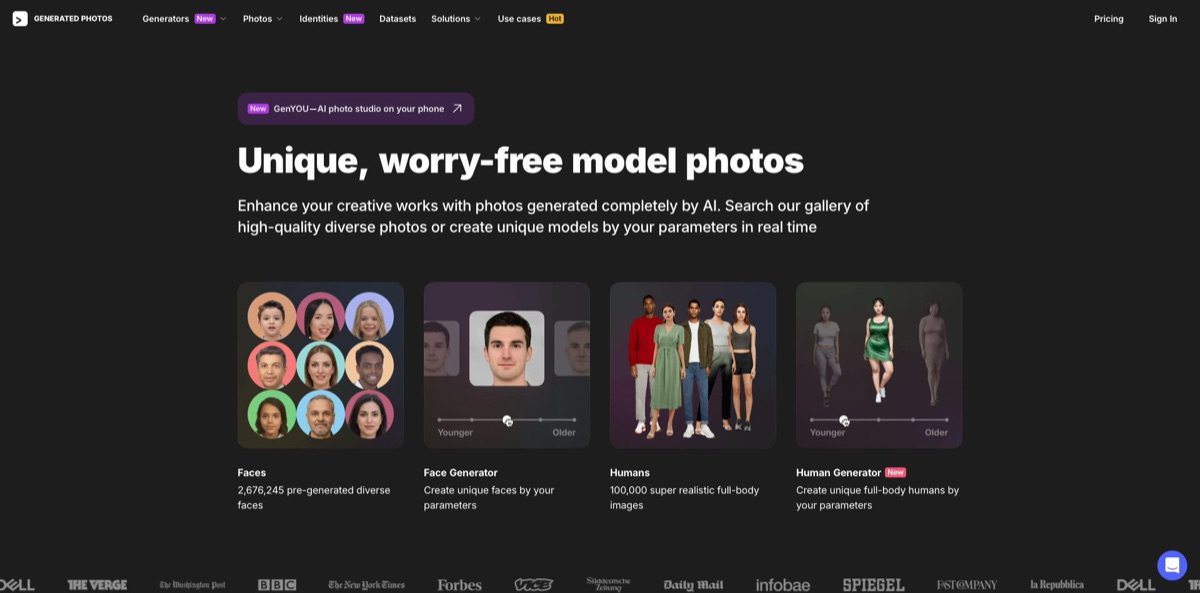
Generated Photos is a source of synthetic people: a searchable gallery of more than 2.6 million AI-made faces, a library of full-body humans, a Face Generator and a Human Generator for custom images, an Anonymizer, ready-made datasets and an API. Founder Ivan Braun’s team of about 30 trained its models on studio shoots of model-released people instead of photos scraped from the web, so there is no real person behind a face and no likeness consent to chase. That solves a familiar problem for designers, marketers and researchers who need believable faces without a photo shoot or stock licensing worries. The weak spots are a narrow scope (people only, no scenes or products), visible glitches on hands and poses in full-body images, and a strict trial policy. Pick it when you specifically need human faces for personas, mockups, ads or research stimuli.
How to start using Generated Photos?
Open generated.photos and choose an entry point: Faces for the pre-made gallery, Face Generator for a custom headshot, Humans for ready-made full-body images or Human Generator for your own. You can browse and generate without paying. Free downloads are low-resolution (the help center cites half-size 500×500 images) with a watermark and are limited to personal, non-commercial projects with a backlink such as “Photo by Generated Photos”. Pressing Download on a gallery photo opens the Start trial window. The 3-day free trial is attached only to the yearly plan: you add a card at checkout, pay $0, and the annual subscription starts automatically unless you cancel within 72 hours.
A realistic first job is finding faces for user personas or a landing-page mockup. In Faces, the filter panel narrows the 2.6M+ library by head pose, sex, age group from infant to middle-aged, eight ethnicity options, eye color, hair color, hair length and emotion (joy or neutral). A Natural or Beautified switch changes the level of retouching, and the background control lets you pick colored, transparent or photo backgrounds. When a search returns a good set, you can select whole batches for bulk download instead of clicking photos one by one.
When the gallery has nothing close enough, move to Face Generator. Its controls cover sex, head pose, age, emotion, skin tone, hair color, hair length, accessories, makeup and ethnic traits, and every change asks whether to update the current face or generate a new one. Clicking the Face Generator logo starts over with a random face. Human Generator does the same for full bodies with age, body type, pose, outfit and background, and it can place an uploaded real face on a generated body. Each confirmed Update human or Generate variation click spends one credit, so the help center advises making several changes before you confirm.
Before using an image, zoom in on the areas the official FAQ itself flags: stray patches of hair, unusual head angles and teeth, plus hands and limbs on full-body images. Paid Face Generator downloads come at 1024×1024 px without the watermark, while Human Generator output has a fixed resolution, so larger prints need a separate upscaler. Everything you buy lands in the Purchased tab of your account, bulk orders also appear under Orders, and invoices sit in the Billing tab.
Who is it for?
Product designers and UX researchers
Personas, onboarding screens and app mockups need faces that look real but belong to no one. The gallery filters help you assemble a believable, diverse cast in minutes, and you skip the consent questions that come with photos pulled from search results.
Marketers and ad creatives
Testing ten ad variants with ten different faces gets expensive with a photo shoot. A subscription covers 15 commercial-use downloads a month, the generators let you match age, emotion and look to each audience, and Face Generator results are exclusive to you by default.
Academic researchers
Face-perception and first-impression studies need controlled variations of the same person. Face Generator changes one parameter at a time, such as age, emotion or head pose, and the site offers a free dataset for academic research alongside paid custom sets.
Machine learning teams
Training face-detection or recognition models on scraped photos creates privacy exposure. The Datasets service sells pre-generated face sets, a pack of 100,000 full-body humans, real-life studio photos and custom synthetic identities with facial landmarks and metadata. The API is not licensed for ML use, so datasets are the route here.
App developers
Placeholder avatars, demo accounts and dynamic interfaces need faces on demand. The API serves 1024×1024 JPGs from the face library and the Anonymizer, filtered by age, gender, ethnicity and physical features, for display inside online products.
Privacy-minded individuals
You want a profile picture that hints at what you look like without exposing your real face. The Anonymizer turns a front-facing photo into look-alike synthetic faces, and personal use is free.
Generated Photos pricing
Generated Photos sells access in three ways: two subscriptions with monthly download quotas, pay-per-photo bulk purchases, and separate API and dataset deals. The prices below come from the official pricing and API pages as of November 2026 and are in US dollars. Yearly billing on the pricing page carries a 15% discount badge, and only yearly plans include the 3-day free trial. Both monthly and yearly subscriptions renew automatically, and you can cancel any time in the Billing tab.
Browse the gallery, run Face Generator and Human Generator, and use the Anonymizer for personal projects. Downloads are half-size and watermarked, and they need an attribution link. Commercial use is not allowed on free images.
15 downloads per month from the 2.6M+ face gallery or Face Generator, unlimited face generations, no watermarks and commercial use. According to the help center, each high-res download can be used perpetually for one commercial project, and unused downloads expire with the subscription.
15 ready-made full-body humans per month from a library of 167K+ images, 1,000 priority generations in Human Generator that refill each billing period, no watermarks and commercial use. Subscribers also keep 30 days of generation history instead of seven.
The price falls with volume: $9 each for photos 1 to 20, $7 for 21 to 50, $5 for 51 to 250, $2.5 for 251 to 1,000 and $1 beyond 1,000, so 100 photos cost $640. A single Face Generator image costs $8.97 as a one-time purchase. Exclusive rights, which remove a gallery photo from the site, cost $18 per photo without a subscription or 3 credits with one.
Access covers the 2.6M-photo library and the Anonymizer with commercial use, but photos cannot be cached, downloaded or used for machine learning.
Custom. Pre-generated, full-body, real-life and synthetic identity datasets are quote-based through the contact form, and an academic dataset is available free for research.
Generated Photos key features
The Faces gallery holds more than 2.6 million pre-generated headshots with filters for head pose, sex, age, ethnicity, eye color, hair and emotion, plus Natural or Beautified retouching and colored, transparent or photo backgrounds. You search instead of prompting, which is faster when you need twenty consistent avatars. Gallery images are shared with other users unless you buy exclusive rights.
Face Generator builds a photorealistic face in real time from parameters such as age, emotion, skin tone, hair, accessories, makeup and ethnic traits, and the product page counts more than 11 million variants of the same face. You can also upload your own photo and modify it. Results are created on the spot and are exclusive to you by default, which matters for brand campaigns and research stimuli.
Human Generator extends the same idea to full-body images with control over age, body type, pose, outfit and background
Its “use it with real faces” option lets you try an uploaded face on a generated body. The History tab keeps your generations for 7 days on free accounts and 30 days for subscribers, so you can reopen a human and edit it later.
The Anonymizer takes a clear, front-facing JPG, PNG or WEBP photo and returns synthetic look-alikes that reflect your skin tone, age, gender and hair length. The vendor says photos are processed in memory and not stored. It is free for personal use and also available through the API for apps that need privacy-safe avatars.
Datasets and synthetic identities serve machine learning and research teams
The Identities section shows a single consistent person in sixteen variations of pose, lighting and age, and the dataset offer includes facial landmarks, metadata and licensing for commercial, non-commercial or academic use. The vendor positions these sets as GDPR and CCPA compliant.
The API delivers 1024×1024 JPGs from the face library and Anonymizer, with parameters listed in the API Reference tab of your dashboard. It suits online products such as avatar pickers, dynamic UIs and demo data, but the terms forbid caching, stockpiling or compiling datasets from API results.
Generated Photos Pros & Cons
Pros
Legal clarity is the main draw. The company built its training data from its own studio shoots, starting with more than 30,000 photos of 69 models, so faces carry no real identity and no likeness rights, and you keep using everything you downloaded after the subscription ends. The gallery filters are granular, letting you assemble a balanced cast by age, ethnicity and emotion in minutes. Face Generator’s per-parameter control produces consistent variations of one person, which is useful for A/B ad tests and perception research. Bulk pricing drops to $1 per photo at volume, and datasets cover ML teams. Use the gallery for volume and the generator when exclusivity matters.
Cons
Scope is narrow: you get people, not scenes, products or illustrations. Full-body output is the weak link, with users reporting extra or missing limbs, awkward poses, plastic-looking skin and a fixed resolution. Quotas are tight at 15 downloads a month, which makes each image relatively expensive if you need dozens. The trial converts straight into an annual charge with no refund for late cancellation, and the license bans deceptive uses such as fake dating profiles and limits selling works built mainly around the photos. Cancel the trial early, inspect hands and edges closely, and read the terms before commercial use.
Use Generated Photos if you want…
- Find model-release-free faces for designs and mockups.
- Build diverse user personas without stock photo licensing.
- Generate custom headshots by age, emotion and pose.
- Create full-body models for ads and catalog visuals.
- Swap your profile photo for a synthetic look-alike.
- Display synthetic faces inside your app through an API.
- Order balanced face datasets for machine learning projects.
- Produce controlled face variations for perception research.
- Buy hundreds of faces at bulk per-photo rates.
Generated Photos alternatives
 MidjourneyRead review →
 Leonardo.aiRead review →
 Adobe FireflyRead review →
 getimg.aiRead review →
 Shutterstock Image GeneratorRead review →
 KreaRead review →
 IdeogramRead review →
Generated Photos Reviews
A website owner on Trustpilot has relied on Human Generator for several months and says support fixed a credit problem quickly; another long-time user calls the service fun and legitimate with no issues over the years.
The sharpest Trustpilot complaint comes from a user who missed the 3-day trial window, was charged about $200 for the annual plan and was refused a refund on the basis of the user agreement.
Product Hunt reviewers of Human Generator liked the intuitive controls and the range of poses, body types, ethnicities and ages, but reported extra or missing limbs, awkward arm poses, weak face aging and outfit options that did not always behave.
In the Hacker News launch thread for Human Generator, some commenters were impressed by how quickly new humans appear, while others said the skin looked plastic, hands and fingers were often wrong, and the tool hit capacity limits under heavy traffic.
G2 reviewers use the faces for user personas, placeholders and design work and rate the detail as good, though one wanted ethnic and national features to look closer to real life.
FAQ
Is Generated Photos free?
You can browse the gallery and use Face Generator, Human Generator and the Anonymizer for free, but free images are half-size, watermarked and limited to non-commercial use with an attribution link. Commercial use needs a subscription, a bulk purchase or a separate license.
Are the people in Generated Photos real?
No. The company says every image is fully synthetic, generated by a model trained on photos of professional models shot in its own studio, and any resemblance to a real person is coincidental.
Can I use Generated Photos images commercially?
Yes, with a paid subscription, bulk purchase or API plan. The license forbids deceptive uses such as fake dating profiles or impersonation, redistributing the original files, and selling works that use the photos as the main subject without substantial changes.
How does the free trial work?
The 3-day trial comes only with the yearly plan and requires a card at checkout with a $0 charge. Cancel in the Billing tab within 72 hours, otherwise the full annual subscription is charged and no refund is issued.
What happens to my images if I cancel?
You can keep using every asset downloaded while the subscription was active. Unused monthly downloads disappear when the subscription expires, and purchased files stay available in the Purchased tab for re-download.
Does Generated Photos have an API?
Yes. API plans cost $250/month for 1,000 photos or $300/month for 10,000 photos, with a discount on yearly billing, and the API is only for displaying images inside online apps, not for downloading or training models.
What happens to the photos I upload?
Faces uploaded to the generators are used only to produce your result, kept until you delete them, and not used for machine learning, according to the help center. The Anonymizer page states that photos are processed in memory and not stored.
Can I get an exclusive photo?
Face Generator images are exclusive to you by default. Gallery photos are shared, but you can add exclusive rights in the cart, after which the company removes the image from the site and never sells it again.
Similar tools
 BannerbearTemplate-based API for generating on-brand images, PDFs, animations and videos at scale from your data via REST, Zapier, Airtable or AI agents.
 VheerBrowser-based AI studio for text-to-image, photo editing and image-to-video, with a free no-signup model plus credit access to Nano Banana, Sora 2
 StablecogOpen-source web app for generating images with FLUX.1, Stable Diffusion 3 and Kandinsky, with a free daily allowance, upscaling and a REST