

Genspark
AI AgentsUpdated October 18, 2026
All-in-one AI agent workspace whose Super Agent plans and finishes multi-step work: research, slides, sheets, docs, code, media and phone calls.
We may earn a commission when you sign up through our links. It does not affect our reviews.
What is Genspark?
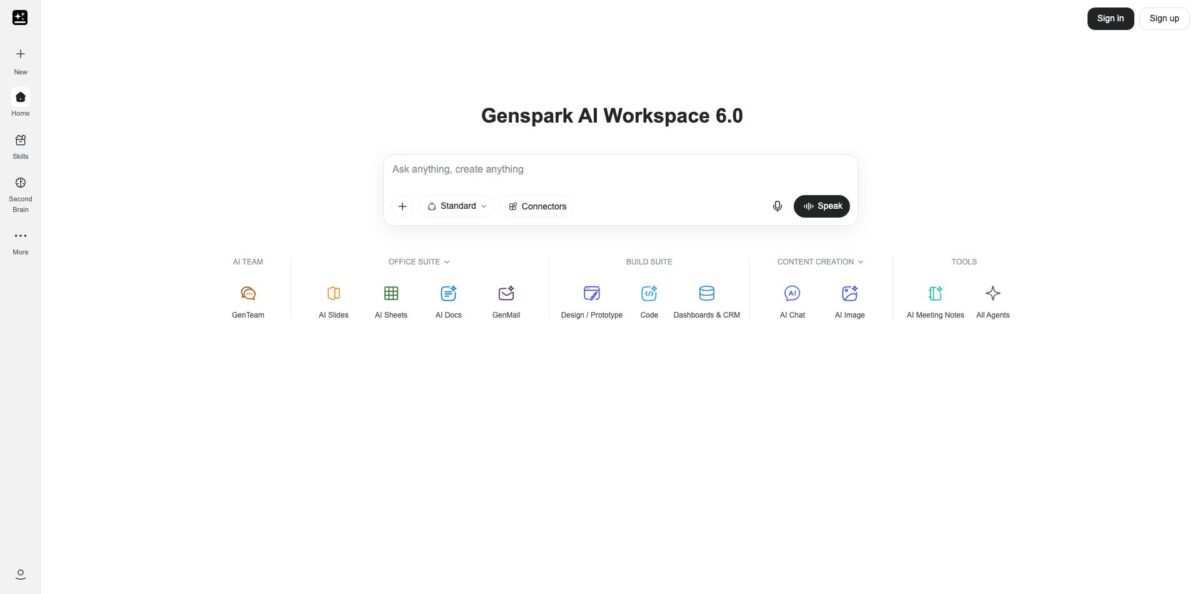
Genspark is a browser-based AI workspace built around an autonomous Super Agent: you describe a task, and it splits the job into steps, picks tools and models, and returns a finished file instead of a chat reply. In its new mode each task runs in a dedicated sandbox with a real browser and its own filesystem, so it can research the web, run code, build a slide deck, fill a spreadsheet or draft an email in one pass. Around that agent sit separate apps for AI Slides, AI Sheets, AI Docs, Genspark Code, image, video and music generation, meeting notes and an AI calling agent. The problem it removes is juggling five subscriptions and copying results between them. The weak spot is the credit system: heavy agent and video tasks burn through credits fast, and failed retries still cost. Take it if you produce lots of decks, reports and research and want one bill for all of it.
How to start using Genspark?
Create an account at genspark.ai with Google, Microsoft, Apple or an email address. Every new account starts on the Free plan with 100 credits per day and 1 GB of AI Drive storage, which is enough to judge output quality on a few small tasks before you pay. The same account works in the iOS and Android apps, though app-store subscriptions are billed and cancelled separately from web ones.
Your first real task goes into the central chat box on the homepage, or you can pick Super Agent from the New menu in the sidebar. Give it something with a clear deliverable, such as researching a market and turning the findings into a 10-slide deck, or analysing an uploaded sales file into a category breakdown with charts. Free accounts can attach files up to 500 MB and paid plans up to 1 GB, and you can also pull files from Google Drive or AI Drive.
Two settings decide how much you spend. Below the input box you choose a quality tier, Standard for everyday work and Ultra for final, high-stakes output. Then open the Connectors tab inside Skills to link Gmail, Outlook, Slack, Google Drive, Salesforce and other services, so the agent can read real context and act on it. Start with a read-only task on a connected account before you let it send or update anything.
When the agent finishes, its deliverables appear as file cards in the chat, saved with the project and downloadable; you can now share a single file without exposing the whole conversation. Check the /credit-usage page after each run to see what the task actually cost, and switch on Ask First on the usage page if you want a confirmation before paid credits are used. If a workflow worked well, tell the agent “Save this workflow as a skill” so you can rerun it later.
Who is it for?
Consultants and analysts
You spend evenings turning research into client decks and memos. Genspark runs the web research, builds the slides and drafts the summary in one task, so your time goes into checking conclusions rather than formatting.
Marketing teams
Campaigns need posters, short videos, social copy and a launch email, usually from four different tools. Here they come from one workspace and one credit balance. Budget carefully for video, which is the most expensive output.
Founders and solo operators
You need a pitch deck on Monday, a landing page on Tuesday and a competitor scan on Wednesday. The Super Agent and Genspark Code cover all three without hiring help. Saved skills let you repeat recurring jobs like weekly recaps.
Sales and account managers
With Gmail, Outlook and Salesforce connected, the agent can pull open opportunities, summarise threads and draft follow-ups. Users who live in their inbox get the most out of GenMail and the connector setup.
Busy professionals with errands
Call for Me places real phone calls to book tables, confirm appointments or check opening hours, then sends back a transcript and summary. It is a small feature, but it removes a task most people put off.
Teams of 2 to 150 people
The Team plan gives every member a private workspace, central billing, SSO and connector management, and the workspace is automatically opted out of model training. Larger organisations move to Enterprise for contracts and data residency.
Genspark pricing
Genspark charges by credits. Every generation consumes credits based on model tier, context length, image resolution, video duration and task complexity, and retries cost the same as the original attempt. Paid plans add a weekly Free Quota that covers Standard-mode text and image tasks in Super Agent, AI Slides, AI Sheets, AI Docs, Deep Research, Fact Check and SecondBrain at no credit cost; a blue bar above the composer tells you when it is active. Core chat and image models are also included without credits, while flagship models are billed. Monthly credits do not roll over, and separately bought top-up credits stay valid for 3 months. Annual billing saves about 20%, and the published benefits are stated as valid through June 30, 2027.
100 credits per day up to a lifetime allowance, after which the daily refill stops. 1 GB of AI Drive storage, limited access to models and agents, and Speakly voice input capped at 4,000 words per week.
From 10,000 credits per month (higher credit tiers available), 50 GB of AI Drive, full access to AI Slides and Genspark Code, weekly Free Quota, commercial use of generated content, AI Meeting Notes and Speakly without a word limit.
From 125,000 credits per month, 1 TB of AI Drive, a Free Quota 10 times larger than Plus and a higher AI Chat limit.
For 2 to 150 people; each seat gets 10,000 credits per month and 60 GB of private AI Drive storage, plus admin controls, SSO and automatic opt-out from model training.
Custom pricing through sales. Seats start at 20,000 credits per month with optional shared credit pools, plus SCIM provisioning, a custom DPA, data residency options, a Customer Success Manager and invoice billing.
Genspark key features
Super Agent: You describe a goal and the agent plans the steps, chooses tools and works in a dedicated sandbox with a real browser and filesystem. It can run several tasks in parallel inside one project and keep going after you close the laptop. The payoff is finished work rather than a draft you still have to assemble.
AI Slides, Sheets and Docs: Each office app turns a prompt or an uploaded file into an editable deck, spreadsheet or document, and plugins bring the same tools into PowerPoint, Excel, Word and Google Workspace. Slides are the feature users praise most often.
Skills and Workflows: Any task that worked once can be saved as a skill by asking the agent to save it, then rerun or shared with your team. This turns recurring jobs like weekly recaps or renewal-risk scoring into one-click routines. It also cuts credit waste, because a tested workflow needs fewer retries.
Connectors: The help centre documents 37 standard connection options, including Gmail, Outlook, Slack, Microsoft Teams, Google Suite, Salesforce and MCP servers. Connections can be narrowed to read-only when an organisation enables that policy. The agent then works with your real emails, files and deals instead of pasted text.
Media generation: AI Image, AI Video, AI Music and AI Audio expose models by name, with core image models included on paid plans. Audio and Music default to Auto-select, which generates several versions and charges for each. Pick a single model manually to keep costs predictable.
Call for Me: The calling agent places a real phone call from a single prompt, navigates phone menus and returns a transcript and summary. You choose from 10 voices and can schedule calls for later. It works well for bookings, confirmations and language barriers.
Genspark Claw and Cloud Computer: Claw is Genspark’s AI employee agent, deployed on a separate Genspark Cloud Computer subscription with Lite, Standard and Powerful machine tiers. Because it runs on a cloud machine, your automations do not depend on your own device staying on.
Genspark Pros & Cons
Pros
The breadth is real: one subscription covers an autonomous agent, slides, spreadsheets, documents, coding, image and video generation, meeting notes and phone calls, with access to several frontier model families in one interface. The new sandboxed Super Agent can browse, run code and build on earlier results in a project, which makes long research-to-deck tasks practical. Paid plans now include a weekly Free Quota for Standard-mode work and no-credit core chat and image models, so everyday tasks do not drain your balance. Users regularly credit the slide decks and reports with strong design, and the mobile app holds a high App Store rating.
Cons
Credit consumption is the most common complaint by far. Users report single images and short videos costing hundreds of credits, failed tasks and retries are charged, and monthly credits expire at the end of each cycle. The plan terms have changed several times, including the move from unlimited chat to capped core models from January 1, 2027, which has frustrated long-time subscribers. Some users report credits that did not appear after purchase, login loops in the app and slow replies on billing disputes, and the Free plan’s lifetime allowance means daily credits eventually stop. Outputs can still contain unsupported details, so sources need checking.
Use Genspark if you want…
- Turn a research question into a finished slide deck.
- Analyse uploaded spreadsheets into charts and summary tables.
- Draft and send emails from connected Gmail or Outlook.
- Build landing pages and small apps from a brief.
- Generate posters, videos and music in one workspace.
- Save repeatable workflows as skills your team can run.
- Let an AI agent phone businesses and book appointments.
- Replace several separate AI subscriptions with one bill.
Genspark alternatives
 Manus AIRead review →
 Skywork.aiRead review →
 ChatGPTRead review →
 Claude AIRead review →
 Microsoft CopilotRead review →
 MiniMaxRead review →
Genspark Reviews
Trustpilot reviewers frequently praise the design quality of generated decks and reports and say support has become faster at resolving billing and login problems, though a sizeable share of one-star reviews focus on usage limits and refunds.
App Store users call it the most versatile all-in-one AI app they use for graphics, research reports and video, while others complain that failed tasks still eat credits and that 100 free daily credits barely cover one complex job.
Several App Store reviewers say image and video generation drained a Plus balance far faster than expected, with single pictures costing hundreds of credits, which makes the plan feel expensive next to a regular chatbot subscription.
Long-time subscribers on Trustpilot welcomed powerful models and tools like Genspark Code and GenTeam but objected when unlimited chat gave way to weekly limits and some top models left the no-credit list.
Product Hunt reviewers like that answers arrive as structured, shareable pages with useful deep research, but note occasional made-up details and lists that come back shorter than requested.
FAQ
Is there a free plan for Genspark?
Yes. The Free plan gives 100 credits per day and 1 GB of AI Drive storage, but only up to a lifetime allowance of free credits; once you reach it, the daily refill stops and you need Plus or Pro to continue.
Do unused Genspark credits roll over?
No. Plan credits reset at the start of each billing cycle and unused ones are lost. Top-up credits bought separately stay valid for 3 months and carry across cycles.
What is the Free Quota on Plus and Pro?
It is a weekly balance that covers Standard-mode text and image tasks in Super Agent, AI Slides, AI Sheets, AI Docs, Deep Research, Fact Check and SecondBrain without spending credits. Pro gets 10 times the Plus balance, and when it runs out tasks continue on your credits.
Does Genspark train AI models on my data?
Team and Enterprise workspaces are automatically opted out of model training, and admins cannot open members’ private projects by default. On individual plans, review the privacy settings and policy before uploading sensitive files.
Which apps does Genspark integrate with?
The connector reference lists 37 standard options, including Gmail, Outlook, Slack, Microsoft Teams, Google Calendar, Google Drive, Salesforce and MCP servers. There are also plugins for PowerPoint, Excel, Word and Google Workspace, plus a Chrome extension.
How do I cancel a Genspark subscription?
Open Settings, go to Billing and select Cancel Subscription on the Cancellation card; your plan stays active until the period ends and then reverts to Free. Subscriptions bought through the App Store or Google Play must be cancelled in your device’s subscription settings.
Can Genspark make phone calls for me?
Yes. Call for Me verifies your number, calls a business or contact from your prompt and returns a transcript and summary. You can pick one of 10 voices and schedule calls in advance.
Is there a Genspark mobile app?
Yes, Genspark AI Workspace is available on iOS and Android. On the US App Store it holds about 4.7 stars from more than 4,300 ratings, and mobile subscribers share the same Free Quota as the web.
Similar tools
 Level AIContact center AI platform that scores every call, chat and email, runs voice and chat virtual agents, and gives live agents real-time
 AiAgent.appNo-code workspace for building AI agents, Autopilots and workflows that act across your business apps, with human approval before external writes.
 MeshPersonal CRM, formerly Clay, that builds contact cards from email, calendar and social apps, with the Nexus AI agent to search and