

GitMind AI Chat
AI ChatUpdated October 28, 2026
Multi-model AI chat inside the GitMind mind-mapping app: GPT, Claude, Gemini and DeepSeek models, file and web Q&A, custom agents and chat-to-map.
We may earn a commission when you sign up through our links. It does not affect our reviews.
What is GitMind AI Chat?
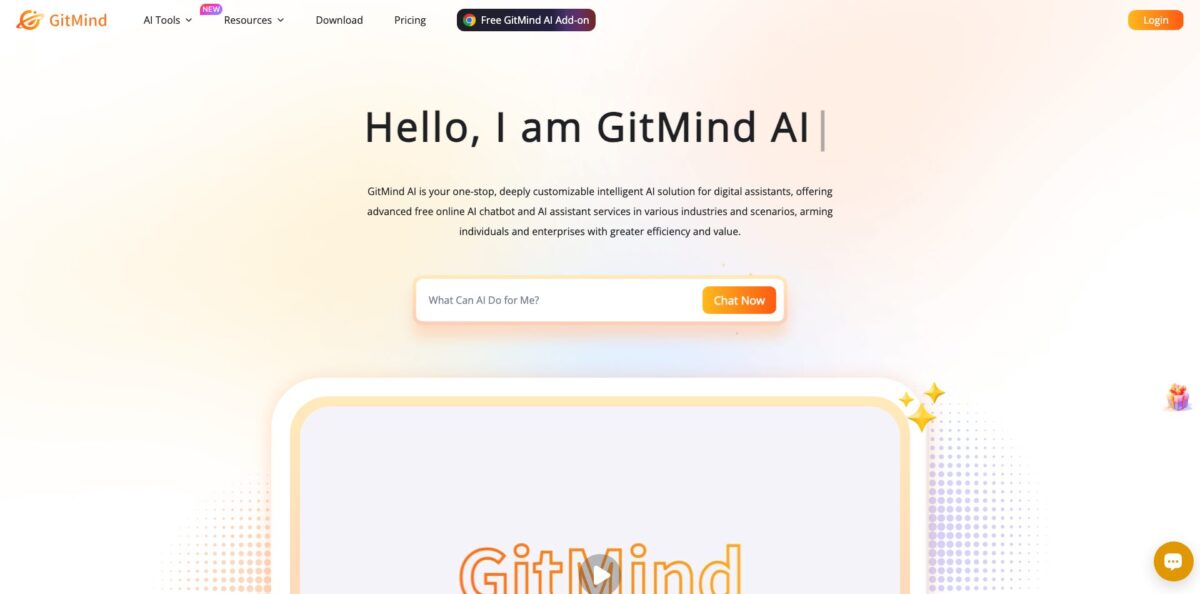
GitMind AI Chat is the conversational module of GitMind, the mind-mapping app run by Wangxu Technology, the company behind the Apowersoft and LetsView apps. It started life as LetsView Chat, and the old letsview.com/ai-chat address now redirects to the GitMind page. Under the hood it is a multi-model chat window: you pick a basic or advanced model from OpenAI, Anthropic, Google or DeepSeek, ask questions, attach files, links or images, and switch on web search when you need fresh facts. Answers can then become mind maps, outlines or flowcharts in the same account, which is the real reason to choose it over a plain chatbot. The weak spot is cost predictability: every message burns credits by token count, and only the Pro tier and above include a monthly credit allowance. Pick it if you already think in GitMind maps, not as a standalone ChatGPT replacement.
How to start using GitMind AI Chat?
Create a GitMind account on gitmind.com with an email address or a Google, Apple or Facebook login. The official help page walks you through the entry point: click Try GitMind AI Now, open GitMind AI, then choose AI Chat. Registration adds a pool of free credits for chatting, though the page does not say how many. TechRadar reported that its Google sign-up received no trial credits while a regular email account did, so expect to check your balance right after the first login. Desktop apps for Windows and Mac, mobile apps for iOS and Android and a browser extension use the same login, and your chat history syncs between them.
For your first real task, choose a model in the Basic Models or Advanced Models tab and give it work you would do anyway. A good test is a lecture PDF or a long report: upload it, then ask for the five main arguments and the evidence behind each one. You can also paste a link or add an image so the answer is grounded in your material rather than in general model knowledge. Start on a basic model, because the official credit table charges six times more per token for advanced ones.
The screen worth exploring next is the agent gallery. GitMind ships pre-trained assistants such as Marketing Specialist Leo, Coding Expert Turing, Legal Advisor Jack and Senior Translator Lisa, and you can build your own in four steps: upload an avatar, fill in role information, choose a type and set rules. Since July 2026 you can @mention a specific agent inside AI Chat. While editing a mind map, the AI Copilot icon in the upper right toolbar opens a chat that can also analyze the map you are working on.
Before you reuse an answer, check it. The Fact Check feature sorts claims from text, images or webpages into Verified, Questionable and Incorrect, which is a quick filter for anything you plan to publish. To pass a conversation on, click Share, select the messages and press Copy link. Be careful with Delete: the help page warns that a deleted chat cannot be recovered. Storage Management in the Personal Center shows how much space each AI chat history uses.
Run your first week on basic models and note how many credits a typical session costs before you buy any plan.
Who is it for?
Students
You have PDFs, lecture recordings and YouTube lessons that need to become revision notes. Chat with the file, then turn the answer into a mind map without copying text between apps. One Google Play reviewer describes using GitMind exactly this way for chapter summaries and revision.
Existing GitMind users
You already plan projects and take notes in GitMind maps, so a chat in the same workspace removes one more browser tab. The Copilot can read the map you have open and suggest new branches. Your ideas, chats and maps stay in one synced account.
Researchers and analysts
You collect papers, web pages and reports and need quick structure before deep reading. Paper Research, added in April 2026, searches academic papers and explains key findings, and Fact Check flags questionable claims. You still verify sources yourself, but the first pass takes minutes.
Writers and marketers
You need drafts, rewrites and campaign ideas from several models without paying for each one separately. Agents such as Writing Master Bob and Marketing Specialist Leo come with preset roles for proofreading, SEO and strategy. A chat brainstorm can become a content outline in one step.
Multilingual teams
The AI Chat page says the chatbot works in 22 languages, and the agent list includes a translator. Keep in mind that the credit FAQ warns non-English text often uses more tokens, so translation work costs more credits. GitMind has also confirmed on Trustpilot that Arabic right-to-left layout is a known limitation.
Small businesses
The vendor offers a customization service that trains an assistant on your Q&A, files, webpages and software, with channels for websites, apps, Slack, Discord and WhatsApp, arranged through a business cooperation form. For internal use, the self-serve Business plan shares one AI credit pool across seats and tracks each member’s usage in real time.
GitMind AI Chat pricing
The chat has no separate price tag. It runs on GitMind membership plus AI credits: the comparison table ticks Chat with AI on every plan, Free included, under the heading AI Features (Credits Required), but only Pro, Ultra and Business come with a monthly credit allowance. Credits are charged by tokens. On a basic model, 1,000 input tokens cost 1 credit and 1,000 output tokens cost 4; on an advanced model the same volume costs 6 and 24. Web search costs more (up to 26 credits per 1,000 output tokens on advanced models), and analyzing one image costs 20 credits plus output. Plan credits refresh on your monthly purchase date and do not roll over. A Monthly / Yearly toggle switches billing, with yearly labelled 20% off (the actual gap on Pro and Ultra is much larger), and Basic and Business appear only on yearly billing.
Three files, up to 60 nodes and 2 images per map, 100 MB of cloud storage and standard image export. Chat with AI is available, but the plan has no monthly credits, so you work from the free credits added at registration.
Unlimited files and nodes, PDF and HD image export, 10 GB of storage, 50 images per map and one planet with five members. No AI credits are included, so this tier is for mind mapping rather than chatting.
2,000 credits per month, chat with AI, summaries of text, webpages, files, audio, YouTube and images, infographic and flowchart generation, 100 images per map and 20 GB of storage. GitMind labels it Most Popular.
4,000 credits per month, 500 images per map, 30 MB image uploads, 30 GB of storage and one planet with 20 members.
5,000 credits per month, one plan and AI credit pool shared by the team, real-time tracking of each member’s AI usage, 800 images per map, 50 GB of storage and unlimited planets and members. The seat picker runs to 20 seats, with 2% off from 6 seats and 5% off from 11.
Extra credits can be bought only by paying members and never expire. Students get a discount through Student Beans, and custom team deployments or bulk purchases go through a business manager.
Monthly and annual plans auto-renew. Refunds are available within 30 days (7 days for monthly members), and credit refunds are calculated from what you have already used. A 1,000-token reply from an advanced model costs about 24 credits before input, so Pro’s 2,000 monthly credits cover roughly 80 long advanced answers, or around 500 replies of that length on a basic model.
GitMind AI Chat key features
Multi-model picker splits models into Basic and Advanced tabs, drawing on OpenAI, Anthropic, Google and DeepSeek
The March 2026 changelog added GPT-5.4 Mini, GPT-5.4 Nano, Claude 4.6 Sonnet, Claude 4.6 Sonnet Thinking and Claude Opus 4.6. You can test one prompt on a cheap model and rerun it on a stronger one without switching services.
File, link and image input lets the chat answer from your own material
You upload a document, paste a URL or add a picture, and the reply works from that content instead of general knowledge. Web search can be switched on for current information, at a higher credit rate because it reads several pages per answer.
Built-in and custom agents give you ten preset roles, from Data Analyst Amy to Philosopher Socrates, plus a four-step builder for your own assistant. You set the avatar, role, type and rules once and reuse the agent in later chats. The July 2026 update added @mentions, so one conversation can pull in several specialists.
Chat-to-map conversion is what separates it from generic chatbots
Inside the editor, the AI Copilot chats about the map you have open and can analyze it, and a single topic can be expanded into a mind map outline. On mobile, a chat can be saved to Idea Flow or turned into a mind map, brief or flowchart.
Fact Check and Meeting Minutes cover two common follow-up jobs
Fact Check extracts claims from text, a single image or a webpage and labels them Verified, Questionable or Incorrect. Meeting Minutes takes uploaded audio or video and returns structured notes plus a downloadable Word file with the transcript.
Conversation management keeps long histories usable
You can search past chats by keyword, multi-select conversations for batch deletion, share selected messages through a link and see storage used per chat.
Cross-platform access covers the web, Windows, Mac, iOS, Android and a browser extension for Chrome, Edge and Firefox released in April 2025. The Chrome extension has about 20,000 users and a 4.1 rating from 23 ratings. One account and one credit balance follow you across all of them.
GitMind AI Chat Pros & Cons
Pros
You get several model families behind one login, with a clear split between cheap basic models and stronger advanced ones. The chat sits next to a full mind-mapping, flowchart and whiteboard suite, so an answer becomes a structured map without copy-paste. Files, links, images and web search ground the replies in your sources, and Fact Check adds a second pass before you reuse anything. Agents with @mentions save you from rewriting role prompts. Apps exist for every major platform, and the changelog shows steady monthly updates through October 2026. Start with one real document and one agent to see whether the chat-to-map flow fits your work.
Cons
Costs take some arithmetic. Chat with AI appears on every plan, yet Free and the paid Basic tier include no monthly credits, monthly Pro costs $19 against $5.75 on yearly billing, and token-based charges make a single conversation hard to price in advance. The free plan stops at three files, and reviewers complain about paywalls. Cancelling auto-renewal has drawn complaints: the pricing FAQ tells you to email support, though GitMind now also points web users to Account Center. Support chat may switch to AI replies outside working hours, and Arabic right-to-left text is not supported. Track your credit balance weekly and request any refund inside the 30-day window, or 7 days on monthly plans.
Use GitMind AI Chat if you want…
- Turn chat answers into editable mind maps instantly.
- Compare GPT, Claude, Gemini and DeepSeek in one window.
- Ask questions about PDFs, links and uploaded images.
- Build custom agents with your own roles and rules.
- Check claims as Verified, Questionable or Incorrect.
- Summarize lectures and reports into revision notes.
- Brainstorm with an AI Copilot inside your map.
- Keep chats synced across desktop, mobile and browser.
GitMind AI Chat alternatives
 ChatGPTRead review →
 Claude AIRead review →
 Google GeminiRead review →
 MonicaRead review →
 ChatGOTRead review →
 Overchat AIRead review →
GitMind AI Chat Reviews
A student on Google Play calls GitMind an all-in-one tool for chapter summaries, revision notes and project planning, and says the AI features make organizing material much faster.
A Trustpilot reviewer praises the AI mind map feature for saving a lot of time, but misses the option to keep several maps open on one screen.
A March 2026 Google Play review, marked helpful by 29 people, says the app turned greedy, with paywalls at every turn and a cap on maps that still counts deleted ones.
A 2026 Trustpilot review found no way to stop auto-renewal on the platform and had to email support; GitMind replied that web users can cancel in Account Center under My Orders.
Another 2026 Trustpilot reviewer reports broken Arabic text and robotic support replies; GitMind answered that right-to-left layout is a known limitation and that live chat may use AI outside working hours.
FAQ
Is GitMind AI Chat free to use?
Yes, with limits. Chat with AI is available on the Free plan, but it uses credits and Free has no monthly allowance beyond the credits added at registration. Monthly credits start with Pro: 2,000 per month for $19 a month, or $5.75 a month billed annually.
Is GitMind AI Chat the same product as LetsView Chat?
Yes. LetsView Chat was the earlier name from the same developer, and the old letsview.com/ai-chat address now redirects to the GitMind AI Chat page.
Which AI models can I use?
GitMind offers basic and advanced models from OpenAI, Anthropic, Google and DeepSeek. The March 2026 update added GPT-5.4 Mini, GPT-5.4 Nano, Claude 4.6 Sonnet, Claude 4.6 Sonnet Thinking and Claude Opus 4.6.
How are credits counted in AI Chat?
Credits depend on tokens and model tier. A basic model charges 1 credit per 1,000 input tokens and 4 per 1,000 output tokens, while an advanced model charges 6 and 24.
Can I upload PDFs, links and images?
Yes. You can attach files, paste links or upload images, and the chat answers from that content. Image analysis costs 20 credits per image plus output tokens.
How do I cancel my GitMind subscription?
The pricing FAQ says to email support@gitmind.com or use the Contact Us section to stop auto-renewal, and GitMind has told reviewers that web users can also cancel in Account Center under My Orders. Mobile purchases are cancelled through the App Store or Google Play.
Is my data safe in GitMind AI Chat?
The pricing page says data is encrypted in transit and at rest and lists ISO/IEC 27001, ISO/IEC 27701 and GDPR. The privacy policy also states alignment with GDPR.
Does GitMind AI Chat work on mobile?
Yes. GitMind runs on iOS and Android as well as the web, Windows and Mac, and mobile chats can be saved to Idea Flow or turned into mind maps and flowcharts.
Similar tools
 Chat 4O AIAll-in-one AI workspace with GPT, Claude, Gemini and Grok chat plus image and video models like Veo, Kling and Nano Banana, paid
 LiveChatAIAI customer support agent trained on your website, docs and Q&As, with human live chat handoff, AI Actions, and WhatsApp, Slack and
 Kore.aiEnterprise agentic AI platform for building, governing and improving voice and chat AI agents for customer service, HR, IT and business processes.