

Guideflow
No-Code AIUpdated October 19, 2026
No-code interactive demo platform that turns your product into clickable tours and sandboxes, with AI voiceover, translation and personalization.
We may earn a commission when you sign up through our links. It does not affect our reviews.
What is Guideflow?
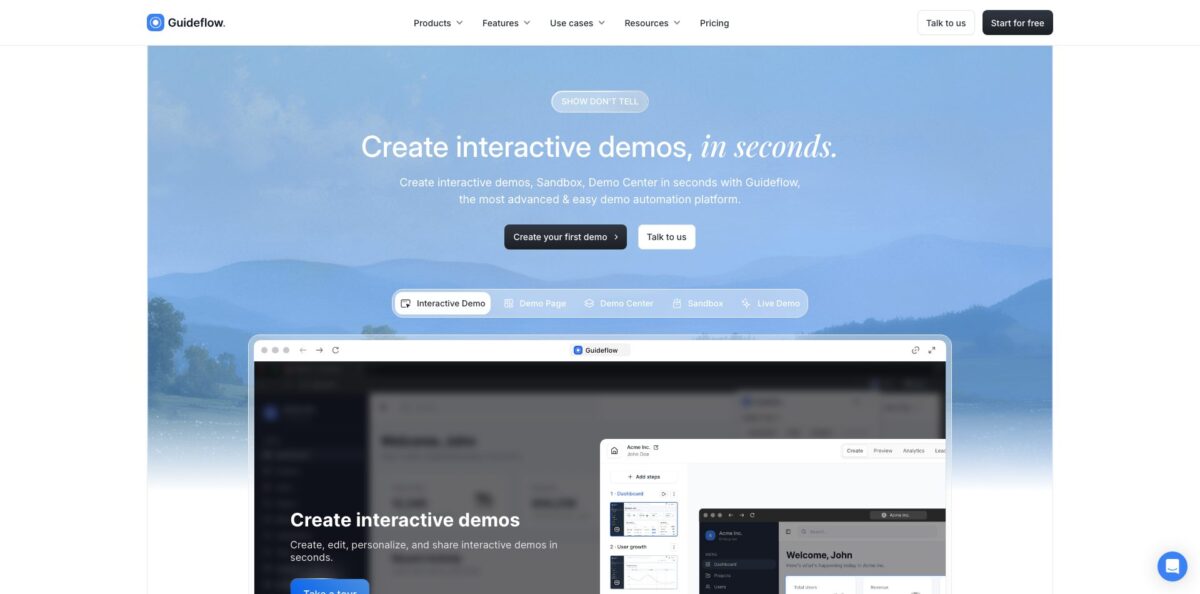
Guideflow is a demo automation platform that records your web app, desktop software or Figma prototype and turns the recording into a clickable product tour that prospects and customers can explore without a login. You capture screens with a Chrome extension or a desktop app, and the editor converts each click into a step with hotspots, popups and branching. On top of the basic tour it adds HTML-based sandboxes, demo centers and an AI layer for voiceover, avatars, translation and lead-specific personalization. It removes the need to build a separate demo environment or to wait on engineers every time the UI changes. The weak spot is the price ladder: the HTML capture that makes demos truly editable sits on the team tier, far above the entry plan. Pick it if marketing, sales or support needs self-serve demos fast.
How to start using Guideflow?
Click Start for free on the homepage and create an account in the web app. The Free plan needs no card and lets you build up to five guideflows. Next, install a capture tool. Guideflow offers a Chrome extension, a macOS app, a Windows app and a Figma plugin, so choose the one that matches where your product lives. Browser-based SaaS teams usually start with the extension because it records directly in the tab you already use.
Your first real scenario should be one short, high-value flow, such as creating a project or running a first report. Start the capture, click through the flow exactly as a user would, then hit Finish. Guideflow builds the step-by-step demo on the fly, using screenshots on the entry plans and full HTML snapshots on the higher tiers. Multi-tab capture lets you follow a process that jumps between apps or windows without stopping the recording.
Then open the plug-and-play builder. Here you add hotspots, walkthrough tooltips, spotlights, popups and chapters, adjust branding colors and upload your logo. Blur or hide sensitive data before anything leaves the workspace. If your plan includes the AI features, the chat assistant can rewrite step text, translate the flow, restyle elements or generate a voiceover from a prompt, which saves a lot of manual polishing on longer tours.
Finally, preview the demo, then share it as a public link, embed it as an iframe on a landing page or help article, or export it as MP4, GIF or PDF. Add a lead form if the demo is meant to capture contacts. After launch, watch the analytics for impressions, completion rate and drop-off steps, and fix the step where most viewers leave.
Who is it for?
Product marketers
Your homepage explains the product with static screenshots and a Book a demo button that many visitors ignore. An embedded guideflow lets them click through the real interface on their own. You also see which steps they finish and who converts.
Sales and pre-sales teams
Reps repeat the same 30-minute screen share for every early-stage lead. With a demo library and lead-specific personalization, you send a tailored tour before the first call. Calls then start with qualified questions instead of a basic walkthrough.
Customer success and support
Tickets keep asking how to do the same five things in your app. Interactive guides embedded in the help center walk users through each task step by step. Ticket volume drops and agents spend time on real problems.
Training and onboarding leads
Written manuals go stale every time the UI changes. A captured guide is quicker to update by editing or inserting steps. New hires and new customers learn the workflow by clicking, not reading.
Partnership managers
Resellers and partners need to show your product without getting access to a live account. A sandbox or demo center gives them a safe, branded environment. They pitch consistently, and you track which partners actually use it.
Product teams
You want feedback on a new feature before it ships. The Figma plugin turns a prototype into a clickable demo. Stakeholders and test users react to something that feels real.
Guideflow pricing
Guideflow sells workspace subscriptions with a set number of seats per plan and a fee for each extra member. The pricing page shows two toggles: yearly billing (the default view, with lower monthly rates) and monthly billing. Payments go through Paddle, which accepts credit and debit cards, bank transfer and PayPal. Prices below are from the official pricing page as of October 2026.
Up to 5 guideflows with screenshot and mobile demos, unlimited viewers, 7-day analytics, a Guideflow watermark and 1 team member.
Unlimited guideflows, Demo Page, advanced analytics, AI demo content, video and GIF export, AI translation, blur for sensitive elements, lead forms and surveys, visitor identification and Guideflow MCP. 1 member is included, and each extra user costs $35.
Adds HTML-based demos and HTML capture, AI personalization, text, picture and graph editing, a demo library, advanced branching, a Slack or Teams channel and a dedicated CSM. 10 members are included, with $50 per extra user.
Adds sandbox demos, clickable environments, auto-linking of elements, offline demos, presenter notes, custom domain, team training and a custom seat count. Demo Center is an add-on.
Custom. The cards say Contact us, while the comparison table lists $2,999/month. It adds the Live Demo add-on, the AI dataset generator, professional services, demo creation by the Guideflow team and a dedicated expert.
Guideflow key features
Flexible capture lets you record with screenshots, video or full HTML snapshots through the Chrome extension, the Windows and macOS apps or the Figma plugin. Multi-tab capture follows a process across browser tabs, windows and screens, and you can insert or rearrange steps later without re-recording. You get a usable demo in minutes rather than days of design work.
The no-code editor lets you change any text, number, image, chart or graph inside an HTML-based demo, hide or blur elements, and apply find-and-replace or a bulk style editor. Dynamic variables pull a lead’s name or company into the tour. One master demo can become dozens of personalized versions without touching the real product.
The AI layer covers voiceover in more than 40 languages, a library of over 150 AI avatars, an AI video clone of yourself, translation into 100+ languages and a chat assistant that edits content, colors and layouts from plain-English prompts. An AI dataset generator fills demos with realistic, industry-specific data. Localizing and polishing a tour becomes a prompt instead of a project.
Sandboxes and demo centers go beyond linear tours
A sandbox is a clickable copy of your product with interaction logic and no live backend, while a demo center gathers all your demos in one branded hub. Prospects explore freely, and nothing breaks because no real data is involved.
Sharing options include public links, iframe embeds, personalized pages, MP4, GIF and PDF export, password protection, link expiration, domain-based access and offline demos. Presenter mode keeps private talking points visible only to the person running a live call. The same demo serves a landing page, an email and a sales meeting.
Analytics and lead signals track impressions, completion rates, drop-off steps, form submissions and returning visitors
AI visitor and account recognition identifies the company behind a view, and real-time alerts can go to Slack or your CRM.
Integrations include HubSpot, Salesforce, Pipedrive, Zoho, Slack, Zapier, webhooks, Marketo, Pardot and Eloqua, plus Amplitude, Mixpanel, Google Analytics and Segment. The pricing table also lists SOC 2 Type II, GDPR and CCPA compliance, with SSO, SCIM and SAML for larger teams. Demo data flows into the tools your revenue team already watches.
Guideflow Pros & Cons
Pros
Speed is the main reason teams pick Guideflow. You click through a flow once and get a polished, step-by-step demo without asking design or engineering for help, and reviewers on Product Hunt and G2 repeatedly mention how little learning it takes. The feature set is unusually wide for one tool: screenshot tours, HTML sandboxes, demo centers, video export and an AI layer for voiceover, avatars and translation all live in the same workspace. Personalization through variables and AI prompts makes one demo reusable across many accounts. The free plan is enough to judge whether the format works. Build two or three demos on Free before deciding on a tier.
Cons
The jump from Solo to Growth is steep, and the features that make demos truly editable, such as HTML capture and AI personalization, sit on the higher tier. Several reviewers also say the tool is excellent for basic walkthroughs but feels limited once you need complex branching paths, and that advanced brand styling takes extra time to configure. Plan naming is not fully consistent on the pricing page, with the same tier called Growth or Startup depending on billing, so confirm exactly what you are buying. Ask sales for a written plan summary before you sign a yearly contract.
Use Guideflow if you want…
- Turn your web app into clickable product tours.
- Embed self-serve demos on landing pages and ads.
- Personalize one demo for many target accounts.
- Build sandboxes without a separate demo environment.
- Translate and voice demos with AI in minutes.
- Reduce support tickets with interactive help guides.
- Track which prospects finish your demo and convert.
- Give partners a safe, branded product showcase.
Guideflow alternatives
Guideflow Reviews
Users on Product Hunt say demos and step-by-step guides are fast to build with no real learning curve, though some would like more UI customization options and industry-specific templates.
A go-to-market user calls the personalization features the strongest part, since tailoring a flow to a specific persona or account takes almost no effort compared with chasing design help.
A solo business owner finds the receiver experience easy to follow but considers the price high for someone who would only build a demo once or twice a month.
G2 reviewers praise how quickly interactive demos come together for sales and onboarding, while one notes that the Solo plan feels restrictive for capturing full HTML states.
Another G2 reviewer says Guideflow handles basic flows well but becomes limited when you need more advanced, branching paths.
FAQ
Is there a free plan?
Yes. The Free plan costs $0 and includes up to 5 guideflows, screenshot and mobile demos, unlimited viewers, 7-day analytics and 1 team member, with a Guideflow watermark on demos.
Do I need to code to build a demo?
No. You capture your product with the Chrome extension, desktop app or Figma plugin, and edit steps, text, images and branding in a no-code builder.
Can I remove the Guideflow watermark?
The watermark appears on the Free plan. Paid plans let you remove it and add your own branding.
Which tools does Guideflow integrate with?
Native options include HubSpot, Salesforce, Pipedrive, Zoho, Slack, Zapier, webhooks, Marketo, Pardot, Eloqua, Amplitude, Mixpanel, Google Analytics and Segment, plus an API on higher tiers.
How many languages does the AI support?
Guideflow states that AI translation covers more than 100 languages and AI voiceover supports more than 40 languages.
Is my data secure?
The pricing page lists SOC 2 Type II, GDPR and CCPA compliance, along with SSO, SCIM and SAML. You can also blur or hide sensitive elements before sharing a demo.
How do seats and cancellations work?
Subscriptions renew automatically at the end of each monthly or yearly period and apply to one workspace. You pay for occupied seats, and an empty seat that stays unfilled is not billed at renewal.
What payment methods are accepted?
Payments run through Paddle, which accepts credit cards, debit cards, bank transfer and PayPal.
Similar tools
 MindflowNo-code and agentic automation platform for SecOps, ITOps and CloudOps teams that turns prompts into workflows across thousands of tool APIs.
 OnSpace.AINo-code AI app builder that turns chat prompts into React Native iOS and Android apps or web apps, with a managed backend,
 Jet AdminAI and no-code builder for internal tools, admin panels, dashboards and client portals that runs on top of your existing databases and