
Gupshup
AI ChatUpdated November 11, 2026
Conversational AI platform for WhatsApp, RCS, SMS and voice that runs AI agents, bots, campaigns and live chat from one prepaid wallet.
We may earn a commission when you sign up through our links. It does not affect our reviews.
What is Gupshup?
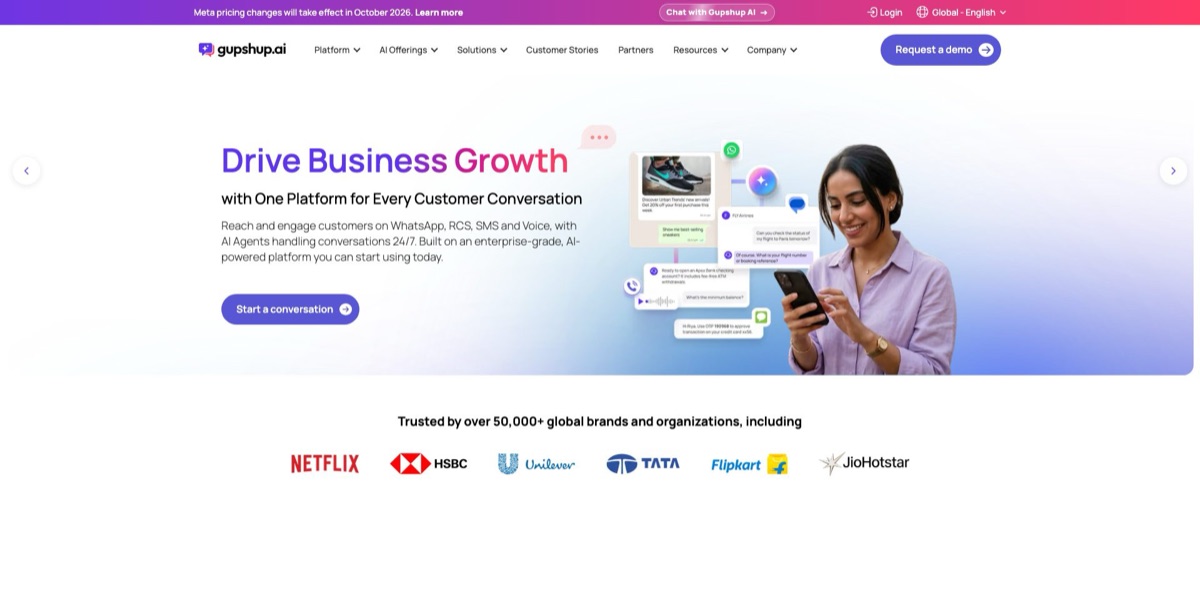
Think of this platform as a messaging carrier with an AI layer on top. It connects your business to customers over WhatsApp, RCS, SMS, Truecaller and voice, then lets bots, AI Agents and human staff share those conversations from one account. You pay per message from a prepaid wallet instead of buying seats, which suits brands with high message volume and a WhatsApp-first audience, especially in markets such as India and Latin America. The company claims 50,000+ customers and 120 billion conversations a year. The weak spots are after-sales support, which reviewers often describe as slow, and pricing spread across several pages that do not fully agree. Take it if WhatsApp is a main revenue channel for you. Skip it if all you need is a simple website chat widget.
How to start using Gupshup?
Open the pricing page and select Create your account for the Pay as you go plan, or Talk to sales for Enterprise. Developers who only want the WhatsApp API can log in to the self-serve dashboard with an email, Google, Facebook or GitHub account. From there, hover over Dashboard, choose WhatsApp and select Create your first app. The app name needs at least six characters, with no spaces or special characters. Use the app soon, because Gupshup deletes apps left unused for 60 days.
Your first real scenario belongs in the Sandbox, a test environment with a shared number. Send a custom text, attach sample media, try the predefined interactive messages and watch inbound replies appear in the list. A single order-update message is a sensible first test. Top up your Wallet first, since Sandbox sends still deduct applicable charges. On the self-serve wallet, 1 USD equals 1 credit, so balances are easy to read.
The App Dashboard is the screen you will return to most. It holds Templates, Profile, Settings, Webhooks, Sandbox and WABA Health, and it is where you set your callback URL. For automation, open Bot Studio and build a journey from the Starting Node, adding message and action nodes. To answer FAQs with AI, train a data workspace in AI Admin, drop an AI Node on the canvas, select that workspace and store the response in a JSON variable that a text node can send back.
Publishing starts with Go Live. Choose the phone number type, review the data storage region and country fee, select Proceed, enter your details and the emailed OTP, then select Confirm and Continue with Facebook. Expect to need Meta Business Verification before the app is fully live. A number already active on the WhatsApp app must be removed from it first, and chat history does not carry over. The exception is Coex, which keeps the WhatsApp Business App working alongside the API if the account is at least 3 months old with active messaging; Nigeria and South Africa are not supported. After launch, check Conversational Path and Exit Nodes in Bot Analytics to see where people drop out.
Who is it for?
E-commerce Marketers
Your customers ignore email but open WhatsApp, and abandoned carts pile up. Campaign journeys, Click to WhatsApp ads and the Shopify integration move recovery and order updates into chat. A Product Finder agent can answer product questions and handle payment support in the same thread.
Banks and Fintech Teams
Routine KYC updates, statement requests and card blocking eat up relationship managers’ time. Prebuilt agents cover those requests, and a loan agent can run eligibility checks. Enterprise adds SSO, custom roles and audit logs for compliance reviews.
Contact Center Leads
IVR menus route callers around without resolving anything. Voice AI Agents answer from your own documents and escalate only when needed, over PSTN, SIP trunks, WhatsApp or web calling. Transcripts and debug logs per call give QA something concrete to review.
Real Estate and Lead Generation Teams
Print and other offline ads bring in leads that go cold before a salesperson calls. Agents answer property questions, share brochures, qualify by budget, location and intent, and book site visits. Your sales staff then spend their time on buyers who are ready to talk.
SaaS Developers and ISVs
You need WhatsApp inside your own product without becoming a Meta partner yourself. APIs, webhooks, a partner portal and an onboarding SDK cover that route. The partner console is where you onboard and manage client accounts, with discounts and commissions on offer.
Small Businesses on a Tight Budget
A monthly software bill is hard to justify when your volume is low. The no-platform-fee account includes 10 agent seats and 5 chatbot flows, so costs follow what you send. Keep expectations modest on support, since several reviewers at smaller companies report slow replies.
Gupshup pricing
Two separate price lists apply, and they work differently. Conversation Cloud, the full product, has no platform fee and charges all-in rates from a prepaid wallet, with Meta and operator charges included. The self-serve WhatsApp API charges a small Gupshup fee and passes Meta’s fee through at actuals. Messaging costs vary by country and message category in both cases, so no single per-message number will apply to you. The USD figures below come from the official pricing pages and the rate card dated 13 October 2026. Visitors in some regions see rupees by default.
You fund a prepaid wallet, plus applicable taxes. Every account includes 10 agent seats, 5 chatbot flows, 5 AI Agents, 5 automated campaigns and 1,000 AI Messages a month, after which each AI Message costs $0.012.
priced per message by destination. North America is $0.0325 for marketing and $0.00442 for utility, authentication or service. The United Kingdom is $0.08255 and $0.0286, Germany is $0.17745 and $0.0715, and India is $0.015722 and $0.001765.
SMS and Voice AI minutes are listed as on request, and PSTN charges may be billed separately. RCS and Truecaller rates vary by market. Avatar AI costs $0.001 per second of voice, $0.004 per second of video and $0.0005 per message.
Media above 64 KB adds no Gupshup fee, and calls cost $0.0001 per second. Since 1 January 2026, marketing messages sent through regular Cloud API rather than MM Lite carry an extra 6% markup on WhatsApp’s marketing fee.
Custom. You get a rate card built on committed volume, paid by wallet or monthly invoice, with throughput scaling to 10,000 messages a second, an uptime SLA, a named account manager and 24/7 priority support.
Two details deserve a second look. Meta began charging for service messages on 1 October 2026, so replies to customers now cost money; the self-serve page lists only the first 1,000 service messages as free of WhatsApp fees. The FAQ on the pricing page also still asks what “the $99 monthly fee” covers, while the plan card shows $0, so confirm the fee at signup before you top up.
Gupshup key features
AI Agents for messaging channels come as industry templates such as Lead Capture, Loan Assistance, Product Finder and Warranty Sales. They run on Gupshup’s fine-tuned ACE LLM and can escalate complex cases to staff. An AI Co-Pilot suggests replies and summaries for human agents. You start from a working pattern for your sector instead of a blank prompt.
Bot Studio is the no-code journey builder, based on a Starting Node plus message and action nodes
The AI Node connects a journey to a workspace trained on your FAQs or product catalog, while Block Templates and Copy Journey cut repeat work. Bot Analytics then shows Conversational Path, Journey Tracking and Exit Nodes. Scripted flows and AI answers can live in one conversation.
Voice AI Agents handle inbound and outbound calls over PSTN, SIP trunks, WhatsApp and web calling
Speech-to-text, text-to-speech and language model providers are configurable, and the agent replies in the language the caller speaks. Guardrails, scenario simulations and scheduled test runs let you catch bad behavior before and after launch.
Broadcast and automated campaigns cover WhatsApp, RCS, SMS and Truecaller with templates, segments, scheduling and delivery reports. Journeys can trigger on reads, clicks or third-party events, so follow-ups go out without manual lists. The Personalise customer data module feeds segments into those campaigns. Marketing gets one place to plan outreach across channels.
The live agent dashboard brings human staff into the same conversations as your bots
Routine chats stay automated, and AI-powered escalation passes harder cases to a person. Ten seats are included on every account. That keeps a handover from turning into a separate tool or a lost thread.
Superagent is an AI orchestrator that builds campaigns, journeys and templates from a prompt
Gupshup announced it in beta in April 2026, and the pricing page still labels it early access. A self-hosted version called Superclaw is aimed at teams that need data kept on their own machines.
Integrations include APIs and webhooks alongside Shopify, Zoho, HubSpot, Salesforce, MoEngage, CleverTap, Bloomreach and Braze. Click to WhatsApp ads on Facebook and Instagram and RCS ads capture leads directly. Conversations can then update the CRM your sales staff already work in. Check the specific connector docs early, since setup steps differ by product.
Gupshup Pros & Cons
Pros
Channel breadth is the main draw. WhatsApp, RCS, SMS, Truecaller and voice run from one login and one wallet, and with no platform fee you can begin with a small top-up. The base account already bundles ten agent seats, bots and AI Agents. On Capterra, where 35 verified reviews average 4.3 out of 5, users regularly mention ease of use, flexible APIs for bulk campaigns and dependable service, and one reported almost zero downtime. Enterprise buyers get ISO 27001, SOC 2 Type 2 and GDPR compliance with regional data hosting. Use the Sandbox and the 1,000 free AI Messages to prove one journey before you commit real volume.
Cons
Support is the recurring complaint. Capterra reviewers describe replies that take days, slow turnaround on anything non-urgent and a billing team that is hard to work with. G2 reviewers point to weak reporting and complicated dashboards. Pricing needs careful reading, because the all-in rate card, the self-serve fee, a 6% marketing markup on some accounts and a stray $99 FAQ sit across separate pages. WhatsApp onboarding also depends on Meta, and Gupshup documents unresolved Meta errors in its Coex flow. The Capterra reviews available to read date from 2023 to 2025, so they say little about Superagent or current pricing. Ask for a named contact and written response times before moving production traffic.
Use Gupshup if you want…
- Run WhatsApp, RCS and SMS from one wallet.
- Automate customer support with AI Agents on WhatsApp.
- Replace phone IVR menus with voice AI agents.
- Build no-code chatbot journeys with drag-and-drop nodes.
- Send segmented broadcast campaigns across several messaging channels.
- Capture leads directly from Click to WhatsApp ads.
- Hand complex conversations over to human agents.
- Pay per message instead of per seat.
- Connect customer chats to Shopify, HubSpot or Salesforce.
Gupshup alternatives


Gupshup Reviews
A head of engineering at a large insurance software company values being able to choose between several APIs for bulk campaigns, and is weighing Bot Studio and the AI features for the next version of their chatbot.
A user at a cosmetics company finds the platform very user-friendly and likes how quickly new features ship, but says support response is inconsistent and turnaround is slow unless something is an emergency.
A co-founder at an IT services firm rates the product as reliable with a strong onboarding process, yet calls after-sales support very poor, with queries answered in days and even simple ones taking at least a week.
One reviewer moving a WhatsApp number found the cost low and the interface pleasant, but needed help at every step of the Meta migration and found campaign creation awkward.
G2 users commonly praise the easy interface and connection speed, while several say the reporting is not robust enough and could be more customizable.
FAQ
Does Gupshup have a free plan?
There is no free messaging tier, but the Pay as you go account has no platform fee and includes 1,000 AI Messages each month. Channel messages still come out of your prepaid wallet.
Are Meta’s WhatsApp fees included in the price?
It depends on the plan. Pay as you go rates are all-in, while the WhatsApp Self-Serve API adds a $0.001 Gupshup fee on top of Meta’s charges at actuals.
Can I keep my existing WhatsApp number?
Yes, but a number active on the WhatsApp app normally has to be removed from it before moving to the API, and chat history does not carry over. Coex lets eligible WhatsApp Business App numbers stay on the app and sync chats with the API.
What happens when my wallet runs out?
On Pay as you go, sending pauses until you top up, and nothing is invoiced later. Enterprise customers can be billed by monthly invoice instead.
Does Gupshup offer an API?
Yes. The documentation covers WhatsApp session and template messages, template management, webhooks, SMS and email APIs.
What languages do the AI agents support?
Voice AI Agents detect the language a customer speaks and respond in it, but Gupshup does not publish a full language list on that page. Test your specific languages before launch.
Is customer data secure on Gupshup?
Enterprise plans list ISO 27001, SOC 2 Type 2 and GDPR compliance, with regional data hosting, SSO and audit logs. Ask sales which of these controls apply to a self-serve account.
Can I cancel at any time?
Gupshup’s FAQ says yes, since the platform fee is billed monthly and you can stop before the next billing date. The pricing page does not explain refunds of unused wallet balance, so check that before a large top-up.
Similar tools
 Chat 4O AIAll-in-one AI workspace with GPT, Claude, Gemini and Grok chat plus image and video models like Veo, Kling and Nano Banana, paid
 LiveChatAIAI customer support agent trained on your website, docs and Q&As, with human live chat handoff, AI Actions, and WhatsApp, Slack and
 Kore.aiEnterprise agentic AI platform for building, governing and improving voice and chat AI agents for customer service, HR, IT and business processes.