
HandtextAI
Art GenerationUpdated November 18, 2026
Web editor that turns typed or pasted text into handwritten-style pages, with 96 handwritings, LaTeX maths, tables and notebook-photo exports.
We may earn a commission when you sign up through our links. It does not affect our reviews.
What is HandtextAI?
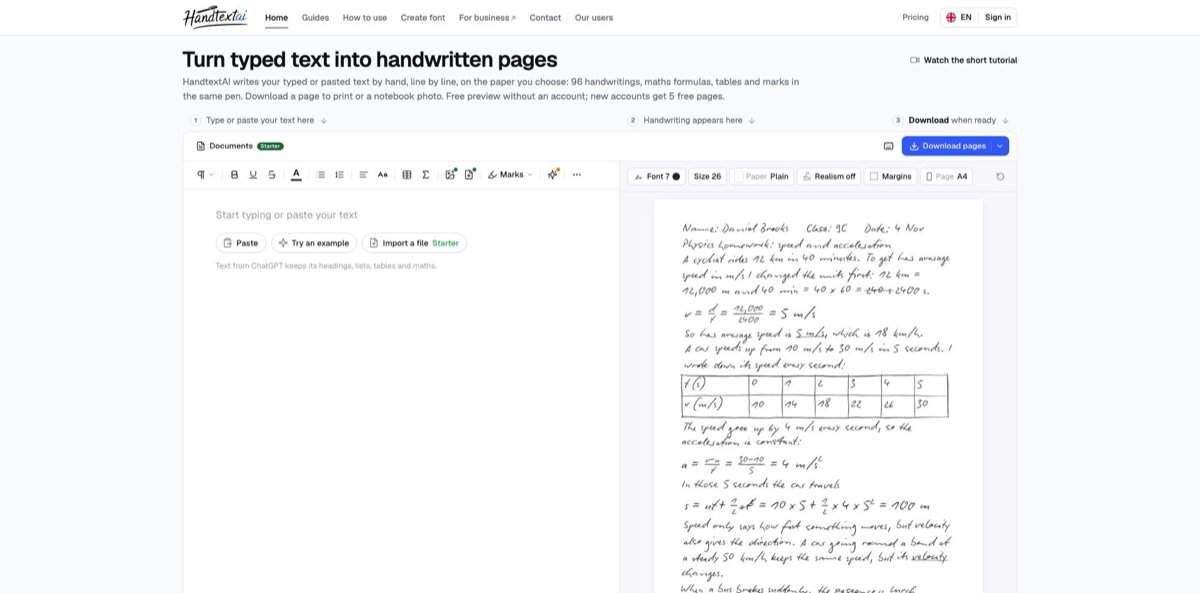
HandtextAI is a browser-based editor that renders typed or pasted text as handwritten-style pages you can print or share as images. You write on the left, and the preview on the right redraws the page about a second after you stop typing, using one of 96 handwriting fonts, school papers such as College Ruled or 5 mm squares, and realism switches that shift words and vary repeated letters. It covers what many simpler converters skip: LaTeX formulas drawn in the same hand, tables, pictures, file import and hand-drawn marks. The weak spot is that letter shapes come from fonts plus controlled randomness, not from a model that writes, so the result is only as convincing as the font you pick, and most fonts, PDF export and HD quality sit behind paid plans. Pick it for notes, worksheets and cards that need a handwritten look on a small monthly budget.
How to start using HandtextAI?
Open handtextai.com and you land straight in the editor, with no account needed to type and preview. Without a plan, previews carry a small “Preview · HandtextAI” mark; downloads never do. Downloading needs sign-in, and a new account gets 5 free pages once, as Standard-quality JPG files without a watermark. Those free pages use free features only: Fonts 1 to 10 and Font 96, plain, College Ruled and Wide Ruled paper, and the A4 page size. Everything else can still be tried in the preview, so you can see a Pro font or paper before paying.
A good first project is a page of revision notes or a worked homework sheet. Paste text from ChatGPT, Google Docs, Word or a Markdown file and the headings, lists, tables and formulas come along; a “Pasted” toast lets you undo. Press Maths in the toolbar to write a formula in LaTeX, or paste it between $ signs, and Insert table adds a grid whose rows sit on the ruled lines. The Recipes on the How to use page also open finished examples, such as Lab report, with their exact settings.
The look bar above the page is the screen you will use most. From left to right it holds the handwriting chip (with ink colours at the top of its panel, a search box, an All languages menu and a star for favourites), Size, the paper list with Print or Photo at the top, Realism, Margins and the page size. Fonts 7 and 96 are marked Recommended. Under Realism, start with Natural movement, which is free, then add Inkflow (Starter) or Vary each letter (Pro) if the page still looks too even. On ruled or squared paper, Write on the lines puts each line of text on a printed line.
Before you download, read the status line under the page. Up to date means the preview matches your text; the first 25 pages refresh by themselves, and longer documents show an Update all pages button. If a font lacks a character, the editor names it and suggests handwritings that have it. The Download panel shows how many pages the export will use and lets you pick JPG, PNG or PDF, the quality, and one ZIP or separate files. Re-downloading unchanged pages costs nothing, on any device. For paper copies, print at 100% scale rather than “fit to page” so the margins stay where you set them.
Who is it for?
Students making study materials
Typed lecture notes are quick to write but easy to skim past, and some people prefer revising from pages that look handwritten. Paste the notes, choose ruled or squared paper, and keep formulas and tables in the same hand. If an assignment must be written by your own hand, HandtextAI’s own About page and Terms tell you to follow your school’s rules, so check before submitting anything generated.
Teachers and tutors
Preparing worked examples, handwritten-style answer keys or worksheets by hand takes evenings. The editor draws maths on 5 mm squares, adds circles, underlines and highlights through Marks, and keeps several versions of a document on Starter and above.
Small business owners and sellers
A handwritten thank-you card in each parcel is a nice touch until you have fifty to write. HandtextAI lays out 4 × 6-inch notes and letters for your own printer, and the separate HandtextAI Business product adds CSV or Excel mail merge, envelopes and postcards on pay-per-page credits. It creates files only, so printing and mailing stay with you.
Social media creators and designers
A notebook photo stops the scroll better than a text card. Photo mode places your text into one of 15 photographed notebook scenes, and PNG exports with a transparent background on Starter and above drop handwriting straight into a design.
Multilingual writers and language learners
Finding a handwriting for a non-Latin script is often the hard part. HandtextAI lists handwritings for Cyrillic, Greek, Arabic (written right to left), Devanagari, Japanese kana, Korean and Vietnamese, and its font browser only shows handwritings that can write your text.
Developers and pen plotter owners
Handwritten mail inside a product usually means a robot-pen service. HandtextAI Business offers an API and SVG output that a pen plotter can draw with a real pen.
HandtextAI pricing
HandtextAI sells subscriptions measured in downloaded pages, while previews stay free for everyone. Each new or changed page you download uses one page from your balance, and downloading the same unchanged page again is free. Unused pages roll over as long as the subscription is active, and yearly plans load all twelve months of pages at once. Prices below are in USD from the official plans page on November 18, 2026.
5 pages once per person, Standard-quality JPG, 11 handwritings (Fonts 1 to 10 and 96), plain and ruled paper on A4, and documents up to 50 pages in the preview. Natural movement is included.
150 pages a month or 1,800 upfront each year. Adds JPG and PNG export in Standard quality, saved documents, import of files up to 100 pages, images in your text, paper texture and Inkflow, and documents up to 100 pages. Fonts stay at the same 11 styles.
600 pages a month or 7,200 upfront each year. Adds PDF export, HD quality, all 96 handwritings, every paper and photo scene, Vary each letter, A3 to A6, Letter and Legal sizes, and documents up to 250 pages.
2,000 pages a month or 24,000 upfront each year. Adds upload of your own handwriting font, 4K quality, hand-drawn marks and drawings, AI Writer with 100 credits a month, early access to new features and documents up to 500 pages.
separate product with no subscription. Credit packs run from $20 for 100 credits (20¢ per page) to $1,000 for 10,000 credits (10¢ per page), and new accounts start with 10 free credits.
Payments run through Stripe and accept Visa, Mastercard, American Express and Discover. You can cancel from Billing at any time; the plan runs to the end of the paid period, then your balance drops back to 5 free pages and any AI writing credits disappear. All purchases are final with no refunds, and a yearly plan cannot be switched back to monthly.
HandtextAI key features
Live preview with structured paste
There is no Generate button: the page redraws a second after you stop typing, and text pasted from ChatGPT, Google Docs or Markdown keeps its headings, lists, tables and formulas. Bold, underline, colours and per-paragraph alignment all reach the page, so you see the result without exporting.
Handwritten maths and tables
Press Maths to write LaTeX, or paste formulas between $ signs, and they are drawn in the chosen handwriting rather than a typeset font. Tables wrap whole words in each cell and sit on the ruled lines.
Three realism switches
Natural movement shifts words, line starts and spacing slightly (Free), Inkflow varies stroke pressure like a real pen (Starter), and Vary each letter writes repeated letters differently each time (Pro, except Font 81 and uploaded fonts). Advanced settings add Tilt each letter, paper texture, shading and soft focus.
School papers and Photo mode
HandtextAI lists 15 papers, including plain, college, wide and feint ruled, 5 mm and 10 mm squares, German Lineatur, French Seyès, CIS and Indian school papers, plus 11 page sizes. Photo mode drops your text into 15 photographed notebook scenes. Photo pages download with Pro, in Standard quality.
Marks and Draw
Marks puts hand-drawn circles, boxes, wavy or double underlines, cross-outs, frames and four highlight colours on selected words, and Word parts marks prefixes, roots and endings. Draw adds pen, highlighter, arrows, shapes, check marks, stars, numbered circles and text notes on the page itself. Both are free to try, but downloading pages with them needs Premium.
Import, AI Writer and your own font
Starter and above import PDF, Word, PowerPoint files or photos up to 50 MB and 100 pages, reflowing the content into the editor. Premium adds AI Writer for study notes, summaries and explanations, and upload of a TTF, OTF, WOFF or WOFF2 handwriting font up to 10 MB. A photo of your handwriting is not accepted, so the site points you to Calligraphr to make a font first.
Multilingual handwriting
The site and editor are in English, German, Russian, Spanish and French, and the handwritings cover Cyrillic, Greek, Arabic, Devanagari, Japanese kana, Korean and Vietnamese. The font list filters itself to handwritings that support your text. Character coverage still varies by font, so scan the preview for blanks before you download.
HandtextAI Pros & Cons
Pros
HandtextAI goes further than most text-to-handwriting tools: LaTeX maths, tables, images, file import, hand-drawn marks and real school paper formats all render in one handwriting. The live preview is free without an account and shows every paid font, paper and photo scene before you spend anything. Re-downloads of unchanged pages are free, unused pages roll over, and Pro costs $6.49 a month on yearly billing for 600 pages a month. It also writes Cyrillic, Arabic, Devanagari and other scripts, and the vendor’s own terms are clear that you retain rights to your content and may use the output for personal, educational or business purposes. Start with Fonts 7 or 96 and Natural movement to see the best free result.
Cons
The free tier is a demo: 5 pages once, JPG only, 11 fonts and A4. Starter still keeps you on those 11 fonts with no PDF, so the useful tier starts at Pro, and your own font, marks and 4K need Premium. All purchases are final with no refunds, and AI writing credits vanish when a subscription ends. The output is font-based: without Vary each letter, which needs Pro and skips Font 81 and uploaded fonts, repeated letters keep the same shape. Import reflows documents instead of preserving layout, and optional AI or import content goes to third-party model and OCR providers. Pay monthly first, and keep sensitive material out of the optional AI and import features.
Use HandtextAI if you want…
- Turn typed notes into handwritten-style study pages.
- Write LaTeX formulas in the same handwriting as text.
- Place your text on a photographed notebook page.
- Print handwritten-style cards and letters on your own printer.
- Upload your own handwriting font for personal notes.
- Circle, underline and highlight words with hand-drawn marks.
- Import PDF, Word or PowerPoint files as handwriting.
- Write handwritten-style pages in Cyrillic, Arabic or Devanagari.
- Preview every font and paper before paying anything.
HandtextAI alternatives
HandtextAI Reviews
Most people voting on TopAI.tools recommend it, mainly for ease of use and value for the price, while the minority who would not recommend it point to missing features and results that are not always consistent.
On There’s An AI For That the ratings split between top marks and middling scores, and the only written comment simply calls it a pretty helpful app.
An independent hands-on review on GistDam found the interface intuitive and the output convincing once the settings are tuned, but described the free plan as little more than a test drive and noted that some complex fonts take a moment to render.
A Skywork reviewer who converted a typed thank-you letter praised the speed and realism, yet warned that quality varies by font and that long multi-page documents can slow down.
FAQ
Is HandtextAI free?
Typing and previewing are free without an account, in every font and paper. Downloading needs an account, and a new one gets 5 free pages once as Standard-quality JPGs; more pages require a paid plan from $3.99 a month billed yearly or $5.99 billed monthly.
Does HandtextAI add a watermark?
Previews show a small “Preview · HandtextAI” mark when you have no plan or use a feature your plan does not include. Downloaded pages never carry it, including the 5 free pages.
Can I use my own handwriting?
Yes, on Premium. You upload a TTF, OTF, WOFF or WOFF2 font up to 10 MB; a photo of your handwriting is not enough, so you first turn it into a font with a service such as Calligraphr.
Is it allowed to use HandtextAI for school assignments?
That depends entirely on your school or teacher. HandtextAI’s About page asks users to follow their school’s rules on handwritten work, and its Terms forbid misleading others about authorship where that breaks school or workplace policy, so ask before submitting generated pages.
What happens to my documents and data?
Drafts are kept in your browser, and on Starter and above documents save to your account until you delete them. HandtextAI says it does not sell personal information, but content you send to the optional AI Writer or import features may go to third-party model and OCR providers.
Which languages can HandtextAI write?
Any language the chosen handwriting has letters for. The site lists handwritings for Cyrillic, Greek, Arabic, Devanagari, Japanese kana, Korean and Vietnamese, and the font browser shows only fonts that can write your text.
Does HandtextAI have an API?
Not in the main editor. The separate HandtextAI Business product offers a handwriting API, CSV or Excel mail merge and SVG output for pen plotters, priced with pay-per-page credit packs.
Can I cancel or get a refund?
You can cancel any time from Billing, and the plan stays active until the paid period ends. Refunds are not offered: all purchases are final unless the law requires otherwise.
Similar tools
 Pixel DojoSubscription AI studio with 80+ image and 60+ video models, consistent characters, LoRA training and an agent that builds ads and short
 ArtbreederBrowser-based AI art studio for mixing, breeding and editing images with gene sliders, prompts, collages and a remix-friendly community.
 mnml.aiAI rendering studio for architects and designers that turns sketches, photos and SketchUp, Revit or Rhino views into photoreal renders and short