

Hotpot Art Generator
Art GenerationUpdated October 5, 2026
Hotpot Art Generator is a versatile AI tool that transforms text into stunning graphics, headshots, and restored photos.
We may earn a commission when you sign up through our links. It does not affect our reviews.
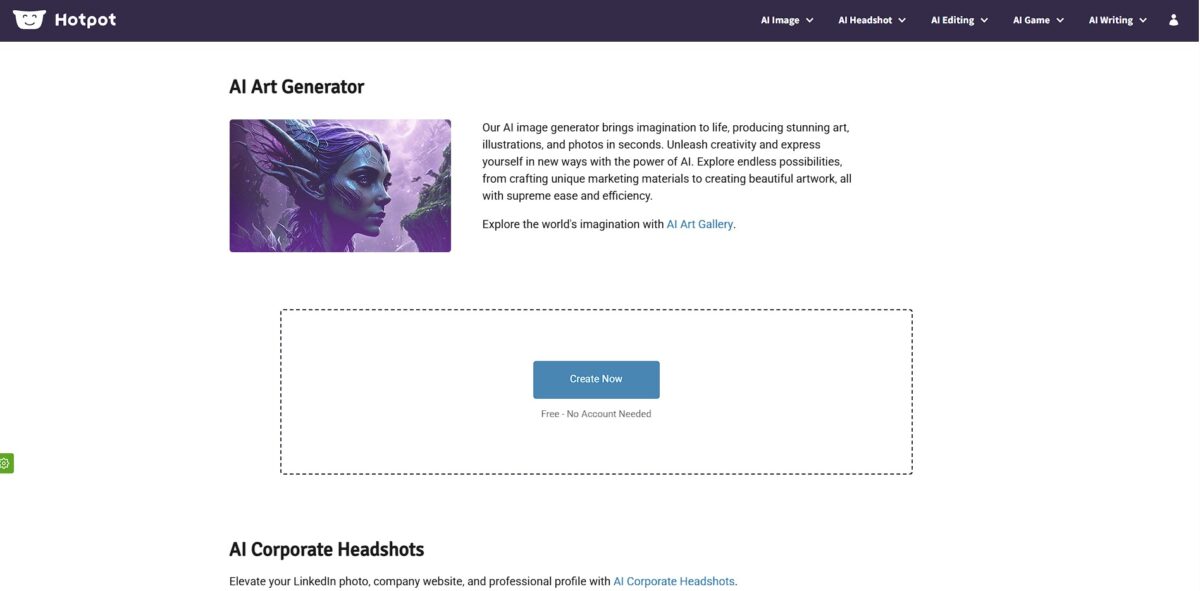
What is Hotpot Art Generator?
Hotpot Art Generator functions as a versatile digital canvas that turns text descriptions into visual assets across dozens of aesthetic styles. It moves beyond generic diffusion by offering specialized sub-tools for tasks like expanding canvas borders or restoring scratched photos, making it a Swiss Army knife for quick social media graphics. I noticed the interface prioritizes speed, letting you toggle between an oil painting look and a 3D render without rebuilding your entire prompt. This accessibility allows non-designers to bypass the steep learning curve of complex local installs, though it lacks the granular layer control found in pro-grade editors. This matters because it bridges the gap between a blank page and a usable draft in seconds. Use it for rapid-fire ideation, but expect to need external tools for pixel-perfect finishing touches.
How to start using Hotpot Art Generator?
Start by heading to the Hotpot AI Art Generator page. You do not need to create an account or link a Discord profile to begin testing, which is a relief if you just want to see if the engine can handle your specific aesthetic. Simply locate the text input box. This low friction allows for immediate experimentation without handing over an email address right away.
Type your idea into the prompt field. Being overly vague, like just typing “lily flowers,” often leads to generic results. Instead, try specific instructions such as “Oil painting of water lilies with vibrant brushstrokes.” Adding details about the medium or color palette helps the AI understand your creative intent rather than guessing. Specific phrasing means fewer discarded generations.
Browse the style menu to find a preset that fits your project. You can choose from options like anime, 3D render, or custom to steer the visual logic. While the presets are helpful for speed, the custom setting provides the most control for unique branding. Choosing the right style up front prevents the AI from defaulting to a look that clashes with your existing assets.
Click the “Create” button and wait for the render. Free users should expect a wait time of about 20 seconds per image, especially during peak hours when the servers are busy. If you need 4K resolution or want to remove the watermark for a presentation, you will need to purchase credits. On the free tier, you pay for the zero upfront cost with a slower workflow.
Useful takeaway: If the AI struggles to count objects correctly—like giving a character six fingers—use the “Edit Objects” or “Restore” tools to manually patch the specific area.
Who is it for?
Social Media Managers
Skip the designer waitlist for simple quote graphics or post backgrounds. It excels at churning out multiple aesthetic variations of the same prompt for A/B testing, so you can populate a weekly content calendar in one sitting.
Self-Publishing Authors
Generate book covers or character concept art without commissioning an illustrator for early drafts. It handles specific genres like “oil painting” or “vintage sketch” better than complex anatomical realism. You get immediate visual feedback for your world-building.
Solo App Developers
Build placeholder assets or app store screenshots without opening Photoshop. The simple interface lets you toggle between 3D renders and flat icons quickly. Your focus stays on code rather than pixel-pushing.
Marketing Generalists
Create blog headers and newsletter visuals that match your brand’s color palette. It bridges the gap for those who find Midjourney’s Discord interface chaotic or intimidating. Non-creative departments can take on design tasks themselves.
Game Hobbyists
Visualize items, landscapes, or NPC portraits for tabletop campaigns and indie prototypes. The tool is great for broad concepts and rapid iteration during brainstorming, but in testing it struggled with precise 1:1 character consistency across different scenes.
Digital Archivists
Clean up scanned family photos or restore scratched historical images using the integrated AI repair tools. It functions like a specialized restoration suite rather than just a generative toy. Personal history that might otherwise be lost to physical decay gets a second life.
Hotpot Art Generator pricing
Hotpot pricing revolves around a credit system that balances accessibility with a pay-as-you-go model. The free tier lets you test the waters, but be ready for watermarks and a mandatory 20-second wait between generations. This structure allows casual users to experiment while shifting costs to those needing higher volume or commercial rights.
You get limited daily generations. Each image carries a watermark and requires a 20-second wait before the server processes your request. This helps you gauge style compatibility without committing funds.
Purchasing credits removes watermarks and wait times. This tier suits individuals finishing a specific project or needing a few dozen assets monthly.
Higher credit counts lower the cost per image. This is the sweet spot for creators managing a consistent social media schedule. Moving to a paid tier replaces generic experimentation with usable, license-clear assets you can put into professional work without legal headaches or distracting logos.
Hotpot Art Generator key features
Automated prompt refinement takes your rough three-word idea and expands it into a descriptive string
This helps you skip the trial-and-error of learning complex prompt engineering for different art styles. You reach a usable asset without burning your daily credit limit on failed attempts.
The generator offers a dedicated gallery of pre-set artistic styles from oil painting to pixel art
You can lock in a specific aesthetic for an entire set of social media posts, ensuring your Instagram feed looks consistent rather than a random mix of styles. In testing, the “Anime” and “Cyberpunk” presets proved particularly reliable for character concept art.
Commercial rights are included for paid users, removing the legal gray area when using images for book covers or ad campaigns. This protects you from copyright headaches when monetizing your creations on marketplaces like Etsy. Free users, on the other hand, often face watermarks and limited resolution.
A browser-based editor allows for post-generation tweaks like background removal or basic color adjustments
You avoid jumping between three different apps just to clean up an image for a presentation. For non-designers who need a “good enough” result in five minutes, that saves a lot of back-and-forth.
Batch processing enables the creation of multiple variations of a single prompt simultaneously
You can compare four or five different interpretations of your text to find the one that fits your layout best. This is a massive win for A/B testing social media graphics or finding the right character pose.
The API integration allows developers to plug the image generation engine directly into their own websites or apps. You can build customized internal tools that generate unique icons or profile backgrounds on demand. This moves the tool from a simple playground to a functional piece of your tech stack.
Hotpot Art Generator Pros & Cons
Pros
Hotpot puts an entire graphics department into a single browser tab. You can jump from generating a cyberpunk landscape to upscaling a blurry product shot by 10x without switching apps or managing different subscriptions. I noticed the headshot generator handles professional lighting surprisingly well, which saves small business owners from booking expensive studio sessions for team pages. For solo founders needing cohesive branding, that lowers the financial barrier. While the art generator is versatile, the utility tools for background removal and photo restoration are the real stars for daily productivity. The 10x upscaler is worth trying when you need to rescue low-resolution assets for print.
Cons
The template-driven approach limits your ability to tweak fine details. You won’t find the surgical precision of Photoshop layers here, and the AI sometimes ignores specific counts in a prompt, like asking for three cats and getting five. Free users face a mandatory 20-second wait per generation, which can stall your workflow during a quick brainstorming session. The trade-off for such a broad toolset is that specialized generators like Midjourney often produce more intricate textures. That matters because professional illustrators might find the output too “smooth” or predictable for high-end client work. Stick to the paid credit packs if you need watermark-free images for commercial projects.
Use Hotpot Art Generator if you want…
- To turn brief text into high-fidelity artistic concepts
- Professional graphics without hiring an expensive design agency
- To restore vintage family photos with AI precision
- Consistent brand assets for daily social media updates
- To expand existing image borders with generative outpainting
- Customized game assets in various unique aesthetic styles
- To upscale low-resolution images for high-quality printing
- Rapid prototyping for marketing campaign visual directions
- To remove distracting objects from your favorite photos
Hotpot Art Generator alternatives
 MidjourneyRead review →
 Canva Magic MediaRead review →
 Adobe FireflyRead review →
 Leonardo.aiRead review →
 FotorRead review →
Hotpot Art Generator Reviews
Solid for quick social media assets and basic backgrounds, but the AI can be a bit unpredictable with complex prompts. Great if you value speed over pixel-perfect control.
FAQ
Can I remove watermarks from Hotpot AI images?
Free users will have watermarks on their generated images. To remove these watermarks and access commercial usage rights, you must purchase credits or a subscription.
Does Hotpot Art Generator support batch processing?
Yes, Hotpot offers API access and specialized tools for bulk transformations, allowing developers and power users to generate or edit multiple images efficiently.
What file formats does Hotpot support for uploads?
Hotpot is compatible with common image formats including JPG, JPEG, PNG, WEBP, and HEIC, making it easy to use your existing photos as references.
How long does it take to generate an image?
Generation times vary based on server load; free users may experience a wait time of around 20 seconds per image, while paid users receive faster processing.
Can I use Hotpot generated art for commercial projects?
Commercial use is permitted for images generated using paid credits or an active subscription. Images created under the free tier are generally restricted to personal use and include watermarks.
Does Hotpot provide a mobile app?
Hotpot is primarily a browser-based platform, meaning it works across all devices including smartphones and tablets without requiring a separate app download.
Is my data and uploaded imagery private?
Hotpot prioritizes user privacy by using encryption for image processing to ensure that your uploads and generations are handled securely.
Similar tools
 CustomuseAI 3D creation platform that chains image, video and 3D models into node workflows for game-ready assets, Roblox items and scenes.
 VisualGPTCredit-based AI image and video studio that runs Nano Banana, GPT Image, Seedream, Flux and Kling for product photos, photo edits and
 LovartAI design agent that turns a chat brief into logos, social posts, product shots, slides and videos on one editable infinite canvas.