

Humata
Data AnalysisUpdated October 21, 2026
AI document assistant that answers questions across your PDFs, Office files and web pages, with every answer linked to the highlighted source passage.
We may earn a commission when you sign up through our links. It does not affect our reviews.
What is Humata?
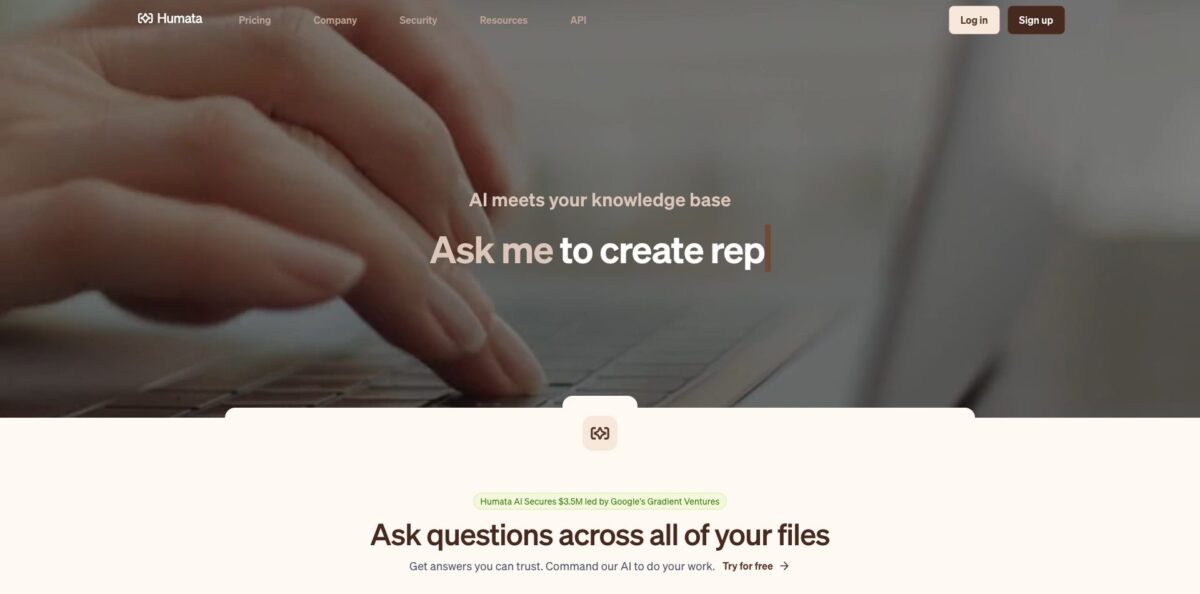
Humata is a retrieval-based document assistant from Austin-based Tilda Technologies that reads the files you upload and answers questions strictly from their contents. You drop in PDFs, Word or PowerPoint files, or import a whole website, then ask for summaries, comparisons or specific facts, and each answer comes with a citation that jumps to the highlighted passage in the source. That solves a narrow but costly problem: long contracts, research papers and technical manuals that nobody on the team has time to read end to end. The weak spot is that it is a reading tool, not a calculation engine, so it will not run statistics on a spreadsheet the way a code-executing analyst would. Pick it if your “data” lives in dense text and you need answers you can verify page by page.
How to start using Humata?
Sign up at app.humata.ai with an email and a password of at least eight characters, then confirm the verification link that lands in your inbox (check spam if it does not show up). No credit card is needed for the Free plan, which gives you 60 pages and up to 10 answers to see whether the citations hold up on your own material. Single sign-on through SAML 2.0 is available later for teams that want to log in with Okta, Microsoft Azure AD, Google Workspace or OneLogin.
Your first real task is building a small library. Drag and drop files or an entire folder into the upload section, or click the upload button to pick documents from disk. To pull in a website, choose “From URL” in the same upload area, enter the address, and confirm; Humata crawls the pages and adds an Ask button once the import finishes. As soon as a file is processed, the ask feature switches on and you can start questioning that single document.
The screen that changes how you work is the multi-file view. Tick the boxes next to several files or a whole folder and press “Ask All” to query them together, which is how you compare two versions of a contract or pull the same metric out of a dozen reports. Before going deep, open Chat Settings and choose a mode: Grounded answers only from your documents and says so when the answer is not there, Balanced adds outside knowledge where your files fall short, and Creative uses your data loosely. Under Settings, then “Chats”, you can also write a custom prompt that is sent with every question, for example “always answer in Spanish” or “assume the reader is an engineer”.
Verification is built into the answer itself. Click a citation and Humata opens the source with the relevant text highlighted, so you can confirm the quote before it goes into a memo or slide. When you are ready to share, select a file or folder, press Ask, then Share, and copy the embed code to place a chat window on your own site or intranet. Keep an eye on the Plan section of Account settings, which shows how many pages you have used this month and what extra charges will hit your next bill.
Who is it for?
Academic Researchers
You have a folder of papers to skim before a literature review and no time to read every methods section. Humata summarizes findings, compares studies side by side, and links each claim back to the page it came from. Your footnotes start from a verified quote instead of a half-remembered abstract.
Corporate Attorneys and Paralegals
Due diligence means reading the same clause across dozens of agreements. Ask All lets you query a whole deal folder at once and get cited answers about change-of-control, termination or indemnity terms. You still review the final language, but the hunt for where it lives shrinks to minutes.
Analysts and Consultants
Market reports, earnings transcripts and RFP packets arrive as long PDFs that clients expect you to digest overnight. Humata pulls the specific figures and statements you need, with page references you can paste into a deck. Your client sees the source, which ends the “where did this number come from?” back-and-forth.
Technical Support and Sales Engineers
Product specs and manuals hold the answers customers ask for, buried in hundreds of pages. Embedding a Humata chat on a help page lets visitors query those documents directly, and the citations show exactly which section the answer came from. Fewer tickets reach your queue for questions the manual already covers.
Small Teams with a Messy Shared Drive
Old proposals, policies and onboarding docs are too valuable to delete and too dense to reread. The Expert plan covers three people for one flat fee, so a small team can build a searchable library without a knowledge-management project. New hires ask the library instead of interrupting the person who wrote the file.
Students on a Budget
Long readings and course packs pile up fast during exam season. The Free plan handles a few chapters, and Expert at $9.99 a month covers a semester of heavier reading. Use the citations to check that the summary matches the text before you quote it in an essay.
Humata pricing
Humata charges by pages processed rather than by questions asked. Every plan includes a monthly allowance of free pages, and once you upload past it, each additional page is billed on a pay-as-you-go basis at a rate set by your plan. All tiers list GPT-5 support, and billing runs monthly through Stripe with no annual prices shown on the official page. You can switch plans or cancel at any time, and a spending-control setting in Account settings lets you cap how much overage you are willing to pay.
One user, 60 pages per month and up to 10 answers. Enough to test citation quality on a single long report, not enough for ongoing work.
Up to three users share 500 free pages per month, with additional pages at $0.02 each. Adds chat support. This is the tier the site labels as most popular, and for a small team it is one of the cheapest paid entry points in the category.
Up to 10 users, 5,000 free pages per month and additional pages at $0.01 each. Adds enterprise support, department and folder level permissions, OCR for images and scanned text, response personalization and access to the SOC 2 certificate.
Custom. Unlimited users, custom page allowances and overage rates, an uptime SLA and early access to new features. White labeling of embedded chats is documented as an Enterprise feature, and sales handles quotes for teams past 10 users.
The FAQ on the pricing page also mentions a Student plan billed at $0.02 per extra page, but no Student tier appears in the current plan table, so confirm availability at checkout before counting on it.
Humata key features
Cited answers with source highlighting
Every response links to the passage it was drawn from, and clicking the citation opens the document with that text highlighted. You can check a claim in seconds instead of searching the PDF yourself.
Ask All across files and folders
Select several documents or an entire folder and query them as one collection. This is how you compare versions, find conflicting statements across reports, or extract the same field from a stack of contracts. A single question replaces opening a dozen tabs and using Ctrl+F in each.
Three chat modes
Grounded keeps answers strictly to your documents and refuses when the information is missing, Balanced fills gaps with general knowledge, and Creative treats your files as loose context. Switching modes lets you choose between auditability and brainstorming per conversation.
Website import and embeddable chat
The “From URL” option crawls a site into your library, and the Share menu produces an embed code that places a Humata chat on any web page. Enterprise accounts can swap in their own logo and organization name. Your help center or documentation site gets a question box that answers from your own content.
Custom prompts and response personalization
A custom prompt set under Settings is sent with every question, so you can fix the answer language, tone or level of technical detail for the whole workspace. Teams stop retyping the same instructions in every chat and get consistent output.
Team permissions and enterprise security
Admins invite members from Account Settings, group them into teams and restrict access by folder, while SAML SSO and multi-factor authentication tie logins to your identity provider. Humata states it is SOC 2 Type II compliant, encrypts files with AES-256 at rest and TLS in transit, and does not train AI models on customer data. Sensitive deal rooms can live next to general files without everyone seeing everything.
REST API
Admins create an API key in Developer Settings, then import documents by URL, open conversations and ask questions programmatically, with a default limit of 120 requests per minute that support can raise. You can wire Humata into an internal tool or a document pipeline instead of uploading by hand.
Humata Pros & Cons
Pros
Humata keeps answers tied to your documents, and the highlighted citations make checking them fast enough that you actually do it. Ask All handles multi-file questions well, and users who uploaded dozens of documents into a folder describe getting useful cross-file answers within minutes. The Grounded mode’s willingness to say “not in these files” reduces the risk of a polished but invented answer slipping into a report. Pricing starts low: $9.99 a month for three users is cheap for a team tool, and SOC 2 Type II, SSO and a no-training policy make it easier to clear a security review. Reviewers on AppSumo also repeatedly mention responsive support chat. Start with Grounded mode and a folder of related files to see the strongest version of the product.
Cons
Page-based billing is easy to underestimate: a few long annual reports can consume the Expert allowance in one afternoon, and overage keeps charging until you set a cap. OCR for scanned documents and folder-level permissions only arrive on the $49-per-user Team plan, which is a steep jump from Expert. Humata reads text; it does not run calculations or build charts from tabular data, so it is a weak fit if your analysis lives in spreadsheets. Some users report that answers on highly technical or niche material, and on video transcripts, stay general rather than precise. White labeling is limited to Enterprise. Set a spending limit in Account settings on day one so overage never surprises you.
Use Humata if you want…
- Ask questions across dozens of PDFs at once.
- Verify every AI answer against a highlighted source passage.
- Compare clauses across contracts without reading each one.
- Summarize long research papers for a literature review.
- Turn a documentation website into a searchable chat.
- Embed a document Q&A widget on your own site.
- Give a small team shared AI document search cheaply.
- Keep sensitive files under SSO and folder permissions.
- Automate document questions through a simple API.
Humata alternatives
 AskYourPDFRead review →
 SciteRead review →
 ChatbaseRead review →
 Claude AIRead review →
 ChatGPTRead review →
Humata Reviews
Uploading around 40 documents into one folder took only minutes, and the Ask All button plus linked highlights made it one of the cleanest multi-document research tools the reviewer compared. Upgrading the plan tier was awkward, though support fixed it quickly by email.
A professor and author uses it daily for contracts, grant RFPs and research articles, saying the page references are solid enough for footnotes. The wish list is richer export formats and bulk operations for very large projects.
Answers are fast, highlighted and cited, with no hallucinations noticed by one reviewer. The main limitation flagged was that it cannot work with YouTube videos that have no transcript.
Users trying it on technical YouTube training videos found the answers stayed close to general knowledge instead of digging into the actual transcript, which made it less useful for deep technical comparison.
The interface is easy to pick up and summaries come back quickly, but reviewers would like more competitive pricing, better accuracy on niche technical content and a stronger mobile experience.
FAQ
Is Humata free?
Yes. The Free plan costs $0 and includes one user, 60 pages per month and up to 10 answers, with no credit card required at signup.
What file types can I upload to Humata?
Humata works with PDF, DOC, DOCX, PPT and PPTX files, and you can also import whole websites through the “From URL” option. Scanned documents and images need OCR, which is included from the Team plan up.
Does Humata train AI models on my documents?
No. Humata states that it does not use customer data to train its models, and document data used for answering is not retained beyond 30 days, while files in your dashboard stay until you delete them.
How is Humata different from ChatGPT?
Humata is built around your files: it reads every document you upload, answers from that content, and cites the exact section each answer came from. The Grounded mode refuses to answer when the information is not in your documents.
What happens when I go over my monthly page limit?
Extra pages are billed pay-as-you-go at $0.02 per page on Expert and $0.01 per page on Team. You can set a spending limit in the Plan section of Account settings.
Does Humata have an API?
Yes. Admins create an API key in Developer Settings and can import documents by URL, create conversations and ask questions programmatically, with a default rate limit of 120 requests per minute.
Is Humata secure enough for confidential documents?
Humata reports SOC 2 Type II compliance, AES-256 encryption at rest, TLS encryption in transit and SAML 2.0 single sign-on. Folder and department permissions are available on Team and Enterprise plans.
Can I cancel my Humata subscription anytime?
Yes. Plans are billed monthly, and you can upgrade, downgrade or cancel at any time from your account.
Similar tools
 HexCollaborative analytics workspace that mixes SQL, Python and AI agents in notebooks, then publishes results as data apps and plain-language answers.
 WindwardMaritime AI platform that fuses AIS, satellite and ownership data into vessel risk scores, sanctions screening, alerts and container ETAs.
 Delve AIAI market research platform that builds personas from analytics, CRM and social data, then lets you chat with them or run synthetic