

Ideogram
Image GenerationUpdated October 5, 2026
Ideogram is an advanced AI generator specializing in realistic images and precise, professional-grade typography for logos and branding.
We may earn a commission when you sign up through our links. It does not affect our reviews.
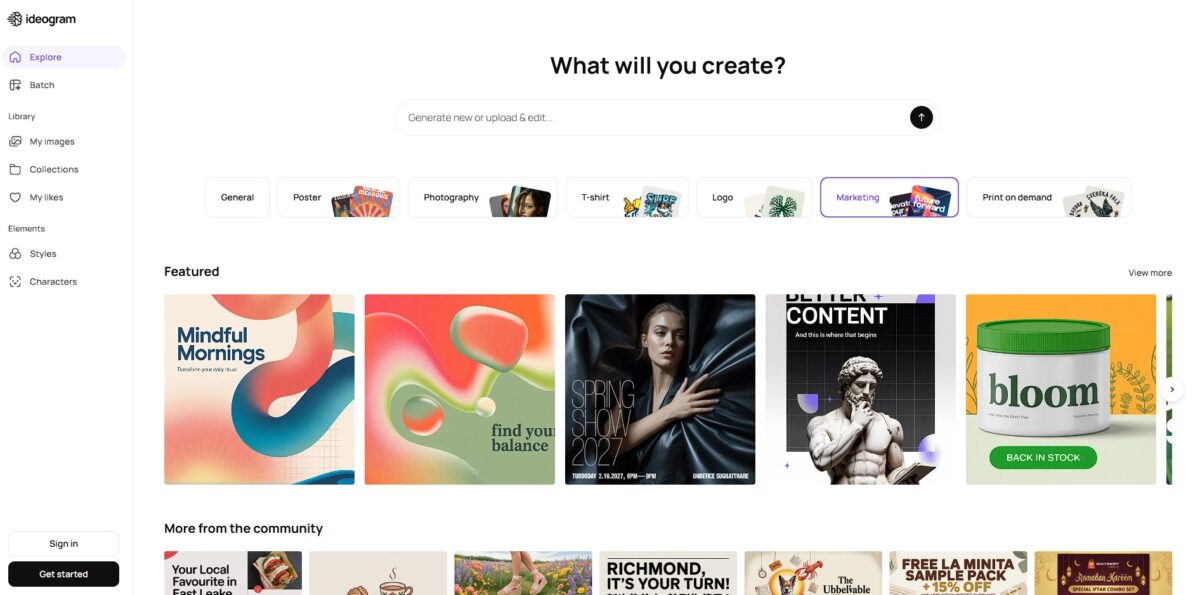
What is Ideogram?
Ideogram solves the most frustrating limitation of generative AI: the “alphabet soup” problem where text in images looks like garbled nonsense. While rivals often struggle to spell a simple word on a sign, this tool renders crisp, legible typography directly into logos, movie posters, and product packaging. It handles stylized fonts and complex layouts—like a specific brand name on a curved coffee cup—with a precision that eliminates hours of manual Photoshop touch-ups. As a result, a prompt produces not just a reference image but a usable asset for social media or marketing. The trade-off is that while it leads in graphic design accuracy, it can occasionally feel more literal and less atmospheric than the painterly outputs of Midjourney. Use Ideogram as your primary generator whenever your visual requires specific, readable text to be part of the composition.
How to start using Ideogram?
Head to ideogram.ai and link your Google or Apple account to get started. You must choose a permanent username immediately, which serves as your public profile handle. The free tier grants ten slow credits weekly, which is enough for about forty images if you aren’t in a rush and lets you test the text-rendering engine without a financial commitment.
Takeaway: Pick your username carefully since you cannot change it later.Locate the prompt box at the top of the dashboard to enter your description. Put specific phrases in quotation marks if you need them to appear on a logo or poster. This prevents the AI from turning your brand name into abstract shapes or gibberish. Your typography stays legible and accurately spelled on the first render.
Takeaway: Wrap in double quotes you want the model to print literally.Fine-tune your output using the settings bar before hitting generate. You can toggle Magic Prompt to expand simple ideas into detailed scenes or select a specific aspect ratio for Instagram or YouTube. In practice, Model 3.0 usually yields more realistic textures, though older versions can sometimes feel more experimental. Either way, you control the visual style before spending a credit.
Takeaway: Magic Prompt helps if you are struggling to describe lighting or composition.Review the four variations the AI produces in the feed. Click any thumbnail to upscale the resolution or use the Remix tool to iterate on a specific layout you like. The editor also features a Magic Fill tool for swapping out objects or modifying specific sections of an image. So a small error can be fixed without starting the entire prompt from scratch.
Takeaway: The Remix button helps you maintain a consistent style across multiple generations.
Who is it for?
Typographic Graphic Designers
Stop fighting with unreadable AI gibberish when a project requires specific slogans or company names. This model renders letters as distinct symbols, allowing you to generate usable posters or logo concepts that actually spell the brand correctly. In testing, it handled complex multi-line layouts better than standard diffusion models, though you will still need a vector tool for final production files. That alone cuts the hours spent manually fixing mangled text in Photoshop.
Startup Founders and Entrepreneurs
Generate professional-grade product photography and branding assets without a studio budget. You can visualize packaging with accurate labels or create landing page hero images in seconds to test market interest. It struggles with photorealistic human faces compared to some rivals, so it works best for product-centric or stylized visuals. You can move from a concept to a visual pitch deck without hiring a design agency for early iterations.
B2B Marketing Teams
Create clean, structured graphics for whitepapers and social ads that avoid the “trippy” look of other AI generators. The tool produces aesthetic styles like “Design” or “Realistic” that fit corporate presentations better than fantastical art. The “Magic Prompt” feature helps non-designers beef up simple requests into studio-quality visuals, so your marketing materials look professional rather than like AI-generated hobbyist art.
Print-on-Demand Sellers
Rapidly iterate on t-shirt slogans, sticker designs, and book covers that are ready for printing. The batch generation feature allows you to scale artwork by uploading a CSV of prompts, which is a massive time-saver for high-volume shops. The trade-off is that free users lose privacy, meaning your profitable niche ideas are visible to everyone in the public gallery. Even so, batch mode turns a slow manual creative process into a scalable production pipeline.
Social Media Managers and Bloggers
Produce scroll-stopping Pinterest pins and Instagram quote cards that actually communicate a message. You can blend up to three reference images to maintain a consistent visual brand across different posts. While the interface is intuitive, the layer management in the Canvas editor can feel clunky during heavy editing. Unique, text-integrated visuals gain more engagement than generic stock photos everyone else is using.
Ideogram pricing
Ideogram operates on a credit-based tier system that scales with your need for privacy and generation speed. The entry point is a free plan offering a limited rotation of slow credits, though your creations remain public. This serves as a decent playground for testing the model’s typography skills before committing. Moving to paid tiers unlocks priority rendering and essential tools for professional work.
The Basic Plan ($8/month) provides 400 priority credits and 100 daily slow credits. It enables high-quality PNG downloads but keeps your prompts and images visible to other users. In other words, your creative process and visual ideas remain open for anyone to browse or remix.
The Plus Plan ($20/month) is the sweet spot for freelancers. It grants 1,000 priority credits and unlimited slow generations while finally adding private mode. You can also upload your own images to guide the AI’s output. That secures your intellectual property and allows for specific character or style consistency across a project.
The Pro Plan ($60/month) targets agencies needing high-volume output. It offers 3,500 priority credits and exclusive access to batch generation via spreadsheet uploads. Teams can produce hundreds of marketing assets in a single workflow rather than prompting one by one.
Ideogram key features
Typographic Accuracy
Ideogram renders legible, coherent text inside images. Most models turn complex letters into unreadable gibberish, but here you can specify a “Sale” sign or a branded logo and get the spelling right on the first try. That matters because it saves hours of fixing warped characters in Photoshop.
Style Reference Blending
You can upload up to three images to guide the visual aesthetic. Instead of wrestling with complex prompt tokens, you simply show the AI a specific color palette or texture. The upshot is consistency across a series of marketing assets without manual color matching.
Magic Prompt Expansion
A short, lazy prompt becomes a detailed scene description automatically. It often adds technical lighting terms like “cinematic rim lighting” that a casual user might forget, which bridges the gap between a vague idea and a professional-looking render.
In-Canvas Remixing
The editor lets you modify specific areas of a generation without starting over. If a character looks great but the background is distracting, you can brush over the mess and prompt a replacement. This matters because you keep the parts that work while iterating on the failures.
Aspect Ratio Versatility
You have 16 different layout options to choose from immediately. This works well for vertical TikTok covers or wide website hero images, though the composition occasionally struggles in extreme ultra-wide modes. Picking the right ratio up front means you don’t have to crop and lose resolution later.
Multi-Stage Upscaling
The tool increases resolution up to 8K in 2x increments. You can control the resemblance and detail levels during the process to keep the original vibe intact. A quick digital sketch can end up as a sharp file suitable for print or high-res displays.
Ideogram Pros & Cons
Pros
Ideogram fixes the biggest headache in AI generation by rendering legible, correctly spelled text inside logos and posters. Most models turn letters into unreadable soup. This one places crisp typography exactly where you want it. I noticed it handles complex layouts like circular badges or multi-line signs with roughly 90% accuracy. You stop wasting hours in Photoshop manually fixing typos or alignment. The Magic Prompt feature also helps by expanding a three-word idea into a descriptive scene with proper lighting and composition. There’s no need to master complex prompt strings to get professional results.
Cons
The visual output leans toward a clean, graphic design aesthetic rather than the raw photorealism found in Midjourney. Complex scenes with many people often lead to deformed faces and warped fingers. I noticed the upscaler sometimes adds unexpected visual details that change the original character of the image. The price of that simplicity: its inpainting and outpainting tools (Magic Fill and Extend) offer less precise control than advanced editing suites. You might need external tools for localized transformations or subtle retouches. Free users face significant wait times during peak hours, which disrupts a fast iteration workflow.
Use Ideogram if you want…
- Perfect, legible text rendered inside complex graphics
- Professional logos with exact brand name spelling
- Stunning 8K high-resolution marketing and product posters
- Reliable character and style consistency across different scenes
- Creative layouts using advanced spatial composition controls
- Custom color palettes for strict brand visual adherence
- Rapid batch generation for high-volume creative sprints
- Effortless prompt enhancement via built-in Magic Prompt
- Dynamic image editing with Magic Fill and Extend
Ideogram alternatives
 MidjourneyRead review →
 Adobe FireflyRead review →
 Leonardo AIRead review →
 WaveSpeedAIRead review →
 OpenArtRead review →
 Playground AIRead review →
 Google GeminiRead review →
Ideogram Reviews
The typographic control is unmatched; I can finally generate posters with perfectly spelled, stylized text on the first try.
It is the best tool for branding and logo design because it actually understands how to integrate long strings of text into a clean graphic.
The Magic Prompt feature is a lifesaver for quickly turning a simple idea into a professional, high-fidelity visual without overthinking the syntax.
FAQ
Can Ideogram accurately render text in images?
Yes, Ideogram is specifically designed to excel at typography, achieving high accuracy in rendering readable text, logos, and brand elements compared to other generative models.
What is Magic Prompt?
Magic Prompt is an AI-assisted feature that automatically expands simple user prompts into detailed descriptions to improve the visual quality and context of the generated images.
Can I edit images after they are generated?
Yes, Ideogram includes a Canvas editor that allows you to remix images, adjust specific areas, extend the scene, or use image-to-image tools for refinement.
Does Ideogram support different aspect ratios?
Yes, you can adjust the aspect ratio of your generations to fit specific needs such as social media posts, posters, or cinematic layouts.
Can I use my own images as style references?
Yes, you can upload up to three reference images to guide the AI in matching specific colors, textures, and aesthetic styles for your output.
Is there a way to generate images privately?
Private generation is available as a feature for users on certain paid subscription plans, allowing you to keep your creations hidden from the community feed.
How do I download my generated images?
Once an image is generated and selected, you can use the download button to save the file to your device, with options for various formats like JPG and PNG.
What happens if I run out of credits?
Free users have a set amount of weekly credits; once exhausted, you must wait for the next refresh or upgrade to a paid plan for more priority and slow queue credits.
Similar tools
 BannerbearTemplate-based API for generating on-brand images, PDFs, animations and videos at scale from your data via REST, Zapier, Airtable or AI agents.
 Generated PhotosLibrary of 2.6M+ AI-generated faces plus face and full-body human generators for model-release-free people images in design, ads and research.
 VheerBrowser-based AI studio for text-to-image, photo editing and image-to-video, with a free no-signup model plus credit access to Nano Banana, Sora 2