
Idyllic
Art GenerationUpdated November 18, 2026
AI studio that puts FLUX, GPT Image, Veo, Kling and 3D models behind one prompt box, with word-based editing and ready-made design flows.
We may earn a commission when you sign up through our links. It does not affect our reviews.
What is Idyllic?
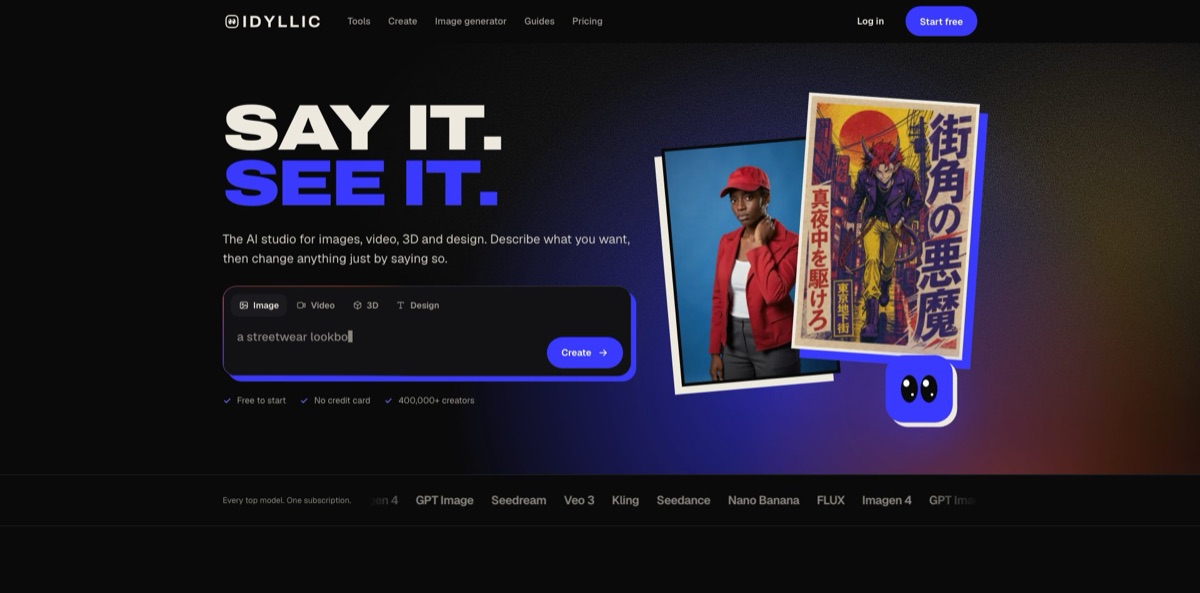
Idyllic is a browser-based AI studio from Levy Street, a product studio in Wellington, New Zealand, that puts third-party image, video, 3D and audio models behind a single prompt box and one credit balance. You pick FLUX, Imagen 4, GPT Image, Seedream or Nano Banana for stills, Veo, Kling or Seedance for clips, and then refine any result by typing what should change. Ready-made flows produce finished assets such as YouTube thumbnails, book covers, pixel art sprites and room makeovers, with text set as editable type rather than baked into the pixels. The weak points are a small free allowance of 3 images a day, a public gallery for everything made on the free plan, and very few independent user reviews so far. It suits creators and small marketers who want many models without paying for several separate subscriptions.
How to start using Idyllic?
Open idyllic.app and click Start free. The app itself lives at us.idyllic.app and asks for no credit card. The free plan gives you 3 images a day with fast image and design models, Magic Prompt, a background remover and 4× upscaling. Before you sign up, the marketing site groups its tool pages into 15 categories, from 267 art-style generators and 178 design tools to 24 pixel art tools and 17 interior tools, and each page includes prompt ideas you can open straight in the studio. Free creations appear in the public gallery, so keep anything confidential off the free tier.
For a first project, type a sentence into the “Describe what you want to make” box on the Home screen, keep the Image tab selected and press Create. If you only have three words, switch on Magic Prompt, which expands a short idea into a detailed prompt. Idyllic’s own guide suggests writing the subject first, then style, composition, light and format, for example “square” for a feed post or “16:9” for a thumbnail. Prompts work in any language, and Remix lets you add up to 9 reference images to steer the result.
The part of the interface you will use most is the conversation attached to each image. Type “make the background navy” or “tighter, cinematic crop”, and only that part changes, because every image remembers its thread. Canvas covers the hands-on jobs: fill, extend, erase and background replacement, plus changing any word, font, outline or shadow on designs made by flows. The sidebar also holds Flows, Agent, Projects and a Library with Characters, Scenes and Collections, so a face or setting you like can be reused across a whole series.
Before you publish anything, check what your plan allows. Commercial use and private mode come only with paid plans, and 8K upscaling is reserved for Pro and Max. Flows such as the YouTube thumbnail generator let you preview the plan for free, but running them costs credits, for example 36 credits for three thumbnails on Plus and up. Download the final file, such as the 1920×1080 PNG the thumbnail flow exports, and keep a local copy of everything you plan to reuse.
Who is it for?
YouTubers and short-form creators
Thumbnails and vertical clips usually mean hopping between several apps. The thumbnail flow turns one line about your video into three 16:9 designs with a 2-4 word hook, keeps your face if you upload a photo, and leaves every word editable. Pro adds Veo 3.1 and Kling 3 video sized for Reels, Shorts and TikTok.
Small marketers and solo founders
Ad creative normally means briefing a designer or fighting with templates. The ad generator reads your brand or website and returns four Meta ad concepts as finished 4:5 ads with headline and button, plus the copy. You get testable variations without opening a layout program.
Indie game developers
Prototypes need sprites, icons and props long before there is an art budget. The pixel art flow draws scenes, character sprites or item icons in 8-bit, 16-bit, isometric or 1-bit looks, and Pro adds text-to-3D models with rigging that export to a game engine or a 3D printing slicer. Treat the meshes as a starting point and check thin parts before printing.
Homeowners and interior hobbyists
Choosing paint or a sofa from swatches is guesswork. Upload a daylight photo of the room, say what must stay, and restyle it as Japandi, Scandinavian or industrial one change at a time. Idyllic’s own page advises treating renders as concepts and measuring before you buy furniture.
Anime and fan-art makers
Dozens of tool pages target anime posters, original characters, character sheets and coloring pages. The Characters feature keeps one face consistent across scenes, which matters for comics and OC sheets. Remember that anything made on the free plan lands in the public gallery.
Self-published authors and musicians
Covers need correctly spelled titles and art that fits the genre. The book cover flow returns three 1600×2400 px designs with your title and author name already set, and the album art tool makes square covers with the artist name and title as real text.
Idyllic pricing
Idyllic sells one subscription that covers every model, with a monthly credit allowance on the paid tiers. Credits are spent at different rates per model and format: the pricing cards translate 300 credits into roughly 33 Seedream images, and 1,400 credits into about 155 images or 28 3D models. Flows show their price before you run them, such as 36 credits for three YouTube thumbnails or four pixel art images. The billing toggle labels yearly payment as 30% off, which matches Plus and Pro, while on Max the yearly price is less than half of twelve monthly payments. All prices below come from the official pricing section on the homepage, which states that prices are in USD.
3 images a day, fast image and design models, Magic Prompt, a background remover and 4× upscale. No credit card is needed, and creations appear in the public gallery.
300 credits a month (about 33 Seedream images), every image model, edit with words, private mode, a commercial license, and the ability to run Flows and Agent plans.
1,400 credits a month (about 155 images or 28 3D models), plus video with Veo 3.1 and Kling 3, 3D models and rigging, voices, sound effects and music, and upscaling to 8K. The video page says Pro includes 40 videos a month.
4,500 credits a month (about 45 Veo videos with sound) and the lowest price per credit; the video page cites 150 videos a month, so the real number depends on the model you choose. A faster queue and API access are marked as coming soon.
There is no team or enterprise tier on the page. The App Store listing for the iPhone app still shows older in-app purchases named Explorer and Creator Pro, so compare before subscribing on mobile. You can cancel from your account in two clicks, and the plan keeps running until the end of the period you paid for.
Idyllic key features
Edit with words
Each image keeps its own conversation, so you can say “make it black and white” or “swap the outfit” and only that element changes. It works on uploaded photos as well as generated images, and every change builds on the previous one. For most routine fixes you skip masks and layers entirely.
Many models under one balance
The app lists FLUX 3, Nano Banana, Seedream 5 and GPT Image for stills, with Imagen 4 also named on the homepage; video runs on Veo 3.1, Kling 3, Seedance and PixVerse; 3D uses Tripo, Hunyuan3D and Trellis; audio uses ElevenLabs v4 and Lyria 3. You choose a model per creation from the same prompt box and can run one prompt on several models to compare. One credit balance replaces a stack of separate subscriptions.
Ready-made flows
Pages like the YouTube thumbnail, book cover, pixel art and ad generators follow a fixed recipe: an AI writer plans several directions, an image model draws them, and Idyllic sets the text as live type. You can preview the plan for free and see the credit cost before running it. What you get back is a finished asset rather than a raw picture you still need to lay out.
Agent mode
In the app, Agent takes a described outcome, plans every step, shows you the cost and then makes the pieces, from concept images to video, 3D, voices, music and finished designs. Sample jobs include Meta ads from a website, a game cast taken from concept art to rigged 3D, and an anime short with its own score. Agent plans are included from Plus upward.
Canvas, Remix and upscaling
Canvas fills, extends, erases and swaps backgrounds, and on flow designs it lets you edit words, fonts, outlines and shadows. Remix blends up to 9 reference images into one result. Upscaling reaches 4× on the free plan and 8K on Pro and Max, which the upscaler page says covers prints of about 25×14 inches at 300 PPI.
Characters and Styles
Characters keep one face across every scene and series, which helps with comics, mascots and character sheets. Styles let you apply a preset or train your own on reference images. Together they cut down the drift that usually breaks a series of AI images.
3D, video and audio studios
Pro and Max add text- or image-to-3D with modelling, texturing, rigging, animation and export for games, AR or 3D printing, plus clips in 16:9, 9:16 or 1:1 and voices, sound effects and music. Image to video starts from a still, so the character, product and colors stay as you designed them.
Idyllic Pros & Cons
Pros
Idyllic gives you a wide set of current models for a modest fee: Plus costs $10.50 a month on yearly billing, and Pro adds video, 3D and audio for $17.50. Word-based editing keeps the full conversation, so small fixes never force you to start over. Flows turn one brief into finished thumbnails, covers or ads with correctly spelled, editable type, which removes the step of moving images into a separate design tool. The free plan needs no credit card, prompts work in any language, and the site lists prompt ideas for hundreds of specific use cases. Start with a flow that matches a real task to judge output quality quickly.
Cons
The free tier is thin at 3 images a day, and those images go to the public gallery, so private work requires a paid plan. Credit math varies by model, and the site’s own figures do not line up: the Max card estimates about 45 Veo videos, while the video page mentions 150 videos a month. Independent feedback is scarce, with no reviews on G2 or Product Hunt and only two on Trustpilot. The Terms of Service were last updated in February 2025, focus largely on AdSense rules, and fall under New Zealand law. API access and a faster queue are not live yet. Try Plus monthly before you commit to a yearly plan.
Use Idyllic if you want…
- Generate images with several top models in one place.
- Edit pictures by describing changes in plain words.
- Make YouTube thumbnails with editable hook text.
- Design posters, book covers and album art with correct type.
- Create pixel art sprites and icons for indie games.
- Restyle a room photo before buying new furniture.
- Turn still images into short clips with Veo or Kling.
- Build textured, rigged 3D models from a short prompt.
Idyllic alternatives
 Leonardo.aiRead review →
 KreaRead review →
 IdeogramRead review →
 RecraftRead review →
 OpenArtRead review →
 Adobe FireflyRead review →
 MidjourneyRead review →
 ImagineArtRead review →
 DzineRead review →
Idyllic Reviews
A Trustpilot reviewer calls Idyllic great value for money and rates its image quality close to Midjourney, with the caveat that it takes some practice before results get there.
Another Trustpilot reviewer describes it as an enjoyable way to make pictures together with family, though the profile holds only two reviews and none from the last 12 months.
Beyond that, independent feedback is thin: G2, AlternativeTo and Product Hunt list Idyllic without a single user review, and the App Store listing has too few ratings to show a score, so the newer video and 3D tools have barely been assessed by outside users.
FAQ
Is Idyllic free?
Yes. The free plan gives you 3 images a day with no credit card, plus Magic Prompt, a background remover and 4× upscaling. Paid plans start at $15 a month, or $10.50 a month billed yearly.
Can I use Idyllic images commercially?
Yes, on a paid plan. Everything made on Plus, Pro or Max comes with a commercial license, while images from the free plan appear in the public gallery.
Are my Idyllic creations private?
Free creations are public by default, and any paid plan can switch to private mode. The privacy policy lets you request deletion of your personal data by emailing hello@idyllic.app, and it notes that the website shows ads through Google AdSense and Monumetric.
Which AI models does Idyllic use?
For images it offers FLUX, Imagen 4, GPT Image, Seedream and Nano Banana. Video runs on Veo 3.1, Kling 3, Seedance and PixVerse, 3D on Tripo, Hunyuan3D and Trellis, and audio on ElevenLabs v4 and Lyria 3.
Can Idyllic make video and 3D models?
Yes, both are included on Pro and Max. You can turn text or an image into a clip in 16:9, 9:16 or 1:1, and turn text or an image into a textured 3D model you can export for games, AR or 3D printing.
Is there an Idyllic mobile app or API?
There is a free iPhone app, Idyllic App, with in-app purchases; its App Store seller is Dreamhome AI Limited. API access is listed on the Max plan but marked as coming soon.
Can I write prompts in languages other than English?
Yes, prompts work in any language. The website itself is available in English, Spanish, Portuguese, French, Russian, Indonesian, Hindi and Simplified Chinese.
How do I cancel or ask for a refund?
You can cancel from your account in two clicks, and the plan runs until the end of the period you paid for. The Terms say refunds follow New Zealand’s Consumer Guarantees Act and ask you to contact hello@idyllic.app within 30 days of purchase.
Similar tools
 Pixel DojoSubscription AI studio with 80+ image and 60+ video models, consistent characters, LoRA training and an agent that builds ads and short
 ArtbreederBrowser-based AI art studio for mixing, breeding and editing images with gene sliders, prompts, collages and a remix-friendly community.
 mnml.aiAI rendering studio for architects and designers that turns sketches, photos and SketchUp, Revit or Rhino views into photoreal renders and short