

ImageColorizer
Image EditingUpdated November 18, 2026
AI photo restoration app that colorizes black-and-white pictures, repairs scratches and sharpens faded family portraits on the web and mobile.
We may earn a commission when you sign up through our links. It does not affect our reviews.
What is ImageColorizer?
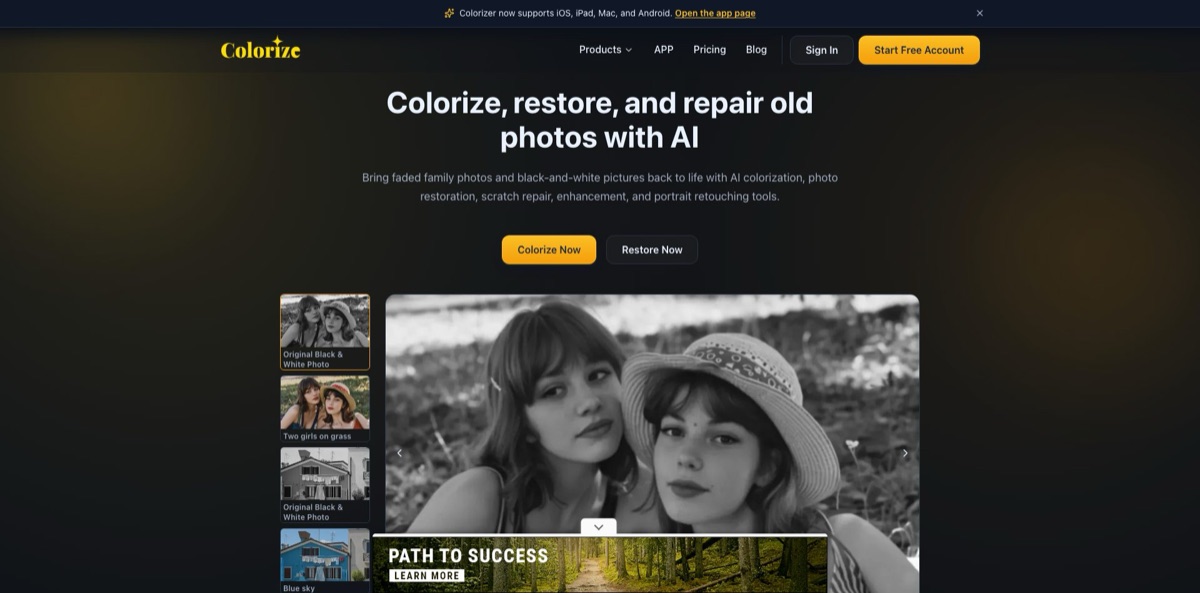
ImageColorizer is a browser-based restoration suite built around one job: turning scanned black-and-white prints into believable color photos. You upload a JPG, PNG or WEBP file, choose a model, and get back a colorized copy, with separate tools for restoring faded detail, sharpening blurry scans, retouching faces and repairing scratches. The current V2 model takes a text prompt, while the older V0 and V1 colorizers stay available as free legacy engines. The same service powers Colorize apps for iPhone, iPad, Mac and Android, published on Google Play by Hong Kong developer Vertexshare. The weak spots are the split between new and legacy models, a 4,000px upload ceiling on paid plans, and user reports of green color casts. Pick it if you have a box of family photos and want fast, inexpensive results rather than studio-grade manual restoration.
How to start using ImageColorizer?
Open imagecolorizer.com and click Start Free Account in the header. A free account gets 50 credits each month, which is enough to judge the output on your own scans before paying anything. The Products menu lists every tool: Colorize Black & White Photos, Enhance Old Photos, Retouch old Portraits, Repair Scratched Photos, Restore Old Photos and Remove Objects from Old Photos, the last of which opens the sister site objectremover.com. Before uploading, scan your print at a decent resolution, because every tool works from the digital copy you give it.
For a first real job, open Colorize B&W Photo. Drop an image into the upload zone, click Select image, or paste straight from the clipboard. Then pick a model: V0 is the legacy classic colorizer, V1 is a legacy SD-based version with enhanced texture reconstruction, and V2 is the latest generation. With V2 selected, a prompt box appears, prefilled with an instruction to colorize the photo naturally and preserve facial details. Edit it to describe colors you actually know, such as a navy uniform or a red brick wall, then click Upload & Start.
The setting that matters most is the model choice, because it decides what you pay. The colorize screen shows that a V2 run uses 4 credits, while V0 and V1 are labelled Free. Restore Old Photo uses the same layout with a prompt aimed at scratches and lost detail. The Enhance, Repair and Retouch pages run a legacy batch flow that takes up to 8 images at once and offers Download all as ZIP. Batch processing sits on paid plans, and in batch mode each processed or downloaded image costs 1 credit, including repeat downloads.
When the result comes back, compare it with the original at full size. Check faces, hands and backgrounds, where colorizers tend to guess wrong, and rerun with a more specific prompt if skin or clothing looks off. The homepage says a restore usually takes a few minutes, depending on file size, model and queue. Download what you want to keep straight away: the privacy policy says uploaded and generated images on the web are deleted automatically within 2 hours.
Who is it for?
Family historians
You inherited an album of grey portraits and want relatives to recognize great-grandparents at the next reunion. ImageColorizer handles colorization, scratch repair and face retouching from one account, so you skip learning Photoshop layers. The Starter plan’s 500 monthly credits cover a steady weekend project.
Genealogy researchers
Family-tree profiles look better with clean, consistent images, but restoring them one by one is slow. The legacy batch flow processes up to 8 images in a run and packs the results into a ZIP. You spend your evenings on research instead of retouching.
Memorial and event organizers
A funeral slideshow or anniversary print often has a deadline measured in days. With results in a few minutes per photo, you can prepare a dozen restored pictures in one sitting. The Terms allow personal or commercial use, provided you have rights to the original image.
Small restoration side businesses
If you restore photos for paying customers, unpredictable per-image costs eat margins. The Business plan gives unlimited access to the V2 model for a flat monthly price, which makes quoting simpler. The 4,000px input limit means large-format print jobs still need another tool.
Local history groups and archive volunteers
Volunteer-run societies digitizing donated prints rarely have budget for professional restoration. The low entry price fits, but uploads are deleted within 2 hours, so you must keep your own master archive. Treat colorized versions as illustrations, since the app listing itself says AI colors are an interpretation rather than verified history.
Phone-first users
If your old photos live in a phone gallery, the Colorize apps for iPhone, iPad, Mac and Android cover the same workflow. The iOS app starts with 10 free credits and adds an optional 4x upscale that runs on the device. You can restore a picture and send it to family without touching a computer.
ImageColorizer pricing
ImageColorizer sells monthly or yearly subscriptions that refill a credit balance, with a free tier to start. On the web, a V2 colorization costs 4 credits, while the legacy V0 and V1 models run free in single-image mode. Listed prices include applicable taxes based on your billing address, payment works with credit cards and PayPal, and there is a 7-day refund window for eligible purchases.
50 credits per month, single-image processing and all AI features, with ads. That is roughly a dozen V2 runs.
500 credits per month, priority support, legacy batch processing and no ads, or about 125 V2 colorizations.
1,000 credits per month with the same features as Starter. The pricing page marks it Most Popular.
Unlimited access to the V2 model, plus priority support, legacy batch processing and no ads.
The Colorize apps sell their own Colorizer Pro upgrade as a monthly or yearly subscription or a one-time lifetime purchase through the app stores. The App Store listing says current prices are shown in the app, so there is no public USD figure to quote.
Paid uploads must be under 100MB and 4,000px on the longest side; larger files are resized or compressed before upload. Unused credits roll over while your subscription stays active, but they are cleared once it expires or is canceled.
ImageColorizer key features
Three colorization engines
The colorize screen offers V0, a legacy classic model with stable defaults, V1, a legacy SD-based model with enhanced texture reconstruction, and V2, the latest generation. V0 and V1 are labelled Free, while V2 costs 4 credits per run. Having all three means you can retry a stubborn scan with a different engine instead of giving up on it.
Prompt-guided V2 results
V2 adds a prompt field, prefilled with an instruction to colorize naturally and preserve facial details. You can rewrite it to name known colors, like a green dress or a white picket fence. That gives you more say over the outcome than a one-click colorizer, which usually guesses every tone.
Restore, enhance, retouch and repair tools
Beyond color, separate pages handle faded detail, blurry scans, noisy portraits and physical damage such as scratches, tears, creases and water spots. The site positions these as one workspace, so a single account covers the whole restoration chain. You can fix damage first and colorize the clean copy afterwards.
Legacy batch processing
The Enhance, Repair and Retouch pages accept up to 8 images per run, track how many have finished, and let you download everything as a ZIP. Batch runs on the original legacy models, and the page itself recommends V2 for better results. It saves time on routine cleanup of large scan sets.
Short file retention
According to the privacy policy, uploaded source images and generated results from cloud processing are deleted automatically within 2 hours, and the web service keeps no file history. The mobile app’s release notes say uploads there are auto-deleted within 24 hours. That suits private family photos, but it also means the service is not a backup.
Apps with on-device upscaling
The Colorize app runs on iPhone, iPad and Mac, with an Android version on Google Play. Colorization still happens online, but an optional Enhance step upscales the result to 4x its width and height locally and can work offline once the result is downloaded. History keeps past results, and the Mac version exports PNG or JPEG.
Commercial use
Processed images can be used for personal or commercial projects, subject to your rights to the original image and the Terms. That opens the door to paid restoration work, print products and history content.
ImageColorizer Pros & Cons
Pros
ImageColorizer keeps the cost of entry very low. The free tier gives you 50 credits a month, the legacy models cost nothing in single mode, and the Business plan removes credit counting for V2 at under $20 a month. Colorization, restoration, retouching and scratch repair live in one account, so you do not need several subscriptions for one old photo. The V2 prompt box gives you real influence over colors when you know what the scene looked like. Privacy is handled conservatively, with web files deleted within 2 hours. Apps on four platforms cover phone galleries too. Start with V2 on your most damaged photo; if it handles that, the rest of your album will be easy.
Cons
The product is mid-transition, and it shows. The homepage calls part of the toolset legacy, batch runs only on the old models, and the V2 prompt workflow is single-image. Paid uploads stop at 4,000px on one side, which limits large scans. AppSumo buyers have complained about a greenish cast on colorized images, poor download quality and lifetime-deal activation problems, although the founder says a newer algorithm has since shipped. Web plans and app purchases are sold separately, and the vendor confirmed a lifetime deal did not cover the app. There is also no documented public API. Keep your original high-resolution scans and judge each result at full size before you print.
Use ImageColorizer if you want…
- Colorize grandparents’ black-and-white portraits in a few minutes.
- Repair scratches, creases and water spots on scanned prints.
- Guide AI colors with a short descriptive prompt.
- Restore faded family photos before printing or framing.
- Batch-process up to eight old scans at once.
- Retouch noisy vintage portraits while keeping faces natural.
- Colorize photos straight from your iPhone or Android gallery.
- Keep restoration costs low with a free monthly allowance.
ImageColorizer alternatives
 VanceAIRead review →
 HitPaw FotorPeaRead review →
 Cutout.ProRead review →
 Movavi Photo EditorRead review →
ImageColorizer Reviews
App Store users praise how natural the tones look on old family portraits and how easy the app is for people with no editing experience, though one long-time user complained that it took minutes just to reach the colorize screen.
A recent Google Play reviewer was impressed that a crowded family group shot came out right, with hands, feet and two-piece dresses colored correctly, and others mention an affordable price; the Play listing averages 4.3 stars across roughly 10,000 reviews.
One AppSumo buyer rates the colorized images as roughly 95% accurate and the monthly allowance as generous, but says the interface takes a few minutes to learn and asks for a beginner tutorial video.
Critical AppSumo reviews describe missing lifetime-deal activation codes, a desktop app that would not work, poor download quality and too much green in colorized results, with the founder replying that an updated colorization algorithm has been released.
An older App Store review liked the ad-supported free option but left when the app moved toward paid subscriptions, and the developer answered that watching ads still earns free credits.
FAQ
Is ImageColorizer free?
Yes, there is a free plan with 50 credits per month, single-image processing and ads. The legacy V0 and V1 colorizers are labelled Free on the colorize screen, while a V2 run costs 4 credits.
Which model should I use, V0, V1 or V2?
V2 is the latest generation and the one the site recommends for the best quality and control, including a text prompt. V0 and V1 are legacy models that cost no credits in single mode, so they are worth trying when you are on a tight credit budget.
How long does ImageColorizer keep my photos?
The privacy policy says uploaded source images and generated results from cloud processing are deleted automatically within 2 hours. The mobile app’s release notes say its uploads are removed within 24 hours, so download results promptly.
Can I use restored photos commercially?
Yes, the site says processed images can be used for personal or commercial projects, as long as you have rights to the original image and follow the Terms.
What are the upload limits?
On paid plans, photos must be under 100MB and no more than 4,000px on one side; larger files are resized or compressed before upload. The editors accept JPG, PNG and WEBP files.
Do unused credits roll over?
Unused subscription credits can roll over while your subscription remains active. If the subscription expires, is canceled or is downgraded, accumulated credits may be cleared.
How do I cancel or get a refund?
Log in, open the Dashboard and click Cancel Subscription; you keep remaining credits until the period ends. The Terms offer a 7-day refund window for eligible purchases, requested through support with your order details.
Is there a mobile app or an API?
Yes to apps: Colorize is available for iPhone, iPad and Mac on the App Store and for Android on Google Play, with its own in-app subscription. The site does not document a public API.
Similar tools
 Picture to DrawingBrowser tool that turns photos into pencil, charcoal, ink or watercolor drawings, cartoons and coloring pages, with free daily tries and one-time
 Retouch4meAI retouching plugins and cloud apps that automate skin cleanup, dodge and burn, culling and color grading for photographers and video editors.
 Pixelfox AIBrowser-based AI photo and video editor for object removal, background cutouts, upscaling, virtual try-on and AI video on one shared credit balance.