

Image Describer
Content CreationUpdated November 17, 2026
Credit-based web tool that turns photos into detailed descriptions, alt text, tags, captions and prompts for Midjourney, Stable Diffusion and Flux.
We may earn a commission when you sign up through our links. It does not affect our reviews.
What is Image Describer?
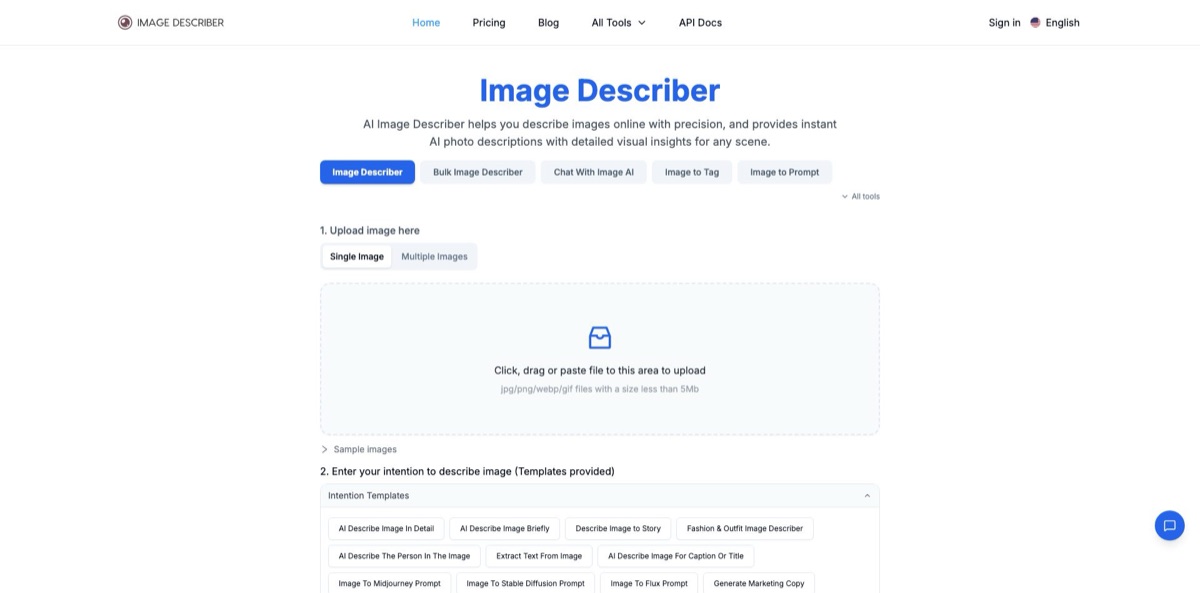
Image Describer is a browser tool that reads a picture and writes text about it. You upload a photo, choose an intention such as a detailed description, a caption, extracted text, marketing copy or a prompt for Midjourney, Stable Diffusion or Flux, and a multimodal model returns the result in the language you pick. Around that core sit a bulk mode for up to 50 images, a chat window for follow-up questions, tag and alt text generators, an image-to-video script writer, a Chrome extension and a paid API. It saves you from writing alt text, product blurbs and reverse-engineered prompts by hand. The weak points are transparency and depth: the vendor does not name the model behind it, the company behind it is barely identified, and independent testers found some descriptions repetitive. Pick it if you need cheap, fast image-to-text output in bulk rather than expert-grade visual analysis.
How to start using Image Describer?
Open imagedescriber.online in any browser. You can try the main tool without an account: guests get 3 shared free credits per browser, which reset roughly 24 hours after the trial window starts. Creating an account (the privacy policy describes sign-in through Google) adds 5 one-time account credits, and signing in again later does not add another bonus. That is enough for about eight single-image descriptions, so plan your test images before you start.
For a first real job, stay on the homepage describer. Leave the toggle on Single Image, then drag, click or paste a JPG, PNG, WebP or GIF under 5MB into the upload area. Under step 2, pick one of the intention templates, for example AI Describe Image In Detail, Extract Text From Image or Image To Midjourney Prompt, or type your own instruction. Choose the description language in step 3 and press the Describe Image button, which shows its cost of 1 credit. Ctrl+Enter runs it from the keyboard.
The setting that changes your costs most is the Single Image versus Multiple Images switch. Multiple Images takes 2 to 5 pictures and returns one combined answer for 2 credits, which suits before-and-after pairs, spotting differences or summarizing a small set. For larger jobs, open Bulk Image Describer from the All Tools menu, where you can upload up to 50 images, apply one template to all of them and export the results as CSV. Specialized pages such as Image to Prompt, Image Alt Text Generator and Image to Video Script add their own controls, like target model, character length or camera movement.
Before you paste a result anywhere, read it against the image. Check names, numbers and any text the model claims to have read, because the terms say outputs are informational and not guaranteed to be accurate. The Copy button outputs plain text rather than markdown, and View History lets you revisit earlier results. Only use the share option if you are happy for the image and its description to appear elsewhere on the site.
Spend your free credits on three images that represent your real workload before you buy any pack.
Who is it for?
SEO and web editors
Every image on a page needs alt text, and writing it for a whole catalog is slow. The Alt Text Generator takes optional target keywords and offers a Concise SEO mode capped at 125 characters or a Descriptive WCAG mode, so you start from a usable draft instead of a blank field.
Online sellers
Product photos need titles, descriptions and tags before they can go live. The Generate Marketing Copy template, Image to Tag and the 50-image bulk mode with CSV export let you draft listings for a whole shoot in one pass and fix them in a spreadsheet.
AI image creators
You see a picture you like and want something in the same style. Image to Prompt writes prompts tailored to Midjourney, Stable Diffusion, Flux or Nano Banana, including Midjourney parameters such as aspect ratio, so you spend less time guessing at style words.
Stock photographers
Stock sites expect keywords, titles and descriptions with every upload. Image to Tag lets you set keyword quantity, single words or phrases, output language and title formatting, which turns metadata into a quick review job.
Short-form video creators
Image-to-video tools need detailed motion prompts. The Image to Video Script page turns a start frame into a prompt for tools like Runway, Kling or Sora, with camera movement, motion intensity and a TikTok, cinematic or documentary voiceover.
Developers
You want image descriptions inside your own app or pipeline. The V2 API accepts an image URL, Base64 data or a file plus a custom prompt and returns the description as JSON, billed from the same credit balance.
Image Describer pricing
You pay for credits, not seats. On the main describer, one image costs 1 credit and a Multiple Images analysis of 2 to 5 pictures costs 2 credits, and failed analyses are not charged. Credits come as one-time packs, monthly subscriptions or larger API packs, and the per-credit price drops sharply as you buy more. Prices below are in US dollars from the official pricing page.
Guests get 3 shared credits per browser that reset about every 24 hours, and a new account adds 5 one-time credits.
No recurring charge, and each pack lists the 5MB upload limit, unlimited conversations and priority support.
The cheapest subscription, with 50 more credits than the $9.99 one-time pack, but it renews every month.
Marked Most Popular, and at 1 credit per image it covers about 1,500 single descriptions a month.
Built for steady bulk work such as catalog tagging. You can cancel at any time.
These are one-time payments with lifetime access, high-priority API access and support replies within 24 hours, and API credits also work on the website.
Purchases are generally final. The refund policy makes exceptions for technical faults on the vendor’s side and for accidental purchases reported within 24 hours with no credits used. Cancelling a subscription keeps your remaining credits, but the cancellation cannot be undone.
Image Describer key features
Intention templates and custom prompts
The homepage describer ships with 12 templates, from detailed and brief descriptions to fashion, person, OCR-style text extraction, captions with hashtags, object recognition and marketing copy. You can also write your own instruction, and the Image Description Generator adds styles such as SEO page titles, meta descriptions, technical analysis, poems and narrative stories. One upload can serve several jobs without a new tool for each.
Multiple Images mode
Upload 2 to 5 pictures to compare them, find differences, summarize a collection or describe a sequence, and get one combined answer for 2 credits. The tool shows the cost before you generate, lets you reorder images and keeps your draft through checkout. This suits before-and-after shots, product variants and storyboards where a single-image description misses the relationship.
Bulk Image Describer
Up to 50 JPG, PNG or WebP images at a time run through one template or custom prompt, and the results export as CSV or copy in bulk. The page itself recommends testing a prompt on 2 or 3 images before running a full batch. For catalogs and photo libraries, this is the feature that turns the tool from a toy into a workflow.
Image to Prompt
Pick a target model (General, Midjourney, Stable Diffusion, Nano Banana or Flux) and the tool writes a prompt in that model’s style, with parameters for Midjourney and tag-style prompts for Stable Diffusion. It analyzes lighting, style, composition and medium. Image Describer does not generate images itself, though the page links to a beta Flux 2 [Klein] demo hosted on Hugging Face Spaces.
Purpose-built describers
Separate pages cover alt text with keyword injection and a 125-character concise mode, image-to-video scripts with camera, motion and voiceover options, image tags with keyword controls, character descriptions, face and person descriptions, hair and outfit, color and style, and image-to-story. Each one bakes the right instructions into the form, so you get the format you need without prompt engineering.
28 output languages
Since the November 4, 2026 update, descriptions and tags can come out in 28 languages, including Hindi, Ukrainian, Vietnamese, Czech and Norwegian, independent of the interface language. The interface itself runs in 16 languages, and the homepage mentions a text-to-speech option for reading descriptions aloud.
Chrome extension and API
The extension adds a right-click menu with Describe Image Now and Describe Image…, plus a side panel for local uploads and saved prompts, using your account credits. The V2 API is a single POST endpoint with Bearer authentication that accepts a URL, Base64 data or a file and returns error codes for things like insufficient credits or harmful content.
Image Describer Pros & Cons
Pros
The pricing is clear and cheap at volume. Every pack is listed in US dollars with a per-credit price, the top subscription and the API packs bring a single description down to about one cent, and failed analyses cost nothing. You also get far more than a plain describer for that money: bulk processing with CSV export, multi-image comparison, prompt writing for four image models, alt text, tags, video scripts and an API on one balance. The changelog shows regular releases through November 2026, so the product is actively maintained. Start with a one-time pack, since you do not need a subscription to reach the useful features.
Cons
You know very little about who runs Image Describer or which model it uses. The About page lists only a Gmail contact, the terms point to Singapore law, and the site describes its engine only as multimodal models. Independent ratings barely exist: the Chrome extension has 41 users and no ratings, and Trustpilot shows no reviews. Testers describe output that can repeat itself or lean on mood over concrete detail, the free allowance is small, uploads stop at 5MB, and credits are generally non-refundable. Some pages still show raw placeholder text. Avoid uploading confidential images, and test with your own files before buying a large pack.
Use Image Describer if you want…
- Generate alt text for large image libraries quickly.
- Turn product photos into marketing copy and tags.
- Reverse-engineer prompts for Midjourney, Stable Diffusion or Flux.
- Describe up to 50 images and export CSV.
- Compare two to five images in one answer.
- Extract readable text from screenshots and photos.
- Write motion prompts for Runway, Kling or Sora.
- Add image descriptions to your app through an API.
- Pay per credit instead of a fixed subscription.
Image Describer alternatives
 ImagePrompt.orgRead review →
 ChatGPTRead review →
 Google GeminiRead review →
 Microsoft CopilotRead review →
 MidjourneyRead review →
Image Describer Reviews
A hands-on comparison of five image describers rated it 4.0 out of 5, crediting bulk generation and the adjustable description intent, but found its detailed description repeated itself and focused on mood more than visual detail, and called the free allowance small.
One reviewer found the upload, template and language workflow easy and liked the custom prompts and read-aloud button, but noted only three free uses, a 5MB cap, no precise control over word count and occasional misreads of artistic style.
A roundup of free description generators praised the intention templates, custom instructions, text extraction and prompt conversion, while warning that uploaded data may be retained by outside services.
A comparison table of describers rated its description depth as medium-high, below the most detailed tools tested, while crediting the batch mode, chat with image and automatic tags.
FAQ
Is Image Describer free?
You can try it without paying. Guests get 3 shared free credits per browser that reset about every 24 hours, and creating an account adds 5 one-time credits.
How much does one description cost?
A single-image description costs 1 credit and a Multiple Images analysis costs 2 credits. Depending on the pack, a credit costs between $0.067 and $0.010.
Does Image Describer store my images?
The privacy policy says uploaded images and generated text are processed temporarily and stored only with your consent. If you choose to share a result, the image and its description can appear in other sections of the site.
Does Image Describer have an API?
Yes, the V2 API takes an image URL, Base64 data or file plus a prompt and an optional language code, and returns the description as JSON. API packs start at $49.99 for 5,000 credits.
Which languages does it support?
Descriptions and tags can be generated in 28 languages, and the website interface is available in 16 languages.
Can Image Describer generate images?
No, it turns images into text. Its Image to Prompt tool writes prompts you can paste into Midjourney, Stable Diffusion, Flux or Nano Banana to create similar pictures.
How do I cancel my subscription?
Click your profile icon, choose Manage Subscription and press Cancel on the active plan. Your remaining credits stay usable, but the cancellation cannot be reversed.
Can I get a refund?
Purchases are generally non-refundable. The policy allows refunds for technical faults on the vendor’s side and for accidental purchases reported within 24 hours with no credits used.
Similar tools
 Contents.comEnterprise AI content platform that writes, translates and illustrates on-brand content, with batch generation, approval workflows and audit trails.
 CopyterSpanish-first AI writing platform that researches keywords, drafts SEO articles and publishes them to WordPress, with image, voice and chat tools.
 DocswritePublishing hub that sends Google Docs, Drive folders and Sheets to WordPress, Webflow, Shopify and 8 more destinations, with an AI writer