

Image2Image.ai
Image EditingUpdated November 12, 2026
Browser-based AI photo editor that changes uploaded images from text prompts, with object removal, background swaps, upscaling and multi-image merging.
We may earn a commission when you sign up through our links. It does not affect our reviews.
What is Image2Image.ai?
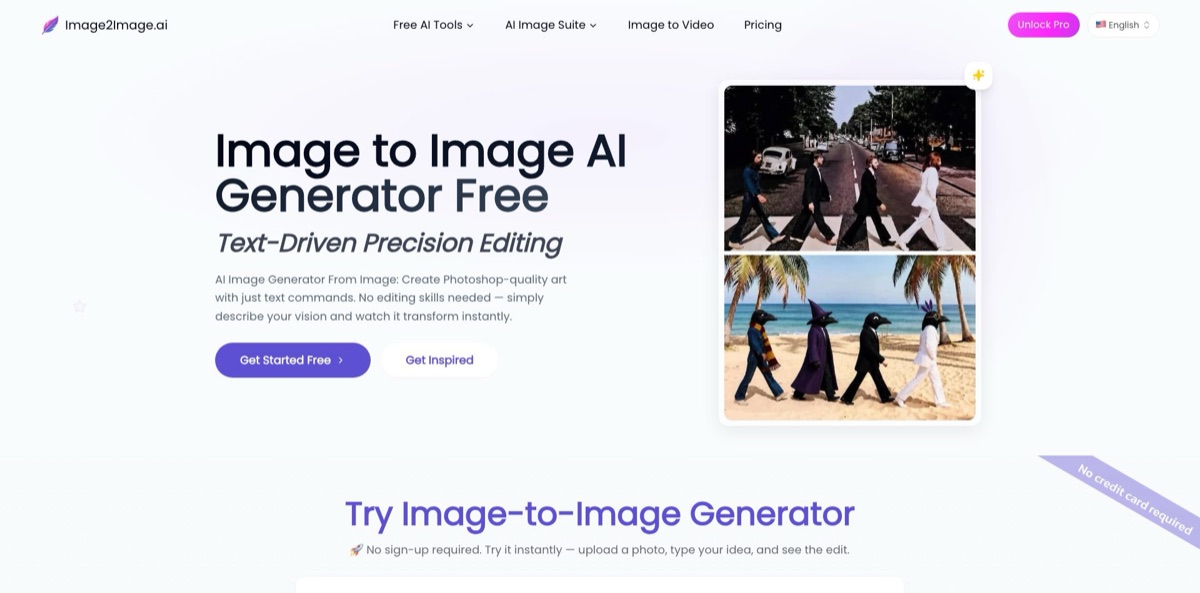
Upload a photo, type the change you want, and this browser-based editor redraws the picture while keeping its composition, faces and lighting. Around that core sit separate tools for text-to-image, object and watermark removal, background removal, a 4x upscaler, an enhancer, multi-image merging and short image-to-video clips. The AI Photo Editor runs on Google’s Nano Banana model, and GPT Image was added in June 2026. For everyday jobs such as background swaps, product scenes or restoring an old print, it spares you the layers and masks of a classic editor. The weak points are a thin public footprint with no company named in its legal pages, a free tier that runs a lighter model with queues, and help pages that contradict each other on credits, watermarks and image retention. Pick it for quick prompt edits, not pixel-precise retouching.
How to start using Image2Image.ai?
Open image2image.ai and try the editor on the homepage or one of the tools under Free AI Tools: the AI Image Editor, AI Image Generator and AI Headshot Generator work without an account or a credit card. These free versions use a lite model with a shared queue, which the pricing page puts at 40 to 60 seconds per job, plus a daily generation limit, lower resolution and a personal-use license. For the credit-based Pro editors, click Sign In and use Sign in with Google or an email and password. The site says new accounts receive some free credits for testing but does not say how many.
Your first real job should go through the Image to Image editor. Upload a JPG, PNG or WEBP file; any side longer than 2048 px is rejected, and the homepage FAQ recommends at least 512 × 512 pixels with good lighting and a clear subject. Then write one clear instruction, such as changing the background to a night street or turning a portrait into an oil painting. The help pages suggest an Action + Subject + Style formula and warn that the model does not understand “no” or “without”, so describe what you want instead of what you want removed.
Before you click Generate, set the aspect ratio (1:1, 16:9, 9:16, 4:3 or Match input image) and the quality level: Medium at about 1 megapixel, High at 2 to 3 and Ultra at 3 to 4. The cost formula is 15 base credits, plus 15 for each input image, plus 10, 15 or 25 for the quality level, and the Generate button shows the exact total before you commit. Add extra reference images when you need an outfit, product or character carried into the scene. If you are short on ideas, the Examples sidebar and the Prompt Gallery with its Create Similar buttons load ready-made prompts.
Paid jobs finish in roughly 5 to 20 seconds on the priority queue. Compare the result with your original and look closely at faces, hands and any text, since those are where AI redraws usually slip. The how-to guide recommends chaining edits, changing the background first and then objects and lighting, and adding “keep the subject in the exact same position and scale” to stop the framing from drifting. Download as JPG, PNG or WEBP right away: the About page says uploads are deleted within an hour, and commercial use requires a paid plan.
Who is it for?
E-commerce sellers
You have product shots on plain or messy backgrounds and need listing images fast. Background Remover cuts out the subject for 1 credit, and Custom Backgrounds or a background-swap prompt place the product in a styled scene. Paid plans add the commercial license you need for marketplace listings.
Real estate agents
Empty rooms and gray skies make listings look flat, and reshoots cost time. The site pitches prompt-based staging of empty rooms as furnished homes, plus season and lighting changes for exterior shots. Because the result is an AI redraw, check your market’s disclosure rules for virtually staged photos.
Job seekers and remote workers
A professional headshot usually means booking a photographer. The free AI Headshot Generator turns a selfie into a studio-style portrait with an outfit, style and background you describe, and Pro adds advanced models and higher-resolution output. The site pitches it for LinkedIn, résumé and corporate profile photos.
Concept artists and illustrators
Turning rough sketches into finished renders eats hours of linework. Image to Image keeps your composition while restyling it, and multi-image references help keep a character or outfit consistent across a series. The pricing page lists multi-image editing on the Advanced plan card.
Social media and marketing teams
Banners, posters and promo graphics need constant small edits. The editors can rewrite text on signs or change a “60%” to “34%” while matching the original font, and the Image to Video tool turns a still into a 6-second clip. That covers many small requests without opening a desktop editor.
Family archivists
Faded, scratched prints need repair before they can be shared or reprinted. A restoration prompt can fix damage and colorize black-and-white photos, and the upscaler enlarges results up to 4x for printing. Keep the original scan, since the AI reconstructs detail rather than recovering it.
Image2Image.ai pricing
The service combines a free tier with credit-based subscriptions, and prices on the official pricing page are shown in USD. Annual billing saves up to 31.6%. Credits reset every month and do not roll over. Most image jobs cost 20 to 30 credits, the upscaler 10 and background removal 1, while the enhancer charges by output pixel count. The Image to Image editor uses its own formula, so a single-image Medium run costs 40 credits.
Lite-model editors with no sign-up, a shared queue during peak hours, a daily generation limit, lower resolution, personal use only, no custom aspect ratios and no multi-image editing. The pricing FAQ says free outputs are watermarked, while the free generator page promises watermark-free 1024 px downloads, so expect either.
800 credits a month, which the plan card equates to 40 images, plus copyright ownership and commercial use, unlimited daily generations, priority processing and access to all advanced editing tools.
2,000 credits a month, or about 100 images by the plan card’s math, highest priority access, unlimited daily generations and multi-image editing.
You need an active subscription to buy them, the credits expire at your next monthly renewal and they are not refundable.
Payment works with Visa, Mastercard, American Express, PayPal and selected cryptocurrencies. The terms give a 3-day discretionary window for refund requests, with partial refunds if some credits were used and possible denial if most were consumed. You can cancel from your profile settings and keep access until the end of the billing period. There is no team plan, enterprise tier or API on the pricing page.
Image2Image.ai key features
Prompt-based Image to Image editor
You upload one or more reference images, describe the change and the model keeps the structure, pose and subject while applying your instruction. Medium, High and Ultra quality levels trade cost for resolution, and the Generate button shows the credit total before each run.
AI Photo Editor on Nano Banana
This editor accepts up to 6 images at 20 credits per run and is built for local edits, composites and keeping the same face across new poses, outfits and scenes. According to the About page changelog, GPT Image joined the lineup in June 2026, and a separate Image GPT tool handles multi-image prompting. Together they give you two current models without separate subscriptions.
Object, text and watermark removal
AI Object Remover erases people, text, shadows, glare, blemishes and clutter, then rebuilds the background at the original resolution for 20 credits. Dedicated pages cover people, glare, shadow and text removal. Remove watermarks only from images you have the rights to use.
Background tools
Background Remover isolates the subject into a transparent PNG for 1 credit, Background Changer swaps in a scene you describe and Custom Backgrounds generates product settings. Together they turn one product photo into a set of listing images.
Upscaler and Enhancer
The upscaler enlarges images 2x or 4x for 10 credits, and the enhancer fixes blur, noise and weak color, charging by output pixel count and taking 30 to 40 seconds. The upscaler FAQ itself admits it cannot recover detail that is completely lost, so start from the best source you have.
Text-to-image and in-image text editing
The AI Image Generator costs 20 credits per run, defaults to 2K output and is advertised up to 4K, and the editors can render legible text for posters and mockups. A separate text tool changes numbers and words on banners while matching the original font, which helps with quick price or date updates.
Image to Video
A still image becomes a 6-second clip at 512p, with most jobs done in under 90 seconds and credits refunded automatically if a job fails on a system error. The page lists 30 credits per video in its FAQ but 50 on the Generate button, so check the button before you run it.
Image2Image.ai Pros & Cons
Pros
The barrier to entry is low: the free editors need no account, so you can judge output on your own photos before paying anything. One login covers prompt editing, generation, object and background removal, upscaling and short videos, with recognizable models such as Nano Banana and GPT Image behind the main editors. The Image to Image editor shows the credit cost before every run, and quality tiers let you draft cheaply. At $7 to $13 a month on annual billing, both paid plans include commercial rights, which costs less than stacking several single-purpose subscriptions. The prompt guides are practical, with concrete advice on locking faces, framing and text. Start at Medium quality with one image and scale up once the prompt behaves.
Cons
The operator is hard to pin down: the About page names only a founder called Dylan from Singapore, the terms and privacy policy name no company, address or governing law, and the domain dates from May 2025. Independent reviews are almost nonexistent. The help pages contradict each other on credits per run (20 versus 40 or more), watermarks on free output, how long uploads are kept (one hour versus 24 hours) and video cost (30 versus 50 credits). There is no API or team plan, credits expire monthly, Boost Packs are non-refundable and the refund window is only three days. The pricing page itself warns that the free model may produce ghosting artifacts. Pay monthly at first and confirm the credit cost on the Generate button before large batches.
Use Image2Image.ai if you want…
- Swap photo backgrounds by typing a short instruction.
- Remove people, text and clutter from vacation photos.
- Turn plain product shots into lifestyle scenes.
- Create studio-style headshots from a casual selfie.
- Restore and colorize old family photographs quickly.
- Upscale low-resolution images up to four times larger.
- Merge several reference images into one consistent scene.
- Change prices and numbers on promotional banners.
- Test AI photo edits free without creating an account.
Image2Image.ai alternatives
 PixlrRead review →
 ClipdropRead review →
 DzineRead review →
 PixelcutRead review →
 Adobe FireflyRead review →
 Nano BananaRead review →
 getimg.aiRead review →
Image2Image.ai Reviews
Independent feedback is scarce: the only Trustpilot review, from October 2025, gives one star and complains that the service is advertised as free but then asks for payment.
On TopAI.tools, four voters split evenly: those who recommend it credit value for money, quality results and ease of use, while the others find it hard to use, not worth the price and short on integrations.
A commenter on its PeerPush launch page in March 2026 called it a nice app but asked whether a public API exists for integration; no reply is visible, and the site lists no API.
FAQ
Is Image2Image.ai free to use?
Partly. The free image editor, image generator and headshot generator work without sign-up or a card, but they use a lite model with a shared queue, a daily limit, lower resolution and a personal-use license. Pro editors run on credits, and new accounts get an unspecified number of free credits to test them.
Can I use the images commercially?
Only on a paid plan. Starter and Advanced include full commercial rights and copyright ownership with no attribution required, while free-tier output is restricted to personal use.
What happens to the photos I upload?
The About page and pricing FAQ say uploads are deleted within one hour and never used to train models, although the homepage FAQ mentions keeping them for up to 24 hours. Pro users can request immediate deletion after download.
How many credits does an edit cost?
Most image jobs cost 20 to 30 credits, the upscaler 10 and background removal 1. The Image to Image editor charges 15 base credits plus 15 per input image plus 10, 15 or 25 for quality, so a single-image Medium run costs 40.
Does Image2Image.ai have an API?
No public API or developer documentation is listed. All tools are used through the web editor.
Which file formats and sizes are supported?
You can upload JPG, PNG or WEBP files up to 2048 px on any side, and download results as JPG, PNG or WEBP.
How do I cancel or get a refund?
Cancel from your profile settings, and access continues until the end of the billing period. Refund requests made within 3 days are reviewed case by case and may be partial if credits were used, while Boost Packs are never refunded.
Which languages does the site support?
The interface is available in 11 languages: English, German, Spanish, French, Italian, Japanese, Korean, Portuguese, Russian, Chinese and Arabic.
Similar tools
 HamaFree browser-based AI eraser that removes people, objects, text and blemishes from photos with a brush, plus an inpainting API for developers.
 BgEraserBrowser-based AI background remover that turns up to 20 photos per batch into transparent PNGs without an account, plus offline apps for
 ImgkitsBrowser-based set of AI photo tools for background removal, object cleanup, upscaling, old photo restoration, image generation and image-to-video.