

ImagePrompt.org
Art GenerationUpdated November 18, 2026
Browser toolkit that turns images, videos and rough ideas into detailed prompts for AI art models, with a style gallery and a built-in image generator.
We may earn a commission when you sign up through our links. It does not affect our reviews.
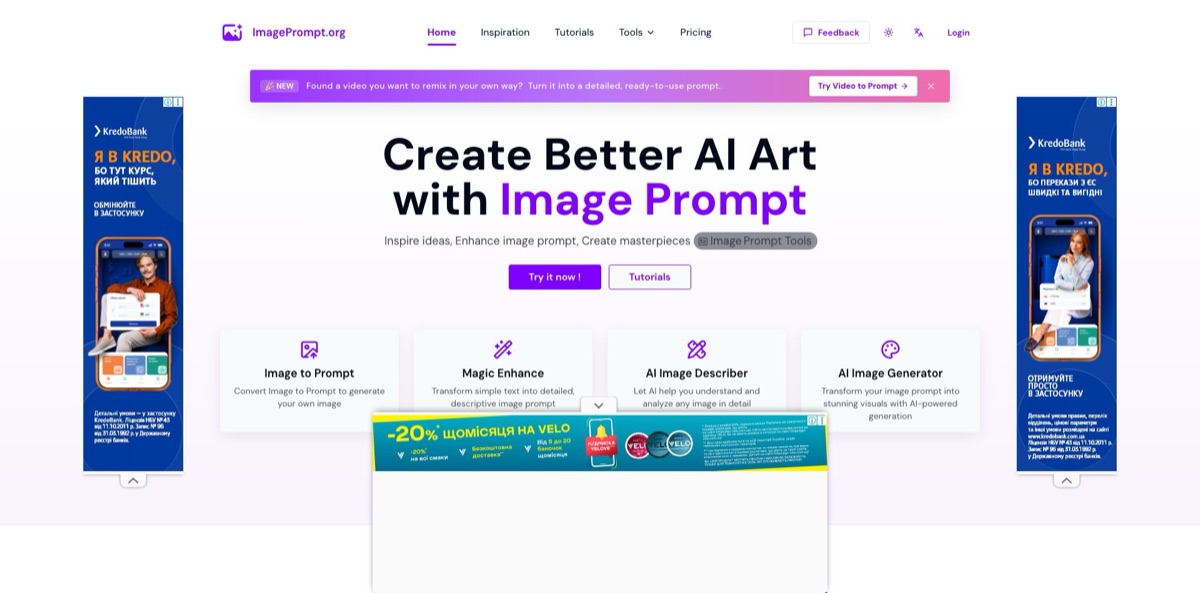
What is ImagePrompt.org?
ImagePrompt.org is a browser toolkit from EchoFlow, LLC built around one job: writing better prompts for AI image and video models. Its best-known tool reads an uploaded picture and returns a prompt formatted for Flux, Midjourney, Stable Diffusion, JSON or plain language, while the Image Prompt Generator expands a rough idea, rewrites it on instruction and translates it. Around that core sit an inspiration gallery of style prompts, an image describer, three video prompt tools and a credit-based image generator running models such as Nano Banana and Flux. The prompt writing is generous for a free product, but the output still needs a human edit, and the built-in generator is a convenience rather than the main reason to visit. Pick it if you work across several image models or write prompts in a second language.
How to start using ImagePrompt.org?
Open imageprompt.org and you can use several tools before creating an account. Image to Prompt accepts an upload, a pasted image (Ctrl+V) or an image URL, in PNG, JPG or WEBP up to 4MB, and the free allowance is 5 Prompt Credits per day shared across the prompt tools. The reset time appears in your local timezone next to the balance. Sign in once you want saved history, Batch Image to Prompt, which is limited to registered users, or the AI Image Generator, which gives 2 free images after login. Balances and renewal dates later show up on the My Subscription page under your avatar.
A good first project is reverse-engineering a picture you like. Drop it into Image to Prompt, choose a format from the Select AI Model list (General Image Prompt, Structured Prompt, Graphic Design, JSON, Flux, Midjourney or Stable Diffusion), set the Prompt Language and click Generate Prompt. The result describes the subject, setting, style, colors, lighting and mood, and sometimes pose and camera angle. Copy it into your usual generator, or into the site’s own AI Image Generator, and compare the new picture with the source side by side.
The screen you will return to most is the Image Prompt Generator. Type a plain idea and press Magic Enhance to get a long, descriptive prompt. Then use Edit with AI to give instructions in normal language, such as swapping a tiger for a panther or turning a daytime scene into night, or press Translate to move the prompt between English and your own language. Text-to-prompt work is unlimited on the free plan, so this is where you can iterate without watching a counter. The Inspiration section adds ready-made style prompts, from Ukiyo-e to Bauhaus, each with Copy and Generate buttons.
Before you publish anything, check the prompt against the image. The site itself says the model can misread elements and that abstract or busy pictures produce more generalized descriptions. A third-party comparison also caught a Midjourney-mode prompt with an aspect-ratio flag that did not match the photo. Fix wrong colors, delete anything invented, set the ratio yourself, and remember that a commercial license only comes with paid plans or credit packs.
Who is it for?
Midjourney and Flux hobbyists
You see an image on social media, love the look, and the creator never shared the prompt. Image to Prompt turns the picture into a model-specific draft in seconds, so you start from detailed wording instead of a blank box. Expect to tune a few details before the output matches.
Non-native English speakers
Most image models respond best to English, yet writing a long descriptive prompt in a second language is slow and frustrating. The Translate button and the 16 output languages in Image to Prompt let you think in your own language and paste English into the model. The about page says this language barrier is the reason the site exists.
Designers and marketers matching a reference
Clients send mood boards, not prompts. The Graphic Design and Structured Prompt modes break an image into editable parts like subject, lighting and composition, so you can change one element and keep the rest. The first round of concept variations goes much faster.
AI video creators
Writing camera directions for Sora, Veo or Kling AI is a skill of its own. Video to Prompt splits a clip of up to one minute into time-based segments with prompts, dialogue and audio cues, while Image to Video Prompt adds camera moves like Push in or Handheld. You get a storyboard-style starting point instead of one vague paragraph.
Teams captioning image sets
Describing dozens of product shots or references by hand eats an afternoon. Batch Image to Prompt processes up to 20 images per run and exports a CSV, which suits catalog work or building a prompt library. Watch the credit math, since every successful image uses Prompt Credits.
Prompt-writing learners
Reading how an AI describes a picture is a quick way to pick up the vocabulary of lighting, framing and style. The tutorials and the style gallery add worked examples. It is a cheap way to practice before paying for a large generator plan.
ImagePrompt.org pricing
ImagePrompt.org runs on two separate balances that cannot be swapped. Prompt Credits pay for tools that read an image or video and return text, such as Image to Prompt, AI Image Describer and Video to Prompt (2 credits per video). Image Generation Credits pay for new images in the AI Image Generator and Image to Image. Text-to-prompt tools sit outside both systems and stay free. Payments go through Stripe, and subscriptions renew until you cancel.
5 Prompt Credits a day plus unlimited text-to-prompt generation, with 2 free image generations after you sign in. No commercial license.
300 Prompt Credits and 500 Image Generation Credits, access to all features, no ads, a commercial license and 50% off extra image credit packs.
600 Prompt Credits and 800 Image Generation Credits with the same perks; the pricing page labels it Most Popular.
Unlimited Prompt Credits and 1,200 Image Generation Credits.
Unlimited Prompt Credits and 15,000 Image Generation Credits for the subscription period.
If you only need images now and then, one-time Image Generation Credits Packs cost $14.99 for 500 credits, $39.99 for 3,000 and $99.99 for 10,000, with subscribers paying half ($7.49, $19.99 and $49.99). Pack credits expire one month after purchase. The page converts 500 credits into a maximum of 500 Flux.1 Schnell images, 25 Nano Banana images or 7 Nano Banana Pro images, so premium models drain a balance fast. A Prompt Credits Power Pack adds 50 Prompt Credits valid for 72 hours, but its price is not shown on the public pricing grid. There is no team or enterprise tier, and API access is billed separately. Refunds are limited to requests within 7 days of purchase when nothing has been used.
ImagePrompt.org key features
Image to Prompt with seven output modes
Upload, paste or link an image, then pick General Image Prompt, Structured Prompt, Graphic Design, JSON, Flux, Midjourney or Stable Diffusion. The AI writes subject, setting, style, palette, lighting and mood in the format your target model expects, in any of 16 languages. You skip the guesswork of describing a look you can see but cannot name.
Magic Enhance, Edit with AI and Translate
The Image Prompt Generator expands a one-line idea into a detailed prompt, rewrites it from plain instructions such as changing the animal, the light or the art style, and translates it between languages. All three are free and unlimited.
Batch Image to Prompt
Registered users can queue up to 20 images, run them with one mode and language, then copy everything at once or download a CSV. Closing the page mid-run loses unfinished items, though completed prompts stay in history. Captioning a whole reference folder becomes a single job.
AI Image Describer
Beyond prompts, this tool answers custom questions about an image or runs presets such as Describe Image In Detail, Recognize Objects, Analyze Art Style and Extract Text From Image. It doubles as a research and accessibility aid.
Video prompt tools
Video to Prompt breaks an MP4 or MOV clip (up to 50MB and one minute) into time-based segments, each with a generation prompt, dialogue in its original language and audio notes, plus keyframes for checking the match. Video Prompt Generator and Image to Video Prompt cover text and image starting points, with camera presets like Push in and Subject Tracking. The text is model-independent, so it adapts to Sora, Veo, Kling AI or Runway.
Built-in image generation and editing
The AI Image Generator and Image to Image tool spend Image Generation Credits; the FAQ names Flux, Imagen 4 and the Nano Banana series, and the model picker also lists GPT Image 2.5 Fast. Image to Image accepts up to 5 reference images with Nano Banana, lets you draw annotations to target an edit, and Nano Banana Pro handles 2K or 4K output. You can test a prompt without leaving the site.
Inspiration gallery
Styles are grouped under Animation & Illustration, Sci-Fi & Fantasy, Perspective, Traditional & Cultural, Modern & Abstract and Historical & Art Movement, each with a sample prompt you can copy or generate. It is a fast way to borrow precise style language for a new idea.
ImagePrompt.org Pros & Cons
Pros
The main strength is range in one place: seven output formats for image-to-prompt, structured video breakdowns, and free, unlimited prompt expansion, editing and translation. A Taskade comparison that ran one photo through free tools found ImagePrompt.org named 7 of 8 visible details in every mode it tried, against 2 for CLIP Interrogator. The free tier works without an account, the site states that uploads are deleted right after processing, and 16 output languages make it unusually friendly to non-English speakers. Paid plans are cheap next to full generator subscriptions. Use the free daily credits for a week before deciding whether a paid tier matches your volume.
Cons
Model-specific modes do not always respect the target syntax: the same Taskade test saw the Midjourney mode attach a 3:2 ratio flag to a 16:9 photo and the Stable Diffusion mode return full sentences rather than tags. Five Prompt Credits a day go quickly, the Power Pack expires after 72 hours, and pack image credits lapse after a month. Premium generation is expensive in credits, with a 500-credit pack covering only 7 Nano Banana Pro images. Refunds apply only to unused purchases within 7 days, and NSFW video uploads still burn their 2 credits. Always edit model flags by hand and test prompts on Flux before spending on premium models.
Use ImagePrompt.org if you want…
- Reverse-engineer prompts from images you admire.
- Format one prompt for Flux, Midjourney or Stable Diffusion.
- Expand rough ideas into detailed image prompts for free.
- Write English prompts while thinking in your language.
- Caption up to 20 reference images in one batch.
- Turn reference videos into segmented, reusable video prompts.
- Learn prompt vocabulary for lighting, framing and style.
- Test prompts on Nano Banana or Flux in one place.
ImagePrompt.org alternatives
 MidjourneyRead review →
 IdeogramRead review →
 Leonardo.aiRead review →
 VheerRead review →
 ChatGPTRead review →
 Google GeminiRead review →
ImagePrompt.org Reviews
The single Trustpilot review on the profile, posted in November 2024, calls it the best image-to-prompt tool the reviewer had used, but one rating is not a consensus, and G2 still lists no reviews at all.
A Taskade comparison on one photo credited it with 7 of 8 visible details in every mode, far ahead of CLIP Interrogator, while flagging a mismatched ratio in Midjourney mode and sentence-style output where Stable Diffusion users expect tags.
Early write-ups on Dataconomy and DEV Community like the model-specific formats and the clear deletion policy for uploads, yet warn that abstract or busy images come back vaguer, results need manual edits, and the free limit runs out fast.
FAQ
Is ImagePrompt.org free to use?
Yes. Text-to-prompt tools such as Magic Enhance, Edit with AI, Translate and the Video Prompt Generator are free and unlimited, and free users get 5 Prompt Credits a day for image and video analysis. Image generation uses separate credits, and signing in gives you 2 free images.
Does ImagePrompt.org store my uploaded images?
The site says uploads are processed only to create the prompt or description and are deleted immediately afterward, and the describer page adds that uploads are not used to train models. Images you generate are private to your account.
Which AI models can it write prompts for?
Image to Prompt has dedicated Flux, Midjourney and Stable Diffusion modes, plus General, Structured Prompt, Graphic Design and JSON formats. Video prompts are model-independent text you can adapt for Sora, Google Veo, Kling AI, Runway, Seedance, Pika or Luma.
Can I use generated images commercially?
Yes, the paid subscriptions and Image Generation Credits Packs include a commercial license. For Image to Image work, you also need the rights to the source photos you upload.
Does ImagePrompt.org have an API?
An API for Image to Prompt and Magic Enhance is in a closed test program that you join by email. API usage is billed separately from subscriptions, although subscribers get some free test calls depending on their tier.
What languages does ImagePrompt.org support?
Image to Prompt, the describer and Video to Prompt can write output in 16 languages, including Spanish, German, Japanese, Chinese, Arabic, Hindi and Indonesian. The website interface itself is available in 12 languages.
Is NSFW content allowed?
No. Every tool blocks NSFW images, prompts and videos, and NSFW submissions to Video to Prompt still consume the 2 Prompt Credits charged for the analysis.
How do I cancel my subscription or get a refund?
Open My Subscription, click Manage next to your plan and cancel; access continues until the end of the billing period. Refunds are generally limited to requests made within 7 days of purchase when no credits or features have been used.
Similar tools
 Pixel DojoSubscription AI studio with 80+ image and 60+ video models, consistent characters, LoRA training and an agent that builds ads and short
 ArtbreederBrowser-based AI art studio for mixing, breeding and editing images with gene sliders, prompts, collages and a remix-friendly community.
 mnml.aiAI rendering studio for architects and designers that turns sketches, photos and SketchUp, Revit or Rhino views into photoreal renders and short