

ImgGen AI
Image GenerationUpdated November 20, 2026
Browser-based AI image generator and photo editing suite with background removal, 8K upscaling, restoration and an API on one credit balance.
We may earn a commission when you sign up through our links. It does not affect our reviews.
What is ImgGen AI?
ImgGen AI is a browser-based image platform from Cerebrox Technologies, Inc., a small Delaware-registered company founded in 2023. It pairs a text-to-image generator with about twenty single-purpose editing tools: background removal, 2× to 8× upscaling, watermark, text and object removal, photo restoration, colorizing, face enhancement and even a video watermark remover. Every tool draws on one credit balance that you can also spend through a seven-endpoint REST API, and no output carries a watermark, even on the free tier. The weak spot is the generator itself: the stronger ImgGen Imagine and ImgGen Edit modes are paid-only, the company does not say which underlying models power them, and independent ratings are thin and mostly negative. Pick it if you need cheap, fast cleanup of product shots and old photos with occasional generated images, not art-directed illustration.
How to start using ImgGen AI?
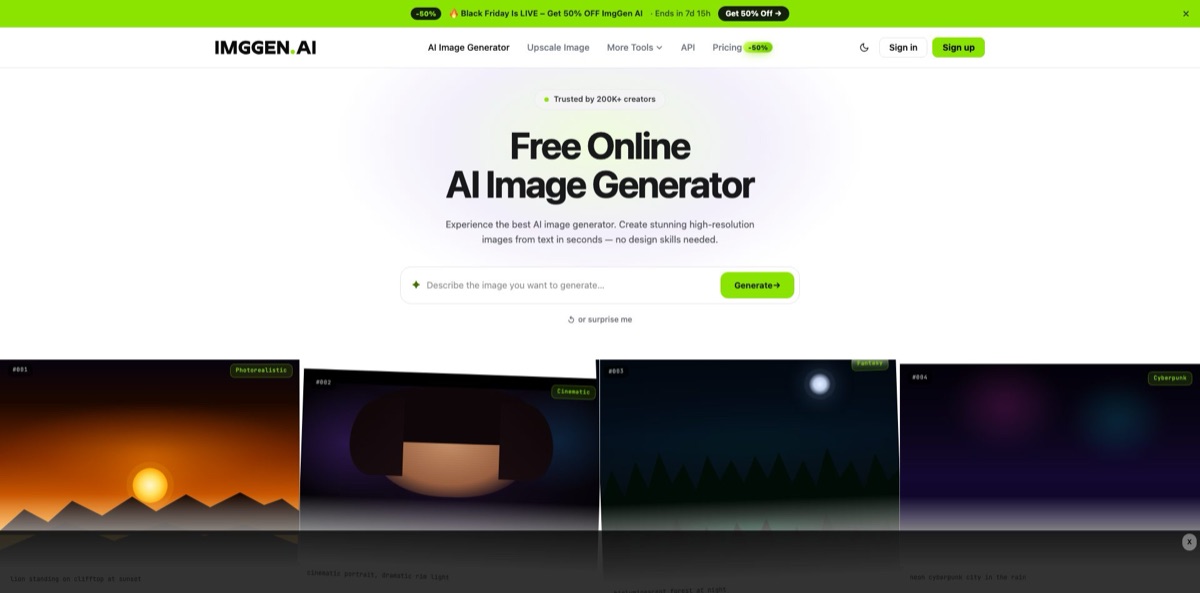
Open imggen.ai and you land straight on the generator: a prompt box with a Generate button, a “surprise me” option and sample prompts tagged Photorealistic, Cinematic, Fantasy and Cyberpunk. Accounts are created on editor.imggen.ai through Sign up, and the Free plan gives you 50 one-time credits without asking for a card. Those credits do not renew each month, so treat them as a trial budget rather than an ongoing allowance. The free tier also opens only a limited set of tools, so decide early which ones you actually need.
For a first real job, write a concrete prompt, pick a style such as Realistic, Anime, Watercolor, 3D Render, Pixel Art or Cinematic, and press Generate Image. The default ImgGen Basic model costs 3 credits per image, which means the free balance covers about 16 generations. ImgGen Imagine (10 credits) and ImgGen Edit (20 credits) are listed for paid plans only, so free users cannot compare all three tiers before paying. Be specific about subject, lighting and composition, since a small balance leaves few retries for a vague request.
The second screen worth learning is any single-purpose tool, for example Upscale Image. You drag in a JPG, PNG or WEBP file of up to 10 MB and no larger than 4000×4000 px, then choose a 2×, 4× or 8× factor; 8× is a paid option that reaches 7680×4320. Every operation has a fixed price listed on the pricing page, from 1 credit for background removal to 25 for deblur or denoise, and a call that fails is refunded automatically. On Starter and Pro, bulk mode lets you process several images at once, up to 10 per batch for upscaling.
Before you publish anything, zoom into faces, hands, text and edges on the download, because AI cleanup can smear fine detail. Files come without a watermark, and every plan, Free included, carries commercial usage rights, so a checked image can go straight into a listing or post. To run the same tools inside your own pipeline, create an API key in the editor on Starter or Pro and send requests to app.imggen.ai; each response reports your remaining balance in an X-Credit-Remaining header. Designers can also paste a key into the ImgGen AI Background Remover plugin for Figma.
Who is it for?
Online sellers
Supplier photos rarely arrive on clean backgrounds. ImgGen removes a background for 1 credit, the Background Generator adds Studio, Lifestyle or Gradient backdrops, and the paid Shadow Generator adds Soft, Drop or Long shadows, so a whole catalog can look consistent without a retoucher.
Bloggers and content marketers
Every article needs a header image, and stock libraries make everyone look the same. You can generate an original visual from the headline, upscale it and shrink it with the Image Compressor, which runs in the browser without uploading the file. The generator suits editorial filler better than brand-critical artwork.
Families and archivists
Scanned prints come out faded, scratched and yellowed. Image Restoration offers an Auto repair mode and a Colorize mode for black-and-white photos at 2 credits per image, which turns a shoebox of damaged prints into shareable files for very little money.
Developers on a budget
If your app needs background removal, upscaling or text removal, the API gives you seven endpoints under one key, and uploads are deleted after processing rather than used for training. There is no SDK, OpenAPI spec or webhook support, so plan to write a thin client yourself.
Figma designers
The ImgGen AI Background Remover plugin lists 32.8k users and cuts out subjects without leaving the canvas once you add an API key. It removes the export, cut and re-import loop from mockups and slide work.
Irregular users
Freelancers with quiet and busy months usually lose unused credits on other services. Here Starter and Pro credits roll over and keep accumulating while the subscription stays active, so a slow month funds the next big project.
ImgGen AI pricing
Billing runs on credits rather than seats or daily caps. Each operation has a fixed cost, from 1 credit for a background removal to 3 for an image on the default model, 10 for ImgGen Imagine and 20 for ImgGen Edit, and the editor and the API share the same balance. Unused credits on paid plans roll over, but the whole balance disappears if you cancel, if a renewal payment fails or if the account becomes inactive. The pricing page lists monthly billing only, paid by Visa, Mastercard or Amex through Stripe. In November 2026 it also ran a limited-time 50% discount with a countdown timer, showing $4.99 for Starter and $14.99 for Pro; the regular prices are listed below.
50 one-time credits with no monthly top-up, limited tool access, full commercial rights and no watermark. There is no API access, no bulk mode and no rollover.
400 credits per month, access to all AI tools, API access, bulk mode, credit rollover and standard support. On the default model that is about 133 generated images, or roughly 400 background removals.
1,400 credits per month, 3.5× the Starter allowance, plus priority support and everything in Starter. It makes sense once you regularly run heavy operations such as deblur or denoise at 25 credits each.
Custom. Custom volume limits, dedicated infrastructure, SLA guarantees and a dedicated account manager, arranged through the sales contact.
Refund requests for paid plans are reviewed case by case if you email support within 7 days of purchase. Watch the expensive operations: 400 Starter credits cover only about 16 deblur or denoise jobs, or 40 images on ImgGen Imagine.
ImgGen AI key features
Text-to-image generator
Type a prompt, choose a style preset and pick one of three tiers: ImgGen Basic at 3 credits, or the paid-only ImgGen Imagine at 10 and ImgGen Edit at 20. Through the API you can request one to four samples per call in square, portrait or landscape format, using the imggen-base, imggen-base-fast or imggen-xl models.
AI upscaler up to 8K
Upload a JPG, PNG or WEBP file of up to 10 MB and enlarge it 2×, 4× or 8×, with 8× reaching 7680×4320 on paid plans. A 2× pass costs 2 credits, 4× costs 4 and 8× costs 8, and paid users can batch up to 10 images. It is the cheapest route here from small supplier files to print-ready product shots.
Cleanup tools for images and video
Watermark Remover and Text Remover cost 2 credits each, while Object Remover works with a brush for 2 credits or with a text prompt for 10, and generative inpainting rebuilds the area behind the removed element. The Video Watermark Remover accepts MP4 and MOV files up to 100 MB and charges 1 credit per second of footage.
Restoration and color fixes
Image Restoration repairs scratches, tears, stains, fading and blur in an Auto mode, with a separate Colorize mode for black-and-white photos, and both cost 2 credits. Companion tools cover color correction, brightening, face enhancement, sharpening, unblurring and unpixelation. The product description says most restoration jobs finish in under 10 seconds.
Product photo kit
Background Remover returns a transparent PNG for 1 credit, Background Generator swaps in prompt-made or Studio, Lifestyle and Gradient backdrops, and AI Blur Background offers Subtle, Medium, Strong and Max bokeh. The Shadow Generator adds Soft, Drop or Long shadows on paid plans. Together they cover most marketplace listing prep without a separate design app.
REST API on the same balance
Seven endpoints under app.imggen.ai accept uploads up to 25 MB with a bearer key and return base64 results synchronously within a 60-second ceiling. Text removal returns a 422 error and charges nothing when it finds no text, and failed calls are refunded. Uploads are deleted after processing and are not used to train models, but there are no SDKs, webhooks or published rate limits.
Rolling credits and a multilingual site
Starter and Pro credits roll over month to month and survive plan changes, so a quiet month’s allowance stays in your account while you are subscribed. The site and tools come in 10 languages, including Spanish, Chinese, Arabic, Japanese, Korean and Russian.
ImgGen AI Pros & Cons
Pros
You get a broad toolbox for the price of a streaming subscription. One balance covers generation, around twenty editing tools and the API, every plan including Free comes with commercial rights and no watermark, and Starter costs $9.99 a month. Costs are unusually transparent: the pricing page lists the exact credit price of each operation, failed calls are refunded automatically, and unused credits roll over instead of resetting. Developers get a plain REST API with clear error codes and a stateless design that deletes uploads after processing, and the in-browser Image Compressor never uploads your file at all. Map your typical monthly jobs against the credit table before you choose a plan, and you will know your real cost per image.
Cons
The free label oversells the Free plan: 50 credits arrive once and never renew, and several users complained about exactly that. The best generation tiers are paid-only, the company does not name the models behind them, and independent ratings are poor, averaging about 2.2 out of 5 on There’s An AI For That. Login problems show up in user comments from launch onward. The site loads display ads, including an interstitial, the privacy policy mentions session replay analytics, and files uploaded through the editor stay on the servers while your account is active, unlike API uploads. Cancelling wipes banked credits, and no annual discount is listed. Spend down your balance before cancelling, and send sensitive images through the API instead.
Use ImgGen AI if you want…
- Remove product photo backgrounds for one credit each.
- Upscale small images to 4K or 8K resolution.
- Restore and colorize scanned family photos cheaply.
- Generate quick blog header images from short prompts.
- Erase watermarks, captions and stray objects from images.
- Bank unused credits during quiet months for later projects.
- Add background removal to your app through REST.
- Cut out images directly inside Figma with a plugin.
ImgGen AI alternatives
 PixlrRead review →
 Cutout.ProRead review →
 SnapEditRead review →
 ClipdropRead review →
 VanceAIRead review →
 Phot.AIRead review →
 getimg.aiRead review →
 Adobe FireflyRead review →
 Leonardo.aiRead review →
ImgGen AI Reviews
Early Product Hunt commenters liked getting a generator and a long list of editing tools in one free browser app, and one called 8K upscaling the strongest selling point, while another saw the page freeze for a few seconds between prompts.
On There’s An AI For That the tool averages about 2.2 out of 5 from 18 ratings, and one commenter found the generated images decent but said the free offer ended after a single trial before credits had to be bought.
Several users reported that sign-in failed or that the tool did not work, starting with a Google login problem at launch that the maker said was being fixed, although a later commenter replied that logging in worked fine for them.
In the Figma community, one user confirmed the background remover plugin works, while another complained it is not really free because it asks for a credit upgrade after a handful of requests.
FAQ
Is ImgGen AI free?
Partly. The Free plan gives you 50 one-time credits with no credit card, limited tool access and no watermark, but the credits never renew, so ongoing use needs Starter at $9.99 a month or Pro at $29.99 a month.
How many images can I generate for free?
The default ImgGen Basic model costs 3 credits per image, so 50 free credits cover about 16 images. ImgGen Imagine and ImgGen Edit are available on paid plans only.
Can I use ImgGen AI images commercially?
Yes. All plans, including Free, include full commercial usage rights, and no output carries a watermark.
Do unused credits expire?
On Starter and Pro, unused credits roll over and accumulate while the subscription stays active, and plan changes keep the balance. They are removed if you cancel, if a renewal payment fails or if the account becomes inactive.
Does ImgGen AI have an API?
Yes, on Starter and Pro. Seven REST endpoints cover background removal, upscaling, watermark and text removal, restoration, colorization and image generation, billed from the same credit balance, but there is no official SDK or webhook support.
What happens to the images I upload?
API uploads are deleted once the response is returned and are not used to train models. Files uploaded in the editor are kept while your account is active, and you can have them removed by deleting the account or emailing support.
Is there an ImgGen AI mobile app?
ImgGen AI runs in any mobile or desktop browser. Cerebrox says native iOS and Android apps are being prepared, so check the app stores before counting on one.
Can I get a refund on a paid plan?
You can request one by emailing support within 7 days of purchase, and each request is reviewed case by case. You can also cancel from account settings at any time and keep access until the end of the billing period.
Similar tools
 RunComfyCloud ComfyUI platform with per-second GPU billing, 200+ ready workflows, hosted image and video models, LoRA training and a serverless API.
 Bulk Image GenerationBatch AI image generator that turns a prompt list or one brief into up to 100 images per run, with five models,
 Mage SpaceBrowser-based AI studio that runs dozens of image, video and audio models on one account, with pay-as-you-go Gems or unlimited plans.