

Imgkits
Image EditingUpdated November 12, 2026
Browser-based set of AI photo tools for background removal, object cleanup, upscaling, old photo restoration, image generation and image-to-video.
We may earn a commission when you sign up through our links. It does not affect our reviews.
What is Imgkits?
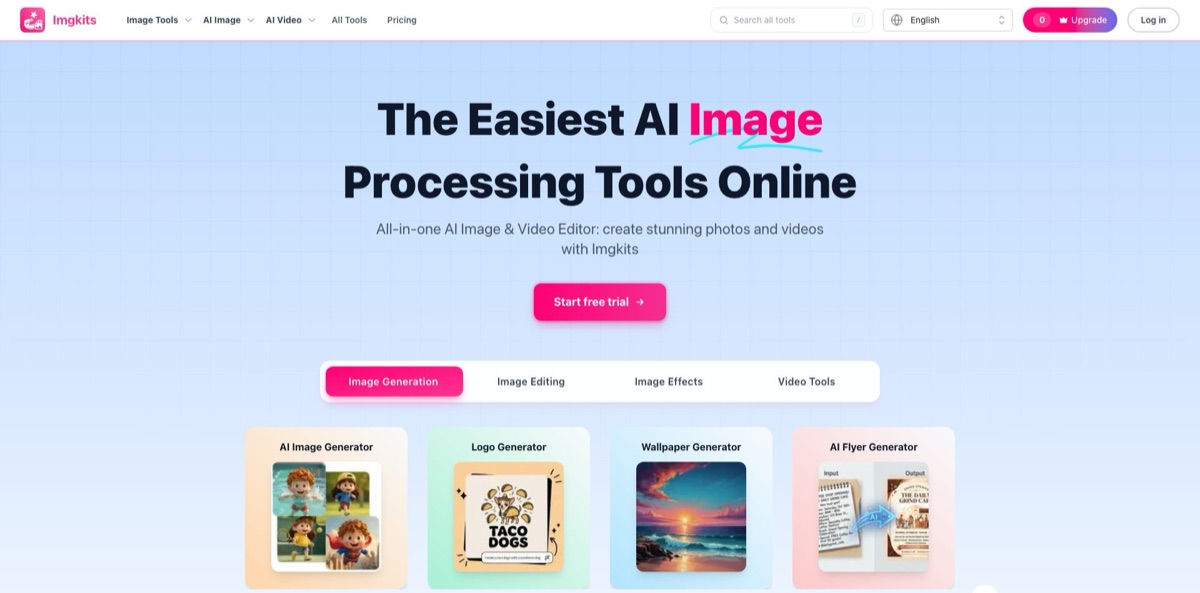
Imgkits is a browser-based collection of AI image and video tools run by Need You, LLC, a US company registered in Delaware. Instead of one layered editor, it splits the work into single-purpose pages: Background Remover, AI Object Remover, Image Upscaler, Photo Restoration, a prompt-driven AI Image Editor, text-to-image, image-to-video and a long tail of novelty generators, with 144 entries in its tools directory. A separate AI Models section gives third-party models such as Nano Banana, Flux Kontext, Qwen Image Edit and Sora 2 their own pages, and every tool draws on one credit balance. The weak spot is reliability: AppSumo buyers describe failed tasks, unresponsive buttons and lost logins. Pick Imgkits if you want quick cutouts, object cleanup and photo restoration without installing software, and run your own photos through the trial before paying for a year.
How to start using Imgkits?
Open imgkits.com and click Log in in the top-right corner, or press Start free trial on the homepage. Nothing needs to be installed: the tools run in a desktop browser and also in supported mobile browsers. New accounts get a limited free trial, but signing up does not add a credit balance, and some tools, such as the AI Video Generator, have no free generation at all. The interface is translated into 21 languages, so switch the language selector next to the Log in button if English is not your first choice.
Make your first real job a background removal, because it is the tool most users praise. Upload a PNG or JPG to Background Remover, let it cut out the subject in one pass, preview the result on the page and download a transparent PNG. If you need a new backdrop rather than an empty one, Background Changer swaps the background for a solid color or a new scene. For a stray object, open AI Object Remover, paint over the person, sign or dust spot with an adjustable brush, and the model rebuilds the masked area from the pixels around it.
The editor behind each landing page is where the real choices happen. The AI Image Editor accepts JPG, PNG or WebP plus a written instruction of up to 500 characters, so a request like “replace the wall behind the chair with warm brick and keep the chair unchanged” fits easily. Under All Tools, the AI Models category lists dedicated pages for Nano Banana, Nano Banana 2, Flux Kontext, Qwen Image Edit, Bagel, Sora 2 and P-Video. Photo Restoration takes up to five PNG, JPG or WEBP files of up to 10 MB each and offers unblur, enlarge and colorize options in the editor.
Before you download, compare the result with the original, because Imgkits itself warns that generated details vary between runs and a tighter prompt or another attempt often fixes a miss. Your remaining credits sit behind the avatar in the top-right corner. Download videos promptly, since the AI Video Generator page says generated videos are deleted within 24 hours. If the output is meant for paid work, read the Terms first: they say the service may not be used for commercial endeavors unless Imgkits endorses or approves them, while the video page advertises commercial use. Support at vote@imgkits.com says it usually replies within 12 hours, so ask for written confirmation.
Spend the trial on one background removal and one object cleanup using your own photos, then decide between a small credit pack and a subscription.
Who is it for?
Online store owners
Marketplaces want clean product shots, and retouching each one by hand eats your evenings. Background Remover delivers a transparent PNG in one pass, Background Changer drops in a color or scene, and AI Product Photography builds commercial-style settings. Confirm the licence for selling with support before you build a catalog on it.
Families digitizing old albums
Scanned prints arrive faded, blurry or black and white. Photo Restoration accepts up to five images per upload and combines unblur, upscaling of up to 4x and colorization, so a shoebox of photos becomes shareable files in an afternoon instead of a week of manual retouching.
Social media creators
Trends move from anime filters to action figures to short clips within weeks. Imgkits keeps Anime Filter, Photo to Cartoon, Action Figure Generator, AI Headshot Generator and Image to Video under one login and one credit balance, so you can jump on a trend without signing up for a new app.
Occasional editors who avoid subscriptions
You need a cutout twice a month, not a monthly bill. Pay-as-you-go packs start at 10 credits for $5 and never expire, so the cost follows your actual use rather than the calendar.
Tabletop players and fiction writers
Campaign worlds need maps, and commissioning an illustrator for every dungeon is expensive. The Fantasy Map Generator produces worlds, regions, cities and dungeons for D&D campaigns, novels and game design drafts.
Model shoppers
You want to see how Nano Banana, Flux Kontext or Qwen Image Edit treat the same photo without opening three accounts. Each model has its own page, and all of them spend the same credits.
Imgkits pricing
Imgkits sells credits in two ways: a Pro subscription that refills a monthly credit allowance, and one-time packs for light use. On the Pro card a slider moves from 100 to 6,000 monthly credits, and yearly billing halves the entry price. Subscription credits do not roll over to the next billing cycle, pack credits never expire, and plan credits are spent first. The pricing page does not publish how many credits each tool consumes, so watch your balance during the trial. All prices are listed in USD.
New accounts get a limited free trial, no credit balance is added at signup, and the AI Video Generator has no free generation.
Includes all popular models, workflow presets and export options, the core creative tools, faster generation and priority support.
$28/month, or $175/year on annual billing.
$79/month, or $479/year.
$239/month, or $1,449/year.
$419/month, or $2,559/year.
These are one-time charges with no expiry date, which works out to between $0.50 and $0.12 per credit.
Refunds are limited: you can request one within 3 days of your first purchase if you have used no more than 10 credits. The pricing FAQ says you cancel a subscription by emailing vote@imgkits.com, and access continues until the paid term ends.
Imgkits key features
Background Remover and Background Changer
Upload a PNG or JPG and the model separates the subject from the backdrop in one pass, then hands back a transparent PNG. Background Changer goes a step further and places the subject on a solid color or a new scene. This covers the most common marketplace and profile-picture job without opening a desktop editor.
AI Object Remover with brush masking
You paint over people, props, signs, text or dust spots, adjust the brush size to stay close to the edges, and the model fills the masked area using nearby visual context. JPG, JPEG, PNG and WebP are the recommended formats. Simple backgrounds give the model more to work with, so expect cleaner fills on sky or walls than on busy crowds.
Prompt-based AI Image Editor and model pages
Describe a change of up to 500 characters, such as a new background, a lighting mood or an added object, and the editor generates a new version from your image and prompt. Dedicated pages run Nano Banana, Nano Banana 2, Flux Kontext, Qwen Image Edit and Bagel for comparison.
Photo Restoration, enhancement and upscaling
Restoration accepts up to five images of up to 10 MB at once and combines unblur, enlarge and colorize options, with the restoration page advertising upscaling of up to 4x. The separate Image Upscaler and AI Photo Enhancer sharpen low-resolution or compressed shots. Together they turn old scans and blurry phone photos into printable files.
Image generation and design generators. Beyond a general AI Image Generator, Imgkits offers single-purpose pages for logos, flyers, posters, product photography, sketch to image, tattoos, wallpapers and fantasy maps. The AI Image Extender adds outpainting when a photo needs a wider frame for a banner or a new aspect ratio. Each generator keeps its own simple form, which lowers the learning curve but limits fine control.
Video tools
Image to Video animates an uploaded JPG, PNG, GIF or WEBP of up to 10 MB and 3000px, and its page names Kling, Hailuo and Google Veo2 among the models behind it. Text to Video, Sora 2, P-Video, AI Video Upscaler, AI Video Enhancer and an AI Sound Effect Generator sit alongside.
Portrait tools
The AI Headshot Generator takes one centered portrait of up to 10 MB and, in custom mode, lets you combine an outfit preset, a background and a pose or expression. AI Hairstyle Changer and AI Clothes Changer preview new looks on the same photo. These are handy for profile pictures, though results depend heavily on a clear, evenly lit source image.
Imgkits Pros & Cons
Pros
Imgkits puts a very wide toolbox behind one login and one credit wallet, from background removal and inpainting to restoration, upscaling, generators and video. The single-purpose pages are easy to follow: upload, adjust a few settings, preview and download, with no layers or install. Pay-as-you-go packs that never expire suit people who edit a handful of images a month, and the yearly entry plan costs $6 a month. G2 reviewers of the background remover rate it 4.4 out of 5 and repeatedly mention fast, one-click cutouts. Access to third-party models such as Nano Banana and Flux Kontext on dedicated pages is a bonus. Start with background removal and object cleanup, the tools with the most positive feedback.
Cons
Reliability is the recurring complaint. AppSumo lifetime-deal buyers report a site that ignored clicks, frequent “Task failed” messages, unanswered support questions and, by May 2026, accounts they could no longer log into, which pulled the deal’s rating down to 3.4 out of 5. The free trial adds no credit balance, the pricing page does not list per-tool credit costs, and refunds close after 3 days or 10 credits. The Terms bar commercial endeavors that Imgkits has not approved, which clashes with commercial promises on the video page. The FAQ only describes cancelling by email, not from the account page. Buy the smallest pack first and keep receipts.
Use Imgkits if you want…
- Remove photo backgrounds and export transparent PNGs fast.
- Erase people, text and clutter with a brush mask.
- Restore and colorize faded family photos in batches.
- Upscale blurry or compressed images for printing.
- Edit pictures with plain-language prompts instead of layers.
- Compare Nano Banana, Flux Kontext and Qwen edits.
- Turn a still product photo into a short clip.
- Pay for credits once without a monthly subscription.
Imgkits alternatives
 PixlrRead review →
 PixelcutRead review →
 ClipdropRead review →
 Cutout.ProRead review →
 FotorRead review →
 VanceAIRead review →
 SnapEditRead review →
 DzineRead review →
Imgkits Reviews
G2 reviewers of the background remover call it fast and accurate, giving clean cutouts with one click, though some say complex images still leave problem areas and there is no way to touch up the result by hand.
Users who combine the background remover and inpainting to refresh old photos like the range of tools, but wish the free credits were more generous and say some jobs take a long time to finish.
Early AppSumo buyers praised the value, the image quality and a background remover that handled flying hair, and one pointed to a FLUX-based generator and frequent updates.
A longer-term AppSumo user still found it helpful every day but docked a star after AI image generation started requiring credits and the monthly credit refill for deal holders stopped.
Later AppSumo reviews turned harsh, describing a site where logins and tool buttons did nothing, frequent “Task failed” errors, unanswered questions to the vendor and, in 2026, lifetime accounts that no longer worked.
FAQ
Is Imgkits free to use?
New accounts get a limited free trial, but no credit balance is added at signup. After the trial you need a Pro subscription or a one-time credit pack, and the AI Video Generator has no free generation.
How much does Imgkits cost?
Pro starts at $12 a month for 100 monthly credits, or $72 a year billed annually, and scales to 6,000 credits for $419 a month. One-time packs run from $5 for 10 credits to $59 for 500.
Do unused Imgkits credits roll over?
Subscription credits expire at the end of each billing cycle. Credits from one-time packs never expire, and the service spends plan credits before pack credits.
How do I cancel my Imgkits subscription?
The pricing FAQ says to email vote@imgkits.com. Cancellation takes effect at the end of the paid term, and you keep your plan benefits until then.
Can I get a refund from Imgkits?
You can request a refund within 3 days of your first purchase, provided you have used no more than 10 credits. Refunds are not processed automatically, so you have to ask support.
Can I use Imgkits images for commercial projects?
The Terms of Service, updated in August 2026, say the service may not be used for commercial endeavors unless Imgkits specifically endorses or approves them. Ask support for written permission before using outputs in client work or product listings.
Which file formats does Imgkits support?
It depends on the tool. Most image tools accept JPG, PNG and WebP, Photo Restoration and Image to Video take files of up to 10 MB, and Background Remover exports a transparent PNG.
Does Imgkits have a mobile app?
No dedicated app is offered. Imgkits runs in a web browser on desktop and in supported mobile browsers, so nothing needs to be installed.
Similar tools
 HamaFree browser-based AI eraser that removes people, objects, text and blemishes from photos with a brush, plus an inpainting API for developers.
 BgEraserBrowser-based AI background remover that turns up to 20 photos per batch into transparent PNGs without an account, plus offline apps for
 FacetuneLightricks' face-aware photo and video editor for iOS, Android and the web: retouching, reshaping, makeup, hair and outfit try-on, and AI headshots.