

Jarvis AI
AI AssistantsUpdated November 17, 2026
Multi-model AI copilot for browsers, desktop and mobile, plus Jarvis Helpdesk, an AI agent that answers customers on Zalo, WhatsApp and Messenger.
We may earn a commission when you sign up through our links. It does not affect our reviews.
What is Jarvis AI?
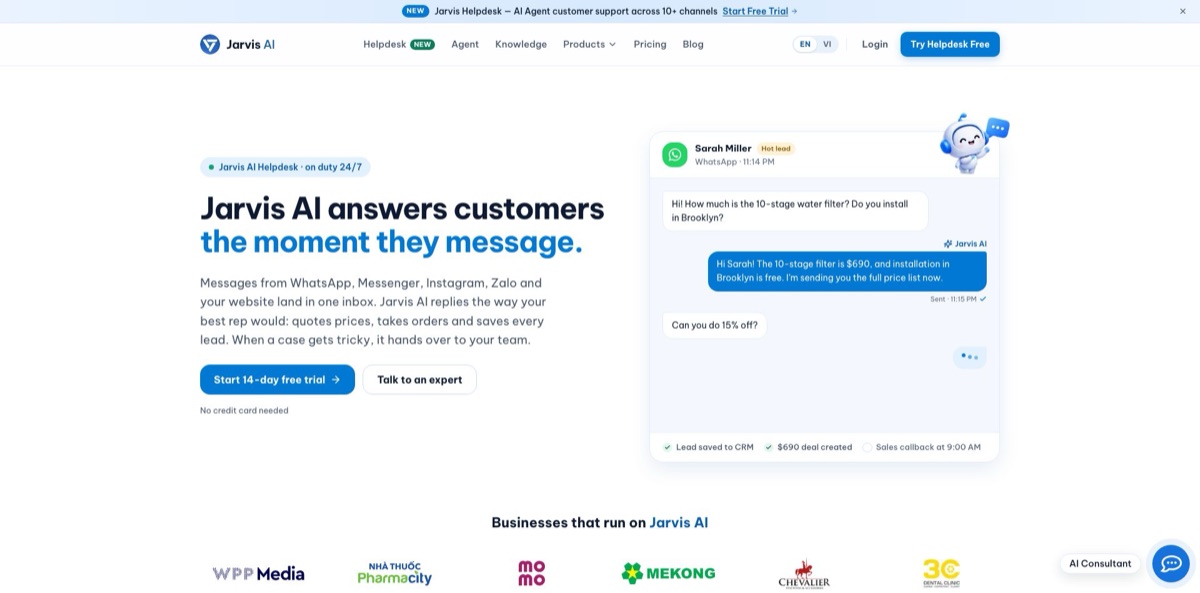
Jarvis AI is a family of AI tools from Jarvis AI Company Limited in Ho Chi Minh City. The personal side is a copilot for Chrome, Edge, Safari, Windows, macOS, iOS and Android: a sidebar chat with 30+ models, plus translation, grammar fixes, summaries and email replies on any page. The business side, Jarvis Helpdesk, is what the homepage now leads with: one inbox for WhatsApp, Messenger, Instagram, Zalo, email and web chat, with AI agents that answer from your own documents, quote prices and save leads. The weak spots are trust and polish. Store reviews include billing and cancellation complaints, the Android app sits at 1.9 stars, and parts of the help center still describe older models. It fits sellers who live in Southeast Asian chat apps and anyone who wants a cheap multi-model copilot, as long as you test it on the free tier first.
How to start using Jarvis AI?
Decide which half you need, because the two use different entry points. For the personal copilot, install the extension from the Chrome Web Store, Edge Add-ons or Safari, or grab the desktop or mobile app from the Download page. Sign in with Google or with an email and password; the same account carries your plan across every device. For the business product, open helpdesk.jarvis.cx, enter a work email, name your organization and pick your industry. The Helpdesk trial lasts 14 days and asks for no credit card.
Your first real task on the personal side is simple: open any article, press Ctrl+J to bring up the sidebar, pick a model and ask about the page. Then highlight a paragraph and use the pop-up toolbar to translate, summarize, explain or rewrite it in place. On Helpdesk, the first task is feeding the AI. Upload your price list, return policy and the questions customers ask most (PDF, DOCX and TXT are accepted), crawl your website, or connect Google Drive. Jarvis then suggests which of its six agents to switch on for your industry, such as retail, clinics, spas or education.
The key screen on Helpdesk is the channel setup. Messenger needs Facebook Page admin access, the website widget is a paste-in code snippet, and Zalo OA requires you to create an app on the Zalo developer portal and copy its App ID and Secret Key into Jarvis. The AI runs in one of three modes: Off, Training or Autopilot. In Training, the AI drafts every reply and a person edits and sends it, and those edits teach it your tone. On the personal side, the equivalent screen is Jarvis Admin, where the Subscription tab holds your plan details.
Before you let the AI talk to real customers, role-play as a customer and check what it says. Set a discount limit so anything above it waits for your approval, and read the audit trail, which logs what the AI said, to whom and from which source. Switch to Autopilot only once drafts start going out with no edits. For the copilot, compare a few answers across two models before you trust one for work.
Who is it for?
Shop owners selling through chat apps
Orders arrive on Zalo, Messenger, Instagram, Shopee and TikTok Shop, and each app needs its own login. Jarvis Helpdesk pulls them into one inbox, groups messages by customer rather than by channel, and lets the AI answer stock and shipping questions at night.
Clinics, spas and education centers
Most questions repeat, and they come in after hours. The AI answers opening hours, prices and booking questions from your own documents, then sends appointment reminders and follow-ups once someone has visited.
Support leads on a tight budget
Per-seat helpdesks get expensive as soon as you add part-time staff. Jarvis charges a flat plan price with unlimited agent seats and conversations, and you buy AI credits only for the replies the AI actually writes.
Multilingual readers and writers
If you read in one language and write in another, the selection toolbar translates, explains and rewrites text right on the page. On Starter, webpage translation can also run through DeepL, alongside the advanced models.
Budget users who want many models
You want to switch between models from different vendors without paying for three subscriptions. The Starter plan gives unlimited access to basic and advanced models under one subscription, with a free tier to test first.
Developers working in GitHub
Pull requests pile up and nobody writes proper descriptions. The Code Review Copilot suggests PR titles and descriptions, summarizes changes and flags issues for reviewers across 20 programming languages.
Jarvis AI pricing
Jarvis runs two separate price lists on one pricing page, switched by a Personal / Business toggle, and every amount is shown in US dollars. Personal plans are a flat subscription with daily or monthly model quotas plus Advanced Credits for image, video and PDF work. Helpdesk plans are a flat price per organization with no per-seat fee, and the AI’s work is billed separately through prepaid credits.
The plan card promises 40 basic-model requests a day, while the comparison table on the same page says 50. You also get limited trials of image and video generation, ChatPDF, web search and PDF translation, Google and Microsoft engines for page translation, and 3 login devices.
It includes unlimited basic and advanced model access, web search and advanced skills, ChatPDF, DeepL page translation, priority email support, 2x response speed and 5 login devices. The card lists 1,500 Advanced Credits and the table lists 4,500, so confirm the number after you subscribe.
You get unlimited agent seats, conversations and tickets, an omnichannel inbox for Zalo OA, Zalo Personal, Messenger, Instagram, WhatsApp, Telegram and Gmail, a web chat widget, AI auto-replies from your knowledge base, SLA tickets, roles and CSV export.
It adds AI Harness (rules, run log and shadow mode), approvals over Zalo for prices and orders, sub-agents with SOP automations, testing on real conversations, a CRM deal pipeline, broadcasts, Shopify, Lazada, TikTok Shop and Nhanh.vn integrations, and Jarvis Claw, an AI assistant for your staff.
Custom. This tier covers multiple organizations, volume credit pricing, custom AI training, the Helpdesk API, migration from Zendesk and Zoho Desk, white-label, SSO and SAML, and a dedicated success manager.
Each AI reply to a customer uses about 1 credit, so 10,000 credits covers roughly 10,000 replies.
Jarvis AI key features
The sidebar chat opens on any page with Ctrl+J and connects to more than 30 models from vendors such as OpenAI, Anthropic and Google. You can ask the same question to several models at once and keep the best answer, add web search, generate images or turn on extended thinking.
The text selection toolbar appears when you highlight anything on a web page and offers 20+ actions: translate, check grammar, rewrite, simplify, summarize, extract key points or explain code. Results appear where you are reading, so there is no copy and paste into another tab. Whole pages and PDFs can be translated too, with DeepL available on Starter.
In-context writing puts a Jarvis Reply button under emails in Gmail and Outlook and an AI assist button in text fields across the web. It drafts replies and social posts, offers several reply options to pick from, and summarizes long threads. The mobile apps bring the same rewrite and translate actions to your phone keyboard.
Knowledge base bots read your own sources, such as files, websites, GitHub and GitLab repos, Google Drive, Notion, Confluence, Slack, Jira, HubSpot and Linear. You can chat with that knowledge in the sidebar, share the bot with colleagues, or publish it to Slack, Telegram and Messenger. Internal Q&A stops depending on whoever remembers where a document lives.
The Helpdesk omnichannel inbox collects WhatsApp, Messenger, Instagram, website chat, email, Telegram, TikTok Shop, Shopee, Zalo OA, Zalo Personal and hotline conversations on one screen. Messages are grouped by customer, so someone who wrote on WhatsApp yesterday and Messenger today shows one history. Conversations can be assigned to teammates and exported to Excel or CSV.
Six switchable AI agents cover 24/7 answers, lead qualification, sales and quotes, in-chat orders, CRM updates and after-sales care. They answer only from documents you supply and ask a teammate when no source exists. Discounts above your limit, complaints and large orders wait for human approval, and every AI action lands in an audit log.
The Code Review Copilot works inside GitHub pull requests
It suggests titles and descriptions, summarizes the changes, explains code line by line and flags potential issues for reviewers.
Jarvis AI Pros & Cons
Pros
Few tools cover both a personal multi-model copilot and a customer-facing helpdesk, and Jarvis prices both low. Starter at $9.90 a month bundles unlimited chat across many models with translation, grammar and email tools that run on any site. On the business side, flat Helpdesk pricing with unlimited seats beats per-agent pricing once you have more than a couple of people answering chats. Built-in Zalo OA and Zalo Personal support, plus Shopee, Lazada and TikTok Shop, targets the channels Southeast Asian sellers actually use. The Trust Center is unusually frank about which certifications the company does not hold. Start with the free personal tier to judge answer quality before you commit any customer channels.
Cons
The trust record is thin. Chrome Web Store and Google Play reviews describe trial users being charged after a downgrade, losing dashboard access and waiting weeks for support. The Android app holds 1.9 stars, and its Google Play data safety section says data is not encrypted and cannot be deleted. The Helpdesk holds no SOC 2, no ISO 27001 and no third-party penetration test, and replies are generated through Google’s Gemini API outside Vietnam. Plan details contradict each other on the same pricing page, and some help articles still mention GPT-3.5 and DALL-E 3. Pay monthly at first, keep the receipt, and note the Cancel Plan path in Jarvis Admin before you subscribe.
Use Jarvis AI if you want…
- Answer Zalo, Messenger and WhatsApp customers from one inbox.
- Let AI quote prices and take orders after hours.
- Approve big discounts before the AI promises them.
- Pay one flat helpdesk price instead of per-seat fees.
- Chat with 30+ AI models from one browser sidebar.
- Translate and rewrite selected text without leaving the page.
- Draft Gmail and Outlook replies with one click.
- Turn Notion, Drive and Slack docs into a team bot.
- Summarize GitHub pull requests before you review them.
Jarvis AI alternatives





Jarvis AI Reviews
One Chrome user calls it an everyday assistant with instant responses, quick setup, a simple interface and responsive support, and several short reviews rate it a good extension for work, though the same page also carries a bare server-error complaint.
A paying Android subscriber liked that the rewrite tool accepts wording Grammarly rejects, but found the floating bubble got in the way of typing and changed text before there was a chance to approve it.
One Chrome reviewer found the chat could not hold context, repeated itself and dragged facts from an old conversation into a new topic, and said cancelling the subscription was the hardest part.
Two separate reviews on Chrome and Google Play describe the same billing problem: the account was downgraded during a trial, the card was still charged, admin access disappeared and support replies never came.
FAQ
Is Jarvis AI the same as Jasper?
No. Jasper, the AI writing platform at jasper.ai, briefly used the name Jarvis in 2021 before renaming itself in early 2022. Jarvis AI at jarvis.cx is an unrelated product built by Jarvis AI Company Limited in Vietnam.
Is there a free version of Jarvis AI?
Yes. The personal Free plan costs $0 and gives a daily quota of basic-model requests plus limited trials of image generation, ChatPDF and web search. Jarvis Helpdesk plans start at $29 a month, with a 14-day trial that needs no credit card.
How do Jarvis Helpdesk AI credits work?
The plan price covers your team and channels, while AI work is paid from prepaid credits at $39 per 10,000. One AI reply uses about 1 credit, and credits also power automations and Jarvis Claw.
Which channels can Jarvis Helpdesk connect?
The homepage lists WhatsApp, Facebook Messenger, Instagram, website chat, email, Telegram, TikTok Shop, Shopee, Zalo OA, Zalo Personal and hotline. Pro adds Shopify, Lazada, TikTok Shop and Nhanh.vn integrations, and Enterprise adds API access.
Where is Helpdesk data stored, and is it used to train AI?
Helpdesk data sits on servers at a Viettel data center in Ho Chi Minh City, in a separate tenant per customer. Jarvis says it never trains models on customer data, but conversation text is sent to Google’s Gemini API to generate replies.
Does Jarvis hold SOC 2 or ISO 27001 certification?
No. The Trust Center states that neither certification is held and no third-party penetration test has been done. A data processing agreement is available, and breaches are reported to affected customers within 24 hours.
How do I cancel a Jarvis subscription?
Log in to Jarvis Admin, open the Subscription tab and click Cancel Plan. Signing out or deleting the app does not cancel billing, and the plan stays active until the end of the paid period.
Which devices does Jarvis AI support?
The copilot runs as a Chrome, Edge and Safari extension and as apps for macOS, Windows, iOS and Android, all on one account. Helpdesk runs in the browser, and the Android app also sends ticket and escalation alerts.
Similar tools
 MyMapAI canvas that turns a prompt, PDF or YouTube link into editable mind maps, flowcharts, SWOTs, genograms and slides, with GPT, Claude
 FirstupEnterprise employee communications platform with AI search, AI writing help and targeted delivery to app, email, intranet and signage.
 VapiDeveloper platform for building, testing and running voice AI agents that answer and place phone calls or talk to users inside apps.