

Jet Admin
No-Code AIUpdated October 21, 2026
AI and no-code builder for internal tools, admin panels, dashboards and client portals that runs on top of your existing databases and APIs.
We may earn a commission when you sign up through our links. It does not affect our reviews.
What is Jet Admin?
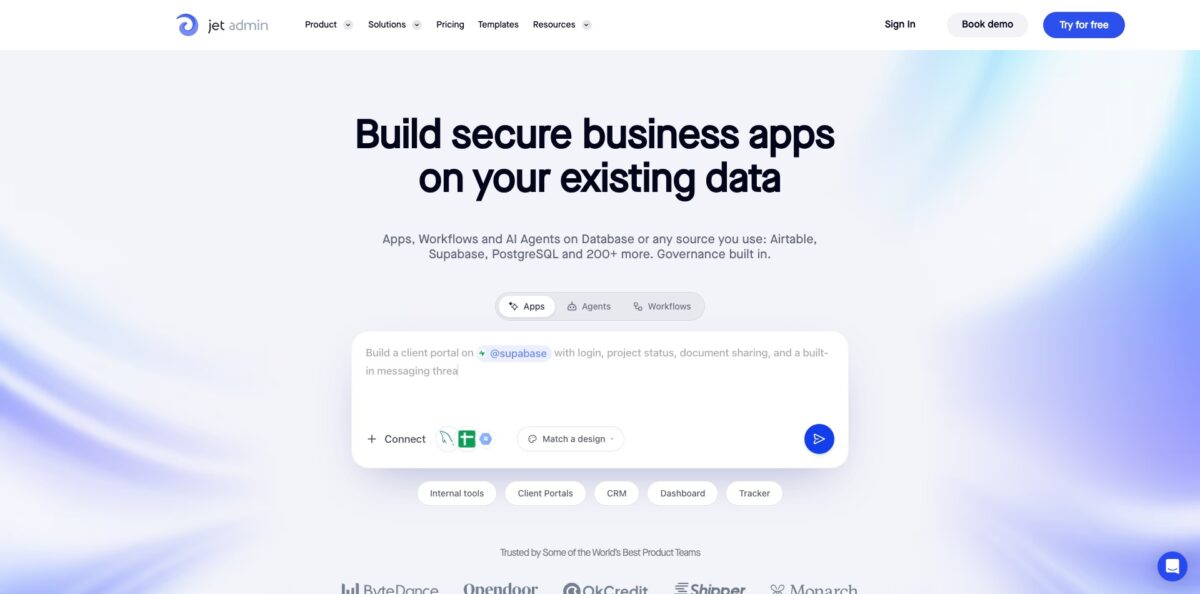
Jet Admin is a business app builder that sits on top of data you already own, such as PostgreSQL, MySQL, Supabase, Firebase, Airtable, Google Sheets or a REST API, and turns it into internal tools, admin panels, dashboards and customer portals. You describe the app in a prompt, the AI Builder proposes a plan, then generates pages, forms and logic wired to your real tables rather than a copy. Around that sits governance: role-based access, SSO, audit logs and the option to run everything in your own cloud or fully on-premise. The weak spot is the AI credit model, since the pricing page does not publish how many credits each plan includes or what a prompt costs. Pick it if you need a governed CRUD layer over existing systems; look elsewhere if you want a consumer-facing mobile app.
How to start using Jet Admin?
Sign up on the Free plan, which needs no credit card and already includes unlimited apps, users and workflows. From the dashboard you land on a single prompt box with a Design picker next to the attachment control. The official quick start suggests preparing a small test table first, for example a Tickets table with Name, Status, Priority and Assigned to fields, so you can tell quickly whether the generated app reads your data correctly.
Next, type a specific description of the app, such as a support ticket queue with a details panel. You can attach a CSV with starting rows or an image of the layout you have in mind. Before anything is built, the assistant inspects the connected resource and shows a plan with pages, data sources, actions and user access. Read it carefully and ask for corrections at this stage, because fixing the plan is cheaper than fixing the generated app.
Once generation finishes, open the AI Assistant and select the data source that holds your records, or start on Jet’s built-in Postgres database if you have nothing connected yet. Then refine in three ways: follow-up prompts (“add a search field for Name, keep the Status filter”), clicking elements in Preview to edit them visually, or dropping into the React, Vue or Angular code on Pro and above. Preview also lets you switch between Desktop, Tablet and Mobile and apply a theme preset.
Before release, test data actions with safe records and preview the app as an invited test user to confirm permissions behave as expected. Publish to a Jet Cloud URL, or to a custom domain on a paid plan, and repeat the same checks in the published version. If something breaks, the console and logs view shows what failed, and Version History lets you revert to an earlier build.
Who is it for?
Operations teams
You run support queues, order checks or inventory updates through spreadsheets and direct database access that only one engineer understands. Jet Admin puts a permission-aware interface over that data, so the team edits records without touching SQL. The engineer stops being a bottleneck for every small change.
Engineering leads
Your developers keep getting pulled into building one more admin screen. Jet Admin generates the CRUD layer, auth and audit trail, and on Pro you can sync the code to GitHub and keep editing it in your own repo. Developers spend their time on the product instead of back-office plumbing.
Agencies and freelancers
You build client portals and dashboards for several customers and need them branded. Paid plans remove Jet branding and support custom domains, and pricing does not grow with the number of end users. That makes per-client margins easier to predict.
Regulated companies
Your security team will not approve a tool that only runs in a vendor cloud. Jet Admin offers self-hosted and fully on-premise deployment, plus self-hosted AI models on Enterprise. Data and inference can stay inside your network perimeter.
Data and analytics teams
Stakeholders want live dashboards over the warehouse without a full BI project. Jet Admin connects to BigQuery, Snowflake, Redshift and Databricks and can run agents that answer questions with SQL. Expect basic charts rather than Looker-level visual control.
Small business founders
You started on Google Sheets or Airtable and now need a proper interface with logins for staff or customers. Jet Admin lets you build pages quickly without coding knowledge, and you can move to Supabase or the Jet database later. Users report they reached production within a week.
Jet Admin pricing
Jet Admin prices around AI credits rather than seats or apps. Every plan includes unlimited apps, unlimited users and unlimited workflows, and credits are spent only when the AI Builder generates or substantially edits an app, not when people use an app you already built. A portal with thousands of daily users therefore costs the same in credits as one with ten. The pricing page and docs do not list a fixed credit allowance per plan or a per-prompt cost, so check the billing view in your account before a large build. Prices are in USD, and yearly billing saves 20%.
Limited monthly AI credits, unlimited apps and workflows, 1 GB storage and community support. Data sources include Jet Tables, PostgreSQL, Google Sheets, Airtable and Firebase, plus business apps such as HubSpot, Slack, Stripe, Zendesk and Salesforce.
Adds a custom domain, removal of Jet branding, 2-way GitHub sync, environments, version control and API access. Storage rises to 20 GB, support moves to email and Slack, and a 14-day free trial is available.
Adds granular permissions, SSO, audit logs and early access to new features, with 50 GB storage, a 99.9% uptime figure in the comparison table and priority support.
Custom. Custom AI credits, uptime SLA, on-premise deployment, self-hosted AI models, a dedicated success manager, credit rollover and on-demand credit top-ups.
Jet Admin key features
AI App Builder with a review step
You describe an internal tool, dashboard or portal in plain language, and the assistant proposes a plan before generating anything. After generation you keep refining with prompts, the visual editor or code. You catch wrong assumptions about your data before they turn into screens.
Connectors for existing data
Jet Admin lists more than 200 integrations, including PostgreSQL, MySQL, MongoDB, Supabase, Firebase, Microsoft SQL, Oracle, BigQuery, Snowflake, Databricks, ClickHouse, REST and GraphQL APIs. The data editor writes straight back to the source like a spreadsheet. You avoid migrating data just to get a usable interface.
Workflows and automations
Triggers include webhooks, button clicks, data changes (create, update, delete) and schedules from every minute to monthly. Steps can transform data with formulas, JavaScript or a JSON parser and branch with switch, if/else and iterator logic. Repetitive steps between systems run without a separate automation tool.
AI Agent Builder
Agents get instructions, tools, skills, files and a model, then run inside apps, workflows or scheduled tasks. They can be reached through Slack, Telegram, email and MCP clients, and templates cover jobs like ticket digests, CRM pipeline reports and BigQuery or Snowflake analysis.
Governance built in
Row-, column- and action-level permissions, Google login, magic links, SSO/SAML with SCIM provisioning and exportable audit logs are part of the platform. The pricing FAQ states SOC 2 Type 2 compliance, TLS 1.2 in transit, AES encryption at rest and daily encrypted backups. Security reviews go faster because the controls are already there.
Flexible deployment
Run on Jet Cloud, host the open-source Jet Bridge (MIT licensed on GitHub) in your own environment, or deploy fully on-premise on AWS, Google Cloud, Azure or air-gapped hardware. The install command is a single shell script. Data stays where your compliance rules require.
Developer handoff
Pro and above expose generated code in React, Vue or Angular, with in-app code editing, 2-way GitHub sync, environments and version control. A CLI is tuned for coding agents such as Claude Code and Cursor. Your engineers can take over the codebase instead of being locked into the visual editor.
Jet Admin Pros & Cons
Pros
Jet Admin works on your live data instead of forcing an import, and connecting a database produces CRUD screens almost immediately, which Product Hunt reviewers call a real time saver. Non-engineers pick it up fast, and several teams report replacing scattered manual workflows with one interface over multiple Postgres databases. Pricing does not scale with end users, so external portals stay affordable as they grow. The governance stack, self-hosting options and code export answer the questions IT usually raises about no-code tools. Build your first app on a copy of a real table, since the value shows most clearly with your own schema.
Cons
The credit system is opaque: no plan lists an exact credit allowance, and one reviewer ran out of trial credits within a couple of days. Chart and dashboard customization is basic compared with dedicated BI tools, a point users raise repeatedly. Support experiences are mixed, with some praising fast custom work and others describing slow or missing replies. Google Sheets as a data source has limits that only become clear later, prompting some users to switch to Supabase. The product is also mid-transition from the Classic drag-and-drop builder to the AI builder. Ask sales for a written credit allowance before committing to a paid plan.
Use Jet Admin if you want…
- Build an admin panel over your existing database.
- Turn a plain-language prompt into a working internal tool.
- Give customers a self-serve portal with secure logins.
- Automate routine steps with webhooks and scheduled jobs.
- Run AI agents on your business data with permissions.
- Deploy business apps inside your own cloud or network.
- Export generated app code to your GitHub repository.
- Avoid per-seat fees for large internal or external audiences.
Jet Admin alternatives



Jet Admin Reviews
Non-engineers on the team got productive quickly, and connecting several Postgres databases into one interface replaced a set of disconnected manual workflows; the vendor’s Jet Experts service also delivered custom features within days.
Building useful pages is fast even without coding knowledge and the CRUD functions justified going premium, but chart and dashboard settings feel limited next to Looker Studio, and the Google Sheets limits should be explained upfront.
Drag and drop feels smooth and the integrations list is impressive, with CRUD generated automatically from a connected database, though trial credits ran out within a day or two and more concrete use-case templates would help.
Flexible enough for complex apps while staying simple to maintain, a good fit for power users, though support can be slow and the features that make it shine, like custom SQL queries, push you to higher plans.
Easy to customize with a clean interface, and data connection and syncing with Google tools works reliably, according to reviewers on G2.
FAQ
Is there a free plan?
Yes. The Free plan costs $0, needs no credit card and includes unlimited apps, users and workflows, with a limited monthly AI credit allowance and 1 GB of storage.
Do I need to know how to code?
No. You can describe the app in plain language and refine it visually. On Pro and above, engineers can also edit the generated React, Vue or Angular code and sync it with GitHub.
What consumes AI credits?
Credits are spent when the AI Builder generates an app or makes substantial edits. People using an app you have already published do not consume credits.
Which databases and services does Jet Admin connect to?
It lists more than 200 integrations, including PostgreSQL, MySQL, MongoDB, Supabase, Firebase, Airtable, Google Sheets, BigQuery, Snowflake, REST and GraphQL APIs, Stripe, HubSpot, Salesforce, Zendesk and Slack.
Can I self-host Jet Admin?
Yes. You can run the open-source Jet Bridge in your own environment, and Enterprise supports full on-premise deployment with self-hosted AI models, including air-gapped setups.
How is my data secured?
Jet Admin states SOC 2 Type 2 compliance, TLS 1.2 in transit, AES encryption at rest and daily encrypted backups. Granular permissions, SSO and audit logs are included from the Business plan.
Can I use my own domain and remove Jet branding?
Yes, both are available from the Pro plan at $20/month, or $16/month billed yearly.
Can I cancel anytime?
Yes. Turn off auto-renewal and you keep access until the end of the current billing period, with no cancellation fee.
Similar tools
 MindflowNo-code and agentic automation platform for SecOps, ITOps and CloudOps teams that turns prompts into workflows across thousands of tool APIs.
 OnSpace.AINo-code AI app builder that turns chat prompts into React Native iOS and Android apps or web apps, with a managed backend,
 UserflowNo-code product adoption platform for building in-app tours, checklists and surveys, with AI flow generation and an in-app Adoption Agent.