

Joyfun AI
Video GenerationUpdated October 5, 2026
Joyfun AI is a browser-based tool for quick face swaps and 10-second AI videos that is free to start, with one-time credit packs that never expire and a separate Face Swap subscription.
We may earn a commission when you sign up through our links. It does not affect our reviews.
What is Joyfun AI?
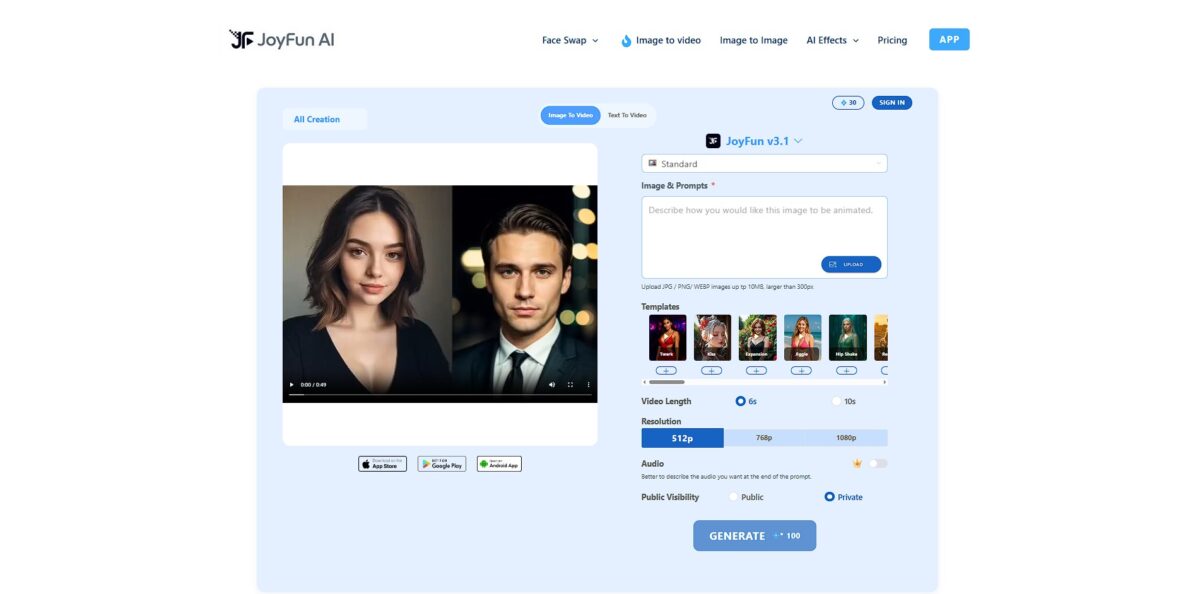
Joyfun AI acts as a browser-based playground for quick video experiments, specializing in face swaps and brief 10-second animations. It aggregates models like Kling 3.0 Omni, Veo 3.1 and Seedance 2.0 so you can generate HD clips from text or animate static photos without jumping between different specialized platforms. It skips the usual forced sign-up for initial testing, which makes it a low-friction option for creators who need a quick social media meme or a talking head avatar. You can validate a visual idea in seconds before committing to a complex editing workflow. While the output is sharp enough for mobile screens, it prioritizes speed and trendy effects over deep cinematic control. Use it as a rapid prototyping tool for social content rather than a professional film suite.
How to start using Joyfun AI?
Head to the Joyfun AI portal to land directly in the browser-based dashboard. You won’t need to download bulky software or worry about GPU compatibility. The homepage says you can start generating without registration and that videos carry no watermark, while the pricing page sells one-time credit packs for heavier use. This setup is perfect for testing quick ideas without a financial commitment, though the site’s free and paid messaging is not entirely consistent, so check your balance before a big batch.
The interface splits into two main paths: text-to-video and image-to-video. If you have a specific photo of a person, the face-swap and portrait animation tools are the most responsive features to try first. Uploading a clear, front-facing image prevents the distorted “melting” effect often seen in cheaper AI generators. Getting the source material right saves you from burning credits on unusable, warped results.
Type your prompt into the generation box if you’re starting from scratch. Stick to concrete nouns and verbs rather than abstract concepts. Instead of asking for a “beautiful scene,” describe a “red car driving through a rainy neon city.” This helps the model anchor the pixels to actual shapes, reducing the frequency of random visual artifacts. While it handles short 10-second bursts well, it struggles with complex multi-step narratives.
Hit generate and wait for the queue to process your request. Browser-based tools can lag during peak hours, so a bit of patience is required. Once the clip appears, review it for character consistency and movement fluidity. If the motion looks too jittery, try adjusting your prompt to be less specific about micro-movements. This iterative process is how you learn the model’s specific “personality” and limits.
Who is it for?
Social Media Managers
Move from static product photos to active 10-second clips that actually stop a scroll. While great for engagement, don’t expect it to replace professional cinematography. This matters because movement captures attention faster than still images on busy feeds.
Hobbyist Animators
Convert anime sketches into fluid motion without frame-by-frame manual labor. It handles simple character physics well, though complex interactions still present challenges. For solo creators, that lowers the barrier to entry.
Travel Influencers
Relive journeys by turning snapshots into shareable stories automatically. I noticed the travel-specific filters add a nice touch to raw outdoor shots. The result is a faster “capture-to-post” workflow during trips.
E-commerce Sellers
Transform product listings into ads without setting up a studio or lighting rig. It works best for clear, isolated subjects but might struggle with busy backgrounds. And professional-looking video assets drive higher conversion rates.
AI Experimenters
Use the browser-based dashboard to test face swaps or 40+ video effects without local GPU hardware. The interface is intuitive for testing ideas, even if the line between free generations and paid credits isn’t always clear. That makes it a low-cost sandbox for creative iteration.
Joyfun AI pricing
Joyfun AI offers a low-friction entry point for testing AI-driven face swaps and short animations without a credit card or sign-up, and its homepage promises watermark-free videos. For heavier use, the pricing page sells one-time credit packs instead of subscriptions; pack sizes and prices are not listed on the public page and only appear when you go to buy. Face Swap is the exception, sold as a separate subscription.
The site advertises free generations with no sign-up and no watermarks on exported videos, though it does not spell out how much you can create before you need credits.
one-time purchases with no recurring charges. One credit balance covers every generative tool, including Image to Video and Text to Video, and purchased credits never expire. You only pay when you actually need more output.
Face Swap is excluded from the one-time model and billed as a subscription. To cancel it, you submit the unsubscribe form on the pricing page with your email and the last four digits of your card.
a full refund is available within 48 hours of purchase if you have used 100 credits or less from the pack; credits are non-transferable and have no cash value. Use the free generations to check how well face swaps work with your source photos before you pay for credits or the Face Swap subscription.
Joyfun AI key features
Swap faces in 1080p video clips by uploading a source portrait
It maps your features onto existing footage, which works for quick parodies but sometimes struggles with blending at the hairline. Still, you can insert yourself into movie scenes or memes without opening a heavy editor.
Animate static photos using text-guided motion
You can tell a still landscape to make the trees sway or a character to blink and smile. I noticed the movement is subtle rather than explosive, keeping the original image’s lighting intact.
Generate 10-second clips from raw text descriptions using integrated engines like Kling 3.0 Omni, Veo 3.1 and Seedance 2.0. It translates a few words into a 1080p scene, though you don’t get to pick which specific model processes your request. In exchange, you get a variety of styles, from anime to cinematic, in one interface.
Explore niche or unconventional themes through a permissive content filter
While mainstream tools block anything slightly suggestive, this platform allows for adult-oriented creative experiments and “uncensored” artistic expression. That spares you the frustration of “prohibited content” flags during your workflow.
Apply specialized one-click effects like “AI Dance” or “AI Kissing” to character assets
These pre-set animations handle the physics of movement for you, though the limbs can occasionally look rubbery during complex rotations. You skip the tedious work of manual keyframing for common social media trends.
Bypass the sign-up gate and generate content immediately in the browser
You don’t have to link an email or create a password just to test a single idea, which keeps your inbox clear of marketing spam. It’s a frictionless sandbox for “impulse” creation.
Joyfun AI Pros & Cons
Pros
Joyfun AI removes the friction of account creation, letting you generate 1080p clips immediately without handing over an email address. The face swap tool handles lighting and shadows better than most web-based wrappers, making it a quick win for creating personalized social memes or portfolio fillers. The image-to-video engine adds natural-looking blinks and subtle head tilts to static portraits. This matters because you can test creative concepts in seconds instead of fighting with a complex animation timeline. Use the face swap templates to bypass prompt engineering entirely for quick visual experiments.
Cons
The output length caps at 10 seconds, which restricts anyone trying to build a narrative beyond a single social media beat. Since the platform lacks end-to-end encryption and shares data with partners, it creates a red flag for those handling sensitive or private imagery. Fine details like fingers and limbs often appear in unconvincing places when the motion intensity is set too high. Pricing is murky, too: the homepage calls Joyfun 100% free with no credit packs, while the pricing page sells credit packs without listing their prices, plus a separate Face Swap subscription. Stick to simple background movements to avoid the “hallucinated limb” glitch common in complex physics renders.
Use Joyfun AI if you want…
- Generate professional-looking video content without registering first.
- Swap faces into cinematic scenes with realistic lighting.
- Animate static photos into high-fidelity 1080p clips.
- Explore creative freedom within a largely uncensored environment.
- Transform simple text prompts into dynamic HD visuals.
- Access premium models like Kling, Veo and Seedance in one place.
- Apply specialized one-click effects like dancing or kissing.
- Produce viral social media content with zero editing skills.
- Skip registration with instant, no-signup access.
Joyfun AI alternatives
 Kling AIRead review →
 Runway Gen-3Read review →
 PikaRead review →
 HeyGenRead review →
 PixVerseRead review →
 Hailuo AIRead review →
Joyfun AI Reviews
The face swap and image-to-video tools are surprisingly smooth, but the 10-second limit makes it more of a playground than a production suite.
I love that I can test concepts without signing up first, though the motion physics can get a bit wonky if the prompt is too complex.
It is a great rapid prototyping tool for social media memes and quick 1080p clips, but heavier use means buying a credit pack, and I wish the prices were shown before checkout.
FAQ
Does Joyfun AI allow adult content?
Yes, Joyfun AI provides a largely uncensored creative environment that allows for a wide range of artistic expressions, including stylized entertainment and adult videos.
Can I maintain character consistency across different videos?
No, Joyfun AI does not currently have a face consistency system; every generation is independent, meaning characters may look different in each new clip.
What is the maximum length of a Joyfun AI video?
The platform typically generates short video clips with a maximum duration of approximately 10 seconds per generation.
Do I need to create an account to use Joyfun AI?
No, Joyfun AI lets you start generating videos directly in the browser without mandatory registration or sign-up.
Can I use Joyfun AI videos for commercial purposes?
Yes. Joyfun’s terms say you own your outputs and can use them for any purpose, including commercial content creation, as long as they follow the content rules; the same terms also let Joyfun use your uploads to train its AI models.
Does Joyfun AI support lip-syncing?
Joyfun AI focuses on video generation and face swapping but does not currently offer a native synchronized lip-sync tool for adding dialogue to characters.
What file formats does Joyfun AI support for uploads?
The platform supports standard image formats including JPG, JPEG, and PNG for image-to-video and face swap features.
Similar tools
 AIAIAll-in-one AI studio that puts Veo, Sora, Kling, Seedance and other models behind one credit balance for video, images, music and voice.
 ToMoviee AIWondershare's AI creative studio that turns text prompts and images into short videos, pictures, music, sound effects and voiceovers.
 Morph StudioBrowser AI video studio that runs Seedance, Kling, Veo and its own style transfer model, with a storyboard canvas for multi-shot clips.