

JXP
Video GenerationUpdated November 10, 2026
Multi-model AI video and image studio that puts Seedance, Veo, Kling, Wan and other third-party engines behind one credit balance.
We may earn a commission when you sign up through our links. It does not affect our reviews.
What is JXP?
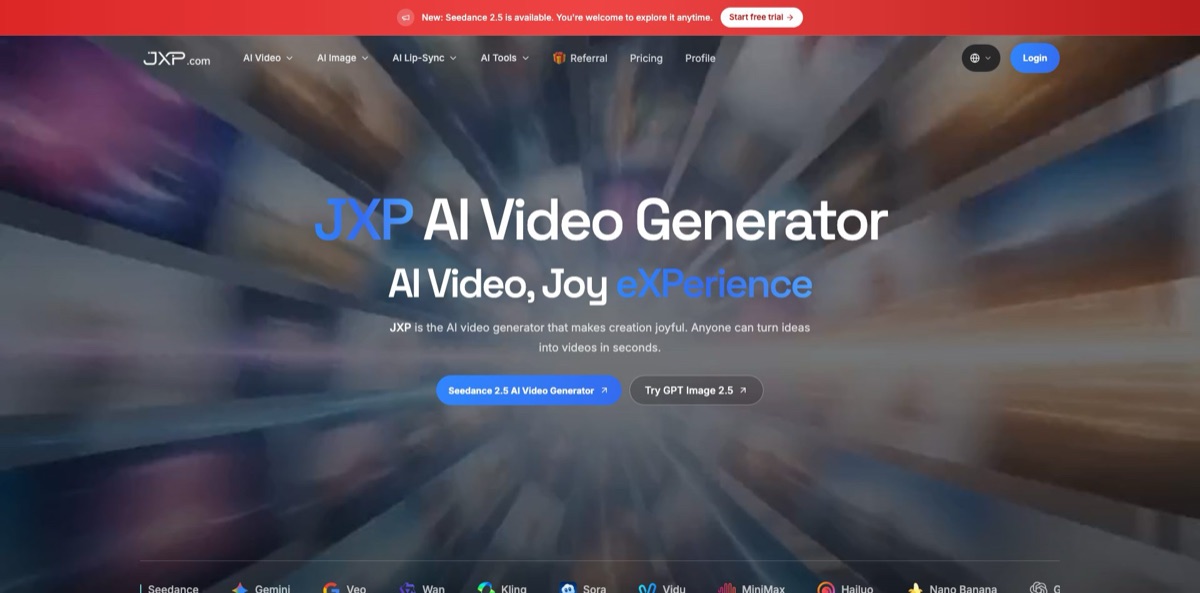
JXP is a web and mobile studio that resells access to third-party video and image models through a single credit wallet. You pick Seedance 2.5, Veo 3.1, Kling 4.0, Wan 3.0, MiniMax H3, Sora 2 or another engine from one menu, set resolution and length, and pay per generation instead of keeping separate accounts with each model vendor. The service ran as Seedance Pro until a rebrand, and seedancepro.com now redirects to jxp.com. Its Google Play listing says outright that JXP is an independent app, not affiliated with the companies behind the models, so output quality comes from the underlying engine rather than from JXP itself. The weak spots are thin documentation, a help center still partly written for the old brand, and very little independent user feedback. It fits creators who want to compare several models on small budgets without a monthly commitment.
How to start using JXP?
Click Login or Start Free Now on jxp.com and create an account; the homepage says no credit card is required, and eligible new users get trial access to supported workflows. The generator marks which settings the trial covers with a Free Trial label, so do not assume every model or resolution is included. The interface is in English, with Japanese and Korean versions on separate sites (jxpjp.com and jxpkr.com). If you prefer a phone, the iOS app requires iOS 18 or later, and the Android app is still labeled beta.
For a first real job, open a model page such as Seedance 2.5 and pick the Text to Video or Reference Generation tab. Type your idea in the Prompt box, or press Help me write if you want the assistant to draft it. Then set Resolution (480p, 720p or 1080p), Aspect Ratio (16:9, 4:3, 1:1, 3:4 or 9:16) and Duration, which runs from 4 to 30 seconds on this model. Each showcase clip on the page has a Recreate button that loads its prompt, which is a quick way to learn how JXP expects shot-by-shot timing and references to be written.
The screen that matters most is the upload panel. Seedance 2.5 accepts up to 50 files per generation (at most 30 images, 10 videos and 10 audio tracks), and the example prompts tag them inline as @Image 1, @Video 2 and so on to anchor characters, products, camera moves and sound. The Model dropdown lets you switch to Kling 4.0, Wan 3.0, Gemini Omni or MiniMax H3 without leaving the page. Other engines expose different controls: the Veo 3.1 page offers a first frame, an end frame, up to three reference images, 4, 6 or 8 second clips and output up to 4K.
Before you press Generate Video, read the credit estimate in the creation panel, because cost moves with model, duration, resolution and reference media. The old FAQ quotes one to three minutes for a typical job, though queue time varies by model. Finished clips appear in your generation history in the profile, where the Points Log shows what each job cost and the Pay Log holds invoices. Downloads carry no burned-in AI label, according to the terms, so you must add disclosure yourself wherever your platform requires it.
Run your first paid test at 480p or 720p with a short duration, then raise resolution only for the take you plan to keep.
Who is it for?
Short-form social creators
You post daily to TikTok, Reels or Shorts and want a fresh hook without filming. JXP gives you text-to-video, a dance generator with ready templates and vertical 9:16 output in one account. You spend credits on clips instead of on three separate subscriptions.
UGC and product ad makers
You need product shots and spokesperson-style clips fast and in several variations. Reference inputs let you lock a product image or a face across takes, and paid plans list a commercial use license. Expect to check each model’s rights before running paid ads.
Model shoppers
Every month a new Seedance, Kling, Veo or Wan release appears and you want to see which one handles your style. JXP adds new versions quickly, judging by its app update log, and keeps them behind one menu. Side-by-side tests cost credits, not new sign-ups.
Indie filmmakers and micro-drama writers
Long single shots used to require stitching several short clips. Seedance 2.5 on JXP renders up to 30 seconds in one pass with native audio and dozens of references, which suits story beats and trailers. Budget carefully, because long 1080p takes are the most expensive thing on the platform.
Podcasters, educators and presenters
You have an audio track and a portrait but no camera crew. InfiniteTalk turns them into a lip-synced talking video of up to 600 seconds, priced per second by resolution. That makes lecture snippets and narrated explainers possible without recording video.
Occasional users who dislike subscriptions
You make a few videos a quarter and hate paying for idle months. One-time credit packs never expire, so a $10 top-up can sit in your account until the next project. You still get the same model menu as subscribers.
JXP pricing
JXP sells credits on two tracks with the same three tiers. One-time packs never expire, and monthly subscriptions give roughly 20% more credits for the same price; subscription credits also never expire and stack from month to month. What a credit buys depends on the model, duration, resolution and reference media. The calculator on the pricing page puts a 10-second 720p Seedance 2.5 clip at 40 credits, while the same model at 1080p runs 9 credits per second, so a full 30-second 1080p take costs 270 credits. Payments go through Stripe with Visa, Mastercard, Amex, Discover or JCB. Inside the iOS app the same tiers appear as $9.99, $29.99 and $99.99 in-app purchases.
Eligible new accounts get complimentary trial credits with no card required. Limits are shown in the generator and do not cover every model or setting.
Includes image and video generation, Seedance 2.5, 1080p output, a commercial use license, downloads and email support. That is about three default Seedance 2.5 clips a month.
Adds priority download speed, priority support and advanced video effects. Expect roughly nine 10-second 720p Seedance 2.5 clips per month, or one 30-second 1080p take with credits to spare.
Adds the fastest download speed, early access to new features and API access marked as coming soon. This is the cheapest rate per credit, at under 7 cents on the monthly plan.
no team or enterprise plan is published. The FAQ points anyone whose needs do not fit a tier to support@jxp.com.
JXP key features
Multi-model catalog behind one wallet
The menu lists video engines such as Seedance 2.5, Veo 3.1, Gemini Omni 1.2 Flash, Kling 4.0, Wan 3.0, Vidu Q4, MiniMax H3 Max, LTX 2.5, HappyHorse and Sora 2, plus image models from GPT Image, Nano Banana, Seedream, Ideogram and Qwen. You switch models from a dropdown while your prompt and settings stay in place.
Long single-shot clips with Seedance 2.5
The model generates 4 to 30 seconds in one continuous clip at up to 1080p with native audio, and the vendor says local edits can fix one detail without re-rendering the whole video. That removes the stitching step for trailers, product demos and story beats. Seedance 2.0 stays available for 15-second work with standard mode up to 4K.
Reference-driven generation
Seedance 2.5 accepts up to 50 multimodal references per job, and you call them by tag inside the prompt to pin a character, a location, a camera move or a sound. Veo 3.1 offers first and end frames plus up to three reference images. Consistent faces and products across shots are the practical gain, but long reference videos raise the per-second credit rate.
InfiniteTalk lip-sync
Upload a PNG or JPG portrait (up to 10MB) or a source video, add speech in MP3, WAV, M4A, OGG or FLAC, and the model animates lips, head tilts and posture to match. Pricing is 1 credit per second at 480p, 2 at 720p and 3 at 1080p, with a maximum length of 600 seconds. It is the cheapest way on JXP to produce minutes of presenter footage.
AI Dance Generator
You supply one full-body image and either a short MP4 or MOV dance clip or one of the ready templates such as Spotlight Bounce or Beat Switch. A 5-second clip costs 15 credits, with 5 seconds as the minimum billed length. It works on people, pets, mascots and drawings, and the output is sized for vertical social feeds.
Image generation and editing on the same credits. GPT Image, Nano Banana, Seedream, SeedEdit, ChronoEdit and Ideogram cover text-to-image, prompt-based edits and text rendering. Because images and videos draw from one balance, you can build a key frame and animate it without a second subscription. Check the per-model cost in the generator, since the help pages disagree on a flat image price.
Web plus mobile apps
The iOS app mirrors the web model list and gets frequent updates that add new engines, and an Android app is in beta. The iOS app sells the same three credit tiers as in-app purchases.
JXP Pros & Cons
Pros
JXP gives you current Seedance, Veo, Kling, Wan, MiniMax and Sora models in one interface, so comparing engines costs credits rather than a stack of subscriptions. Credits never expire on either billing track, which is unusual in AI video and makes the $10 entry pack a low-risk trial. The pricing calculator and the in-panel estimate show cost before you generate, and server-side failures are not charged. Seedance 2.5 with 30-second single shots and 50 references is a strong headline feature, and InfiniteTalk adds long-form lip-sync at modest per-second rates. Use JXP as your testing bench: run the same prompt across two or three models at 480p, then render the winner at full resolution.
Cons
JXP is a reseller, not a model developer, so you depend on upstream availability and on JXP’s markup; an engine listed as JXP 2.0 in the Android store is never explained. The help center still mixes old Seedance Pro answers with current facts, for example claiming purchases are one-time only and that every image costs 1 credit, while JXP’s own llms.txt says no universal image price exists. The privacy policy is short and silent on retention, and the terms grant a license to use uploads to improve the service. There is no public API yet, and one long 1080p clip eats most of a $30 pack. Keep confidential footage off the platform and confirm cost in the generator every time.
Use JXP if you want…
- Compare Seedance, Veo, Kling and Wan in one place.
- Buy video credits once without a monthly subscription.
- Generate 30-second single-shot clips with native audio.
- Turn a portrait and voice track into a talking video.
- Make a photo dance using a template or reference clip.
- Guide scenes with dozens of image, video and audio references.
- Create images and videos from the same credit balance.
- Test new model releases soon after they launch.
JXP alternatives
 OpenArtRead review →
 KreaRead review →
 Kling AIRead review →
 Deevid AIRead review →
 MindVideo AIRead review →
 Vidful.aiRead review →
 RunwayRead review →
JXP Reviews
On the TopAI.tools directory, a small sample of five user ratings is mostly positive, with 80% recommending the tool and value for money singled out; the listing shows no detailed written complaints or long-term usage notes.
A creator’s comparison post on the StartupGrind forum ranked JXP’s Seedance 2.0 workspace first for storytelling, praising natural multi-scene flow and better-than-expected character consistency, but it says nothing about credit costs or support.
App store feedback is still almost empty: the iOS app shows a single five-star rating with no written review, the Android beta lists 100+ downloads, and the lone Product Hunt review does not discuss video features, so reliability and support remain unproven.
FAQ
Is JXP free to use?
Eligible new users get trial credits with no credit card required, but the trial does not cover every model or resolution. After that, paid credits start at $10.
Is JXP the same as ByteDance Seedance?
No. JXP, formerly Seedance Pro, is an independent platform that offers Seedance alongside Veo, Kling, Wan and other models, and its app listing states it is not affiliated with the model owners.
Do JXP credits expire?
No. Both one-time and subscription credits never expire, and subscription credits accumulate from month to month.
Can I use JXP videos commercially?
Every paid plan lists a commercial use license, but JXP notes that rights also depend on the selected model and on the source media you upload. You are responsible for AI disclosure where required.
Does JXP have an API?
Not publicly yet. The Ultimate plan lists API access as coming soon, so plan on using the web or mobile apps for now.
What is JXP’s refund policy?
You get a full refund within 7 days if you have used 10% of the credits or less, and a proportional refund for unused credits if you have used more. After 7 days, or for bonus and promotional credits, there is no refund.
Is my data private on JXP?
Card details are handled by the payment processor, and the policy says JXP does not collect data from children under 13. The terms give JXP a license to use uploaded content to provide and improve the service, and no opt-out is described, so avoid uploading confidential material.
Am I charged for failed generations?
Jobs that fail because of server-side errors are not charged. If a generation is blocked because your prompt or upload contains prohibited content, the credits are still deducted.
Similar tools
 AIAIAll-in-one AI studio that puts Veo, Sora, Kling, Seedance and other models behind one credit balance for video, images, music and voice.
 ToMoviee AIWondershare's AI creative studio that turns text prompts and images into short videos, pictures, music, sound effects and voiceovers.
 Morph StudioBrowser AI video studio that runs Seedance, Kling, Veo and its own style transfer model, with a storyboard canvas for multi-shot clips.