

Katalon
AI AutomationUpdated October 19, 2026
AI-augmented test automation platform for web, mobile, desktop and API testing, with Katalon Studio, test management, cloud execution and self-healing.
We may earn a commission when you sign up through our links. It does not affect our reviews.
What is Katalon?
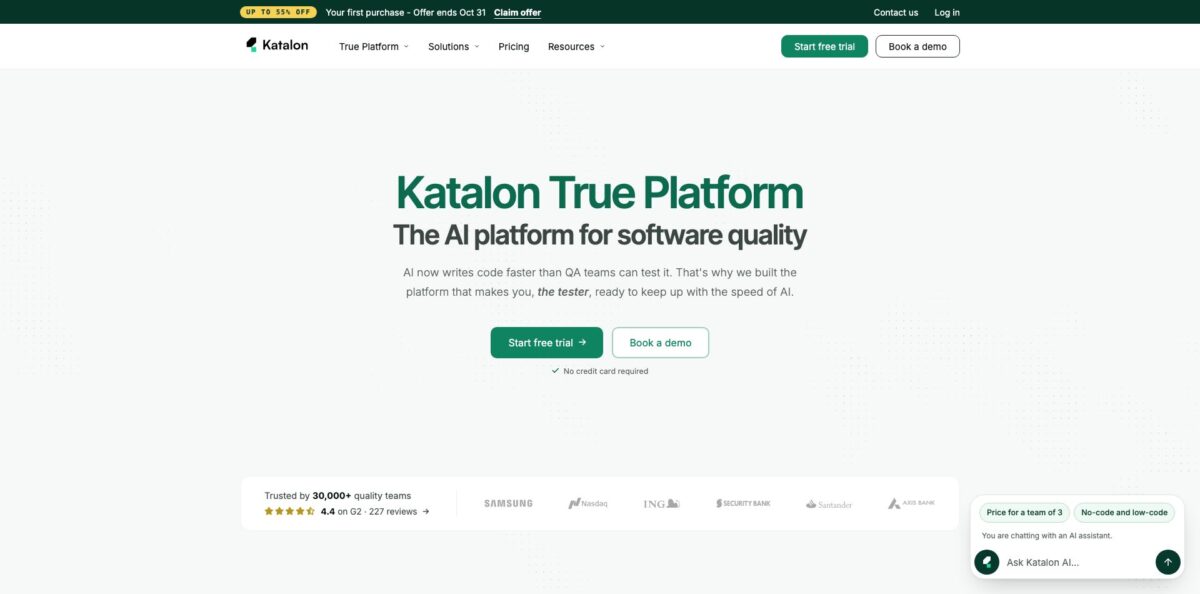
Katalon is a commercial test automation platform built around Katalon Studio, a desktop IDE on Eclipse, Java and Selenium/Appium, plus three web products: TestOps for test management and manual runs, TestCloud for hosted browsers and real devices, and TrueTest for production usage insights. Together the company sells them as the True Platform. You author web, mobile, API and Windows desktop tests in one project, switching between a keyword-based manual view, recorders and a Groovy/Java script view. Katalon AI sits on top: it drafts test cases from Jira tickets or requirement documents, heals broken locators during a run and explains failures in plain language. It solves the classic split where web lives in Playwright, mobile in Appium and API in Postman. The weak spot is weight: Studio is a heavy desktop app, and headless or CI runs need paid add-ons. Pick it if your QA team mixes coders and manual testers.
How to start using Katalon?
Start on the download page and grab Katalon Studio for Windows, macOS (Intel or Apple Silicon) or Linux; the current build is version 11.6.0, with a separate build that adds GitHub Copilot support. After installing, sign up for or log in to a Katalon account to activate the 30-day trial. No credit card is required, and the trial includes five True Automation seats, five Runtime Engine licenses and three TestCloud cross-browser sessions, so you can test the whole stack, not just the IDE.
Create your first project from the File menu and choose a project type (web, mobile, API or a generic one). The fastest first scenario is the Web Recorder: open your app, click through a flow such as sign-in or checkout, and Studio turns each action into keyword steps like Open browser, Click, Set text and Verify text, while capturing page elements into the Object Repository with ranked fallback locators. Mobile works the same way through the Smart Mobile Recorder for Android and iOS, and API requests (REST, SOAP, GraphQL) sit in the same project.
The key screen is the test case editor with its Manual and Script tabs. Non-coders stay in the keyword table, while engineers open the script view and write Groovy or Java, add custom keywords and reuse objects. If you prefer to start from requirements, open the Katalon AI Assistant, point it at a Jira ticket or attach a spec, and let it draft the cases and steps for you to review. Admins can switch AI off entirely or, on Enterprise, connect the company’s own model provider.
Before trusting a suite, run it locally across browsers, read the execution report and check any self-healed locators the AI flags for approval. Then decide where tests will live long term: connect Studio to TestOps for shared reports and release gates, push runs to TestCloud for parallel browsers and real devices, or install Katalon Runtime Engine to run the suites headless from Jenkins, GitHub Actions, GitLab or Azure DevOps.
Record one real user flow on day one, then rewrite it in Script view to see where your team will actually spend its time.
Who is it for?
QA teams with mixed skills
Half your testers can code and half cannot, so every framework choice leaves someone out. Katalon lets manual testers record and edit keyword steps while engineers work on the same test in Groovy, and both see one report.
Test leads drowning in tool sprawl
Web runs in one framework, mobile in another and API checks in Postman, so nobody can state real coverage. Putting all four test types in one Studio project and one TestOps record turns coverage into a single number you can report.
Regulated enterprises
Banks, insurers and healthcare teams often cannot let a model see their code. Studio can run on premises, AI is optional and switchable by admins, and Enterprise adds SSO, SCIM, audit logs, offline activation and a bring-your-own AI provider option.
Teams migrating off Selenium
You have a pile of brittle WebDriver scripts and spend sprints fixing locators. Studio imports Selenium projects, captures objects with ranked locators and self-heals at run time, so maintenance stops eating the backlog.
Manual QA teams moving toward AI
Your testers write cases in spreadsheets and run them by hand. TestOps gives them AI-drafted cases from tickets, an autonomous runner for natural-language test steps and defect filing to Jira, without forcing everyone to learn scripting first.
Playwright-first engineering teams
You like your code-based tests and do not want to rewrite them. Katalon can run Playwright specs on TestCloud and ingest the results into TestOps next to manual and Studio runs.
Katalon pricing
Katalon prices by named seats (Studio, TestOps), concurrent sessions (TestCloud) and concurrent licenses (Runtime Engine), with no per-run or usage fees. The pricing page shows a list price for sales-assisted deals and a discounted online price for first-time self-serve buyers, and the Starter discounts are marked as valid until October 31, 2026. Every new sign-up gets a 30-day trial, after which the account falls back to the Free plan with projects and run history kept.
Local authoring, basic record and playback for web and mobile, web, API and mobile testing, local execution and up to 40 static test suites. No desktop testing, AI agents, parallel runs or Jira integration.
Starter offer for the first online purchase is $1,000/seat/year for the first 3 seats (about $84/seat/month), then $1,800/seat/year from the 4th seat; monthly billing is listed at $180/seat/month. Adds AI agents for authoring, failure analysis and self-healing, the MCP server, unlimited AI sessions, desktop testing, BDD with Cucumber, parallel execution, dynamic suites, Jira and Azure DevOps integration and 24/5 ticket support.
Custom. Annual contract with SSO/SAML and SCIM, role-based access and audit logs, private cloud or on-premises deployment, hybrid and offline licensing, bring-your-own AI provider, custom SLA and a dedicated customer success manager.
Fixed bundle for a team of 3: three TestOps seats, one TestCloud Live Testing session and one TestCloud Cross Browser session.
Fixed bundle for a team of 3: three Studio seats, three TestOps seats and one TestCloud Cross Browser session.
Custom. Scale and deployment flexibility across Studio, TestOps, TestCloud, Runtime Engine and TrueTest.
TestCloud sessions, Runtime Engine licenses and TrueTest extend a Studio or TestOps seat and are not sold on their own; headless and CI/CD runs from Studio require Runtime Engine licenses.
Katalon key features
One project for web, mobile, API and desktop
Web tests run on Selenium, mobile on Appium for native, hybrid and mobile web apps, API tests cover REST, SOAP and GraphQL with common auth schemes, and desktop covers UWP, WinForms, WPF and Win32 apps. Everything shares one object repository, one execution flow and one report.
No-code, low-code and full-code in the same test
The Manual view is a keyword table, the Script view is Groovy or Java, and you can flip between them inside one test case. Recorders for web and mobile capture interactions into reusable steps. Mixed-skill teams can work on the same suite without maintaining two frameworks.
Katalon AI agents
The AI Assistant drafts test cases from a Jira or Azure DevOps ticket, a prompt or an uploaded requirements document, then can automate them and run them on a chosen browser. Version 11.5.0 added AI keywords (Ask, Assert Text, Assert File) so a test can send a prompt to a model and run AI-assisted assertions on the answer.
Self-healing and failure analysis
When a locator breaks mid-run, Studio tries ranked alternative locators, keeps the test going and reports what changed for your approval. After a failed run, AI root-cause analysis reads the full log and names the likely cause in plain language. This cuts the sprint time usually lost to locator fixes and log reading.
MCP server and bring-your-own coding agent
Katalon MCP lets tools such as Cursor, Claude Code, VS Code, GitHub Copilot and Codex create and edit Katalon test cases, trigger suites and read results. Studio can also connect to external MCP servers, including ones protected by Microsoft Entra ID. Developers can drive testing from the editor they already use.
Execution anywhere
Run locally, headless on your own machines and CI with Runtime Engine, or in parallel on TestCloud across Chrome, Firefox, Safari and Edge on Windows and macOS plus real iOS and Android devices. TestCloud also runs Playwright specs, and TestOps ingests Playwright results from your repo.
Integrations and governance
Out-of-the-box connectors cover Jira, Azure DevOps, TestRail, Xray, Zephyr, qTest, Jenkins, GitHub Actions, GitLab, CircleCI, Slack, BrowserStack, LambdaTest and Sauce Labs. Katalon states SOC 2 Type II, ISO 27001 and CSA STAR Level 1, and data is encrypted in transit and at rest.
Katalon Pros & Cons
Pros
Katalon gets a team from zero to working regression suites faster than assembling Selenium, Appium and an API client by hand, because drivers, recorders, an object repository and reporting come in one install. Reviewers on Capterra keep coming back to the same point: manual testers with no coding background start with record and playback, then gradually move into the script view as they learn. Covering web, mobile, API and Windows desktop in one project gives leads a single coverage figure, and the AI layer (test drafting from tickets, self-healing, failure explanations) targets the two most expensive chores in QA, writing cases and fixing broken locators. The free tier and 30-day full trial make evaluation cheap. Start the trial with your two flakiest existing tests so you see self-healing on real pain.
Cons
Studio is a heavy Eclipse-based desktop app, and users report high memory and CPU use, slowdowns and occasional crashes when many suites or sessions run at once. Long-time users also complain that features once free, such as running tests from the command line, moved behind paid Runtime Engine licenses, and the Free plan today lacks parallel runs, desktop testing and AI. Scripting is limited to Groovy and Java, which may feel foreign to JavaScript or Python teams. Mobile recording has historically been fragile across device models, and some reviewers found complex apps hard to automate. Pricing jumps after the Starter offer ($1,800 per extra seat). Load-test Studio on your largest project and price CI execution before signing an annual contract.
Use Katalon if you want…
- Automate web, mobile, API and desktop tests together.
- Let manual testers record tests without writing code.
- Generate test cases straight from Jira tickets.
- Cut locator maintenance with AI self-healing at run time.
- Migrate brittle Selenium scripts into a managed IDE.
- Run regression suites in parallel on real devices.
- Drive test creation from Cursor or Claude Code via MCP.
- Keep manual, automated and Playwright results in one record.
- Run test automation on premises with optional AI.
Katalon alternatives

Katalon Reviews
Record and playback lets people with no coding background build web, API and mobile automation quickly, and switching between manual and script mode helps them grow; the downside is heavy memory use that can slow or crash Studio when many scenarios run.
Bundling UI and API automation in one suite with Jira integration and shareable reports filled gaps Postman left open for a mixed technical team, though reporting was a pain point for a while.
Mobile UI automation was hard to set up for one team: locators recorded on one Android phone did not work on another model, and they eventually went back to hand-written Appium scripts.
Long-term users like the record-and-spy workflow and frequent updates, but resent that features they once used for free, including running tests from a batch script, now require paid editions or engines.
The interface feels dated and the learning curve gets steeper on complex apps, yet many testers say the first basic tests take very little time and the tool simply works.
FAQ
Is Katalon free?
Yes, there is a Free plan for local authoring, basic record and playback and local execution with up to 40 static suites. Every new sign-up first gets a 30-day trial of paid features with no credit card, then drops to Free unless you buy a plan.
How much does Katalon Studio cost?
Professional is listed at $2,199 per seat per year. First-time online buyers get $1,000 per seat per year for the first three seats and $1,800 from the fourth seat; Enterprise is custom-priced.
What can I test with Katalon?
Web apps in Chrome, Firefox, Safari and Edge, Android and iOS native, hybrid and mobile web apps, REST, SOAP and GraphQL APIs, and Windows desktop apps (UWP, WinForms, WPF, Win32). Desktop testing requires a paid plan.
Which programming languages does Katalon use?
You can build tests without code using keywords and recorders. For scripting, the Script view uses Groovy or Java, and you can import third-party Java libraries for custom keywords.
Is my data safe when I use Katalon AI?
Katalon states SOC 2 Type II and ISO 27001 compliance, encryption in transit and at rest, and GDPR and CCPA adherence. Admins can disable AI, Studio can run on premises, and Enterprise can connect your own AI provider.
Does Katalon work with CI/CD?
Yes, with Jenkins, GitHub Actions, GitLab, Azure DevOps, CircleCI, TeamCity and others. Headless and pipeline runs from Studio need Katalon Runtime Engine licenses, and cloud runs need TestCloud sessions.
Can I use Katalon with my AI coding agent?
Yes. Katalon MCP connects tools such as Cursor, Claude Code, VS Code, GitHub Copilot and Codex so they can create test cases, trigger suites and read results.
Are there per-run fees?
No. Katalon charges for seats, sessions and licenses, and runs are unlimited within the capacity you buy.
Similar tools
 GPT WorkspaceAI agent for Google Docs, Sheets, Slides, Gmail and Drive that edits your files, runs GPT formulas in bulk and automates routine
 FPT.AIVietnamese enterprise AI platform from FPT Smart Cloud for chatbots, call-center voicebots, document reading and eKYC that automate customer operations.
 Frigate NVROpen-source NVR that runs real-time AI object detection on your own hardware and sends camera events to Home Assistant and other MQTT