

Kilo Code
Developer ToolsUpdated November 10, 2026
Open-source AI coding agent for VS Code, JetBrains, the terminal and the cloud, with 500+ models at provider rates or your own API keys.
We may earn a commission when you sign up through our links. It does not affect our reviews.
What is Kilo Code?
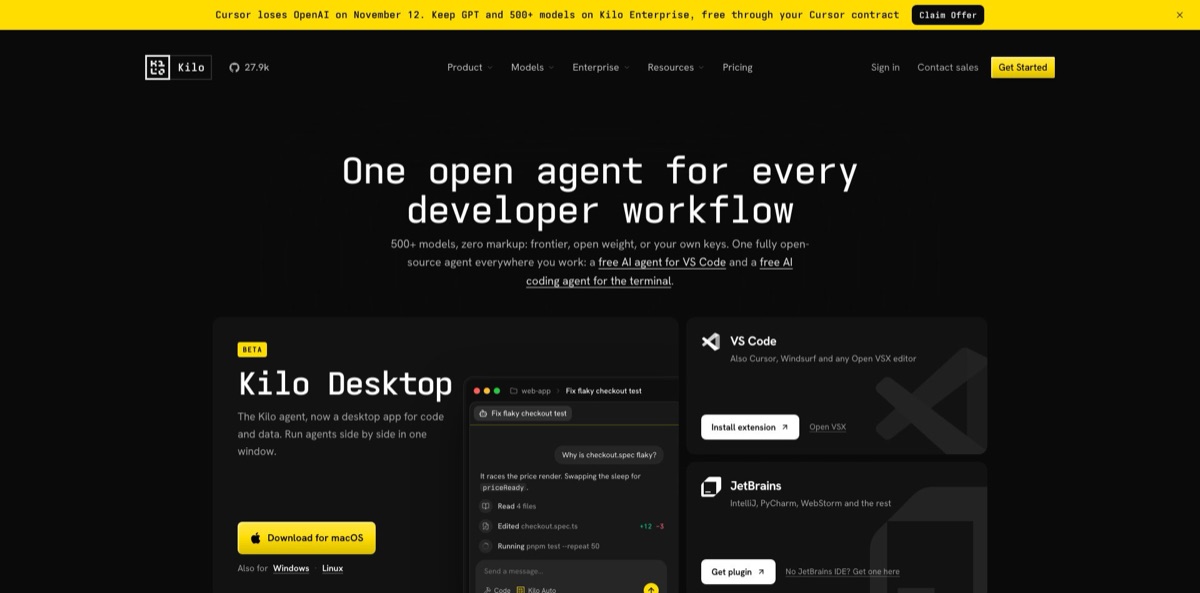
Kilo Code is an open-source AI coding agent that runs as a VS Code extension, a JetBrains plugin, a terminal CLI, cloud agents in the browser and a Slack bot, all sharing one account and one credit balance. It reads your repository, edits files, runs commands and reviews pull requests, while you pick the model: 500+ models through Kilo Gateway at provider list prices, your own API keys, or local models via Ollama and LM Studio. The MIT-licensed clients show every prompt the agent sends. The trade-off is that you manage the economics yourself: inference, cloud compute and a 5% top-up fee are billed separately, and results depend heavily on the model you choose. Anaconda acquired Kilo in July 2026 and says models, pricing and the repo stay the same. Pick it if you want Cursor-style agent workflows inside your existing editor without a locked model subscription.
How to start using Kilo Code?
In VS Code, open the Extensions view, search for “Kilo Code”, then use the dropdown next to Install and choose Install Pre-Release Version; Kilo says that channel is the stable, recommended build of the rebuilt extension. VSCodium, Windsurf and other forks install it from Open VSX, JetBrains users get a plugin for IntelliJ, PyCharm, WebStorm and the rest, and the CLI installs with a one-line curl script or npm, pnpm, bun and brew. VS Code 1.84.0 or later is required.
On first launch you are asked to sign in or create a free account. Options include email, GitHub, GitLab, Google, Apple, ChatGPT and Anaconda, plus SSO for organizations. In the terminal, run kilo auth login. If you already pay for ChatGPT Go, Plus or Pro, you can connect that subscription on the BYOK page and run supported OpenAI models against your plan allowance instead of Kilo credits.
Click the Kilo Code icon in the Primary Side Bar and describe a task in plain English, such as adding error handling to one file. By default most tools run automatically and only shell commands, access outside the workspace and sensitive file reads ask for approval. Change that in Settings under the Auto-Approve tab, where each tool can be set to Allow, Ask or Deny. Switch between the Code, Ask, Plan and Debug agents with the agent selector or Cmd+. on macOS.
Before accepting a large change, open the built-in diff reviewer, leave line comments and send them back to the chat. Checkpoints (called snapshots in the new extension) are on by default and live in a separate Git repository, so you can roll back without touching your project history. In the CLI, kilo run executes a one-shot task; add --auto only when you are comfortable with full auto-approval.
Start on Auto Free or your own API key for a week, watch the token counter, and only then decide whether Kilo Pass is worth it.
Who is it for?
Developers leaving Cursor or Windsurf
You like agentic editing but not the editor fork or the fixed subscription. Kilo Code runs inside standard VS Code and JetBrains, a migration guide helps you move your custom rules, and you pay per token instead of per seat.
Cost-sensitive solo builders
Frontier models get expensive fast on long sessions. Auto Free, free-labelled models and cheap open-weight models such as DeepSeek or MiniMax keep daily costs low, and the Efficient tier of Auto Model routes routine work to cheaper models automatically.
Privacy-conscious teams
You cannot send proprietary code to a vendor that trains on it. Kilo states it never trains on your code, paid plans support no retention of prompts and outputs, and local models through Ollama or LM Studio keep everything on your machine.
JetBrains-heavy shops
Many AI agents treat IntelliJ, PyCharm or Rider as an afterthought. Kilo ships a dedicated plugin that uses the IDE’s own language services, so Java and Kotlin teams get the same agents as VS Code users.
Engineering leads rolling out AI
Different developers use different tools and nobody knows what anything costs. Teams adds shared BYOK keys, centralized billing, usage analytics and an AI adoption score, with model and provider allowlists on Enterprise.
Developers who work away from the desk
Long refactors stall when the laptop closes. Cloud Agents keep running in isolated containers, push to a branch after every message, and the same session can be resumed in the CLI, the IDE or the mobile app.
Kilo Code pricing
Kilo splits cost into three parts: a platform plan, AI inference and cloud compute. The extensions and CLI are free, and inference is billed at exact provider rates with no markup, whether you pay through Kilo Gateway, bring your own keys or run local models. A 5% processing fee applies to credit top-ups and Kilo Pass purchases (a $20 top-up costs $21), but not to Teams or Enterprise seats. Paid credits expire one calendar year after purchase.
Open-source VS Code, JetBrains and CLI clients, the full agent, code completion, any model, and commercial use of 40K+ Anaconda Core packages. You pay only for the inference you use, or nothing with free and local models.
Pay-as-you-go credits for 500+ models across 60+ providers at provider prices, with top-ups only when you need them.
Converts 1:1 into credits plus bonus credits worth up to $26.60 a month in total. Monthly subscribers get 10% bonus in month 1, a 50% welcome bonus in month 2, then up to 40% as the streak grows. Paying annually ($228/year) gives 50% bonus every month.
Kilo Pass Expert: $199/month, worth up to $278.60. Bonus credits expire at the end of each monthly cycle, and paid models have no daily, weekly or monthly rate limits on Pass credits.
Usage analytics, AI adoption score, shared custom agents, centralized billing, shared BYOK, team management, data privacy controls, Bring Your Own Compute and priority support. Every trial is a 14-day Enterprise trial with no credit card required.
Custom. Model and provider limits, a shared private gateway for BYOK, sub-organizations with budgets, audit logs, SSO, OIDC and SCIM, Bitbucket and Jira integrations, SLA commitments, EU inference and compute, and a dedicated support channel.
Code Review runs at $0.33/hour, Cloud Agent Docker and Small at $0.60/hour, Standard at $1.20/hour, billed per second from the same credit balance. You need at least $5 on the balance to start a container, which is not a fee.
Kilo Code key features
Specialized agents with native subagents
Code has full tool access, Ask is read-only, Plan can only write plan files to .kilo/plans/, and Debug works through errors methodically. Code, Plan and Debug can delegate to subagents, and you can define custom agents with their own prompts, tool permissions and model. The read-only modes let you explore an unfamiliar repo without risking edits.
Model freedom through Kilo Gateway and BYOK
One picker covers 500+ hosted models, keys from Anthropic, OpenAI, Google, Azure, AWS Bedrock and other providers, and local models via Ollama or LM Studio. Auto Model routes work through Frontier, Efficient or Free tiers so you do not switch models by hand.
Agent Manager with parallel worktrees
Session tabs let you run several agents at once, each in its own Git worktree if you want isolation, and merge results back through a PR, a commit or a direct apply. You can also run Claude, GPT, Gemini or another model on the same prompt and compare the actual output side by side.
Inline review and safety rails
The built-in diff reviewer shows every agent edit in unified or split view, accepts line-level comments and sends them back to the chat with file paths and code. An optional sandbox on macOS and Linux (off by default, not available on Windows) keeps writes inside allowed paths, protects .git and blocks network access except for hosts you approve. Snapshots let you roll back anything the agent touched.
Cloud Agents
Connect GitHub or GitLab in the Integrations tab, pick a repository, and Kilo clones it into an isolated Linux container with Node.js, git, gh and glab preinstalled. Every message auto-commits and pushes to a unique branch, environment profiles store secrets and startup commands, and webhooks can start sessions from other tools. Inactive sessions are deleted after 7 days but stay accessible from the CLI.
Code Reviewer for pull requests
It detects new PRs on GitHub or GitLab and posts inline comments on bugs, security, performance and style, with strict, balanced or lenient profiles and custom instructions. A local review mode checks uncommitted changes from the IDE before you commit.
MCP and project context
Kilo acts as an MCP client with a built-in marketplace for servers such as GitHub, Linear, Jira, Postgres and Context7. You add context with @file, @folder and @url mentions, and project skills stored in .kilocode/skills/ load automatically in cloud sessions.
Kilo Code Pros & Cons
Pros
Kilo Code gives you an agentic workflow close to Cursor’s without leaving VS Code or JetBrains and without a model lock-in. You choose between hundreds of hosted models at list price, your own keys, a ChatGPT subscription or fully local inference, and you can see exactly what each request costs. The MIT-licensed clients let you audit prompts and context, which matters for security reviews. Parallel worktrees, inline diff review, snapshots and the sandbox make it practical to let agents run larger tasks. Cloud Agents and the free Code Reviewer extend the same account to background work and PRs. Pair it with a cheap open-weight model for routine tasks and keep a frontier model for hard refactors.
Cons
Flexibility means more decisions: which model, which tier, BYOK or credits, and whether Kilo Pass bonuses pay off. Costs vary with the model, and autocomplete and background tasks such as session titles consume credits unless you point them at free models. Public user feedback is uneven: some reviewers report the agent looping, breaking working code or stalling on weaker models, and several Trustpilot complaints concern billing and refunds. The product changes fast after the rebuild on the OpenCode core and the Anaconda acquisition, so docs and settings move often. Set the small model to a free one, cap spending with BYOK limits at your provider, and test on a branch first.
Use Kilo Code if you want…
- Run an open-source coding agent inside your current editor.
- Switch between 500+ models without changing tools.
- Pay provider list prices for tokens with no markup.
- Keep code on your machine with Ollama or LM Studio.
- Run several agents in parallel on separate Git worktrees.
- Hand long refactors to cloud agents that push branches.
- Get AI reviews on GitHub or GitLab pull requests.
- Give a team shared keys, billing and usage analytics.
Kilo Code alternatives



Kilo Code Reviews
Product Hunt reviewers rate it highly for the wide model choice through Kilo Gateway, visible token usage, the diff viewer and parallel worktrees, though several ask for clearer pricing examples and better onboarding docs.
Developers on Hacker News say it covers most of what they liked in Cursor without a subscription and pair it with cheap models such as DeepSeek or MiniMax, but some find context compaction on long sessions weak.
One Hacker News user who brings their own API keys in JetBrains questions the point of buying Kilo credits instead of paying providers directly, while another calls the setup rough but less rough than Continue.
Low-score Trustpilot reviews describe the agent going in circles, breaking previously working code or hanging on “Considering the next step”, and several complain about duplicate charges and refused refunds.
Positive Trustpilot reviews say it works well once MCP servers and a low-cost model plan are configured, and mention quick, helpful support.
FAQ
Is Kilo Code free?
Yes. The VS Code extension, JetBrains plugin and CLI are free and open source. You pay only for AI inference and cloud compute, and you can avoid even that with free models, local models or your own provider keys.
Which editors and platforms does Kilo Code support?
VS Code and its forks (including Cursor and Windsurf via Open VSX), all major JetBrains IDEs, a standalone CLI, Cloud Agents in the browser, Slack, mobile apps and a beta desktop app for macOS, Windows and Linux.
Can I use my own API keys or local models?
Yes. BYOK covers Anthropic, OpenAI, Google, Azure, AWS Bedrock and other providers at their own prices, and Ollama or LM Studio run models locally. A ChatGPT Go, Plus or Pro subscription can also be connected for supported OpenAI models.
Does Kilo Code train on my code?
Kilo states it never trains on your code, and paid plans support no retention of prompts and outputs. Auto Free may route to providers that log requests, so avoid sending confidential code through free models.
What is Kilo Pass?
A monthly credit subscription from $19/month that converts 1:1 into credits and adds bonus credits of up to 40% on monthly plans or 50% on annual plans. You can cancel future renewals at any time, but you lose your bonus streak.
Do Kilo credits expire?
Paid credits expire one calendar year after purchase, and Kilo Pass bonus credits expire at the end of each monthly cycle. Credits are spent earliest-expiring first.
Is Kilo Code still open source after the Anaconda acquisition?
Yes. Anaconda acquired Kilo in July 2026 and says models, pricing, the install process and the MIT-licensed repository stay the same, and that Kilo remains free for individual developers.
Can Kilo Code work while my laptop is closed?
Yes, through Cloud Agents. They run in isolated containers connected to GitHub or GitLab, push changes to a branch after every message and can be resumed locally later.
Similar tools
 Novita AIDeveloper cloud with one API for 200+ open-weight AI models, plus GPU instances, dedicated endpoints and isolated sandboxes for AI agents.
 You.comDeveloper platform of web search, content extraction, cited research and model inference APIs that feed AI agents and RAG apps real-time web
 QodoAI code review platform that runs specialized agents on every pull request, enforces team rules and checks changes against tickets and linked