
Kive
Content CreationUpdated November 17, 2026
AI product photography platform that turns a few photos of your product into on-brand studio shots, lifestyle scenes, ads and short videos.
We may earn a commission when you sign up through our links. It does not affect our reviews.
What is Kive?
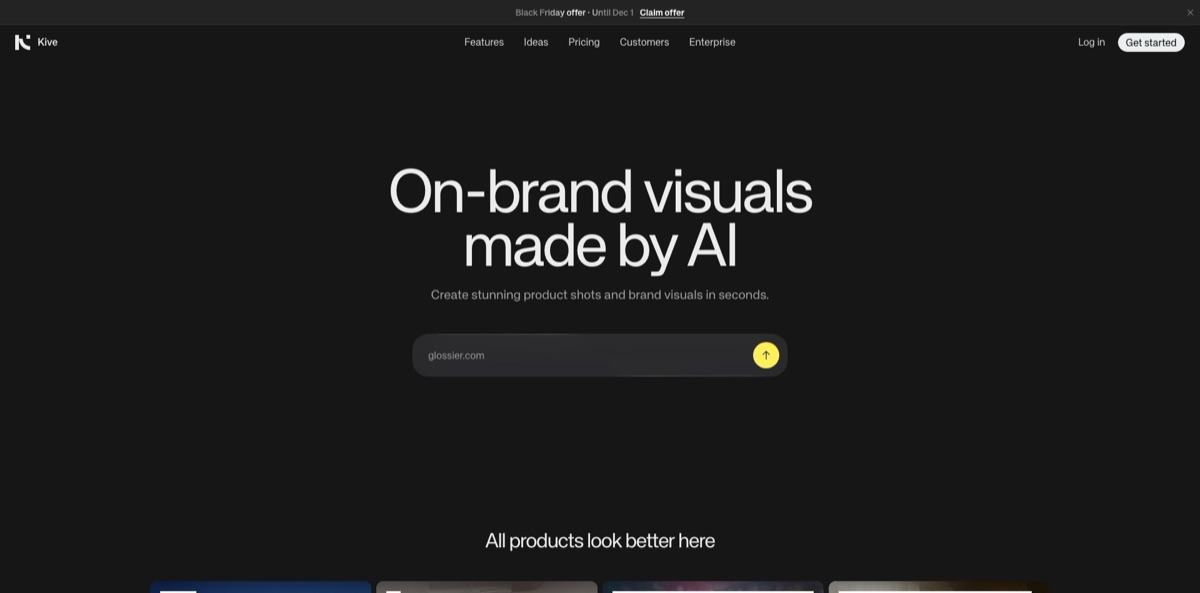
Kive is a browser-based AI product photography platform, run by Stockholm-based To Labs AB, that turns a few photos of a physical product into studio shots, lifestyle scenes, on-model images, ad creatives and short videos. You train a product model from one to four photos, pick a studio preset or describe a scene, and the generator keeps your item recognizable while it changes everything around it. A shared asset library, boards, a creative agent and an MCP server for ChatGPT and Claude sit on top, so a small team can generate, review and file visuals in one tab. The weak spot is consistency: buyers on Trustpilot and the Shopify App Store describe products that drift in shape, texture or logo, and every retry costs credits. Pick it if you sell fashion, beauty, jewelry or home goods and need a steady flow of catalog and ad imagery without booking shoots.
How to start using Kive?
Go to kive.ai, click Get started and sign up with Google, Apple or an email and password. Verify your email first: that releases the starter credits (40, or 80 if you enter a store website during signup) plus downloads and team features. A short setup wizard asks for your name, an optional store URL, what describes your work (Brand or online store, Agency, Freelance creative or Just exploring) and the product categories you sell. You then land on Ideas, a feed of ready-made scenes and ads you can remix with your own product.
The first real job is a product model. Open Organize, choose Products and click Create product, then upload one to four photos of the same item from different angles, pick them from your library or paste a product URL. Kive checks the photos before training and flags problems such as images under 512×512px, blurry logos, busy backgrounds or shots that show different items. Free accounts can only try the demo models (Acme Serum, Black Loafer and others), because product and character models need a paid plan. Shopify merchants on paid plans can connect the store and import products in one click.
Most of your time goes into the Create screen. Type a short prompt, mention your product as @modelname, then use the + button to attach a Studio, a character, a reference image or a saved prompt. The same bar sets aspect ratio (9:16 through 21:9), Versions (1, 2 or 4) and Quality (Draft, Premium or Max), and the credit cost updates below it before anything runs. Switch the IMAGE / VIDEO dropdown to Video for 4 to 15 second clips with optional sound and start or end frames, available on paid plans.
New results land in your private My generations feed. Click Save to move the keepers into the shared library or a board, where teammates can comment and compare versions. When an output goes wrong, the thumbs-down button opens Diagnose & Fix: the Agent asks what is off, proposes a fix and returns the credits for that output, up to a monthly limit. Inside Shopify, Create with Kive lets you review each image before adding it to the product listing.
Who is it for?
Solo Shopify sellers
You list new products every week but cannot afford a photographer for each drop. Kive imports the catalog from your store and generates listing images and lifestyle shots you approve inside Shopify admin. The Basic plan’s 2,000 monthly credits cover roughly 200 Premium images.
Fashion and apparel brands
On-model photos are the most expensive part of a launch. Character models keep the same face across a collection, and the Catalog Lookbook workflow builds on-model images for a whole range. Expect to check garment details closely, because users report fabric textures getting flattened.
Beauty, skincare and jewelry marketers
Small items with labels and fine surfaces need many angles and moods. Studios handle lighting and props, so you can produce a white-background set and an editorial set from the same product model. A jewelry seller on Shopify says silver texture and detail stay accurate.
Performance marketing teams
Paid social burns through creatives fast. The Meta Ad Formats workflow resizes approved visuals for feed, Stories and Reels, and Localize for Market adapts them to another country or language. Short video clips with sound give you motion ads without a shoot.
Agencies and in-house creative teams
Several people working on one brand need shared assets and a review trail. Pro gives up to 10 users, boards, comments, version history and custom studios everyone can reuse. Clients see a consistent look across campaigns instead of one-off AI experiments.
Enterprise catalog teams
Thousands of SKUs need the same treatment. Bulk generate applies one studio to a whole product list, and the Enterprise plan adds SSO, product accuracy checks and trademark and IP checks on outputs.
Kive pricing
Kive runs on workspace credits rather than per-image fees. Kive’s pricing FAQ puts an image at about 10 credits, a 5-second video at about 100 and a finished ad at about 200 across iterations and formats, with the exact cost shown before each run. Unused credits roll over up to 2× your monthly allowance, failed and filtered generations are refunded automatically, and VAT is added at checkout based on your location. Yearly billing is 25% cheaper than monthly.
You get 40 starter credits after verifying your email (80 with a store website), demo models, up to 5 boards and one free image every 30 minutes when credits run out. Images carry a Kive.ai watermark, and video generation is not included.
Includes 2,000 credits a month, which the pricing table equates to about 400 Draft, 200 Premium or 100 Max images, or 20 Premium 5-second videos at 720p. You get 2 users, 10,000 library items, product and character models, the Kive agent and MCP access. Extra credits come as one-time top-ups capped at your monthly allowance.
Yearly billing is $75/month at the standard rate. Adds up to 10 users, unlimited products and brands, 1080p Max video, 50,000 library items, advanced brand training and unlimited credit top-ups.
Custom. Volume pricing upwards of 150,000 credits a month, custom AI ideas and presets, product accuracy checks, trademark and IP checks, SSO, onboarding, priority support, and invoice or wire payment.
Kive key features
Product and character models
You train a product model from one to four photos or a character model from one to three, then call either in any prompt with @name. Kive checks the input photos first and warns about low resolution, unclear logos or mismatched items before you spend credits. The result is the same product or face across hundreds of scenes.
Studios and presets
Studios are pre-built scenes that combine lighting, camera angle, props and background, grouped into styles like Minimalist, Natural, Dramatic and Colorful. Click Remix to swap individual blocks, then save the result as a custom studio for your workspace. Every product shot in a campaign gets the same lighting without long prompts.
Kive agent with named workflows
Describe a job in chat and the agent picks one of nine workflows: Marketplace Listing, Catalog Lookbook, Ad Creative, Meta Ad Formats, Variations & Formats, Localize for Market, Create character, Plan Video Scenes, or Inspect & Fix. Several agents can run in parallel in the background. It turns a vague brief into a structured set of assets rather than single images.
Bulk generate
Pick products, assign a studio, adjust individual line items or combine several products in one shot, then generate the whole batch. Bulk import on the Products page handles up to 200 products at a time, and versions multiply per line item, so 2 versions for 10 products means 20 images.
Video with sound
Video mode creates 4 to 15 second clips in aspect ratios from 21:9 to 9:16, with optional synchronized dialogue and sound effects. Start and end frames lock the composition, and the agent can edit an existing clip, such as changing a garment’s color. Pro adds Max quality at 1080p, while Basic tops out at 720p.
MCP server and integrations
Kive runs an OAuth-protected MCP server with 33 tools for importing products, generating images and video, editing and organizing boards. It is listed in the ChatGPT app directory and has setup guides for Claude, Cursor, Figma, n8n, Zapier, Notion and others, plus a Shopify app. You can trigger on-brand product shots from the tools your team already uses.
AI editing and asset library
Background removal costs 1 credit, canvas extension 2, an Agent edit 10, and upscaling to 16MP or 24MP 10 or 20 credits. Every asset sits in a searchable library with natural-language search, boards, comments and version history. Uploading, organizing and viewing are free, so the library doubles as your brand’s image archive.
Kive Pros & Cons
Pros
Kive is built for one job, product imagery, and the workflow shows it. Product models, studios and bulk generation let you apply one visual direction across a whole catalog instead of prompting image by image. The cost of each run is visible before you click, credits roll over up to twice your allowance, and failed generations come back automatically. The MCP server and the ChatGPT app mean marketers can request shots from chat, while the Shopify app keeps approval inside the store admin. Teams also get a real asset library with comments and versions, which most single-purpose generators lack. Start with one studio per product category and save it, so every new item inherits the same look.
Cons
Output reliability is the most common complaint. Trustpilot reviewers (TrustScore 2.7 from 38 reviews at the time of writing) report changed product shapes, wrong logos, flattened fabric and videos that ignore the prompt. Since only failed or filtered outputs are refunded automatically, poor but completed results still burn credits unless you use Diagnose & Fix within its monthly limit. Several reviewers also found the rollover cap and plan changes confusing, and some describe slow or scripted support replies. The free tier is thin: 40 credits, demo models only and a watermark. Read the rollover rules before you pick a large Pro tier, and verify every label and logo before publishing.
Use Kive if you want…
- Turn a few product photos into catalog-ready shots.
- Generate on-model fashion images without hiring models.
- Apply one studio look across your whole catalog.
- Create Meta ad formats from approved product visuals.
- Make short product videos with sound from images.
- Request product shots directly from ChatGPT or Claude.
- Import Shopify products and add images inside admin.
- Keep brand assets, boards and versions in one library.
Kive alternatives

Kive Reviews
A small jewelry brand owner on the Shopify App Store says Kive has become a weekly tool: you pick a look, add your own ring, and the silver texture and details stay accurate enough for the website and Instagram, replacing shoots the brand could not afford.
Positive Trustpilot reviewers say product and lifestyle images beat other AI tools they tried, especially when starting from studios and presets and then adding custom instructions, and call it a good fit for fashion brands.
A Swedish coffee retailer with six months on Kive reports that great results are possible but most outputs need discarding because the AI alters the product, so you pay for many reruns; the same reviewer felt penalized by the credit rollover cap on a $200 Pro plan.
Several Trustpilot reviewers like the idea of a dedicated product photo app but complain that edits regenerate the whole image or clip, that wrong logos or product shapes appear, and that unwanted results still consume credits.
Some users praise quick help with billing errors, while others say support emails went unanswered or only produced scripted replies, so experiences with the team vary widely.
FAQ
Does Kive have a free plan?
Yes. Free gives you 40 credits after you verify your email (80 if you add a store website at signup), up to 5 boards, demo models and one free image every 30 minutes once credits run out.
Do free images have a watermark?
Yes, images generated on the Free plan carry a Kive.ai watermark, while videos are not watermarked. Images from Basic, Pro and Enterprise plans have no watermark.
Do unused credits roll over?
Yes. Unused monthly credits carry over up to 2× your plan’s allowance, so on a 5,000-credit plan your balance can reach 10,000 at renewal; anything above that cap is not carried forward.
Can I get credits back for bad results?
Failed and filtered generations are refunded automatically. For outputs you made on the Create page, Diagnose & Fix returns the credits once the Agent identifies the problem, up to a monthly limit, but Kive does not refund results simply because you dislike them.
Does Kive work with Shopify?
Yes. The Kive Shopify app lets you open a product in Shopify admin, choose Create with Kive, pick a studio and quality, and add approved images to the listing. Paid workspaces can also import the whole catalog as product models.
Can I use Kive from ChatGPT or Claude?
Yes. Kive is listed in the ChatGPT app directory, and any MCP client, including Claude, Cursor, n8n and Zapier, can connect to its server at mcp.kive.ai/mcp. Generations made there use your normal workspace credits.
How does Kive handle my data?
Kive is operated by To Labs AB in Sweden, and its privacy policy is written around the GDPR. It names cloud, AI model and analytics providers as processors and advises against putting personal data in prompts or uploads unless needed.
Can I cancel anytime?
Yes. Self-serve plans are paid by card through Stripe and can be changed or cancelled at any time; changing plans keeps your current balance until the next renewal.
Similar tools
 WritefullAcademic writing AI for Word, Overleaf and the browser, with journal-trained language edits, an Academizer, a paraphraser and title and abstract generators.
 TypefaceEnterprise marketing AI platform that turns brand guidelines into AI agents for on-brand emails, ads, web pages and campaign variants at scale.
 Storyboarder.aiAI pre-production platform that turns scripts or ideas into shot lists, consistent storyboard frames, animatics and pitch decks for film and ad