

Krea
Art GenerationUpdated October 19, 2026
Browser-based AI creative suite for generating, editing and upscaling images and video with Krea's own models plus dozens of third-party ones.
We may earn a commission when you sign up through our links. It does not affect our reviews.
What is Krea?
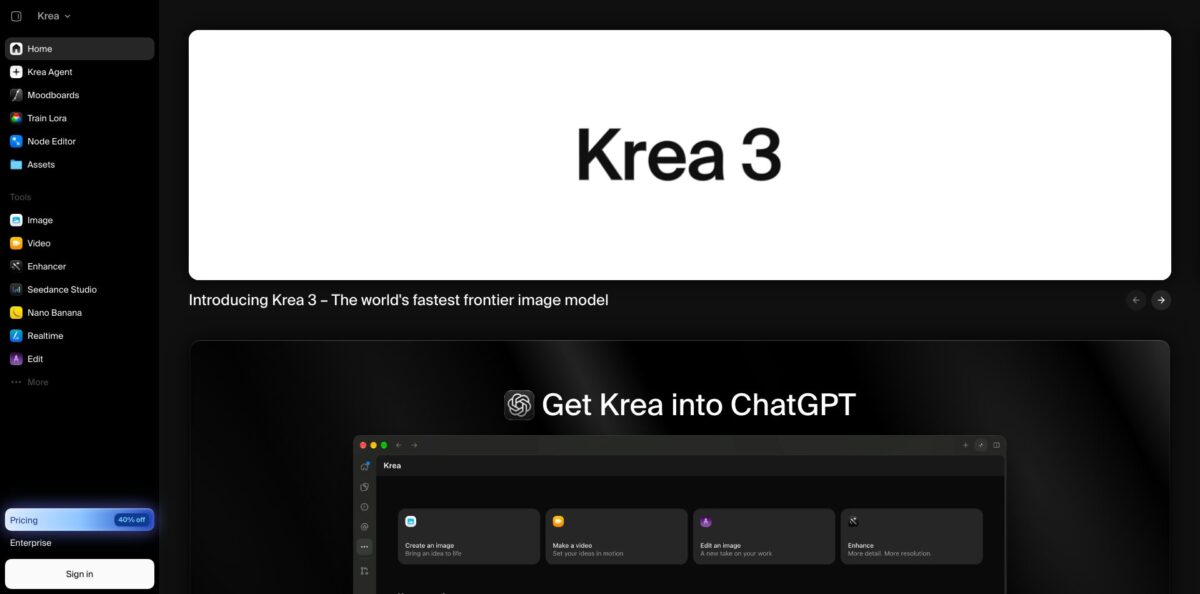
Krea is a browser-based creative suite that puts its own image models (Krea 1, Krea 2 and the newer Krea 3 editing model) next to dozens of third-party models such as Nano Banana, GPT Image, Flux, Seedream, Veo, Kling, Seedance and Wan. Around those models sit tools most single-model generators lack: a Realtime canvas that redraws the output while you sketch, an Enhancer with Topaz upscaling up to 22K, LoRA training, a node editor for repeatable pipelines and an Agent that plans multi-step jobs from one brief. You stop paying for five separate subscriptions just to compare models. The weak spot is cost control, because every tool draws from one pool of compute units and premium video models drain it fast. Krea suits designers, art directors and small studios who want to test many models side by side from one workspace.
How to start using Krea?
Create an account at krea.ai and you land on the Free plan: 100 compute units a day, no credit card required. The allowance refills daily, and Krea’s own comparison table translates it into roughly 50 Krea 2 Turbo images, 5 Krea 2 Large images or about 900 Realtime frames per day. Free output is not licensed for commercial use, and several premium models stay locked, so treat this tier as a sandbox for learning the interface rather than for client work.
For a first real project, open the Image tool and pick a model in the model selector. Each model card shows its approximate unit cost, which helps you plan: Krea 2 Turbo costs 2 units per image, Krea 2 Large costs 20, and Nano Banana Pro sits around 100. Type a prompt that covers subject, composition, style and lighting, choose an aspect ratio, and optionally upload a reference image to steer colors or product details. Krea returns several interpretations you can compare, edit or send to the Video tool as a start frame.
The screen that sets Krea apart is Realtime. The canvas sits on the left and the live output on the right, with no render button and no queue. You pick a draw mode (Draw, Web Camera, Screen Record or Text Only), then paint rough shapes with the Brush (B), move elements with Select (V) or clean up with the Eraser (X). Fast models render at 512px and quality models at 1024px, in 1:1, 3:2 or 2:3. When a frame looks right, pass it to Enhancer, choose a 1x, 2x, 4x or 8x upscale and a model such as Topaz Standard or Topaz Generative.
Before you deliver anything, check that you are on a paid plan if the asset is commercial, and look at the Generations history to see what each step cost. If you will repeat the same chain of steps, rebuild it in Nodes so it runs in one click next time. For brand or character consistency, train a custom style: Krea needs at least 3 images, and its docs suggest 10 to 30 for a model that generalizes well.
Prototype compositions in Realtime and Krea 2 Turbo, then spend units on premium models only for the shots you plan to keep.
Who is it for?
Concept artists and illustrators
You need dozens of rough directions before a client picks one. Realtime turns loose brush strokes into rendered frames as you draw, and a trained style keeps your own look across every variation instead of a generic model aesthetic.
Brand and marketing designers
You produce posters, social formats and packaging mockups on tight deadlines. Krea 3 edits only the region you box, matches a hex code you name, and accepts up to eight reference images, so a product can be dropped into new scenes without redrawing the whole layout.
Architects and interior designers
Clients want to see a sketch as a finished render before signing off. Krea’s Agent ships an Architectural Render template that renders a sketch across seasons and animates a drone flyover, and Realtime lets you adjust massing and light live during a meeting.
Video editors and motion designers
You already work in Premiere Pro, After Effects or DaVinci Resolve and do not want another browser tab. Krea plugins bring its image and video models into those apps, with Seedance, Kling, Veo and Wan available from the same account.
Ecommerce teams
One product photo has to become a full set of lifestyle and studio shots. The Product Photoshoot template and Krea 3’s product-consistent edits cover background swaps, color variants and object removal at volume.
Developers and automation builders
You want image and video generation inside your own product. The Krea API exposes 40+ models through one REST endpoint billed per generation in dollars, and the MCP server lets Claude, ChatGPT or Cursor call Krea directly.
Krea pricing
Krea sells plans by compute units. Every generation, upscale, training job or agent step spends units at a rate that depends on the model, resolution and duration, so the same plan buys thousands of fast images or a few dozen premium videos. On Pro and Max, monthly units do not roll over; Business and Enterprise allow rollover. Yearly billing takes 40% off Pro and Max. Extra one-time compute packs from 2,000 to 50,000 units are available to signed-in users and expire after 90 days.
100 compute units per day, no credit card, Realtime models, limited access to image, video, 3D and lipsync models, LoRA training with up to 50 images, upscaling to 2K, one image job at a time. No commercial license.
20,000 compute units per month, which Krea equates to about 257 Nano Banana 2 images or 83 Seedance 2.0 videos. All video models, Topaz upscaling up to 22K, Nodes, App Builder, commercial license, 8 parallel image jobs and 4 video jobs.
Larger unit tiers can be selected at checkout. Adds LoRA training with up to 2,000 images, unlimited relaxed generations on supported in-house image models, unlimited image concurrency and 8 video jobs.
Up to 50 members included at no per-seat cost, Business Terms of Service with no-training clauses, custom roles, model access controls and private Node Apps.
Custom. Custom seat count and compute packages, custom terms, SAML SSO, priority support with SLA, per-member spend limits, Slack Connect and IP indemnification.
The API is billed separately from app plans, in dollars per generation: for example Nano Banana 2 at $0.06 per image, Veo 3.1 at $0.20 per second of video and Topaz upscaling at $0.10 per image. Failed or cancelled API jobs are not charged.
Krea key features
Multi-model image and video studio: The Image and Video tools list Krea’s own models beside Nano Banana, GPT Image, Flux, Seedream, Ideogram, Recraft, Veo, Kling, Seedance, Wan, Sora and others, each card showing its unit cost. You run one prompt across several models and keep the best result without juggling accounts. New models tend to appear on Krea soon after launch, which matters if you chase the latest release.
Krea 3 editing model: Krea 3 is trained for production edits rather than full-image regeneration
You draw a box, describe the change, and it redraws only that region, finishing an edit in under 8 seconds at native 2K. It accepts up to eight references and matches exact hex colors on a product.
Realtime canvas: Realtime renders as you draw, type, move shapes, share a browser tab or point a webcam at a scene
An AI Strength control balances your input against the text prompt. It is the fastest way to explore composition and color before committing units to high-resolution renders.
Enhancer and Topaz upscaling: Enhancer offers 1x to 8x upscales with Krea Enhance and Topaz models, plus settings for strength, resemblance, denoise and face detection. Paid plans reach outputs up to 22K, which covers large print. Krea’s own docs note that it reconstructs plausible detail rather than recovering real information, so it is a creative tool, not a forensic one.
Custom style and LoRA training: Upload at least 3 images of a style, character or product and Krea trains a reusable style you can apply to generations, edits, upscales and video. Free and Pro allow 50 images per LoRA, Max and Business 2,000. This keeps campaign visuals and recurring characters consistent without long prompts.
Nodes, App Builder and API deployment: The node editor chains models so the output of one becomes the input of the next, runs models in parallel for comparison and saves the chain as a reusable workflow. App Builder turns a workflow into a shareable app, and a finished workflow can be deployed and called as an API endpoint.
Krea Agent, plugins and MCP: Krea Agent takes a brief, plans the steps, picks models and iterates, with templates for rebrands, product shoots and explainer videos. It is open on every plan, and its generations cost the same units as manual ones. Plugins cover Photoshop, After Effects, Premiere Pro, DaVinci Resolve and Blender, and the MCP server connects Krea to Claude, ChatGPT, Cursor and other agents.
Krea Pros & Cons
Pros
The biggest strength is breadth in one place. Image, video, 3D, upscaling and training all live under one login, and you can test the same idea on Krea 2, Nano Banana, Flux or Seedream without exporting files between services. Realtime is genuinely different from a prompt box, giving designers a sketch-first way to work that suits ideation sessions. Krea 3 makes routine product edits fast and inexpensive, and the API is priced per generation in dollars with no charge for failed jobs. Users regularly praise the clean interface and how quickly new models show up. Pick two or three models that fit your style and build a habit around them instead of chasing every new release.
Cons
Compute units are hard to reason about. A Pro allowance that looks generous for images covers only about 83 Seedance 2.0 videos, and units on Pro and Max expire each month. Reviews on Trustpilot raise billing friction: charges after cancellation, unused units lost when a subscription ends, overlapping promo offers at signup and slow replies from support. Some users find recent moderation stricter, and others report that the Agent can misread a detailed brief and spend credits on failed attempts. Output quality also depends heavily on the chosen model and prompt. Watch the per-model unit cost on every card, and set a calendar reminder before renewal if you plan to cancel.
Use Krea if you want…
- Compare leading image models on one prompt.
- Turn rough sketches into renders in real time.
- Upscale images to print size with Topaz models.
- Train a custom style for consistent brand visuals.
- Swap product backgrounds and colors with precise region edits.
- Animate stills with Veo, Kling, Seedance or Wan.
- Automate repeat creative jobs as node workflows.
- Generate images and video from Claude or ChatGPT.
Krea alternatives
 MidjourneyRead review →
 Leonardo.aiRead review →
 IdeogramRead review →
 OpenArtRead review →
 RunwayRead review →
 Adobe FireflyRead review →
 CivitaiRead review →
Krea Reviews
Long-time users like having many of the newest image and video models behind one clean, easy interface, but say the subscription is pricey and compute units run out quickly.
The Enhancer gets credit for adding realistic texture to blurry images, though the gallery lacks folders, tags or search, so large projects get messy.
Some reviewers find that prompts are followed imperfectly and outputs can look plastic, with only part of each batch usable without rerolls.
Several billing complaints describe charges continuing after cancellation and unused credits disappearing once a subscription ends, with slow answers from support.
Photographers and illustrators say access to high-end models has sped up their work, while a few note that content filters have become stricter than before.
FAQ
Is Krea free to use?
Yes. The Free plan gives 100 compute units per day with no credit card, enough for a handful of premium images or dozens of fast ones. Free output is not licensed for commercial use.
Can I use Krea images commercially?
Pro, Max, Business and Enterprise plans include a commercial license for images, video and other generated assets. Business and Enterprise add IP indemnification when usage follows the agreement terms.
Do unused compute units roll over?
Not on Pro or Max: monthly units expire at the end of each billing cycle. Business and Enterprise plans allow rollover, and one-time compute packs stay valid for 90 days.
Does Krea have an API?
Yes. The Krea API offers 40+ image, video and upscaling models through one REST endpoint, with SDK examples in Python, Node.js and Go, webhooks and automatic queueing. It is billed in dollars per generation from a separate API balance.
Can I train Krea on my own images?
Yes. Upload at least 3 images of a style, character or object, ideally 10 to 30, and Krea creates a reusable style you can apply across generations, edits and upscales.
Does Krea train on my content?
The Business Terms of Service include data protection and no-training clauses for your content, and Enterprise workspaces can enable Zero Data Retention for API jobs. On individual plans, review the standard terms before uploading sensitive client material.
Is there a Krea mobile app?
Yes, Krea has an iOS app, and Krea Agent also works in mobile browsers with the same plan rules as the web app.
Can I cancel or change my plan anytime?
Yes. Upgrades and downgrades take effect immediately with prorated billing. Use up remaining units before you cancel, since monthly units do not carry over.
Similar tools
 CustomuseAI 3D creation platform that chains image, video and 3D models into node workflows for game-ready assets, Roblox items and scenes.
 VisualGPTCredit-based AI image and video studio that runs Nano Banana, GPT Image, Seedream, Flux and Kling for product photos, photo edits and
 LovartAI design agent that turns a chat brief into logos, social posts, product shots, slides and videos on one editable infinite canvas.