

Kreo
AI AssistantsUpdated November 17, 2026
Cloud AI takeoff and estimating platform that measures, counts and prices construction drawings, with an AI agent that runs multi-step jobs.
We may earn a commission when you sign up through our links. It does not affect our reviews.
What is Kreo?
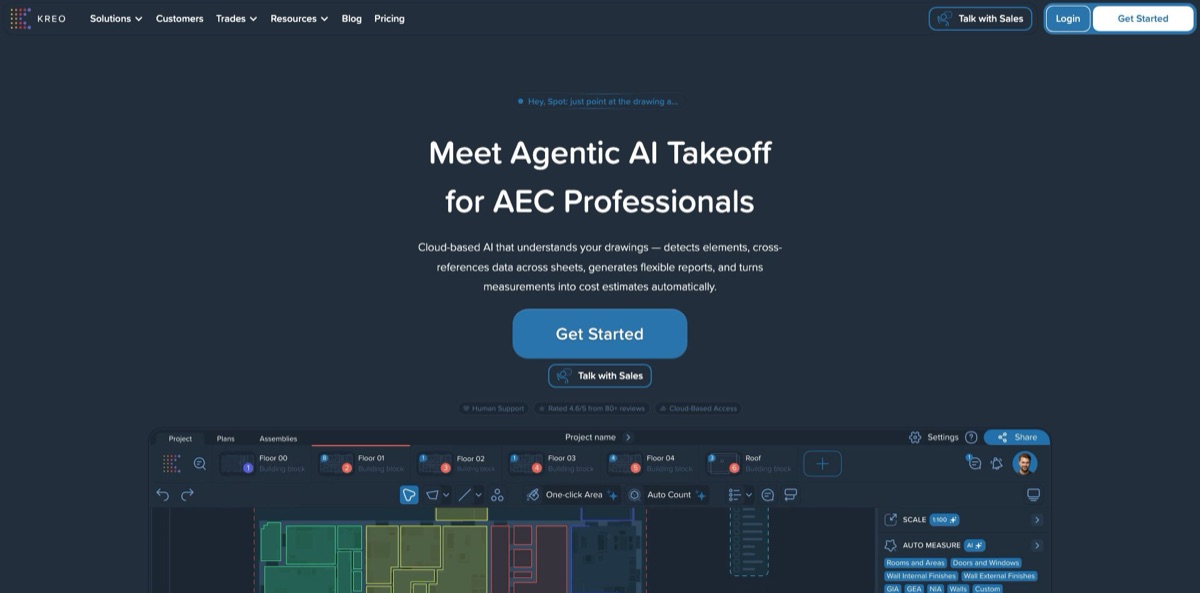
Kreo is a browser-based takeoff and estimating platform from a UK company, built for quantity surveyors, estimators and contractors who price work from 2D drawings. You upload PDF, CAD or image files, and its AI measures rooms, walls, doors and windows, counts repeated symbols and links every quantity to a live spreadsheet and cost database. On top sits Caddie, an AI agent that plans and runs multi-step jobs such as counting the doors on a floor or building a room schedule in Excel, plus Spot, a voice agent you talk to while pointing at the drawing. The result is far less clicking around polygons on large tender sets. The weak spots are the price, annual-only billing and AI output that still needs checking on busy plans. Pick it if takeoff is a weekly job for your team, not an occasional one.
How to start using Kreo?
Sign up from kreo.net with your email, name, company and a password, then answer a short questionnaire. The 7-day free trial starts from a plan card, usually Pro, but the help center is clear that a trial cannot begin without payment details: a card, Direct Debit or Google Pay. The first annual charge lands automatically at 00:00 UK time on the seventh day unless you cancel, and Kreo sends a reminder beforehand. Check the supported countries list first, because sign-ups from elsewhere go through support.
On the Projects page, click the + button or Create, upload your drawings and give the project a name. Kreo accepts PDF, DWG, DXF, DWF, DGN and common image formats such as PNG, TIFF and JPG, and it reads native vector data instead of a flattened picture, so snapping and measurements follow the original lines. Set the scale next. You can calibrate from a known length, pick a standard scale, or let AI Scale find it on the title block and simply confirm it. Start with a clean floor plan, not your messiest set.
Now open a sheet and try the AI tools in order. One-Click Area traces a room boundary when you click inside it. Auto Count finds every symbol matching the one you select, across all pages. Auto Measure runs a whole category at once: Rooms and Areas, Doors and Windows, internal and external wall finishes, GIA, GEA, NIA, Walls 2.0 centerlines or a custom query. Toggles such as Include Doorways or Remove Doors change what gets measured, and Rename with AI pulls names from the PDF text. Results land in the measurement manager, in folders you can save as templates.
Check everything before it goes into a bid. Open the Caddie side panel and give it a task in plain English, for example counting the doors on the first floor; it asks a few clarifying questions, shows a step-by-step plan and runs only after you approve it. Compare its quantities with a sheet you measured by hand, and use Drawing Comparison when a revision arrives. When the numbers hold up, push them into the Spreadsheet or Grid report, export to Excel or a marked-up PDF, and invite the client as a free guest to comment.
Run Auto Measure on one floor you have already priced by hand, and compare the totals before you trust it on a live tender.
Who is it for?
Quantity surveyors
Cost plans and bills of quantities eat days of measuring the same room types across dozens of sheets. Auto Measure covers GIA, GEA and NIA plus room areas and wall finishes, and reports stay linked to the drawing. When the architect issues a revision, quantities move with it instead of being measured again from scratch.
Subcontractor estimators
Drywall, flooring, painting, electrical and concrete trades bid on many tenders and win only a fraction of them. Auto Count and One-Click Area cut the hours spent per bid, and Kreo publishes dedicated pages for each of these trades. Faster takeoffs let the same team price more jobs.
General contractors
Coordinating takeoffs across several estimators usually means emailing spreadsheets that drift out of sync. Kreo keeps projects, a shared cost database and drawing comments in one cloud workspace with company-level roles. Clients and site managers join as free guests to view and comment.
Estimating managers
Every senior estimator has a personal routine, which makes output inconsistent between people. Caddie Skills and the no-code Skill Builder let you record a repeatable process, such as a door schedule check, and run it the same way on every job. New hires follow the house method from their first week.
Firms with in-house software
If takeoff data has to land in an ERP or a custom estimating tool, the AI Search API returns detected walls, doors, windows and rooms as structured data, and the Core Platform API handles projects and measurements. Business plans include API access, while Pro buys it as an add-on.
Small builders who quote occasionally
A builder pricing a handful of jobs a year will struggle to justify an annual seat, and Kreo no longer sells monthly or pay-per-page plans to new customers. The Essential plan offers manual takeoff without AI for less money. A cheaper monthly tool may simply fit better.
Kreo pricing
Kreo bills every plan once a year, per user, and the monthly figures on its pricing page are just the annual price divided by 12; there is no monthly subscription. Older pay-as-you-go and Test Drive plans are closed to new customers. Prices exclude VAT and sales tax, and guests who only view and comment never need a paid seat. Every paid tier starts with a 7-day free trial, and a 7-day money-back guarantee follows the first payment. Paid pilots (one month on Pro, one to three months on Business) are available on request, with an unpublished fee credited to an annual plan if you sign within 14 days.
Manual takeoff and estimating without AI: PDF, CAD and image files, area, length, volume and count measurements, 2D and 3D views, drawing comparison, live-linked estimates, a shared cost database, Excel import and export, and email and chat support. Any team size.
Adds the AI layer: One-Click Area and lines, Auto Count, Auto Measure for rooms, walls, doors and windows, custom AI takeoff requests, AI scale detection and drawing naming, batch AI across sheets, the Caddie agent, reusable Skills and priority support. Limited to 1 to 4 users and paid by card. APIs are optional add-ons: Core Platform API at $140 per user per year, Items and Assemblies API at $160 per user per year, and Auto Measure API at $840 per year plus usage, starting at $1.50 per launch and falling with volume.
Built for 5 to 20 users. Adds branded report templates, cost database import and export, IFC export for BIM, enterprise SSO, data export and team analytics, every API with 200 Auto Measure API launches a month included, a shared customer success manager, a standard SLA and invoice billing.
Custom. For more than 20 users or several offices, with a custom AI allowance, advanced permissions, custom integrations, AI fine-tuning on your own drawings, hands-on data migration, a dedicated CSM and a custom SLA.
Kreo key features
Auto Measure is the core AI takeoff tool
Pick a category such as Rooms and Areas, Doors and Windows, wall finishes, GIA, GEA, NIA, Walls 2.0 or a custom prompt, and the model draws polygons, polylines or counts across the sheet, colour-coded by size. Version 3.0 added a second review pass inside the model, and Kreo claims outlines now land within 94% of the real geometry on busy plans, up from 72% in the previous version. Inside the app it is never billed per run.
Caddie is an agent rather than a chatbot
You describe a task, it asks about the data, processing and output you want, shows a plan for approval and then opens sheets, runs Auto Measure, builds reports, places callouts and exports .xlsx files step by step. It works around blocked steps, remembers project conventions, adjusts to thumbs-up and thumbs-down feedback and accepts attachments of up to 50 MB.
Skills turn repeated routines into one command
The library ships with CountFlow, Excel Template Builder, Window, Door and Rooms and Areas Recognition, and Design Review AI for QA/QC checks across a drawing set. The no-code Skill Builder supports If/Else branches, so you can add quality gates that stop a run when something looks wrong. Your team gets one house method instead of five personal ones.
Spot, released in October 2026, is a live voice agent that works on the drawing itself
Point at a room and ask for its area, say “count all like this” to trigger Auto Count, or dictate a comment that becomes a callout. Bigger jobs are handed to Caddie while Spot reports progress aloud. It answers in the language you speak and refuses to make up numbers when a page has no scale yet.
The drawing tools cover the non-AI basics well
You get CAD-grade snapping, Text Search with regular expressions, Drawing Comparison that highlights added, removed and modified elements between revisions, 2D and 3D split views with heights and thicknesses, and PDF export that keeps layers, legends and your logo.
Reports and the Items and Assemblies database connect quantities to cost
The Spreadsheet report works like Excel with formulas tied to live measurements, the Grid report groups and pivots everything, and assemblies convert measured areas into materials, labour and equipment costs. Change a rate once and it updates across every project that uses it.
APIs and integrations open the engine to other software
The AI Search API returns detected walls, doors, windows and rooms as coordinates, lengths and areas, and the Core Platform API handles projects, measurements and PDF export, all authenticated with an X-API-KEY header. There is a documented Contractor Foreman workflow and an Excel Add-in in early access.
Kreo Pros & Cons
Pros
Kreo puts AI measuring, a live spreadsheet and a cost database in one browser tab, so quantities never have to be retyped into Excel. It reads PDF and CAD vector data directly, works in metric or imperial units and runs on Windows or Mac with no installation. Caddie’s plan-then-execute approach suits estimators who refuse to trust a black box: you approve each plan, watch every step and can undo the last action. Reviewers on G2 and Capterra rate ease of use and support highly, with averages of 4.5 and 4.4. Security is solid for a mid-size vendor, with SOC 2 Type II, two-factor login and SSO on Business. Start the trial on a drawing set you have already priced, so you can measure the time saved directly.
Cons
The pricing is steep for small firms. Billing is annual only, the AI features start at $2,100 per seat a year, and Pro tops out at four users before you are pushed into a $15,000 Business contract. The trial needs payment details up front, and the first charge is automatic. Users report that auto-measure output on cluttered sheets can need as much tidying as a manual takeoff, and that heavy PDF files are slow to display. Because Kreo is fully cloud-based, a dropped internet connection stops work entirely. Availability is also limited to the listed countries. Set a reminder for day six of the trial and budget review time for every AI run.
Use Kreo if you want…
- Measure rooms, walls, doors and windows with AI.
- Count repeated symbols across every sheet in one pass.
- Delegate multi-step takeoff jobs to an AI agent.
- Ask questions about a drawing by voice.
- Link quantities to a live Excel-style estimate.
- Turn measured areas into material and labour costs.
- Spot changes between drawing revisions without manual checks.
- Feed AI takeoff data into your ERP via API.
Kreo alternatives
Kreo Reviews
Quantity surveyors on Capterra credit Auto Measure and the fill-style area tools with cutting takeoff time sharply, and several reviewers single out how quickly the support team answers in chat.
A small-business reviewer on G2 says takeoffs got shorter and the numbers more accurate for estimating and bidding, while another reviewer complains that basics such as notes were held back from the entry plan.
One user found Auto Measure output messy enough that organising the data took about as long as a normal takeoff, and other reviewers say measuring elevations still needs improvement.
Reviewers who like the browser workflow also name its downside: when the office internet drops, Kreo cannot be used at all, and large PDF sets can take a while to display.
The harshest review, a one-star rating on Software Advice from late 2023, says the tool failed to produce the expected measurements and was not user-friendly, an outlier among mostly positive scores.
FAQ
Is there a free plan or free trial?
There is no free plan. Essential, Pro and Business come with a 7-day free trial, but you must add a card, Direct Debit or Google Pay first, and the annual charge applies automatically on day seven unless you cancel.
Can I pay for Kreo monthly?
No. All plans are billed annually per user, and the monthly figures on the pricing page are the annual price divided by 12. Pay-as-you-go and Test Drive plans are no longer offered to new customers.
What file formats does Kreo support?
Kreo opens PDF, DWG, DXF, DWF, DGN and images such as PNG, TIFF, JPG, BMP, EMF and GIF. It reads native vector data from PDF and CAD files, so measurements follow the original geometry.
Does Kreo charge every time I run Auto Measure?
Not inside the app. Auto Measure is included in Pro, Business and Enterprise; per-launch fees apply only to the Auto Measure API, when you call it from your own software.
How does Kreo handle data security?
Kreo is a UK company with SOC 2 Type II compliance. Data is stored with AWS in the UK and US and with Hetzner in Germany, encrypted in transit and at rest, and accounts support app-based two-factor authentication, with SAML or OIDC single sign-on on Business.
Does Kreo have an API?
Yes. The AI Search API detects walls, doors, windows and rooms in uploaded drawings and returns structured measurements, and the Core Platform API manages projects, measurements and PDF exports. Business includes both, while Pro buys them as add-ons.
Which countries can use Kreo?
The help center lists the UK, Ireland, the US, Canada, Australia, New Zealand, EU member states, India, the Philippines and the UAE. Users elsewhere are asked to contact support through the in-app chat.
Can I cancel or get a refund?
You can manage or cancel the subscription in your account settings, and cancelling before renewal stops the next charge. Kreo offers a 7-day money-back guarantee after the first payment; refunds requested later are not available.
Similar tools
 MyMapAI canvas that turns a prompt, PDF or YouTube link into editable mind maps, flowcharts, SWOTs, genograms and slides, with GPT, Claude
 FirstupEnterprise employee communications platform with AI search, AI writing help and targeted delivery to app, email, intranet and signage.
 VapiDeveloper platform for building, testing and running voice AI agents that answer and place phone calls or talk to users inside apps.