

Le Chat (Mistral)
AI AssistantsUpdated October 5, 2026
Mistral’s Le Chat is a privacy-first European AI assistant for advanced research, coding, and seamless project workflows.
We may earn a commission when you sign up through our links. It does not affect our reviews.
What is Le Chat (Mistral)?
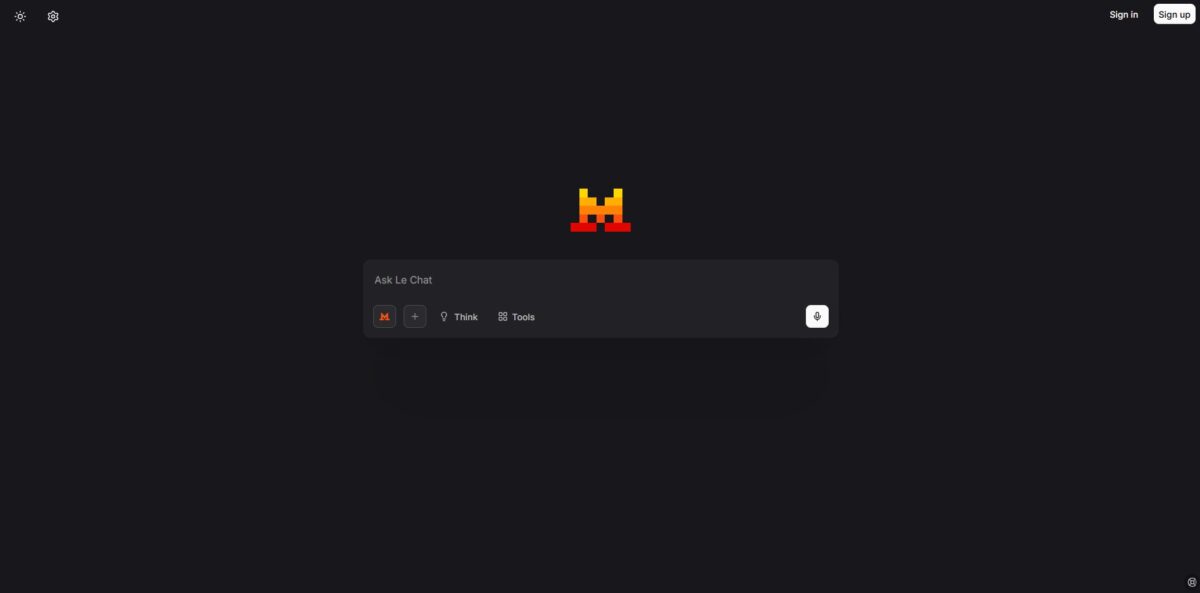
Le Chat serves as the minimalist front-end for Mistral’s open-weight and proprietary models. It acts as a workspace where you can toggle between specialized modes like Deep Research for structured reports or Canvas for live document editing. I noticed it handles dense technical PDFs without choking on the layout, which saves you from manual data extraction. On top of that, you get a low-latency alternative that actually prioritizes data residency. While it excels at coding logic and rapid-fire answers, the search depth occasionally feels narrower than some search-first AI tools. It effectively turns scattered project files into a searchable knowledge base. The trade-off is an interface that feels less cluttered but lacks some of the third-party plugin bloat found elsewhere. Use Le Chat if you need raw speed and a collaborative editor for coding, but stick to specialized research tools for deep academic queries.
How to start using Le Chat (Mistral)?
Go to mistral.ai and look for the Try Le Chat button. You can jump in immediately without an account for quick testing, but your chat history won’t save once you close the tab. For ongoing work, sign up using a Google account, Microsoft login, or a standard email address. This creates a workspace where your research and code snippets persist across different devices, so you build a continuous knowledge base instead of starting from zero every morning.
Once logged in, look for the model selector at the top. You can choose between different versions like Mistral Large or more specialized modes for speed. For heavy lifting like analyzing a 50-page technical PDF, picking the flagship model prevents the AI from skipping over small details in the data. The chat bar sits at the bottom, and you can upload documents or images using the paperclip icon. This turns the conversation from a generic Q&A into a focused audit of your actual files.
Check the left side panel to find your saved conversations and settings. This is where you manage Mistral Agents, which are custom versions of the bot you can configure with specific instructions. For example, you can tell an agent to always respond in Python or avoid using certain corporate jargon. No more repeating your formatting preferences in every single new chat. You can also toggle the Web search feature here to ensure the AI uses live data instead of relying solely on its training cut-off.
If you are working on team projects, look into the Enterprise settings to set up shared workspaces. The free tier is generous, but the more complex multi-step orchestration and advanced privacy controls are tucked behind the paid tiers. Starting a new chat frequently is a good habit to keep the context window clean and prevent the AI from getting confused by old instructions. A fresh context gives you the highest accuracy for technical troubleshooting.
Who is it for?
Privacy-Conscious Developers
Use it to build apps while keeping your data within European jurisdictions. It provides a low-latency alternative to US-based models with a focus on data residency, which keeps you compliant with strict regional data privacy regulations without sacrificing performance.
Technical Documentation Writers
Upload dense PDFs to the workspace to extract logic or summarize complex specifications without the layout breaking. Multi-column technical papers come through much better than in standard chat interfaces, and you save hours on manual data extraction from legacy files.
Python and SQL Scripters
Generate code snippets or debug logic using Mistral’s specialized models optimized for efficiency. It excels at specific coding tasks but may lack the creative flair of competitors for long-form prose. What you get back is clean, executable code that respects standard library conventions.
Cost-Optimizing Startups
Switch between open-weight and proprietary models to balance output quality with your monthly API budget. You can test prompts in the minimalist interface before committing to a specific model version in production. That way you don’t overpay for simple logic tasks that don’t require the most expensive model.
Structured Report Researchers
Use the Deep Research mode to compile information from multiple sources into a formatted document. The Canvas feature allows you to edit these reports live alongside the chat window for immediate refinement. The gap between initial research and a final shareable draft gets much shorter.
Minimalist Power Users
Navigate a clean interface that lacks the bloat of social features or unnecessary plugins. The focus remains on the raw chat and document interaction rather than a crowded ecosystem. Less cognitive load when you just need a direct answer or a code fix.
Le Chat (Mistral) pricing
Mistral separates its pricing between the conversational assistant and the developer API. This allows you to scale costs based on whether you are chatting with documents or running high-volume automated scripts. The structure reflects their focus on being a cost-effective European alternative to the US giants.
Free: $0/month. You get access to the latest models like Mistral Large and Pixtral, though document uploads and web searches hit limits quickly during heavy research. It serves well for basic coding help or drafting emails, and you can benchmark their top-tier reasoning without an upfront subscription.
Student: $6.99/month. This is a discounted Pro license for those with a verified educational email. The automated check is quite strict about your domain, but it effectively slashes the cost of deep research tools by half, bringing specialized academic reasoning into a manageable monthly budget.
Pro: $14.99/month. Moving here gets you 6x more messages and 15GB of storage for your project documents. It includes the “Mistral Vibe” feature for all-day development tasks. In practice, you stop hitting the “usage limit reached” interruption during critical work sessions.
Team: $24.99/user/month. This tier introduces an admin console, 30GB of storage per user, and data export capabilities. Annual billing cuts the price to roughly $19.99. You get a collaborative workspace where team data remains isolated from public training sets.
Enterprise: Custom pricing. This involves annual contracts for organizations requiring SSO, audit logs, and on-premise deployment options. You must contact their sales team for a specific quote. It is aimed at companies that must comply with strict internal security protocols.
Le Chat (Mistral) key features
Toggle Specialized Models
Switch between Mistral Large for complex reasoning and Pixtral for analyzing images or charts. I noticed it handles technical diagrams without the usual OCR hallucinations found in generalist bots. You can pick the right logic density for your specific task.
Deep Research Mode
Generate structured reports by letting the agent browse the live web to verify facts. It crawls multiple sources to build a bibliography, which is a massive upgrade over simple link-scraping. It takes the manual labor out of cross-referencing industry news.
Canvas Document Editing
Edit code snippets or long-form drafts in a side-by-side window while chatting. You can highlight specific paragraphs for rewriting without re-generating the entire response. The chat interface becomes a functional workspace.
Large Context Window
Upload dense PDFs or long code files for analysis across the entire document. It maintains logic across thousands of words, making it reliable for extracting obscure details from legal or technical manuals. This matters because it stops the AI from “forgetting” the start of your file by the time it reaches the end.
Native Coding Support
Use Codestral for Python, JavaScript, and Bash automation. It writes functional scripts based on your specific directory structure, though it occasionally misses obscure environment variables. That clears the “blank page” hurdle for DevOps and site reliability tasks.
Privacy-First Hosting
Keep your data within European jurisdictions to comply with strict regional regulations. Mistral prioritizes data residency, offering a safety net for teams that can’t risk their proprietary data training US-based models. Legal departments stay satisfied while developers get top-tier AI.
Le Chat (Mistral) Pros & Cons
Pros
Mistral’s interface feels refreshingly sparse. You can switch between models like Mistral Large for reasoning or Pixtral for image analysis without navigating buried menus. You can move from raw documentation to a structured summary in one session. The Canvas mode is a highlight for writers, offering a side-by-side view to edit drafts while the AI keeps providing context. It keeps your creative flow steady by separating the chat from the document you are actually building.
Cons
The feature set is still evolving compared to older incumbents. You might miss some of the integrated third-party plugin ecosystems found elsewhere, making it feel like a standalone island rather than a connected hub. The trade-off for its minimalist design is a steeper learning curve for users who prefer guided prompts over a blank command line. While its reasoning is sharp, the web search sometimes returns fewer sources than a dedicated search engine. So you’ll need to double-check citations on highly niche or fast-moving news topics to ensure total accuracy.
Use Le Chat (Mistral) if you want…
- …to host your AI workflows within European data jurisdictions.
- …deep research reports generated autonomously from web sources.
- …a minimalist workspace to switch between specialized Mistral models.
- …to edit documents and code live using Canvas mode.
- …high-reasoning performance without the typical US-based model lag.
- …to process dense technical PDFs without layout errors.
- …to build apps using privacy-first, open-weight model logic.
Le Chat (Mistral) alternatives



Le Chat (Mistral) Reviews
The speed is incredible for drafting quick project outlines, but the mobile app UI still feels a bit clunky compared to the web version.
I appreciate the lack of restrictive guardrails; it actually follows my creative prompts without lecturing me on ethics every five minutes.
A solid European alternative that respects GDPR, though it sometimes struggles with complex image descriptions and hallucinates details.
The deep research mode is a lifesaver for structured reports, but the monthly message cap on the Pro plan is a bit annoying.
Refreshingly fast and objective, it doesn’t try to be your friend like other bots, which makes it perfect for strictly professional use.
FAQ
Does Le Chat use my data to train its models?
By default, Mistral AI may use data from free users to improve its models, but you can opt out of this at any time in your account settings. For users on Team or Enterprise plans, data is not used for model training.
Can Le Chat access the internet for real-time information?
Yes, Le Chat features web search integration that allows it to gather up-to-date information and provide citations for its answers.
What types of files can I upload to Le Chat?
Le Chat supports a variety of file formats including PDF, Word (docx), Excel (xlsx), PowerPoint (pptx), CSV, and several text or code formats like txt, md, html, and py.
Is there a mobile app available for Le Chat?
Yes, Le Chat is available as an app for both iOS and Android devices, allowing you to use the assistant on the go.
What is the difference between Chat and Think mode?
Chat mode is for standard multi-turn conversations, while Think mode uses specialized models to provide step-by-step reasoning for complex problems that require deeper reflection.
Can Le Chat generate images?
Yes, Le Chat includes image generation capabilities powered by advanced models like Flux Pro, which can create high-quality visuals based on your text descriptions.
Similar tools
 KreoCloud AI takeoff and estimating platform that measures, counts and prices construction drawings, with an AI agent that runs multi-step jobs.
 Cabina.AIToken-based AI workspace that puts 55+ text, image, video and audio models, a RAG knowledge base and scheduled AI agents in one
 PlerdyWebsite analytics and CRO suite with heatmaps, session replay, free A/B testing, SEO audits and an MCP connector for asking Claude or