

Leadpages
Marketing ToolsUpdated October 18, 2026
AI landing page builder that turns a one-line brief into an on-brand page, then runs A/B tests, Smart Traffic routing and lead capture.
We may earn a commission when you sign up through our links. It does not affect our reviews.
What is Leadpages?
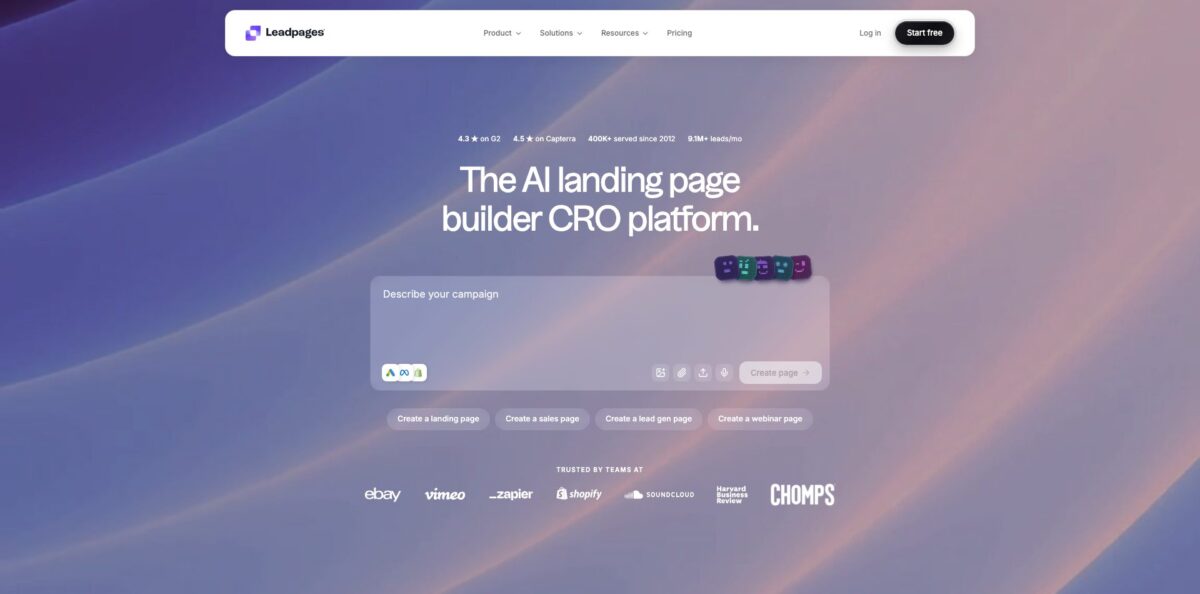
Leadpages is a hosted landing page platform, around since 2012, that was rebuilt in 2026 around an AI builder: you type one sentence about your audience and offer, and it returns a complete page with hero, social proof, form and CTA, styled with your brand kit and live on a URL in about a minute. The paid tiers then layer conversion work on top, from manual A/B tests and dynamic text replacement to Smart Traffic, which routes each visitor to the variant most likely to convert them. It removes the need for a separate page tool, testing tool and heatmap tool. The weak spot is trust in the transition: recent Trustpilot reviews describe forced migrations that broke forms and integrations, and billing complaints are frequent. Pick it if you run paid campaigns and want building and testing in one place.
How to start using Leadpages?
Go to leadpages.com, click Start 7-Day Free Trial and choose the plan you want to test. A card is required at checkout and you are charged on day 7 unless you cancel, so put the cancellation date in your calendar the moment you sign up. During the trial you get the full feature set of the chosen plan, which means picking Grow or Optimize if you want to try A/B testing, Smart Traffic or heatmaps before paying.
Next, set up your brand kit. Paste your website URL and Leadpages pulls colors, fonts, logo and a description of your brand voice, then shows them on a brand board where you confirm or correct each item. Spend a few minutes on the voice fields, because tone, vocabulary and value propositions are fed into the prompt every time the AI writes a headline or CTA. Note that brand kits start on the Business plan; Pro does not include one.
Now create your first real page from the Create page box. You can start from a preset such as a landing page, sales page, lead gen page or webinar page, or describe the page in one sentence, for example a webinar registration page with a countdown timer and an email form. The builder generates the full layout, after which you open it in the drag-and-drop editor to tune copy, swap images, adjust the form and set the mobile view separately if needed. If you already have a page elsewhere, the URL import pulls its content and structure into a new Leadpages page.
Before you publish, connect the form to where leads should go. Integrations such as HubSpot, Salesforce, Mailchimp, Klaviyo, Stripe and Google Sheets connect through OAuth, and you map form fields to fields in the target tool. Then attach your custom domain, which gets SSL automatically, add Google Analytics or Meta Pixel tracking and publish. On Grow and above, duplicate the page or let the AI write a variant and start a split test straight away.
Who is it for?
Performance marketers
You spend real money on Google and Meta ads and every visitor sent to a weak page is wasted budget. Leadpages lets you match headlines to ad keywords with dynamic text replacement and route visitors by device and source with Smart Traffic. Testing stops being a separate project that never gets scheduled.
Small business owners
You need a page for an offer or a booking form but have no designer and no developer. Paste your website, let the brand kit capture your look, and describe the page in a sentence. The result looks like your business rather than a generic template, and you can publish it on your own domain the same day.
Agencies
You build campaign pages for several clients and lose hours restyling templates for each brand. URL-based brand extraction, the MCP server and API access let you generate pages faster, and higher plans add more custom domains and brand kits. Keep in mind that full multi-kit management is still listed as coming soon.
Course creators and coaches
Webinar registrations, lead magnets and sales pages are your main funnel, and payments matter as much as opt-ins. Stripe, Gumroad, LemonSqueezy and Shopify connections let visitors pay without leaving the page. Check the checkout flow carefully after any platform update, since one recent review reported broken payment access after a migration.
AI-first marketers
You already work in Claude, ChatGPT or Cursor and would rather describe a page than click through a dashboard. The Leadpages MCP server exposes 47 actions, so your assistant can create pages, apply the brand kit, upload images and publish from the chat. It turns page production into a conversation you can repeat for every campaign.
Leadpages pricing
Leadpages splits its plans into two groups. Publishing plans cover building and hosting pages, blogs and small sites, while Testing and optimization plans add the CRO layer: A/B testing, personalization, lead enrichment and, higher up, Smart Traffic and heatmaps. Every plan includes custom domains with SSL, AI page creation, API access, webhooks, the MCP connector and unlimited traffic with no overage fees. AI credits power page generation, URL imports and AI chat; they refill monthly, and top-up packs start at $2.50. Annual billing saves 20%, and there is a 7-day free trial with a card required. Prices below are the US figures on the official pricing page as of October 2026; visitors in Europe see euro pricing, with Grow listed at €115 and Optimize at €229.
25 pages, 1 custom domain and site, 1 blog, 5 GB of storage, 90-day analytics with UTM tracking and 12,000 AI credits per month. No brand kit, no lead CSV export, and form submission history is kept for 30 days.
50 pages, 2 custom domains, 2 blogs, 1 brand kit, 10 GB of storage, 12-month analytics, lead CSV export and 20,000 AI credits per month. Still no A/B testing.
Unlimited pages, 4 custom domains, 3 blogs, 3 brand kits, 15 GB of storage and 40,000 AI credits. Adds manual A/B testing with up to 6 variants per page, dynamic text replacement, manual personalization, anonymous traffic detection for 2,000 visitors and lead enrichment for 1,000 visitors per month.
6 custom domains, 5 blogs, 5 brand kits, 25 GB of storage, 80,000 AI credits, 3 team seats and 24-month analytics. Adds Smart Traffic, click and scroll heatmaps, auto-personalization, multivariate A/B/C/D tests, performance alerts, 10 active integrations and priority email support.
Not shown on the plan cards, but the pricing FAQ and product pages describe it as the tier with 160,000 AI credits and a continuous optimization loop that promotes winners and generates the next challenger automatically. Confirm availability with sales.
Custom. SSO, custom contracts, dedicated support and volume publishing.
Leadpages key features
AI page builder
You describe the audience, offer and angle in one sentence, and the builder generates headline, body, social proof, form and CTA together, with the brand kit applied. Leadpages says a page takes about 60 seconds and is responsive across desktop, tablet and mobile by default. You skip the blank canvas and spend your time editing instead of assembling.
Built-in A/B testing
Duplicate a page or let AI write a variant, choose a goal such as form submission, button click, purchase or offsite conversion, and set a 50/50, 70/30 or custom split. Variants are assigned on the server before the page renders, so visitors never see the original flash before the test version. Results are reported as leaning, likely or clear, and you promote the winner to 100% with one click.
Smart Traffic
On Optimize, each visitor is categorized by device, traffic source and new or returning status, then sent to the variant that converts best for similar visitors. Segment routing starts after 20 visitors in a segment and updates every 5 minutes, and a variant can be auto-promoted at 95% confidence.
Brand kits with voice
Paste a URL and Leadpages extracts colors, fonts and logo using CSS analysis and Brandfetch, plus an AI read of your tone. The voice, audience and value propositions are injected into every AI prompt, so generated copy sounds closer to your own. Changes apply to new pages, while existing pages keep their styling unless you reapply the kit.
MCP server and API
Connect Leadpages to Claude, ChatGPT, Cursor, n8n or Make through OAuth, and your assistant gets 47 actions: create and edit pages, manage domains, upload assets, set SEO metadata and publish blog posts. You can also trigger page creation from CRM events or ad launches. It is included on every plan with no extra charge beyond your page and credit limits.
Lead capture and integrations
Forms send leads to HubSpot, Salesforce, Pipedrive, Mailchimp, Klaviyo, ActiveCampaign, Slack and Google Sheets, report conversions to Google Ads, Meta, TikTok and LinkedIn, and accept payments through Stripe. Webhooks are signed with HMAC-SHA256 and Zapier covers tools without a native connector. Grow and Optimize add anonymous traffic detection and lead enrichment so you know more about visitors before they fill in a form.
Ad Studio and routines
Ad Studio turns a product, URL or one-line brief into creator-style video ad variations in 9:16, 1:1 and 16:9 formats. Routines run scheduled jobs such as blog posts, A/B tests and reports.
Leadpages Pros & Cons
Pros
Leadpages puts the whole campaign loop in one product: generate a page from a sentence, connect it to your CRM and ad pixels, test variants with server-side assignment and, on Optimize, let Smart Traffic route visitors automatically. Unlimited traffic on every plan is a real difference from competitors that cap visitors on mid-tier plans, so a successful campaign does not raise your bill. Reviewers on G2 and Capterra consistently praise how quickly pages go live and how little technical skill the editor demands. The MCP server is also unusual in this category and useful if you already draft campaigns in an AI assistant. Use it when testing is part of your weekly routine, not an occasional experiment.
Cons
The 2026 rebuild has been rough for existing customers. Recent Trustpilot reviews, which put the score at 1.9 out of 5, describe pages moved to the new system without warning, forms that stopped sending leads, corrupted Mailchimp fields and an editor that labels sections generically. Billing complaints about trial charges, auto-renewals and hard cancellations are also common. The marketing site contradicts itself in places, for example on integration limits per plan and on which tier includes brand kits, and the Scale plan appears in FAQs but not on the plan cards. Export your pages and leads before any migration, and treat the pricing table as the reference.
Use Leadpages if you want…
- Generate a branded landing page from one sentence.
- Run A/B tests without a separate testing tool.
- Route visitors to the best variant with Smart Traffic.
- Match landing page headlines to your ad keywords.
- Send captured leads straight into HubSpot or Mailchimp.
- Build and publish pages from Claude or ChatGPT.
- Avoid visitor caps and overage fees on busy campaigns.
- Accept Stripe payments directly on your sales pages.
Leadpages alternatives

Leadpages Reviews
Reviewers on G2 and Capterra like how fast they can build and publish lead pages and connect them to their marketing tools, though many say pricing feels high and the editor and templates have limits.
Several Trustpilot users from October 2026 say the forced move to the new builder broke forms or the Mailchimp lead transfer and made existing pages harder to edit right before planned campaigns.
Long-time customers on Trustpilot complain about auto-renewal charges they did not expect and cancellations that were hard to complete, while some independent reviewers frame the frustration as a billing problem rather than a builder problem.
A hands-on 2026 test rated ease of use well and called the learning curve minimal, but scored value for money low compared with cheaper options such as Systeme.io or Carrd.
FAQ
Does Leadpages have a free plan?
No. There is a 7-day free trial with full access to the plan you choose, but a card is required and you are charged on day 7 unless you cancel. You can build and preview pages before paying, while publishing to a live URL needs a paid plan.
Which plan includes A/B testing?
Manual A/B testing and dynamic text replacement start on Grow at $99/month. Smart Traffic, heatmaps and multivariate tests with up to four variants start on Optimize at $199/month.
Are there traffic limits?
No. Leadpages states that every plan has unlimited traffic with no overage fees, although pages, custom domains, blogs and AI credits are limited by plan.
Can I use my own domain?
Yes. Every plan includes at least one custom domain with automatic SSL, rising to 6 domains on Optimize.
What integrations does Leadpages support?
Native integrations include HubSpot, Salesforce, Pipedrive, Mailchimp, Klaviyo, ActiveCampaign, Google Ads, Meta Ads, Stripe, Shopify, Slack and Google Sheets. Webhooks, API access and Zapier cover other tools.
Does Leadpages have an API or MCP server?
Yes. API access and the MCP server are included on every plan, and the MCP server works with Claude, ChatGPT, Cursor, n8n, Make and other MCP clients through OAuth.
How do AI credits work?
Each plan includes a monthly allotment, from 12,000 on Pro to 80,000 on Optimize, used for AI page creation, URL imports and AI chat. Credits refill each billing cycle, and top-up packs start at $2.50.
How do I cancel Leadpages?
You can cancel from your account settings at any time, and plan changes take effect on the next billing cycle. Given the billing complaints in reviews, cancel before the trial or renewal date and keep the confirmation.
Similar tools
 AirOpsAI search platform that tracks how ChatGPT, Gemini and Perplexity cite your brand and runs agent workflows to create and refresh content.
 AdsLibraryChrome extension and web library for saving, organizing and sharing ads from Facebook, TikTok, Instagram and YouTube, with competitor ad tracking.
 JumaShared AI workspace for marketing teams and agencies that runs 700+ ready Flows to turn briefs and live ad data into finished