

Leonardo.ai
Art GenerationUpdated October 5, 2026
Leonardo.ai is a production-grade AI platform for creating consistent, high-quality game assets and professional visual content.
We may earn a commission when you sign up through our links. It does not affect our reviews.
What is Leonardo.ai?
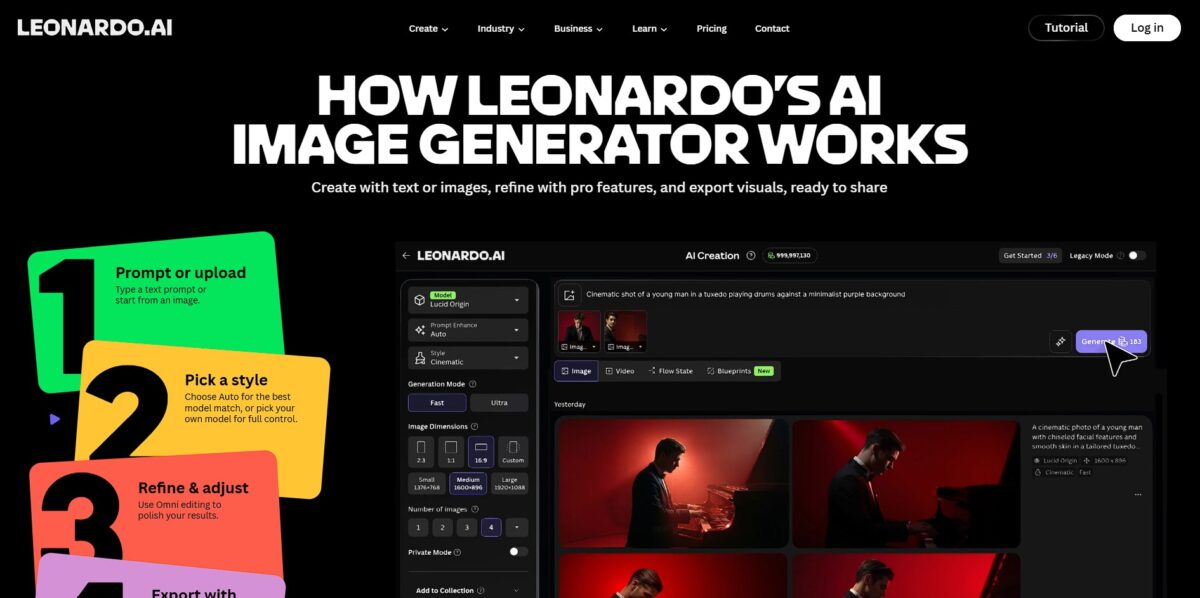
Leonardo.ai functions as a specialized production hub for designers who need consistent visual assets rather than one-off experiments. It combines fine-tuned diffusion models with a spatial canvas, letting you sketch rough shapes and watch the AI translate them into textured 3D game props or character sheets in real-time. While many generators feel like a black box, this platform provides granular sliders for style reference and prompt weighting to prevent the “AI look” from overriding your specific intent. I noticed the UI is significantly more dense than its competitors, which helps with precision but might overwhelm anyone just looking to generate a quick profile picture. This focus on utility means you spend less time wrestling with unpredictable seeds and more time refining a coherent aesthetic across an entire project. In short, the workflow shifts from random discovery to intentional asset creation for professional builds.
How to start using Leonardo.ai?
Start by visiting Leonardo.ai and signing up with a Google or Apple account. You won’t need to configure a local Python environment or hunt for an invite link. The dashboard opens to a gallery of community-generated assets, which acts as a quick reality check for what the different models actually produce. It is helpful to see the exact prompts and settings others used before you burn through your first daily token allotment. This transparency helps you avoid the common frustration of guessing why a specific aesthetic works.
Head straight to the Image Generation tab to test the waters. I noticed the sidebar is packed with sliders for aspect ratios and prompt weighting, which feels more like a professional editor than a simple text box. You can pick a base model like Kino XL or Vision XL depending on whether you need cinematic lighting or clean graphic design. Setting these parameters early prevents the AI from defaulting to a generic “over-processed” look and gives you a predictable baseline for iterative character design.
Try the Realtime Canvas if you prefer sketching over typing. You draw rough shapes on one side while the AI interprets them into textured objects or landscapes on the other. It feels less like a slot machine and more like a collaborative tool for blocking out scene composition. While the text-to-image feature is great for inspiration, the canvas works better for spatial accuracy. This shifts the focus from luck to intent, allowing you to place specific props exactly where the project requires them.
Watch your token counter in the bottom left corner. Each generation costs a specific amount, and the free tier resets daily, which forces you to be deliberate with your prompts. If you find a style that fits, click the “User Model” option to keep those specific visual rules locked in for future sessions. This prevents the “drifting” effect where a character’s features change slightly between every image. It ensures your game assets or marketing visuals remain cohesive across an entire campaign.
Who is it for?
Indie Game Developers
You can sketch a rough blocky shape and watch the AI skin it into a mossy stone ruin asset or a character sprite. It replaces the need for a full concept art team during the prototyping phase. This matters because you can test visual styles in your engine before committing to manual 3D modeling.
Concept Artists
The tool lets you train personal models on your own art style to generate iterations that actually look like your work. It stops the AI from defaulting to that generic plastic look by using your specific brushwork as the logic. Your creative signature survives, while the tool handles the repetitive grunt work of sketching variations.
Graphic Designers
It works well for generating textured backgrounds or specific UI elements without hunting through stock sites. Prompt weighting lets you nudge the AI away from clutter when you need a clean, minimalist layout. That saves hours of compositing different stock images to get a specific lighting mood. Gotcha: High-contrast designs sometimes require manual cleanup in Photoshop to fix edge artifacts.
Marketing Teams
You can feed it a product photo and use the “Image Guidance” to generate social media banners that match your brand’s color palette. It removes the friction of setting up a physical photoshoot for every minor seasonal campaign. You can A/B test different visual hooks quickly at zero extra cost.
Architects and Interior Designers
The platform translates floor plans or 2D elevations into photorealistic renders with specific materials like brushed oak or polished concrete. It handles lighting bounce better than most basic CAD viewers, though it can struggle with exact measurements. Clients can visualize a “vibe” before you spend days on a high-end V-Ray render. Rule: Use “Style Reference” to keep the furniture aesthetic uniform across different rooms.
Dungeon Masters and Storytellers
It creates consistent character portraits and region maps for TTRPG campaigns using simple text descriptions. In my testing, it excels at “Grimdark” or “High Fantasy” aesthetics, making it easy to hand players a visual of the exact monster they are fighting. That deepens immersion without requiring a professional illustration budget.
Leonardo.ai pricing
Leonardo.ai handles its economy through a daily allowance of tokens rather than simple image counts. This system allows you to experiment with different models and resolutions without a fixed cap on how many times you hit the generate button, though advanced features like upscaling eat through your balance faster.
You get 150 daily tokens that reset every 24 hours. It is enough for roughly 15 to 30 basic images, but heavy upscaling or motion effects will drain this quickly. This ensures you can test every new model without entering credit card details.
This grants 8,500 tokens per month and removes the queue wait. It suits indie creators who need consistent character assets for a single project.
You get 25,000 monthly tokens and gain access to “relaxed” generation. This means even if you run out of tokens, you can keep generating at a slower speed.
With 60,000 tokens, this is for power users running batch operations for entire game levels or marketing campaigns. The trade-off is the daily reset on the free tier; if you don’t use the 150 tokens, they vanish. Also, high-resolution 3D renders consume significantly more tokens than standard 2D sketches, so monitor your dashboard during heavy sessions.
If you are just starting out, stick to the free plan to learn the prompt syntax before committing to the Apprentice tier for faster rendering speeds.
Leonardo.ai key features
Fine-tuned models
You pick specialized engines like DreamShaper or Absolute Reality to hit a specific aesthetic without wrestling with complex prompt engineering. You don’t have to guess whether a model can actually handle architectural lines or messy oil paint textures.
Canvas Editor
You mask specific areas of an image to add or remove objects, like swapping a character’s hat or extending a landscape beyond its original borders. It works best for fixing minor anatomical errors that standard generation often misses.
Universal Upscaler
It adds crispness and missing details to blurry renders, letting you prep assets for print or high-res displays. A small, experimental thumbnail becomes a sharp, usable file without losing the original composition.
Motion tool
This converts static images into short video loops with adjustable intensity. It is great for social media backgrounds, though it occasionally struggles with complex overlapping movements.
Realtime Gen
You see results change instantly as you type each word or move a brush on the scratchpad. This matters because it bridges the gap between a vague idea and a final image through immediate visual feedback.
Style Reference
You upload an existing image to force the AI to mimic its specific colors and lighting. This helps maintain a consistent mood across an entire project, preventing your gallery from looking like a disjointed mess.
Leonardo.ai Pros & Cons
Pros
Leonardo.ai excels at keeping characters consistent across different scenes. You can sketch a rough concept on the Realtime Canvas and watch the engine instantly skin it into a usable game asset. The 3D texture generation creates actual UV-mapped albedo and normal maps, which saves hours of manual work for indie developers using Unity or Unreal. In effect, a static image becomes a functional game object with one click. Use the “Character Reference” tool to lock in a face before you start generating pose variations.
Cons
The token system makes it hard to predict exactly what you will spend each month. A standard image is cheap, but enabling features like Alchemy or upscaling to 8K resolution drains your daily 150-token allowance in minutes. While it works well for creative ideation, the generation speed can lag behind pure API-driven platforms during heavy traffic. A 90-second wait for a single iteration can kill your creative flow when you are in a deep design sprint. Use the “Subtle” upscale mode to fix minor distortions without completely rebuilding your original composition.
Use Leonardo.ai if you want…
- To turn rough sketches into polished production-ready assets
- Consistent characters across different scenes and settings
- High-quality UV-mapped textures for 3D game models
- To prototype game environments with specialized fine-tuned models
- Rapidly iterate on visual styles using a spatial creative canvas
- To generate unique marketing posters from simple text prompts
- Professional lighting and composition for character portraits
Leonardo.ai alternatives
 MidjourneyRead review →
 Adobe FireflyRead review →
 OpenArtRead review →
 Canva Magic MediaRead review →
 Playground AIRead review →
 SeaArt.aiRead review →
 ImagineArtRead review →
Leonardo.ai Reviews
Best tool for keeping character styles consistent across a whole project. The realtime canvas is a game changer for concept art.
FAQ
Do I own the images I create on Leonardo.ai?
Paid subscribers retain full ownership, copyright, and intellectual property rights for the images they generate. Free tier users are granted a non-exclusive, royalty-free license for commercial use, but Leonardo.ai retains the rights to use and distribute those images.
Can I generate private images?
Yes, private image generation is a feature exclusive to paid subscribers. Users on a paid plan can toggle Private Mode on to ensure their creations are not visible to the public community.
What are tokens and how do they work?
Tokens are the platform’s currency used to perform actions like generating or upscaling images. Free users receive a daily allowance that resets every 24 hours, while paid subscribers receive a monthly allowance with features like token rollover on select plans.
Can I train my own AI models?
Yes, Leonardo.ai allows users to upload a small set of images to train custom models. This process enables the AI to learn specific styles, themes, or subjects for consistent results across different projects.
Does Leonardo.ai offer an API for developers?
Yes, Leonardo provides a RESTful API that allows businesses and developers to integrate its image generation capabilities and fine-tuned models directly into their own applications or workflows.
Is there a mobile app available?
Yes, Leonardo.ai is available as a dedicated mobile application for both iOS and Android devices, allowing users to generate and manage their creative assets on the go.
What is the difference between the various AI models on the platform?
Leonardo.ai hosts a suite of models with different personalities and strengths, such as Lucid Origin for general tasks or Nano Banana for fixing specific details. Users can switch between them to find the best fit for their specific creative goal.
Similar tools
 CustomuseAI 3D creation platform that chains image, video and 3D models into node workflows for game-ready assets, Roblox items and scenes.
 VisualGPTCredit-based AI image and video studio that runs Nano Banana, GPT Image, Seedream, Flux and Kling for product photos, photo edits and
 LovartAI design agent that turns a chat brief into logos, social posts, product shots, slides and videos on one editable infinite canvas.