

Lovart
Art GenerationUpdated November 12, 2026
AI design agent that turns a chat brief into logos, social posts, product shots, slides and videos on one editable infinite canvas.
We may earn a commission when you sign up through our links. It does not affect our reviews.
What is Lovart?
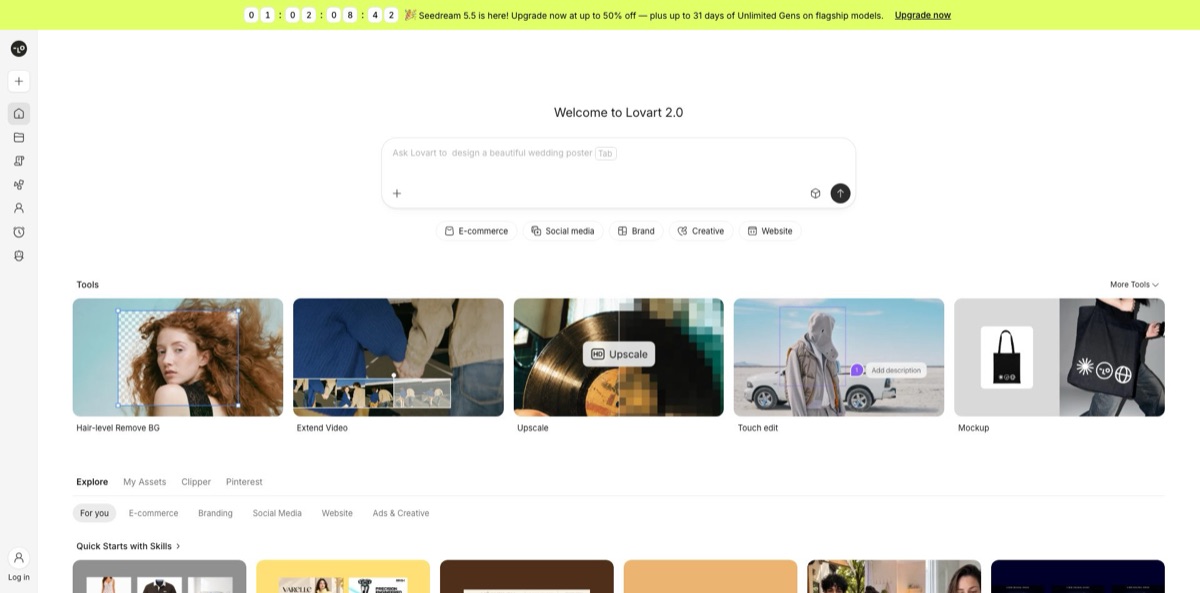
Lovart is a browser-based AI design agent. You describe a deliverable in chat, and it plans the job, routes each step across 30+ image and video models such as Nano Banana, Seedance and GPT Image, then drops finished assets onto an infinite canvas where every piece stays editable. That replaces the usual loop of prompting one generator, fixing text in a second app and resizing in a third. Brand Kits keep logos, colors and fonts consistent, and exports cover PNG, SVG, layered PSD, PPTX and MP4. Lovart 2.0 adds Arti, a beta personal agent that remembers your taste and runs delegated tasks in the background. The weak spot is money: credit use changes with the model and settings, and independent reviews are full of billing and cancellation complaints. Pick it if you produce a steady stream of marketing visuals and want one workspace instead of a single-image generator.
How to start using Lovart?
Sign up at lovart.ai. The free plan needs no credit card and lets you try the core features, but its quota covers image generation only and is limited to selected models, so video and the bigger models wait until you pay. From the homepage you can click New Project for a blank canvas, or run one of the quickstart projects under the input box, grouped into Design, Branding, E-Commerce, Video and more. A quickstart loads a ready prompt, model and reference files, so you see a finished asset without writing anything. It still spends credits, and the docs suggest switching the model if a run fails.
If you work for an existing brand, set up a Brand Kit before you generate anything. Click the Brand Kit icon in the left toolbar, then add logos, fonts, color swatches and design notes by hand, or upload a brand book PDF and let Lovart extract the elements. Apply the kit to a whole project with the selector at the top, or @-mention it in the input box for a single generation. The free plan holds one kit, Starter five, and the counts rise from there.
For a first real job, open the Skill Book in the input box and pick a Skill from Branding, Marketing, Social Media, E-Commerce or Video. Type a short goal, attach references, and the agent asks for anything missing before running the multi-step workflow. The Models panel at the bottom right of the input box decides who picks the engine: with Auto On the agent chooses, with Auto Off you set preferred image, video and 3D models. To force one model, @-mention it, or open Image Generator (A) or Video Generator (S) to bypass the agent entirely.
Then refine and ship. Select an image and press Tab for Quick Edit, press M to mark up to 10 regions for a precise change, or use Edit Elements to split the picture into movable layers and Edit Text to rewrite lettering without losing its style. Every edit lands as a new asset, so the original stays on the canvas for comparison. Upscale to 2K, 4K or 8K before export, then download PNG or JPEG, MP4 for video, PDF or PPTX for slides, SVG for vectorized objects, or PSD when several items are selected.
Who is it for?
Startup founders
You need a logo, a pitch deck and launch posts but have no designer on the payroll. Branding Skills and Lovart Slides produce a first set from one conversation, and the Brand Kit keeps later assets consistent.
Performance marketers
Ad tests eat dozens of variants across sizes. Lovart generates creative from a brief, crops to platform presets for Instagram, TikTok, YouTube, LinkedIn and X, and lets you swap a headline with Edit Text instead of regenerating the whole image.
E-commerce sellers
Product shots, listing images and mockups take most of a small shop’s design time. E-Commerce Skills, background removal and multi-angle variations from a single photo cut the studio work, though you still need to check product details by eye.
Freelance designers and small agencies
Lovart is a fast drafting partner for mood boards, concept rounds and client revisions. Layered PSD export means the final polish can still happen in your usual tools, and separate Brand Kits per client stop palettes from leaking between projects.
YouTubers and social creators
Thumbnails, covers and short clips sit in one place. You can animate a still into a short video with sound, then keep the series consistent by saving the workflow as a Custom Skill.
Consultants and educators
Turn an outline or a PDF into a styled deck, fix individual slides on the canvas, and export PPTX with editable text for final tweaks in PowerPoint, Google Slides or Keynote.
Lovart pricing
Every plan runs on credits. Each generation deducts credits based on the model, resolution, quality and detail of the request, so the same plan stretches much further on cheap image models than on high-end video. Subscription credits reset each billing cycle and do not roll over; annual plans release credits month by month with the same rule. Top-up packs last 366 days, and paid plans also get 100 refresh credits every day. Prices below come from the official pricing page in USD on 11 November 2026.
Try core features with no credit card. The free quota covers images only on selected models, with one Brand Kit and up to 10 generated fonts. The pricing page does not publish a fixed daily credit number for free users.
2,000 fast credits a month, 2 concurrent tasks, 5 Brand Kits, Arti with 2 delegated tasks a day, access to all models and a commercial license.
3,500 credits, 4 concurrent tasks and 10 Brand Kits. Annual Basic adds 31 days of unlimited GPT Image 2.6 at medium 1K and 180 days of unlimited relax-mode Nano Banana Pro at 1K.
11,000 credits, 8 concurrent tasks, 30 Brand Kits and 10% off credit refills, plus time-limited unlimited generations on flagship image models.
27,000 credits, 10 concurrent tasks, 100 Brand Kits, 10% off refills, and on annual billing 180 days of relax-mode Nano Banana Pro at 4K.
Custom. A separate Team plan covers multi-user work, and enterprise deals go through sales; no public per-seat price was listed on the page.
A few rules matter before you pay. Unlimited Relax Generation runs on its own 31- or 180-day clock, works through a slower queue, and is a one-time benefit per account. Accounts are personal and can run tasks on up to 2 desktop browsers and 1 mobile browser at once. The terms rule out refunds for subscriptions bought more than 7 days earlier, and for any subscription you have already used.
Lovart key features
Agent with automatic model routing
You type a goal, and the agent picks suitable models from a pool that includes Nano Banana, Seedance 2.0, GPT Image, Luma uni-1 and Tripo for 3D. You can set preferences in the Models panel or lock one model with an @-mention. You get current engines without tracking every release yourself, though credit cost follows whatever model ends up doing the work.
Infinite canvas with AI editing
Quick Edit, Mark with up to 10 marks per prompt, Edit Elements, Edit Text, Eraser, Expand, Remove BG and Upscale to 8K all act on the selected object. Each edit becomes a new asset, so nothing is overwritten. Revisions stay inside Lovart instead of bouncing to a separate editor.
Skills and Custom Skills
One-click Skills chain prompts and models for logos, product listings, social posts and video ads, and the agent asks for any missing inputs. In Thinking Mode you can save a successful conversation as your own Skill and rerun it on new material. Repeat jobs stop depending on how well you remember last month’s prompt.
Brand Kit
Store logos, palettes, fonts and guidance once, or parse them from a brand book PDF, then apply the kit project-wide or per generation. Output stays on-brand across channels, and agencies can keep a kit per client within their plan’s limit.
Arti, the personal design agent (beta)
Arti reviews your canvases for problems, researches competitors and palettes into a report, keeps a memory of your preferences, and applies teammate or client comments in one click. Delegated tasks run without you watching, capped per day by plan.
Slides, fonts and production exports
Lovart Slides builds a deck from text or a PDF and exports PPTX with editable text. Font Generator creates custom Latin typefaces from an image or description, usable on the canvas but not exportable as TTF or OTF. Layered PSD and one-click SVG vectorization cover handoff to professional tools.
Video and 3D in the same project
Ask the agent to animate a still into a short clip with sound, or use Video Generator with start and end frames, reference images and audio. Multi-Angles creates new viewpoints of a product from one image. Campaign stills and motion stay in one file instead of three subscriptions.
Lovart Pros & Cons
Pros
Lovart covers far more of the design pipeline than a plain image generator. One chat can produce a logo, a social set, a deck and a short video, all on a canvas where text, layers and regions are editable after generation. Model routing gives you access to Nano Banana, Seedance, GPT Image and other leading engines without juggling separate accounts. Brand Kits, Custom Skills and Arti’s memory reduce repeated setup, and exports to PSD, SVG and editable PPTX make handoff to Photoshop or PowerPoint realistic. Early Product Hunt reviewers rate the conversational canvas highly. Start with the Skill closest to your deliverable rather than a blank prompt.
Cons
The credit system is hard to predict, because cost depends on model, resolution and quality, and Trustpilot reviewers complain that failed or unchanged edits still consumed credits. The Trustpilot profile scores 1.5 out of 5, driven by reports of unwanted renewals, slow cancellation help and refusals of refunds. Relax mode is unlimited but queued, and some paying users call it too slow. Annual discounts are steep in year one, then prices climb at renewal. Fonts cannot leave the platform. Set a calendar reminder before renewal and keep receipts of any cancellation.
Use Lovart if you want…
- Turn a single brief into a full brand kit.
- Generate ad creative in every social platform size.
- Edit text inside AI images without regenerating them.
- Produce product shots and listing images without a studio.
- Build slide decks from an outline or PDF.
- Animate still designs into short videos with sound.
- Reuse proven design workflows as one-click Skills.
- Hand off layered PSD files to your designer.
Lovart alternatives
 CanvaRead review →
 RecraftRead review →
 Adobe FireflyRead review →
 MidjourneyRead review →
 IdeogramRead review →
 KreaRead review →
 Leonardo.aiRead review →
Lovart Reviews
Product Hunt users like the chat-plus-canvas workflow: one built a client brand identity in about half an hour, though another wanted clearer demos of how to make videos.
A startup founder on Product Hunt used it for a pitch deck, social posts and logo concepts without a design budget, and valued that the agent asked about the brand before designing.
Several Trustpilot reviewers say credit deductions are not transparent, with failed or unchanged image edits still taking credits.
Paying subscribers on Trustpilot report that unlimited relax mode can be too slow for a paid service, with waits of up to an hour mentioned.
Some Trustpilot reviewers like the software and the design quality but report charges after cancelling and unanswered emails; one reviewer got a refund within days and praised support.
FAQ
Is Lovart free to use?
Yes. The free plan needs no credit card and lets you try the core features, but its quota covers images only on selected models. Paid plans start at $19 per month.
Can I use Lovart designs commercially?
Every paid plan lists a commercial license, and the terms state that you own the output generated from your input. Lovart keeps a license to use content to operate and improve its services.
Which AI models does Lovart use?
The agent routes tasks across 30+ image and video models, including Nano Banana, Seedance 2.0, GPT Image and Luma uni-1, with Tripo for 3D. You can let it choose automatically or lock a model with an @-mention.
Do unused credits roll over?
No. Subscription credits reset each billing cycle, including the monthly portions of annual plans. Purchased top-up packs stay valid for 366 days.
What file formats can I export?
Images export as PNG or JPEG, video as MP4, slides as PDF, PPTX or PPTX with editable text, layouts as HTML, vectorized objects as SVG, and multiple selected objects as a layered PSD.
Can my team share one account?
No. Accounts are for individual use and can run tasks on up to two desktop browsers and one mobile browser at once. Teams need the separate Team plan.
How do I cancel, and can I get a refund?
Cancel in account settings, and the plan stays active until the end of the current billing period. The terms exclude refunds for subscriptions bought more than 7 days earlier or already used.
Does Lovart work inside Slack or Discord?
Through an OpenClaw integration added in April 2026, you can use Lovart from chat platforms such as Slack, Discord and Feishu after a short setup.
Similar tools
 CustomuseAI 3D creation platform that chains image, video and 3D models into node workflows for game-ready assets, Roblox items and scenes.
 VisualGPTCredit-based AI image and video studio that runs Nano Banana, GPT Image, Seedream, Flux and Kling for product photos, photo edits and
 PromeAIBrowser-based AI design studio that turns sketches, photos and 3D views into photorealistic renders, then edits, upscales or animates them into video.