

Magai
AI AssistantsUpdated November 12, 2026
Paid AI workspace that puts ChatGPT, Claude, Gemini, Grok and dozens of image and video models in one chat, with memory and agents shared across models.
We may earn a commission when you sign up through our links. It does not affect our reviews.
What is Magai?
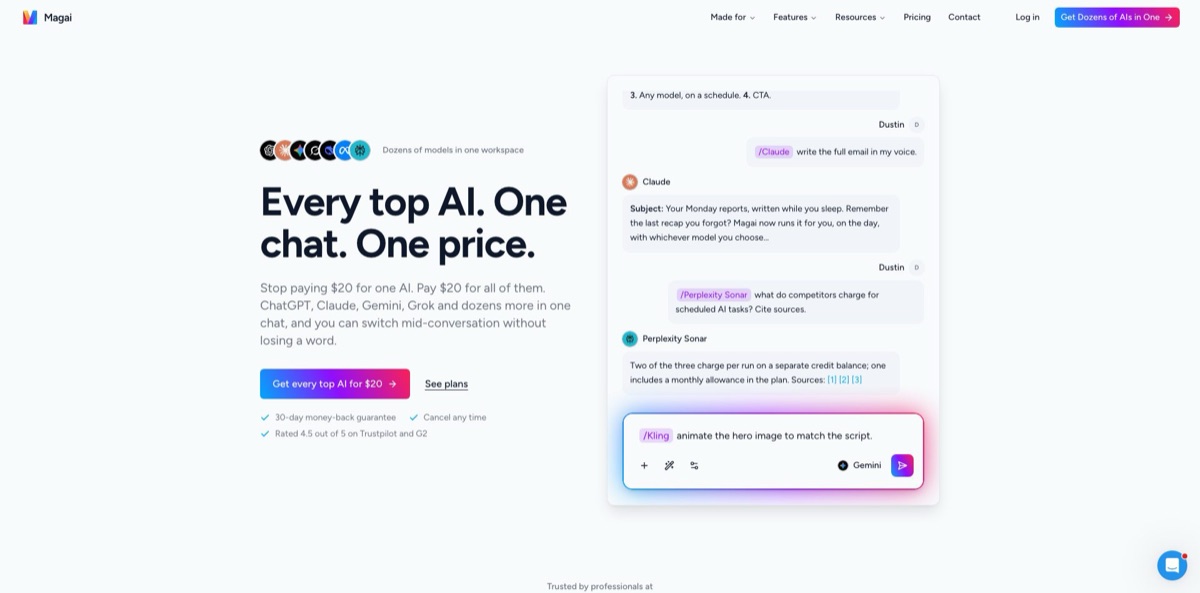
Magai is a paid web workspace that sends your prompts to the official APIs of OpenAI, Anthropic, Google, xAI, DeepSeek, Meta and other labs, so dozens of chat, image and video models sit behind one login and one bill. You can start a thread with GPT, type a slash and a model name, and let Claude or Gemini answer with the whole conversation in hand, while memory, agents and files stay attached to the workspace rather than to a single model. Founded in 2023 by Dustin W. Stout, it targets people who now pay for two or three separate AI subscriptions. The weak spot is the usage meter: each model draws from a dollar balance at its own multiplier, so heavy use of premium models drains a $20 plan quickly. Pick it if you switch between models every day and want one place that keeps the context.
How to start using Magai?
Sign up at app.magai.co and choose a plan on the way in, because there is no free tier and no free trial. Every plan carries a 30-day, 100% money-back guarantee instead, so treat the first month as your trial and put real work through it. If you already have history in ChatGPT or Claude, request a data export there first: ChatGPT exports can take up to seven days, and Magai needs the conversations.json file, not the ZIP. In Magai, open Chats History from the left sidebar, expand the panel, click Import, choose ChatGPT or Claude under Select Chats Origin and click Start Import. Custom GPTs come across as agents.
Your first real scenario happens in Chats. New chats start on Claude Sonnet 5, so type a task you would normally give ChatGPT, such as outlining a client email, and press Enter. Click Attach to add a file, a web page URL or a video link from YouTube, Instagram, TikTok or LinkedIn, and Magai pulls in the page text or the transcript. When you want a second opinion, type a slash and a model name, for example /Gemini or /Perplexity, and the next reply comes from that model with the full thread so far. The microphone icon handles voice dictation if you prefer to talk.
The screen worth learning is the prompt bar. The unified model picker lists chat, image and video models together, sorts them by context and usage, and filters by capability such as Vision, Reasoning, Text to Image or Text to Video. Each model shows a usage multiplier: the help center lists Claude Sonnet 5 at 0.8x and GPT-5.5 Pro at 14x, so the same prompt can cost very different amounts. Next to the picker, Select Agent opens prebuilt roles such as SEO Content Writer or Prompt Engineer, and + New Agent lets you write your own instructions once. The Enhance button rewrites a rough prompt for the model you picked, and Saved Prompts keeps the ones you reuse in folders.
Before you rely on it for client work, check both the output and the meter. Open Canvas to edit a draft beside the chat and export it as PDF or DOCX, and look through the Media gallery for the images and clips you generated. Then open the account menu in the bottom-left corner to see how much of your monthly balance the first week used. If you plan to automate reports, connect apps under Manage Integrations, create a task in Scheduled, and run it once by hand to confirm it reads the right data before it goes on a timer.
Who is it for?
Content creators and solo writers
You bounce between ChatGPT for outlines, Claude for drafting and an image tool for thumbnails, paying for each one. Magai puts them in one thread, and its memory carries your voice rules from model to model. Keep an eye on image and video multipliers, which cost several times more than text.
Marketing agencies
Each client needs its own tone, facts and files, and mixing them up in a shared chatbot is a real risk. Workspaces keep chats, memories, agents and files separate per client, and you can build one agent per brand voice. Adding a teammate costs $20 a seat on Standard.
Consultants and operators
Monday reports, inbox triage and follow-ups eat hours you cannot bill. Scheduled tasks run a prompt or an agent on a timetable through connected apps such as HubSpot, Stripe, Gmail or Slack. Standard includes 100 runs a month, enough for a few daily jobs.
Researchers and analysts
You want sourced answers from Perplexity, long-document reading from Gemini or Claude, and the write-up in one place. Switching mid-thread means the source material does not need to be pasted again. Several models in the picker list a 1M-token context, which helps with long reports.
Small business teams
Staff already use personal AI accounts, and nobody knows what company data went where. Magai states that prompts, files and outputs never train any model, and shared workspaces with roles control who sees which threads. Above ten seats, pricing moves to the enterprise plan with per-seat usage caps.
Magai pricing
Magai sells a monthly usage balance in dollars rather than a message count. Each plan’s balance equals what you pay, and every message, image or video draws from it at the multiplier of the model you chose, from 0.018x for DeepSeek v4 Flash up to 14x for GPT-5.5 Pro and 13.3x for Veo video. When the balance runs out nothing is locked: you can still read everything, top up $5, $10 or $20 without changing plans, or wait for the next billing cycle. Yearly billing saves 17%. There is no free plan or trial, only a 30-day money-back guarantee on every tier. One inconsistency is worth knowing: the comparison table on the pricing page reserves premium models (those costing 3x or more to run than a standard model, such as the top GPT and Claude tiers) for Pro and Ultra, while help center articles say every plan includes them.
You get $20 of monthly usage, every standard chat model plus the image and video models, unlimited agents, 100 scheduled task runs a month, 150+ integrations, MCP connections and standard support. Extra users cost $20 each.
You get $40 of monthly usage, premium models, 1,000 scheduled task runs, multi-account integrations for connecting more than one account of the same app, and priority support. Extra seats are quoted at custom rates.
You get $200 of monthly usage, premium models, unlimited scheduled task runs, multi-account integrations and priority support, again with custom seat rates.
Custom. Volume pricing above ten seats goes through sales, with admin-set monthly caps per seat, workspaces per department or client, one invoice, and weekly live training sessions included.
Magai key features
Mid-conversation model switching is the core idea
Type a slash and a model name, or open the picker, and the next reply comes from that model with the whole thread as context. An Auto option reads the prompt and picks a model for you. You can draft with one model, check facts with Perplexity and polish with Claude without copying text between browser tabs.
Shared memory lives in the workspace, not inside one model
As you chat, Magai stores facts, dates and preferences, labels each one as a fact, event, routine or feeling, and passes the relevant ones to whichever model you use next. A memories screen lets you search and delete entries, and one account setting switches memory off. You stop re-explaining your brand rules every time you change model.
Agents replace what the product used to call personas
An agent bundles instructions, voice, files and skills, is not tied to any model, and can be called with @ in any chat. More than 50 come prebuilt, skills can be imported from other platforms, and an agent can even draft new agents or update its own skills. You brief a specialist once and run it on whichever model is strongest that month.
Scheduled tasks turn a chat into a job on a clock
You write the instruction, choose once or recurring (daily, weekly, monthly or custom), pick a model or agent and the connections it may use, and results land in the thread or in Slack or email. The 150+ integrations include Gmail, Outlook, Google Calendar, Slack, Teams, Notion, HubSpot, Salesforce, Airtable and Stripe with read and write access, and MCP servers can be added as well.
Image and video models share the same balance as chat
The help center lists image models such as Flux, GPT Image, Ideogram, Leonardo.ai, Recraft, Seedream and Nano Banana, and video models including Kling, Runway, Luma, MiniMax, Hailuo and Veo. You can generate a picture in the thread where you wrote the copy and animate it in the next message. Video multipliers between roughly 4x and 13x eat a $20 balance fast, so budget for them.
Canvas, Saved Prompts and the Enhance button cover the work around the chat
Canvas sits beside the conversation for editing a full document and exports to PDF or DOCX, while saved prompts can be organized in folders and shared with the team. Chat import from ChatGPT and Claude brings your old conversations along, so moving to Magai does not mean starting from zero.
Magai Pros & Cons
Pros
The main win is consolidation. One login reaches models from OpenAI, Anthropic, Google, xAI, DeepSeek, Meta, Mistral and Perplexity, plus a long list of image and video generators, and you can change model in the middle of a thread without losing context. Memory and agents sit above the models, so your instructions survive when a lab ships a new version. The dollar-based meter is easy to read, and there are no multi-hour cooldown windows like on single-lab plans. Trustpilot reviewers repeatedly praise a small support team that answers as real people, and the founder replies to reviews himself. Prompts and files are not used for training. Use it as your daily hub and keep a cheap model as the default.
Cons
Usage is the friction point. Premium chat models and video generation carry multipliers from 2x up to 14x, and several Trustpilot reviewers say a handful of prompts consumed a large share of their monthly balance. There is no free plan or trial, no public API and no bring-your-own-key option, so developers and tinkerers have fewer ways in. The pricing page and the help center disagree on whether Standard includes premium models. Some long-time users lost folders or chats during the V3 migration, and older reviews describe billing and cancellation problems that took several contacts to fix. Check the multiplier before every expensive job, and keep confirmation emails for any plan change.
Use Magai if you want…
- Switch between ChatGPT, Claude and Gemini in one thread.
- Replace several separate AI subscriptions with one bill.
- Keep brand voice rules remembered across every model.
- Build reusable agents that run on any model.
- Schedule weekly reports from HubSpot, Stripe or Gmail.
- Generate images and short videos beside your drafts.
- Import your ChatGPT and Claude history into one place.
- Give a small team shared workspaces and agents.
Magai alternatives
 ChatHubRead review →
 MonicaRead review →
 1min.AIRead review →
 GlobalGPTRead review →
 NinjaChatRead review →
 ChatGOTRead review →
Magai Reviews
Trustpilot reviewers like having GPT, Claude and Gemini side by side with switching that needs no copy and paste, and several say it replaced a stack of separate subscriptions. The recurring caveat is that long prompts on expensive models eat the monthly allowance faster than expected.
Support gets frequent praise on Trustpilot for quick, human replies and for restoring lost chats. A few long-time users, though, report missing folders, prompts or chats after the V3 upgrade and slow follow-up before the issue was fixed.
On G2, where Magai averages about 4.5 out of 5, reviewers value having many models in one interface and switching mid-chat. Dislikes include slower responses at peak times, no mobile interface and a price that some students and casual users find hard to justify.
Critical Trustpilot reviews from 2025 describe slow responses and generic answers, with a few prompts using a noticeable share of the plan. The company replied by pointing to model usage multipliers and to speed work in progress.
Some users report billing trouble, such as being charged for two plans after upgrading or a cancel button that did not work. In its replies the company says it refunded the duplicate charges and fixed the cancellation flow.
FAQ
Does Magai have a free plan or free trial?
No. Every plan is paid, starting at $20 a month, and each one comes with a 30-day, 100% money-back guarantee that Magai offers instead of a trial.
Is it the real ChatGPT and Claude?
Yes. Magai calls each lab’s own API on your behalf, so you get current OpenAI, Anthropic, Google, xAI, DeepSeek and other models, and you do not need separate ChatGPT or Claude accounts.
What happens when I run out of usage?
Nothing gets locked, and your existing chats and media stay readable. You can top up $5, $10 or $20, move to a higher plan, or wait for the balance to reset at the next billing cycle.
Is my data used to train AI models?
Magai says prompts, files, inputs and outputs are never used for training, by Magai or by any provider on the platform. Its help center states that data is encrypted in transit and at rest on AWS servers in the U.S., and a GDPR data processing agreement is available.
Does Magai have an API or support my own API keys?
No. Founder Dustin W. Stout wrote in February 2026 that Magai will not release a public API, pointing developers to OpenRouter or the model providers directly, and bring-your-own-key is not supported.
Can I import my ChatGPT or Claude history?
Yes. Export conversations.json from ChatGPT or Claude, then use Import in the Chats History panel; conversations usually arrive within minutes, and Custom GPTs become agents.
Can my team share Magai?
Teams get shared workspaces, agents, prompts and chats with permissions. On Standard each extra user costs $20, Pro and Ultra seats are quoted, and organizations above ten seats go through enterprise sales.
How do I cancel my subscription?
You can cancel at any time from your account settings, reachable through the account menu in the bottom-left corner. Within the first 30 days you can also ask for a full refund.
Similar tools
 FreedomGPTMulti-model AI app that puts hundreds of chat, image and video models, including its own censor-free Liberty models, behind one credit balance.
 ElephasPrivate desktop AI for Mac and Windows that answers questions from your own documents with page-level citations and hides personal details first.
 MetaviewAI recruiting platform with an interview notetaker, sourcing agent, application review and voice screening that sync notes and decisions to your ATS.