
Magic Studio
Image GenerationUpdated October 26, 2026
AI photo studio that turns your selfies into professional headshots and adds a text-to-image generator, object eraser and background remover.
We may earn a commission when you sign up through our links. It does not affect our reviews.
What is Magic Studio?
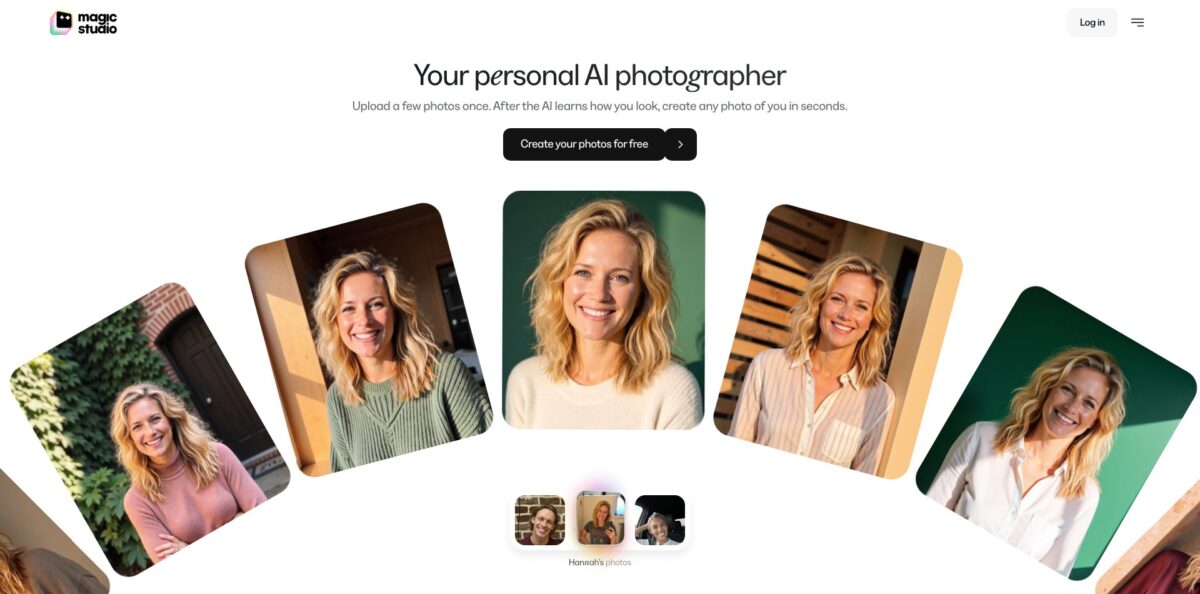
Magic Studio is a browser and mobile photo suite from aarzoo, Inc. that now runs two products under one name. The headline one, sold until recently as InstaHeadshots, trains a personal AI model on ten or more of your everyday photos and then generates studio-style headshots, social pictures and dating photos of you, usually in about 15 minutes. Next to it sits the original Magic Studio editor: a text-to-image generator, an AI art generator, Magic Eraser, a background remover, background blur and a 4K upscaler. The problem it removes is the photoshoot itself, and you see 50 watermarked results before you pay anything. The weak spot is the split: headshot packs and the editor’s PRO subscription are bought separately, accounts are separate, and the “free” preview ends at a paywall some users did not expect. Pick it when you need a believable professional portrait fast.
How to start using Magic Studio?
Open magicstudio.com and click “Create your photos for free”, which takes you to the web app at app.magicstudio.com. Sign up with your email, or, if you bought headshots under the InstaHeadshots name, log in with the same email and sign-in method you used then and your old galleries will be there. If you only want quick edits, the standalone tools live at magicstudio.com/photo-editor/, and Magic Eraser works without signing up at all. Accounts for those editing tools stay separate from accounts that started on InstaHeadshots.
The first real job is the upload. Magic Studio asks for at least 10 clear, recent solo photos: mostly close-ups, at least two waist-up shots, a mix of outfits, backgrounds and lighting, with you facing the camera. Keep your look consistent, because glasses, facial hair or makeup that show up in most photos will be carried into the results. The AI extracts your face, hair and eye features and builds a personal model. You do not need to keep the tab open; an email arrives when the set is ready, usually in about 15 minutes, longer at busy times.
The screen that decides everything is the gallery of 50 watermarked headshots. Scroll through the whole set before paying. If it misses, you can retry once for free with a new batch of photos, and the retry replaces the first set with 50 new images. When you like what you see, pick Starter, Standard or Premium. After purchase, open any photo to change the outfit, backdrop, hairstyle, hair colour, glasses, expression, eye colour or gaze, reduce wrinkles or remove jewellery. Magic Edit takes a plain-language instruction, and Magic Eraser removes small distractions without using credits.
To publish, open a photo and choose Download, or use Select to Download in the gallery to grab several at once. Standard files are 1024 × 1024 pixels, fine for LinkedIn, résumés and websites; Premium files are 4096 × 4096 at 300 DPI for print. Before you replace your profile picture, put the AI shot next to a recent real photo and ask a colleague whether it still looks like you.
Upload twelve to fifteen varied, well-lit photos on the first try instead of the bare minimum of ten, so the free retry stays in reserve.
Who is it for?
Job seekers and LinkedIn users
Your profile photo is a cropped holiday snap and a studio session feels like overkill. Magic Studio gives you 50 business-style options from selfies you already have, and you only pay if a few of them work. You can refresh your profile the same evening.
Consultants, realtors and lawyers
Your face sits on listings, bios and proposals, and it needs to look current. The headshot service offers business casual, formal and industry-specific styles, plus full commercial rights on purchased files. Swapping a backdrop or outfit later costs a credit, not a reshoot.
HR and team leads at remote companies
Matching photos for a website usually means several photographers in several cities. Magic Studio for Teams lets you invite people by email, fix the backdrops and outfits, track who has finished and download everyone’s chosen headshot in one click. Each person gets their own set, and the team admin pays per person.
Dating and social profile users
Group shots and dim bar selfies do you no favours. The social and dating collections generate casual looks from the same personal model once you own a pack. Keep at least one real, unedited photo on the profile so matches are not surprised.
Small online sellers
You need to clean up product shots without learning Photoshop. Magic Eraser, the background remover and background blur run in the browser, and PRO adds bulk editing of up to 50 pictures at once. A cluttered table photo becomes a usable listing image in a few minutes.
Budget hobby creators
You want to play with text-to-image without paying for a high-end generator. The free tier includes 40 AI generations across all tools, and PRO makes generations unlimited at a low yearly price. Expect a simpler tool than the big image models, with preset styles rather than deep controls.
Magic Studio pricing
There are two separate price lists. AI photos of you are sold as one-time packs with no subscription, and you pay only after previewing the full set; each pack includes credits for extra looks and edits. The classic editing and generation tools sit behind a PRO subscription that covers magicstudio.com and the iOS and Android apps, and it does not include headshots. The company says headshot prices vary by location; the US-dollar figures below come from the official headshot, teams and pricing pages and the checkout price data behind them on October 21, 2026.
Create and preview 50 watermarked headshots, with one free retry. In the editor, free use includes 40 AI generations across all tools, watermarked downloads capped at 600 pixels on the longest side, one image at a time, and ads.
Download 3 standard-resolution headshots (1024 × 1024) and get 3 credits. Fine if you need a single profile photo.
All 50 headshots at standard resolution plus 3 credits.
All 50 headshots in 4K at 4096 × 4096 and 300 DPI, plus 50 credits for new looks and edits.
priced per person. For a team of 10 the teams page shows $67 per person ($670 in total, 10% off), with 20% and 25% off at larger sizes, discounts of up to 30%, and custom pricing above 100 people. Each member gets 60 headshots across 3 backdrops and 5 outfits, and you pay only when you are ready to download.
Unlimited AI generations, high-resolution downloads without the watermark, bulk editing for select tools, priority chat support and PRO access in the mobile apps.
Credit maths matter on the headshot side. Most editing tools cost 1 credit, Magic Eraser is free, and five photos in a new look, five “More like this” variations or one 4K upscale cost 5 credits each. You can buy more credits only after a base pack. Headshot payments are non-refundable except where the law requires it, because you see everything before paying. PRO has no refunds either, outside legal requirements and exceptional cases reviewed by email. You cancel PRO under Manage Billing, and moving from monthly to annual requires writing to support.
Magic Studio key features
A personal AI model sits at the core of the headshot service
You upload a set of ordinary photos, the system learns your face, hair and eyes, and it starts you off with 50 professional headshots. Once you own a pack, the same model produces looks from professional, social and dating collections, or more photos in a style you already like.
Post-generation editing works on any headshot you have paid for
You can swap the outfit or backdrop, change hairstyle and hair colour, add or remove glasses, adjust expression, eye colour and gaze, soften wrinkles or remove jewellery. Magic Edit accepts a described change in your own words, and Magic Eraser clears small distractions at no credit cost.
Magic Studio for Teams gives one admin a dashboard for the whole company
You paste a list of emails, choose shared backdrops and outfits or let people pick their own, see who has started, finished or stalled, send reminders and download every member’s primary headshot in bulk. Team data is stored and processed in mainland USA, according to the teams page.
The AI Image Generator turns a written description into a picture
You describe the scene, pick a preset style and choose square 1:1, landscape 2:1 or portrait 1:2, then generate more variations or tweak the prompt. Downloads can be converted to JPG, PNG, WEBP, HEIC and other formats, and a separate AI Art Generator handles illustration-style graphics.
Magic Eraser and the background tools cover the everyday clean-up jobs
You brush over an object, person or text and the AI fills the gap; the page advises covering shadows too and erasing long objects in short sections. The background remover delivers a transparent PNG, background blur fakes a portrait-lens look, and PRO users can bulk edit 50 pictures at once.
The Image Upscaler enlarges pictures up to 4K, and simple converters change HEIC to JPG or WEBP to PNG
The tools accept JPG, JPEG, PNG, HEIC, WEBP and TIFF uploads, so phone photos go in without conversion first.
Mobile apps for iPhone and Android carry the editor, and PRO access extends to both
The iPhone app needs iOS 16 or later, but its last App Store update was version 3.3.0 in November 2024, so the web app at magicstudio.com is the more current place to work.
Magic Studio Pros & Cons
Pros
The pay-after-preview model removes most of the risk of AI headshots. You upload selfies, wait roughly 15 minutes, and judge 50 results before entering a card, with one free retry if the first batch misses. Prices are one-time, not a subscription, and purchased photos come with full commercial rights and no attribution. The teams dashboard is unusually practical for companies, with shared backdrops, progress tracking and bulk downloads. The editor side adds a free eraser, background remover and generator, and PRO at $59.99 a year is cheap for unlimited generations. Spend the free retry on a fresh, varied photo set rather than the same selfies.
Cons
The “free” label confuses people: previews are free, but every clean download needs a paid pack, and the cheapest one gives you only three photos. Headshot and editor purchases are separate, so a PRO subscription does nothing for your portraits. Some users report results that look smoother, thinner or simply unlike them, and occasional artifacts in paid images. Refunds are limited to legal requirements, and several reviewers describe slow email support. The site’s privacy pages also disagree on retention (30 days on the headshot page, 90 days on the homepage). Read the full gallery carefully before paying.
Use Magic Studio if you want…
- Turn everyday selfies into LinkedIn-ready professional headshots.
- Preview 50 AI headshots before paying anything.
- Give a remote team matching headshots without a photoshoot.
- Change outfits, backdrops and hairstyles on existing portraits.
- Print headshots in 4K at 300 DPI.
- Remove objects, people or text from photos for free.
- Generate simple images from text with preset styles.
- Cut out product photo backgrounds for online listings.
Magic Studio alternatives
 PixelcutRead review →
 Fotor Image GeneratorRead review →
 PixlrRead review →
 Canva Text to ImageRead review →
Magic Studio Reviews
Most Trustpilot reviewers say the process took about 15 minutes and gave them dozens of usable business headshots for a fraction of a photographer’s fee, though a few felt some images made them look thinner or over-retouched.
A recurring low-star complaint is the word “free”: the previews cost nothing, but watermark-free downloads need a paid pack, and several people describe the paywall at the end as a surprise.
Some paying customers report headshots that did not resemble them or showed small artifacts, and a handful say their support emails went unanswered, while others say support eventually fixed a failed download link.
On G2, users of the editor like how quickly it generates images and removes backgrounds, but mention slow loading in the web app and lag when editing several photos at once.
App Store reviewers on a budget enjoy the art they get from the generator, yet note that text inside images often comes out garbled and that cancelling and reaching support can take a long time.
FAQ
Is Magic Studio free to use?
Partly. You can create and preview 50 watermarked headshots without paying, and the editor’s free tier includes 40 AI generations and low-resolution, watermarked downloads. Clean headshot downloads start at $59, and the PRO editor plan starts at $4.99 a month billed yearly.
Is InstaHeadshots now Magic Studio?
Yes. Magic Studio says InstaHeadshots is now Magic Studio, the old domain redirects to magicstudio.com/headshots/, and you log in at app.magicstudio.com with the email and sign-in method you used before. The original Magic Studio editor still exists at magicstudio.com/photo-editor/ with separate accounts.
How many photos do I need to upload?
Upload at least 10 clear, recent solo photos, mostly close-ups with at least two waist-up shots. Vary outfits, backgrounds and lighting, face the camera and keep your appearance consistent across the set.
How long does it take to get my headshots?
Most sets are ready in around 15 minutes, though busy periods can take longer. You get an email when the photos are ready, so you can close the page.
Can I use the headshots commercially?
Yes. Purchased photos come with full rights for personal and commercial use, including websites, LinkedIn, résumés, ads, business cards and print, with no watermark and no attribution required.
What happens to my photos?
The homepage says your photos are used only for your personal AI model, are never used to train general models, can be deleted at any time, and that the model is deleted automatically after 90 days. The general privacy policy, last updated in January 2024, allows inputs and outputs from the service to be used to improve its models, so read it before uploading sensitive images to the editor tools.
Can I get a refund?
Generally not. Headshot packs are non-refundable except where the law requires it, since you see the full set before buying, and PRO subscriptions have no refunds outside legal requirements and exceptional cases reviewed by email. You can cancel PRO anytime under Manage Billing and keep access until the paid period ends.
Is there a Magic Studio mobile app?
Yes. The Magic Studio editor has apps for iPhone and Android, and PRO covers both. The headshot service runs in the browser at app.magicstudio.com, which also works on a phone.
Similar tools
 BannerbearTemplate-based API for generating on-brand images, PDFs, animations and videos at scale from your data via REST, Zapier, Airtable or AI agents.
 Generated PhotosLibrary of 2.6M+ AI-generated faces plus face and full-body human generators for model-release-free people images in design, ads and research.
 VheerBrowser-based AI studio for text-to-image, photo editing and image-to-video, with a free no-signup model plus credit access to Nano Banana, Sora 2