

MagicShot
Image GenerationUpdated November 17, 2026
All-in-one AI studio that turns a prompt or photo into images, videos, headshots, photo edits and voiceovers, with many models on one credit balance.
We may earn a commission when you sign up through our links. It does not affect our reviews.
What is MagicShot?
MagicShot packs five AI suites into one web studio and iOS app: image generation, video generation, AI photoshoots, photo editing and audio. You type a prompt or upload a photo, pick one of more than 90 task-specific tools, and MagicShot sends the job to a third-party model such as GPT Image 2.6, Seedream 5.5, Nano Banana 2.1, Kling 4.0 or Seedance 2.5. Every paid plan opens every tool and every model, and all of them draw from one monthly credit pool, which replaces a stack of separate subscriptions. The weak spot is that MagicShot builds on other companies’ models rather than its own, so quality depends on the engine you pick, and video drains credits quickly. It suits creators, online sellers and small businesses who need lots of varied visuals every week without learning several apps.
How to start using MagicShot?
Go to magicshot.ai and press Get started, which opens the web app at app.magicshot.ai. You can sign up with Google, Apple or an email address, and email accounts are confirmed with a one-time code. Pick one sign-in method and stay with it, because Google, Apple and email are separate routes and switching later causes login trouble. Without any plan you can already use three free tools, Video Generator, Text to Speech and AI Photo Generator, and no card is required.
For a first real job, choose the tool by the task rather than by the model, since each tool is already wired to models that suit it. A seller might open Product Photo Generator, upload one clear phone photo and either ask for a white-background catalog shot or describe a scene such as a walnut desk in morning light. For text-to-image, open Photo Generator and write the subject first, then the style, the mood and the lighting. The official docs suggest skipping words like “stunning” or “high quality” because they do not rule anything out.
Once you know which engine you like, move to the All-in-One Studio canvas. There you choose the model yourself and set the aspect ratio (1:1, 4:5, 9:16, 16:9 or 3:2), resolution, seed, steps, guidance, negative prompt and how strongly a reference image pulls on the result. You can queue a batch of prompts, or send one prompt to several models, and collect the whole set later from your library. MagicShot’s own advice is to iterate on a faster model and save the heavier one for the final run, which is the biggest credit saving available.
Before you publish anything, zoom in on faces, hands and label text. Images export as PNG or WebP at up to 4K. Failed generations return their credits automatically, usually within minutes, but a result you simply dislike stays charged. Commercial use is covered only on paid plans, and the content policy blocks NSFW material and anything resembling public figures before it is generated.
Who is it for?
Social media creators
Daily posts, Reels and thumbnails usually mean juggling an image app, a video app and a voice app. MagicShot puts text-to-video, UGC-style video ads, a YouTube Thumbnail Generator and text-to-speech under one login. One idea can become a still, a clip and a voiceover in a single session.
Online sellers
Supplier photos and phone snaps rarely look like a store listing. Product Photo Generator restages one photo on a white background or in a lifestyle scene at up to 4K, and Product to Video turns the same shot into a short clip. You skip booking a studio for every new SKU.
Small business owners
A new business needs a logo, colors and social templates before almost anything else. Brand Studio builds several complete looks from a one-sentence description and hands over a logo system, palette, font pair, business cards and a brand guide. Other MagicShot tools can then output in that brand.
Job seekers and teams
A studio headshot session costs money and a free afternoon. The AI Headshot Generator takes a set of clear selfies and returns business formal, smart casual or studio gray portraits. Teams can reuse the same style settings so every face on the company page matches.
Real estate agents
Listings need photos, staging and video before a videographer is available. MagicShot offers a Real Estate Video Generator for listing clips and an Interior Designer tool that redesigns a room from a photo. You can start marketing a property the same day.
Developers and AI-assistant users
If you already work in Claude, Cursor, VS Code, Codex or Windsurf, the MagicShot MCP server lets you ask for images and videos in plain words. Jobs run on your existing credits, so you avoid managing separate keys for every model provider.
MagicShot pricing
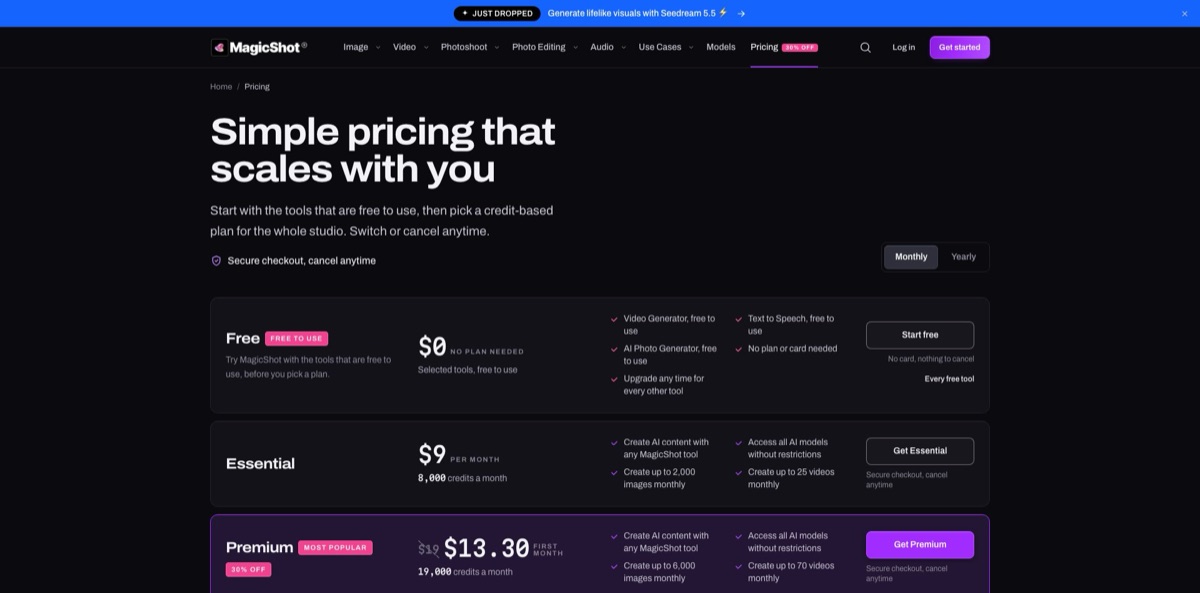
MagicShot sells one product at three volumes. Every paid plan includes every tool and every model, with no premium-only engines and no per-model surcharges; the plans differ only in credits. Each generation spends credits, and the amount depends on the model, so heavier engines and video cost far more than fast image models. The official caps show the gap: on Essential, the same 8,000 credits covers up to 2,000 images or only 25 videos. Monthly credits reset every billing cycle and never roll over, while yearly plans are billed once and list a yearly credit total.
Video Generator, Text to Speech and AI Photo Generator are free to use with no plan and no card. You can download results and post them on your own profile, but the commercial license comes only with a paid plan.
8,000 credits a month (96,000 a year on yearly billing), enough for up to 2,000 images or 25 videos monthly, with every tool, every model and a commercial license.
19,000 credits a month (228,000 a year), covering up to 6,000 images or 70 videos monthly. At the time of writing, a promotion cut the first month by 30% to $13.30. MagicShot calls this the tier most regular creators pick.
40,000 credits a month (480,000 a year), covering up to 10,000 images or 120 videos monthly, aimed at businesses and high-volume work.
There is no custom or enterprise tier on the pricing page. You can switch or cancel at any time with no minimum term, but fees for a billing period that has already started are not refunded. A full refund is possible within 7 days of the first charge if you have not used a meaningful share of your credits, and subscriptions bought through Apple are refunded by Apple under its own rules.
MagicShot key features
One credit pool for many frontier models
MagicShot runs image, video and audio engines from OpenAI, Google, ByteDance, Kuaishou, Black Forest Labs, Ideogram, MiniMax, PixVerse and others, including GPT Image 2.6, Seedream 5.5, Nano Banana 2.1, Flux 3, Kling 4.0 and Seedance 2.5. New releases arrive quickly: Seedream 5.5 went live on MagicShot on November 11, 2026, two days after ByteDance announced it. You can compare engines without opening a separate account for each.
All-in-One Studio canvas
This screen exposes the controls most consumer generators hide: model picker, aspect ratio, resolution, seed, steps, guidance, negative prompt, reference images and a reference strength slider. A locked seed reproduces a result exactly, and the batch queue runs many prompts, or one prompt across several models, while you work in another tab. That keeps catalog shots and ad variants consistent instead of random.
AI Photoshoot suite
Upload your own photos and get professional headshots, AI Model Shoot fashion images, wedding portraits, baby photoshoots, pet portraits, dating profile photos or fashion try-ons. You choose outfits and backdrops, and headshots export as PNG with upscaling to 4K.
Video and audio generation
Text to Video, Image to Video, UGC Videos for ad-style clips, Go Viral AI for trend templates, a Real Estate Video Generator, an AI Podcast Creator and a video upscaler cover most short-form needs. Kling 4.0 produces clips of up to 30 seconds with stereo audio, and Gemini Omni 1.2 Flash makes up to 15 seconds with synchronized sound. The audio side adds text-to-speech, a music generator on Google’s Lyria 3.5, an audio transcriber and voice cloning from a 5 to 30 second sample in 10 languages.
Photo editing toolkit
Background Remover, Object Remover, Image Upscaler, Photo Restorer, Image Colorizer, Brighten Image, Face Enhancer and prompt-based Image Editing all share credits with the generators. A generated image can go straight into cleanup without exporting it to another app.
Brand Studio
Describe your business in a sentence or two, pick moods such as Minimal, Bold, Luxury or Retro, and get several complete looks side by side. Change colors, fonts or wording, then download one ZIP with a logo system in SVG and PNG, a color palette, a font pair, social templates, business cards and a brand guide as a PDF and a web page. The price is shown before anything is charged.
MCP server and browser extension
The MCP endpoint connects MagicShot to Claude, Claude Code, Cursor, VS Code, Codex and Windsurf, with tools such as text_to_image, text_to_video, image_to_video, run_tool and get_credits; most clients use an API key from your account, while claude.ai uses a sign-in instead. The free Chrome extension sends any image on a web page into a MagicShot tool with a right-click.
MagicShot Pros & Cons
Pros
Value per dollar is the headline. Essential costs $9 a month, or $5.25 on yearly billing, and still includes every tool and every model, from the newest GPT Image and Seedream releases to Kling and Seedance for video, with no premium-only engines. One credit pool covers images, video, photoshoots, edits and voice, so you can drop several separate subscriptions. The All-in-One Studio gives advanced users seed, steps, guidance and batch controls, while single-purpose tools stay simple for beginners. Policies are written clearly: failed jobs are refunded in credits automatically, uploads are never used for training, and paid plans carry a commercial license with no attribution required. Start on Essential and note how many credits your typical job costs before upgrading.
Cons
Credits go fast once video enters the picture: the official caps put one video at roughly the cost of 80 images, monthly credits never roll over, and a result you dislike is not refunded. MagicShot does not train its own models, so quality depends on third-party engines, and some App Store reviewers describe hit-or-miss results and misread prompts. Trust is another issue. Early iPhone users with Lifetime Pro accounts were moved to credits in late 2025, which triggered a wave of one-star reviews. The Trustpilot score also rests on only 44 unprompted reviews. Check the credit cost before every video run, and cancel before the renewal date if you are unsure.
Use MagicShot if you want…
- Generate product photos from a single phone snapshot.
- Turn selfies into professional LinkedIn-ready headshots.
- Create short video ads from text or images.
- Compare several image models on one prompt.
- Build a full brand kit from one sentence.
- Clone a voice and narrate your own scripts.
- Restore, colorize and upscale old family photos.
- Generate images and videos directly from Claude or Cursor.
- Pay one subscription instead of several AI apps.
MagicShot alternatives
 Leonardo.aiRead review →
 ImagineArtRead review →
 KreaRead review →
 OpenArtRead review →
 Adobe FireflyRead review →
 Fotor Image GeneratorRead review →
MagicShot Reviews
Trustpilot reviewers mostly praise having image, video, editing and avatar tools in one beginner-friendly app instead of three separate ones, though a couple say it can be a little glitchy or less smooth than they would like.
Early iPhone users who held a Lifetime Pro plan were angry when the app switched to credits in late 2025 and called it a bait and switch; the developer replied that lifetime access had been a free gift and now offers those users monthly credits plus a plan discount.
One App Store reviewer says animated listing photos brought noticeably more sales on eBay and OfferUp, while another dislikes having to pay just to make a simple 5 to 10 second video.
Some App Store reviewers call the results hit or miss, with roughly half of generations strong and half weak and detailed prompts sometimes misread, while others accept the misses because the app is fast and cheap.
FAQ
Is MagicShot free?
Partly. Video Generator, Text to Speech and AI Photo Generator are free to use with no plan and no card, while every other tool needs a paid plan from $9 a month. The commercial license comes only with a paid plan.
How much does MagicShot cost?
Essential is $9 a month for 8,000 credits, Premium is $19 a month for 19,000 credits, and Premium+ is $35 a month for 40,000 credits. Yearly billing lowers these to $5.25, $11.50 and $22.50 a month, charged once as $63, $138 and $270.
Do unused MagicShot credits roll over?
No. Monthly credits reset at the start of each billing cycle, they have no cash value, and canceling does not turn them into a refund. Credits for failed generations are returned automatically.
Can I use MagicShot images commercially?
Yes, on any paid plan. Essential, Premium and Premium+ all include commercial-use rights for your own content, campaigns and client work, with no attribution required, though the content policy still applies.
Does MagicShot train AI models on my photos?
No. MagicShot says it never uses uploads, prompts or results for training, on any account. Files are sent to the model providers only to produce your result, and deleting a result or your account removes it from active storage immediately.
Is there a MagicShot app or API?
There is an iOS app, AI Generation Tools: MagicShot, which requires iOS 17 or later, plus a free Chrome extension. Developers connect through the MagicShot MCP server with an API key from their account; the site documents MCP access rather than a separate REST API.
Can I get a refund from MagicShot?
Technical failures are credited back in full automatically, and generations blocked as NSFW return 50% of their credits. A new subscription can be fully refunded within 7 days if you have not used a meaningful share of credits, but disliking a result is not grounds for a refund.
Can I create images of celebrities or other real people?
No for public figures: content resembling celebrities or politicians is prohibited, and so is NSFW content of any real person. Photos of friends or partners are allowed only with that person’s agreement, and impersonation is banned.
Similar tools
 RunComfyCloud ComfyUI platform with per-second GPU billing, 200+ ready workflows, hosted image and video models, LoRA training and a serverless API.
 ImgGen AIBrowser-based AI image generator and photo editing suite with background removal, 8K upscaling, restoration and an API on one credit balance.
 Bulk Image GenerationBatch AI image generator that turns a prompt list or one brief into up to 100 images per run, with five models,