
Metatable.ai
Developer ToolsUpdated October 5, 2026
Metatable.ai is an AI-driven platform for building and deploying full-stack web and mobile applications with minimal coding.
We may earn a commission when you sign up through our links. It does not affect our reviews.
What is Metatable.ai?
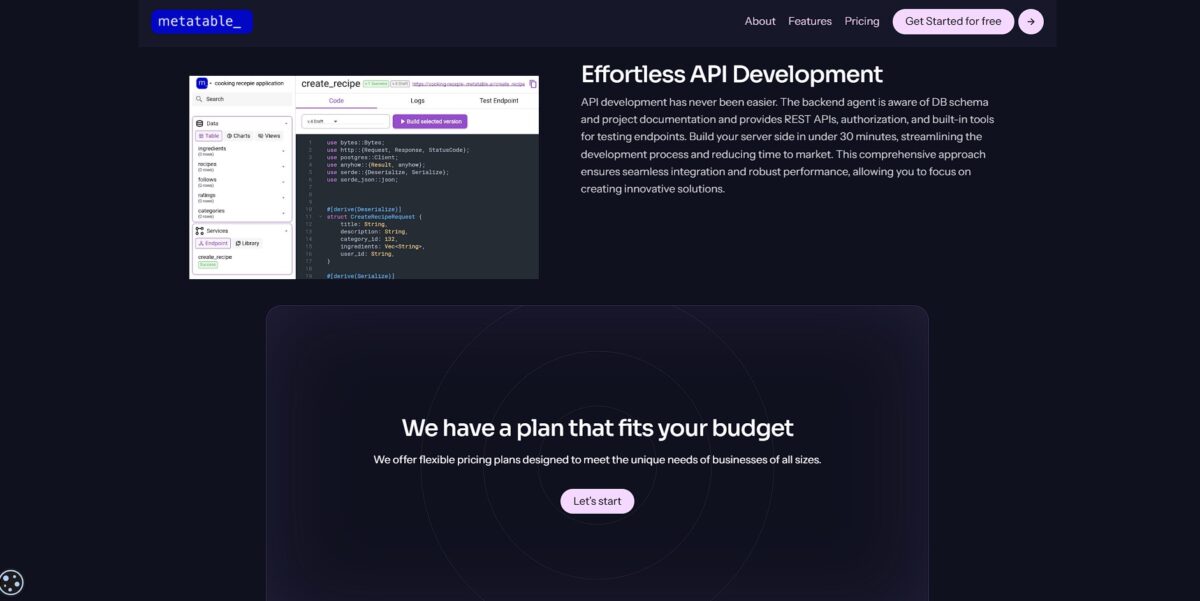
Metatable.ai turns your messy spreadsheets or basic prompts into a functioning full-stack application without the usual back-end heavy lifting. It converts data structures into workable interfaces. The logic stays manageable even when you add complex relations between tables. This matters because you spend less time debugging database schemas and more time refining the user experience. It works well for internal tools or rapid prototyping, but might feel constrained if you need deep, custom-coded server-side logic. Use it to skip the boilerplate phase of a new project.
How to start using Metatable.ai?
To get started, head to the Metatable.ai website and create an account. You typically sign up using an email or a social login to access the main dashboard. This workspace serves as your central hub for managing different app projects. Your data schemas and interface designs stay organized in one place.
Once inside, you can initiate a new project by describing your app idea in plain English. The AI agent listens to your requirements and begins scaffolding the database and frontend logic. I noticed the initial generation focuses heavily on core CRUD operations, which helps you move from an idea to a clickable prototype in minutes. This speed lets you validate concepts before committing to complex customizations.
Next, you dive into the editor to refine the generated output. You can click on specific UI components to change their properties or adjust the data relationships. This blend of automated generation and manual control works well for internal tools, though it might feel a bit rigid if you need highly bespoke animations. You get no-code speed with developer-level control when you need it.
Finally, connect your existing data sources or use the built-in storage to power the application. After testing the workflows in the sandbox environment, hit the deploy button to make the app live. You get a hosted URL immediately, allowing team members to start entering data without any server configuration. The trade-off is relying on their infrastructure, but it eliminates the headache of manual DevOps.
Who is it for?
The Solo Founder
You need a functioning backend and a clickable interface to show investors, but you lack a dev team. It generates the boilerplate while you focus on finding product-market fit. That can save months of coding costs.
The Spreadsheet Wrangler
You manage complex data in messy sheets and need a way for your team to edit it securely. It maps your columns to a real SQL database with proper user permissions. Non-technical staff can no longer wipe data by accident.
The Backend-Curious Frontend Dev
You can build beautiful React components but struggle with server-side logic and database migrations. The AI handles the Rust-based infrastructure, letting you stick to the UI. Scaling a serverless backend stops being scary.
The Rapid Prototyper
You work in an agency where clients demand a vertical slice of an app by next Friday. It handles the wiring between the frontend and database in minutes, not days, so you iterate on feedback faster.
The Process Automator
You need to connect a web form to an API that triggers a complex workflow. It scaffolds the necessary endpoints and documentation without you writing a single line of Node.js. Your logic stays documented and reproducible.
Metatable.ai pricing
Metatable scales from individual experimentation to heavy-duty production without hiding costs behind a sales call. You can spin up a serverless backend for free to test a concept, though I noticed the idle timeout means your API hibernates every four hours. Moving to a paid plan keeps your backend always online and opens up project exports, so you aren’t locked into their ecosystem if you decide to self-host later.
Includes 250k tokens and one project. Good for sandboxing ideas, but the “shut down when idle” rule makes it a no-go for live users. In practice, your app will feel sluggish on the first load after a break.
This is the sweet spot for MVPs. It offers 1M tokens and 100k requests. It removes the idle shutdown, ensuring your API responds instantly to every call.
Bumps you to 4M tokens and 500k requests. It places your app on a premium shared instance for better response times under load. Your backend won’t slow down during traffic spikes.
Offers a dedicated instance and unlimited projects. It adds human-assisted development for complex architecture needs.
Metatable.ai key features
Generates frontend and backend code simultaneously from one prompt
You describe the app logic, and it scaffolds the React components and Rust backend routes in one pass. The tedious manual wiring between your UI and API is gone.
Connects your app to live databases like PostgreSQL or MongoDB automatically
It writes the schema migrations and CRUD operations based on your natural language description. You stop wrestling with database connection strings and boilerplate query logic.
Integrates authentication flows like JWT or OAuth without manual configuration
It handles the login logic and protected routes during the initial build phase, securing your user data from day one without you writing custom middleware.
Deploys your application to a live URL with a single click
It manages the hosting environment and environment variables so your code is instantly accessible. Goodbye to the “it works on my machine” headache of cloud configuration.
Corrects its own code errors through an automated testing loop
If the generated backend fails a check, the AI identifies the bug and applies a fix before you even see the file. That reduces the initial debugging workload typical of AI-generated snippets.
Metatable.ai Pros & Cons
Pros
Metatable.ai accelerates the leap from concept to MVP. It generates both frontend and backend code, significantly cutting down on manual boilerplate. Complex integrations with Stripe and Slack work right out of the box, taking the technical friction out of setting up payments or notifications. Its use of Rust and WebAssembly ensures your app remains fast and secure as you scale. This allows you to focus on product-market fit instead of server management. Choose this if you need to validate a business idea in hours rather than months.
Cons
The platform works best for standard web and mobile application patterns. Customizing highly unique or obscure logic might require more manual intervention than expected. It simplifies the development process, but you still need a baseline understanding of technical specifications to guide the AI effectively. The trade-off for such rapid deployment is a reliance on their specific infrastructure and supported integrations. This matters because migrating a fully built app to a different stack later could be complex. Use it to build and iterate quickly, but verify if your niche requirements fit its current feature set.
Use Metatable.ai if you want…
- Launch full-stack MVPs in under sixty minutes.
- Build secure Rust backends without writing complex code.
- Generate instant REST APIs from simple natural language.
- Deploy scalable SQL databases with a single click.
- Eliminate repetitive boilerplate using intelligent AI agents.
- Bridge frontend and backend in one cohesive environment.
- Create custom business apps with minimal technical expertise.
- Automate documentation and infrastructure setup effortlessly.
Metatable.ai alternatives


Metatable.ai Reviews
The speed from prompt to a working Rust-based backend is impressive. It handled my Firebase integration without the usual manual boilerplate headache.
I built a functional MVP in under an hour. The one-click deployment to scalable infrastructure is a massive time-saver for solo founders.
The AI assistant actually understands technical specs. I noticed it validates the frontend-backend logic better than general-purpose LLMs I’ve tried.
The platform’s use of Rust gives us confidence our application is built for both speed and security. It is a game changer for our dev cycle.
FAQ
What programming language does Metatable.ai use for backends?
Metatable.ai generates production-ready backend code primarily in Rust, ensuring high performance and security for applications.
Can I convert an image directly into a web application?
Yes, Metatable.ai offers an Image to HTML AI tool that allows you to quickly convert images into functional web applications.
How fast can I build an MVP with this platform?
You can transition from an idea to a functional MVP in approximately 60 minutes, compared to months of traditional development.
Which AI models power the code generation?
The platform integrates advanced LLMs including GPT-4 from OpenAI and Claude 3.5 Sonnet from Anthropic to ensure reliable and high-quality code output.
Does Metatable.ai support database management?
Yes, it includes a secure and scalable SQL database with features like Spec-to-SQL for automated schema generation and management through plain text commands.
What happens if I exceed my plan’s token limits?
If you exceed your monthly token limits, charges for out-of-scope services are applied at the end of the billing period or added to your next invoice if under five dollars.
Is there a vendor lock-in when using Metatable.ai?
No, the platform is designed for flexibility with no vendor lock-in, providing custom domain support and allowing you to manage your infrastructure independently.
Similar tools
 Novita AIDeveloper cloud with one API for 200+ open-weight AI models, plus GPU instances, dedicated endpoints and isolated sandboxes for AI agents.
 You.comDeveloper platform of web search, content extraction, cited research and model inference APIs that feed AI agents and RAG apps real-time web
 QodoAI code review platform that runs specialized agents on every pull request, enforces team rules and checks changes against tickets and linked