

Mindflow
No-Code AIUpdated October 27, 2026
No-code and agentic automation platform for SecOps, ITOps and CloudOps teams that turns prompts into workflows across thousands of tool APIs.
We may earn a commission when you sign up through our links. It does not affect our reviews.
What is Mindflow?
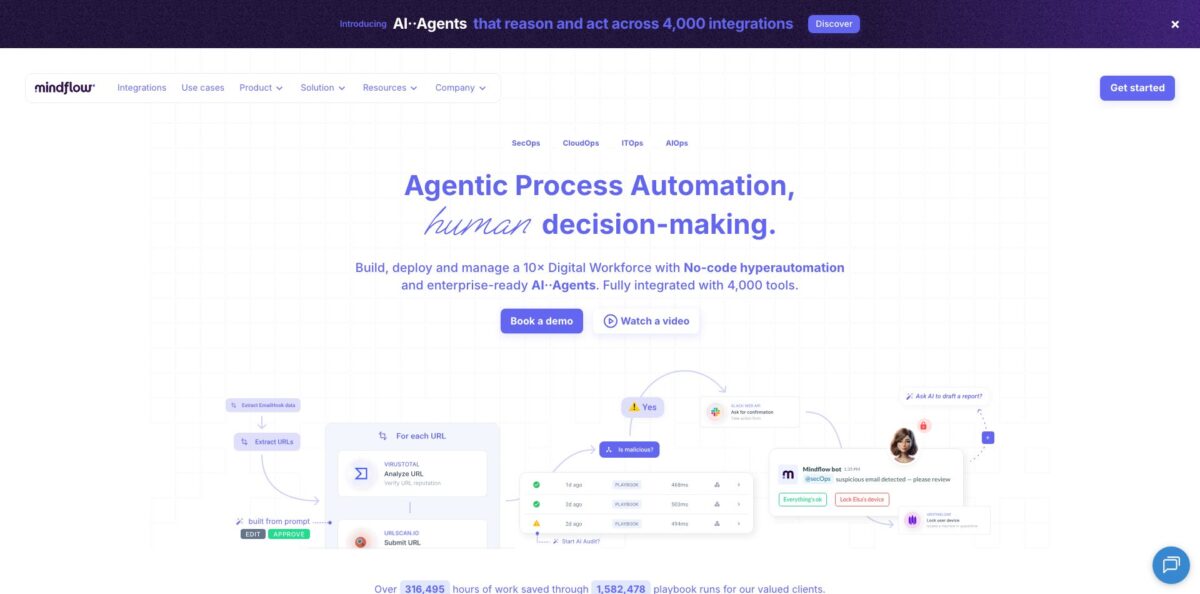
Mindflow is a Paris-based automation platform for enterprise IT and security teams that combines a visual no-code flow builder with AI agents and a prompt-to-workflow assistant. You describe a job such as “enrich a CrowdStrike alert with VirusTotal and open a ticket in TheHive”, and the AI drafts the steps by picking operations from a catalog the company puts at 4,000+ integrations and 150,000 operations. At heart it is a modern SOAR and it still leans hard on SecOps, though it now pitches ITOps, CloudOps and MSP use cases too. The trade-off is access and cost: there is no self-serve plan, and the AWS Marketplace contracts start at $30,000 a year. Pick it if you run a SOC or IT operations team that wants governed automation across a large tool stack without writing glue code.
How to start using Mindflow?
Access starts with sales. The website offers Book a demo and a short sign-up form that asks for your name and a business email; there is no public free plan. Once your organization has a tenant, you sign in at your own workspace URL (for example
https://your-tenant.mindflow.io). If self-registration is enabled, choose Sign Up, enter your name, email and password, and confirm the verification code Mindflow emails you. On first login, an onboarding screen prepares your first environment and some sample flows; click Open my flows! when it reports All done. Turn on two-factor authentication from My profile, or use SSO if your company has an identity provider.Before you open the canvas, the docs recommend writing the scenario as WHEN, THEN and IF lines so branches and exceptions show up early. Then go to Integrations, search for each vendor you need (say, Amazon AWS or VirusTotal) and flip the switch on the services your flow will call. Open Environments, create one per context (a dev environment and a production one is the usual split), and add credentials there with Create a credential. Secrets live in the environment, not in the flow, so the same design can later run with different keys.
Now build. On the Flows page, click Create and choose Flow for a step-by-step design or Agent to start from a single prompt; the Agent starter seeds a webhook trigger plus an AI Task step. Inside the designer, the right rail holds AI Build: click Ask AI to generate Steps, type something like “Using @VirusTotal analyze the URL from the previous step”, and the assistant adds the matching operation. Triggers include Webhook, Emailhook (a unique address that starts the flow), Scheduler and Flowhook, which lets one flow or agent call another. The first lesson in the docs walks you through a weekly NewsAPI digest delivered to your inbox.
Test with Run in the top toolbar and read the run in the logs side panel. In Settings, set a timeout (the field suggests 300 seconds and accepts up to one week), choose email notifications for failures or successes, and set how long run logs are kept, with an option to redact log data. When the design behaves, deploy a version into an environment; each deployment has its own triggers and credentials. Lock production designs so nobody edits them by accident, and use Document workflow to have AI Note write a description next to the flow.
Who is it for?
SOC Managers
Your analysts spend the day copying IPs, URLs and hashes between a SIEM, VirusTotal, URLScan and a ticketing tool. Mindflow turns that enrichment and triage into flows or agents with approval steps, so people review decisions instead of collecting data.
IT Operations Teams
Onboarding and offboarding touch Okta, Google Workspace, GitHub and Jira, and each manual step is a chance to miss an account. Prebuilt templates and the integration catalog let you script the whole sequence once and run it the same way every time.
CloudOps and Platform Engineers
AWS Config findings, public S3 buckets and idle EC2 instances pile up faster than anyone can fix them by hand. Mindflow’s templates cover remediation and cost flows that report to Slack, and you can route any step for human approval before a fix runs.
Managed Security Service Providers
You serve many clients, each with its own stack and secrets. Separate environments keep credentials and members isolated per client, and the vendor markets agents and AI Rooms specifically for MSSP work.
Security Engineers Who Script
You can write Python, but you do not want to read API docs for 50 tools. No-code steps cover the common calls, and Python or JavaScript steps cover the edge cases, so you keep control without maintaining a pile of scripts.
Incident Communication Teams
Outages mean updating Jira, paging on-call and posting in Slack, often by hand. Webhook-triggered flows can do all three at once, which is the scenario in Mindflow’s Doctolib case study.
Mindflow pricing
Mindflow does not publish prices on its own website. The site routes you to a demo, and the AI Agents FAQ says new customers get a quote based on agent volume, while existing customers can add agents through an AI Credits add-on. The only public numbers come from Mindflow’s own listing on AWS Marketplace, which sells 12-month contracts priced by workspaces and workflows, as shown on October 25, 2026. AWS notes that extra infrastructure costs may apply, and no free trial is listed.
One team workspace, up to 5 workflows, limited customizations. That works out to $6,000 per workflow per year, so it suits a team proving one or two high-value use cases.
One team workspace, up to 20 workflows, with add-ons available for extra features. This is the realistic tier for a SOC or IT team automating several processes.
You set the number of workspaces and flows to match your organization, and AWS lets you request a private offer for a custom quote.
quote-based. Existing plans can add agents through AI Credits; the exact credit pricing is not public.
Mindflow key features
AI Build turns plain-language requests into flow steps
You open a chat panel in the designer, mention a service with @, and describe the action; the AI reads the vendor’s documentation and adds the operation that fits. The homepage also offers text-to-automation that drafts a whole flow or workspace from one prompt. Expect to review every generated step, because you still need to fill in credentials and replace placeholders.
A very large integration catalog
Mindflow claims 4,000+ integrations and full coverage of each vendor’s API calls, from Splunk, CrowdStrike and SentinelOne to Okta, Jira, ServiceNow, AWS and OpenAI. For private or missing endpoints you can send raw HTTP requests, and the FAQ says both public and private APIs are supported.
AI Agents and AI Tasks
An AI Task is a flow step that sends a prompt to an LLM, can call integration tools you attach, and returns text or structured output; an Agent starts from a prompt and works toward a goal within the environment’s credentials. Agents can call other agents through Flowhooks, and the vendor says it runs models from OpenAI, Anthropic and Mistral on Amazon Bedrock. You get flexible triage for messy inputs while deterministic steps stay deterministic.
AI Rooms is a chat command center for operations
Teams ask questions, review context, approve actions and trigger flows from one auditable conversation instead of hopping between consoles. Human approval can be required on any step or task. It is the closest Mindflow comes to a copilot for analysts on shift.
Environments, a credential vault and role-based access
Credentials, variables and members live in environments, with Owner, Operator and Auditor roles, and each deployment runs a specific flow version with only that environment’s secrets. Flow versioning, a Lock switch, run logs with retention settings and log redaction round out the governance story. Security-minded buyers will also note the stated SOC 2 Type II and ISO/IEC 27001 certifications and single-tenant deployment.
Low-code escape hatches
When no-code steps are not enough, you can insert Python or JavaScript, split big designs into reusable sub-flows, and process data up to 100 MB inside a flow. Triggers cover manual runs, schedules, webhooks and email. This keeps engineers on board instead of pushing them back to standalone scripts.
Relay Agent for on-premise systems
Flows are orchestrated in Mindflow’s cloud, while a local agent built on Cloudflare Zero Trust tunnels connects to tools in your own server rooms. You can automate internal systems without opening inbound firewall ports.
Mindflow Pros & Cons
Pros
Mindflow covers a lot of ground in one product: a visual builder, prompt-generated steps, autonomous agents and a chat interface for approvals, all on top of a huge catalog of security and IT tool operations. Governance is taken seriously, with per-environment credentials, Owner, Operator and Auditor roles, versioned deployments, audit logs, log redaction and stated SOC 2 Type II and ISO 27001 certifications. Python and JavaScript steps mean engineers are not boxed in, and the Relay Agent reaches on-premise tools. The docs are current, with hands-on lessons up to MCP-based GitHub triage. Start with the vendor’s templates for phishing or alert enrichment to see value before designing your own agents.
Cons
Cost and access are the main hurdles. There is no free tier or public trial, and the AWS Marketplace list prices start at $30,000 a year for five workflows, which rules out small teams. Independent user reviews are almost nonexistent, so you rely on vendor case studies and references. Vendor figures also vary: the site says 4,000+ integrations, while one AWS listing highlight still says 600+. A customer case study published by Mindflow warns that live flow edits need strict process, concurrent writes to shared variables can race, and large payloads strain the AI agent’s context. Ask for a scoped pilot with clear success criteria before you commit to a 12-month contract.
Use Mindflow if you want…
- Automate alert triage and enrichment across your security stack.
- Turn plain-language prompts into working automation flows.
- Run AI agents with scoped credentials and human approvals.
- Orchestrate onboarding and offboarding across identity and ticketing tools.
- Connect cloud workflows to on-premise systems through a relay.
- Replace brittle in-house scripts with versioned, auditable flows.
- Give analysts a chat interface for approving operational actions.
- Keep each client’s credentials isolated in separate environments.
Mindflow alternatives


Mindflow Reviews
In a customer story published by Mindflow, the Colas incident response lead praises the friendly interface and the range of integrations; the same story says a two-person team was facing about 500 alerts a month before automating. Treat it as a vendor reference, not an independent review.
A Doctolib support performance lead, quoted in a Mindflow case study, credits the platform with cutting incident communication delays from about 30 minutes to 3 by chaining Jira, PagerDuty and Slack. The figure comes from the vendor’s own write-up.
A customer case study on Mindflow’s blog reports new workflows working within a single session and fast team onboarding, but also lists real friction: live edits need strict change control, shared variables can race under concurrency, and big payloads need care with AI context limits.
Independent review platforms are nearly empty: TrustRadius, the AWS Marketplace listing and, according to its public profile, G2 show no user reviews as of October 2026, so ask Mindflow for reference customers in your evaluation.
FAQ
Does Mindflow have a free plan or free trial?
No public free plan is advertised, and the AWS Marketplace listing shows no free trial. Access starts with a demo or a sign-up form that asks for a business email.
How much does Mindflow cost?
Mindflow’s AWS Marketplace listing shows 12-month contracts at $30,000 for the Startup Plan, $50,000 for the Team Plan and $200,000 for the Custom Enterprise Plan. Direct deals and AI Agents pricing are quote-based.
Is Mindflow only for cybersecurity teams?
No. It grew out of security automation and its templates lean that way, but the platform also targets ITOps, CloudOps and business tools such as Jira, Slack and Google Workspace.
Can Mindflow connect to on-premise systems?
Yes. Workflows run in Mindflow’s cloud, and a Relay Agent based on Cloudflare Zero Trust tunnels reaches services inside your own network.
Is my data used to train AI models?
Mindflow says your content is never shared with model providers or used to improve base models. It cites tenant isolation, Amazon Bedrock hosting, AES-256 encryption and SOC 2 Type II and ISO/IEC 27001 certification.
Do I need to know how to code?
No. Flows are built visually and AI Build can generate steps from a prompt, but you can add Python or JavaScript steps when a use case needs custom logic.
Does Mindflow support MCP?
Yes, as an MCP client. The docs show an AI Task that builds JSON-RPC calls to an MCP server, with a lesson that triages GitHub issues through GitHub’s MCP server.
Does Mindflow have a public API?
The documented platform API currently covers authentication and audit logs at https://api-{tenant}.mindflow.io/v1. Flows themselves can also be exposed through webhooks to act as no-code APIs.
Similar tools
 OnSpace.AINo-code AI app builder that turns chat prompts into React Native iOS and Android apps or web apps, with a managed backend,
 Jet AdminAI and no-code builder for internal tools, admin panels, dashboards and client portals that runs on top of your existing databases and
 UserflowNo-code product adoption platform for building in-app tours, checklists and surveys, with AI flow generation and an in-app Adoption Agent.