

mnml.ai
Art GenerationUpdated November 18, 2026
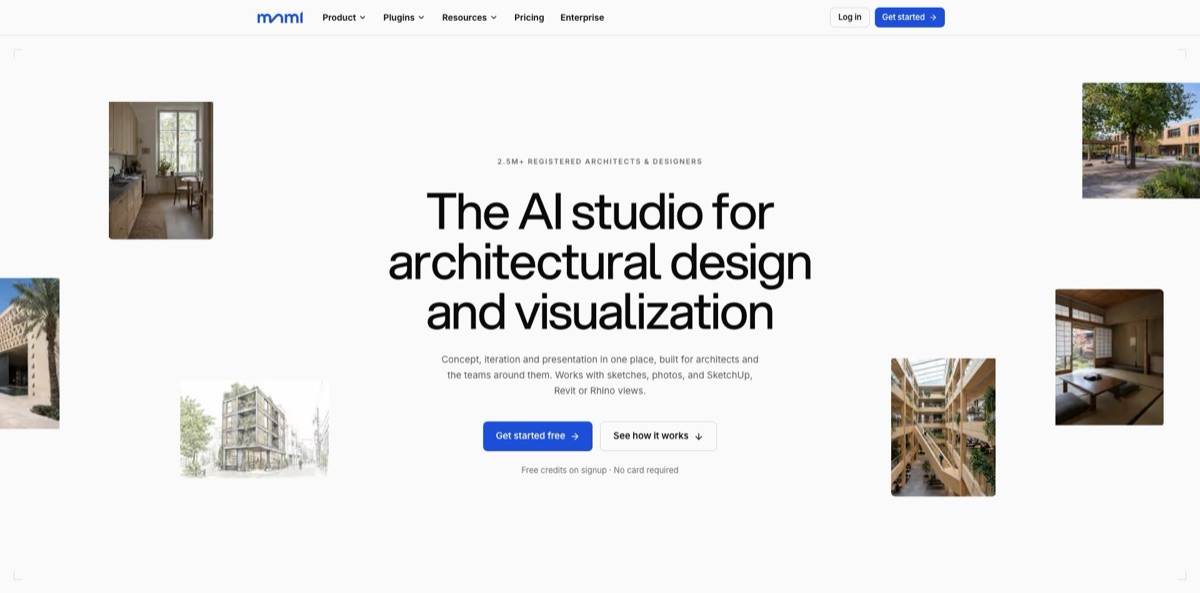
AI rendering studio for architects and designers that turns sketches, photos and SketchUp, Revit or Rhino views into photoreal renders and short videos.
We may earn a commission when you sign up through our links. It does not affect our reviews.
What is mnml.ai?
Pronounced “minimal”, this is a browser-based rendering platform for architects and interior designers that turns hand sketches, site photos and SketchUp, Revit or Rhino viewport exports into photoreal images. Instead of setting up materials, lights and a render engine, you upload a view, say whether it shows an exterior, interior, plan, masterplan or landscape, and steer the result with controls for style, time of day, weather and camera. Two workspaces share one credit balance: Studio takes a single image all the way to approval, and Flow is a board for comparing options side by side. The weak spot is control. Users report that edit prompts and “keep the massing” instructions are not always respected, so exact geometry can drift. Pick it for concept work, competition boards and early client reviews, not for construction-accurate visuals.
How to start using mnml.ai?
Sign up with Google or an email and password. New accounts get 100 free credits that do not expire, and no card is asked for. From the dashboard, click New project, name it, and upload the image you want to render: a hand sketch, a site photo, or a view exported from SketchUp, Revit, Rhino or Blender as JPG, PNG or WebP up to 50 MB. If you only need one quick result, the quick tools (Exterior AI, Interior AI, Sketch to Image, Floor Plan AI, Masterplan AI and others) take one image and return one render, which you can later continue in Studio.
For a first real job, take a plain massing export and open it in Studio. Studio reads the upload and assigns an expert (exterior, interior, plan, masterplan, landscape or product), then shows the matching controls on the left rail: render style (Photoreal, Sketch, Watercolor, CAD or RAW), view, time of day, weather and people. Write a short brief about materials and setting, the way you would brief a visualizer, and let the image carry the geometry. You can attach up to ten reference images, each tagged with one job: style, material, atmosphere, colour or geometry.
The engine picker is the setting that drives your bill. v4.5 Ultra is the default at 30 credits per render, v4.5 Fast costs 10 credits and is meant for filling a board with options, and v4.6 is a preview engine at 25 credits. Every Render button shows the price before you click. Once a result is close, switch to Mask, draw a polygon, rectangle, lasso or brush selection around the part that is wrong, and describe the change. The rest of the image stays put, and each edit lands as a new image beside the original. If you are still exploring, open Flow instead and run up to four variations of one brief next to each other.
Before anything goes to a client, compare versions with the pin-and-slider view, upscale the keeper to 8K, and check that windows, columns and rooflines still match your model. You can download a single image or a zip, or export DXF or DWG. Renders on the free tier carry a watermark, so presentation work needs a paid plan, which also adds the commercial license. For motion, Animate turns a still into a 10- or 15-second clip with named camera moves such as walkthrough, drone view or pull back.
Render your first options on a Fast engine and spend Ultra credits only on the one view the client will actually see.
Who is it for?
Architects in small practices
You have no visualization specialist, and an outsourced render takes days. mnml.ai turns the SketchUp or Revit view you already have into a presentable image in minutes, and the free plugins render the active view without exporting it. You can show a client two facade options in the same meeting instead of the following week.
Architecture students
Studio deadlines leave little time to learn V-Ray or Corona properly. Verified students and educators get 30% off every plan, and the free credits let you test the workflow on a real project first. Expect strong concept boards and competition panels rather than exact technical drawings.
Interior designers
Selling a scheme usually means a mood board and a lot of imagination from the client. Upload a room photo or a model view, set the style and lighting, and the client sees finishes in context. Masked edits let you swap a sofa or a floor finish without regenerating the whole room.
Landscape and urban designers
Masterplans and site plans are hard to render convincingly with general-purpose image generators. mnml.ai has dedicated landscape, masterplan and site-plan modes that turn grey massing into aerial views with planting, streets and water. It is quick enough to test several layouts in one afternoon.
Computational designers in Rhino and Grasshopper
You generate dozens of parametric options and then struggle to present them. The Grasshopper tab captures design options and renders between two and eight of them in one batch, and re-solving the definition never spends credits. Option studies become a set of images instead of a grid of grey screenshots.
Practice owners and studio managers
Personal subscriptions scattered across the office are hard to track and harder to budget. Team plans pool credits, set per-member caps, and show spend by member and by project, with 2FA and SSO-only sign-in policies.
mnml.ai pricing
Everything runs on credits. Each plan grants a monthly allowance, and every render, edit, upscale or video spends credits depending on the engine, with the cost printed on the button before you run anything. A Fast render on the current engines costs 10 credits and an Ultra render 30. Annual billing gives two months free, unused plan credits roll over up to two months’ worth, and top-up credits bought on a plan never expire. Payments go through LemonSqueezy, which issues VAT invoices.
100 free credits on signup that do not expire, no card required. Renders carry a watermark, and upscaling, enhancing, extending and video need a plan or purchased credits.
1,000 credits a month (about 100 Fast or 33 Ultra renders), 2 parallel renders and 10 video generations. Rollover is capped at 2,000 credits.
3,000 credits a month (about 300 Fast or 100 Ultra renders), 4 parallel renders, 30 video generations and priority support. Rollover is capped at 6,000 credits.
10,000 credits a month (about 1,000 Fast or 333 Ultra renders), 6 parallel renders, 100 video generations and priority support. Rollover is capped at 20,000 credits.
10,000 credits valid for 12 months with no subscription, including 100 video generations, 8K upscaling and the commercial license.
4 seats (3 team seats plus 1 IT admin), 15,000 pooled credits a month, 3 parallel renders per person, audit log and email support.
8 seats, 30,000 pooled credits a month and 4 parallel renders per person.
16 seats, 100,000 pooled credits a month and 5 parallel renders per person.
31 seats, 300,000 credits a month, a dedicated account manager, a 99.9% uptime SLA, contract invoicing and 10 parallel renders per person.
All personal plans include every tool, 8K upscaling, PNG and DXF export and a commercial license. Verified students and educators get 30% off.
mnml.ai key features
Studio is a single canvas with every control on a rail beside the render: expert, render style, view, time of day, weather, people and up to ten reference images. A history strip under the canvas keeps every render in order, and clicking one restores the settings that made it. You direct an image with settings instead of rewriting a long prompt, and you can always return to the version that worked.
Flow is an infinite board where renders, uploads, notes, reference images and clips are tiles, and any tile can be the source of the next render. You can run up to four variations of one brief, group them in a frame, lock the approved one and keep the rest for the next meeting. Each render records its sources, expert and prompt, so the lineage of a design option is never lost.
Select and edit changes one region without touching the rest: draw a polygon, rectangle, lasso or brush selection and describe the change. The same toolset includes an AI Eraser, Extend for outpainting to a new aspect ratio, Isolate for background removal and an A/B slider for comparing two renders.
Free plugins bring rendering into the modelling software: SketchUp 2026 on Windows and Mac, Revit 2024 to 2027 on Windows, and Rhino 8 on both, with a Grasshopper tab that batches two to eight design options. Each one renders the active view without an export and can place the result back in the model in one undo. It removes the export, upload and download loop from every iteration.
Upscale, enhance and animate cover the output side
Upscale takes a still to 8K, Enhance sharpens and regrades a rough pass, the Render Enhancer tool refines finished renders from V-Ray, Corona, Lumion, Enscape or D5, and Animate makes 10- or 15-second clips priced by the second on two video engines, with an optional end frame. One tool produces the print image, the deck image and the short clip for the meeting room.
An MCP connector lets you render from Claude, ChatGPT, Microsoft 365 Copilot, Gemini, Perplexity, Mistral Vibe, Cursor and Claude Code on your own account. A render costs 25 credits there, an edit 10 and a 4K upscale 2, with a daily cap of 300 credits on free accounts and 1,000 on paid ones, and failed renders are refunded.
The team console pools the plan’s credits into one balance, with owner, admin, member and IT manager roles and per-member allocations. Spend is shown by member and by project over 7, 30 or 90 days, and security switches cover required 2FA, SSO-only sign-in for verified domains and an audit log. SAML sign-in is not available yet.
mnml.ai Pros & Cons
Pros
The platform is built for architecture rather than adapted from a general image generator. Dedicated modes for exterior, interior, plan, masterplan and landscape mean you start from relevant controls instead of an empty prompt box. The plugins for SketchUp, Revit, Rhino and Grasshopper cut out the export loop, and Flow keeps every option with its lineage. Pricing is transparent: the credit cost sits on every button, the plan page lists approximate render counts, and the company states that uploads, prompts and renders are never used for model training. Recent Trustpilot reviewers praise output quality, time saved and quick support responses. Start with the free 100 credits on one real project view before choosing a plan.
Cons
Control is the recurring complaint. Several Trustpilot reviewers say edits and positive or negative prompts get ignored, and one could not get the tool to keep a building’s volume unchanged despite repeated instructions. That quickly becomes a credit problem, because every miss costs 10 to 30 credits. The credit rules need careful reading: plan credits roll over only up to two months’ worth, and one user lost unused credits after a subscription lapsed. Refunds are not typically offered, billing runs through a third-party provider, and there is no public share link for clients. Iterate on Fast engines with masked edits, and send clients exported images rather than expecting a client viewer.
Use mnml.ai if you want…
- Turn hand sketches into photoreal exterior renders quickly.
- Render SketchUp, Revit or Rhino views without exporting.
- Compare several design options side by side on one board.
- Change one facade detail without regenerating the whole image.
- Batch-render Grasshopper design options for parametric studies.
- Upscale finished renders to 8K for print boards.
- Animate a still render into a short walkthrough clip.
- Share one pooled credit balance across a design studio.
- Generate architecture renders from inside Claude or ChatGPT.
mnml.ai alternatives


mnml.ai Reviews
Architecture users on Trustpilot describe it as a real time saver for early-stage visualization, with good render quality and useful options for facades, materials and site plans; several credit the latest model update with faster, better-looking output.
A long-time user values it for turning wireframes into renders and improving existing 3D renders; another praised support for fixing a billing sync bug within hours, though the bug had blocked a paid account.
Critical reviewers say the edit tool and positive or negative prompts are often ignored, so reaching one specific result can take many paid renders; one user could not make it preserve a building’s volume despite keywords, full sentences and structured instructions.
Billing draws mixed comments: a double charge on the Plus plan was sorted out by support, unused credits vanished after a subscription lapsed and were restored only as a courtesy, and one reviewer was uneasy about the third-party payment provider.
On Reddit’s r/Architects, a practitioner comparing mnml and Veras said both speed up getting good-looking renders, but dialing in something truly client-presentable is still hard.
FAQ
Is mnml.ai free to use?
You can start free: every new account gets 100 credits that do not expire, with no card required. Free renders carry a watermark, and paid plans remove it and add a commercial license.
Does mnml.ai train AI models on my designs?
No. The company states that uploads, prompts and renders are used only to produce your results and operate the service, and are never shared with third parties. The Teams page adds that a DPA is available with any plan.
Does mnml.ai work with SketchUp, Revit and Rhino?
Yes, through free plugins: SketchUp 2026 on Windows and Mac, Revit 2024 to 2027 on Windows (not Revit LT), and Rhino 8 with a Grasshopper tab. For Blender or anything else, export the view as JPG, PNG or WebP up to 50 MB and upload it.
How many credits does one render cost?
On the current engines a Fast render costs 10 credits, an Ultra render 30, and the v4.6 preview engine 25. The exact price is shown on the Render button before you spend anything.
Do unused credits roll over?
Plan credits roll over up to two months’ worth: 2,000 on Lite, 6,000 on Plus and 20,000 on Studio. Top-ups bought on a plan never expire, and the one-time pack is valid for 12 months.
Is there an API?
Yes. Developers can use the mnml API with API keys and a separate prepaid API wallet, while the MCP connector lets assistants such as Claude and ChatGPT render on your normal account credits.
Is there a student discount?
Verified students and educators get 30% off every plan. You apply from the pricing page, and no account is needed to submit the application.
Can I cancel anytime and get a refund?
You can cancel at any time, and the plan stays active until the end of the current billing cycle. Refunds are not typically available, since the free credits are meant for testing before you pay.
Similar tools
 Pixel DojoSubscription AI studio with 80+ image and 60+ video models, consistent characters, LoRA training and an agent that builds ads and short
 ArtbreederBrowser-based AI art studio for mixing, breeding and editing images with gene sliders, prompts, collages and a remix-friendly community.
 Hyper3D RodinAI 3D model generator from Deemos that turns text prompts or up to five reference images into textured, editable 3D assets with