

Monica
AI ChatUpdated October 18, 2026
All-in-one AI assistant that puts GPT, Claude and Gemini models in a browser sidebar, desktop and mobile app for chat, writing, translation and summaries.
We may earn a commission when you sign up through our links. It does not affect our reviews.
What is Monica?
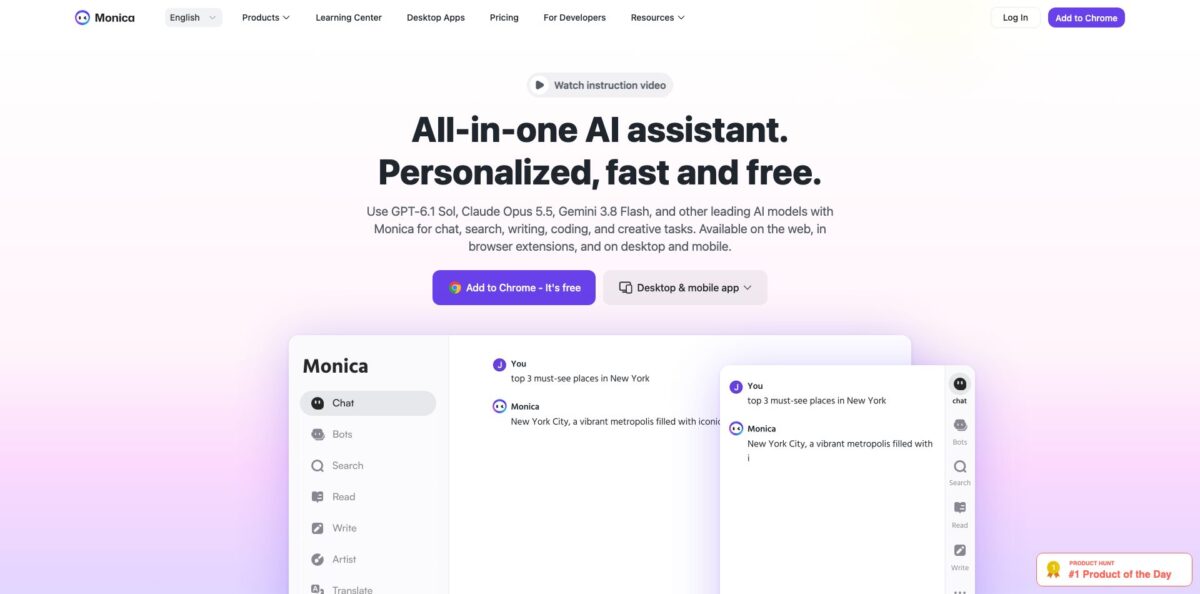
Monica is a multi-model AI assistant from Singapore-based Butterfly Effect that lives in a browser sidebar, a desktop app for Windows and Mac, mobile apps and a web app. One account gives you GPT, Claude and Gemini models side by side, plus page summaries, YouTube digests, parallel webpage translation, a writing helper inside any text field, ChatPDF, image and video generation and agent tools such as Deep Research and Create Slides. The problem it removes is tab-hopping: you press Cmd+M or Ctrl+M on whatever page you are reading and ask about it in place, instead of copying text into a separate chatbot. The weak spots are quota-based plans, a strict refund policy and support that many reviewers call slow. Pick it if you want one subscription that covers chat, reading and writing across the whole browser.
How to start using Monica?
Install the extension from the Chrome Web Store or the Edge Add-ons store, or download the desktop app for Windows and macOS and the mobile app for iOS and Android. Sign in with Google, Apple or email. Every account starts on the Free plan with 40 basic-model queries per day, which reset at 0:00 UTC, so you can judge answer quality on real pages before paying. Your quota is shared across devices on the same account.
Your first real task should happen on a page you actually need to read. Open a long article or report, press Cmd+M on Mac or Ctrl+M on Windows, and the chat panel slides out on the right. Use the Read function to summarise the page, a URL, a screenshot or a PDF, then ask follow-up questions in the same thread. On YouTube, the Summarize button next to the video returns key points with clickable timestamps.
Next, set up the parts that run in the background. Highlight any text and the Quick Actions toolbar appears with translate, grammar check, explain and expand; the settings page lets you reorder those shortcuts. In the Write tab, Compose lets you set length, format, tone and output language, while Reply drafts email answers. The Parallel Translation button above the Monica icon translates a whole page without replacing the original text. If Monica answers in the wrong language, fix it under Language Settings for each function.
Before you rely on the output, switch on web access for factual questions and compare answers from two models on anything important. Monica’s own FAQ admits that models can invent facts and recommends a stronger model or web access when accuracy matters. For PDFs, keep files under 50 MB and 100,000 tokens, since image-only scans fail to upload.
Who is it for?
Knowledge workers who read all day
Reports, long articles and documentation pile up faster than you can get through them. Monica summarises pages, PDFs and videos where you already are, so you skim the key points first and read the full text only when it earns your attention.
Non-native English readers and multilingual teams
Parallel webpage translation shows the original and the translation side by side, which helps you learn terms instead of guessing them. Paid plans add DeepL and advanced models for page translation, and PDF translation is included too.
Students and researchers
ChatPDF, Deep Research, a mind map generator and Create Slides cover the path from source to outline to presentation. Expect to check citations yourself, because the assistant can still get facts wrong.
Email-heavy professionals
Gmail and Outlook enhancement reads a thread and drafts a contextual reply that you review before sending. Writing help also appears in X, Facebook and LinkedIn boxes, so short social replies stop eating your morning.
People paying for several chatbots
If you keep separate subscriptions just to compare GPT, Claude and Gemini, Monica puts them in one window with multi-model answer comparison. One bill replaces several, as long as the monthly query caps fit your usage.
Developers on a budget
Monica Code adds an assistant to VS Code and JetBrains IDEs, and paid members get Monica Code benefits as part of the plan. It suits light coding help rather than a full agentic coding setup.
Monica pricing
Monica sells personal subscriptions built on two meters. Chat queries are split into basic models (Claude 4.5 Haiku, Gemini 3.1 Flash-Lite, GPT-6 Luna) and advanced models (GPT-6.1 Sol, Claude Sonnet 5.5, Gemini 3.8 Flash). Agent tasks, image and video generation and ChatPDF draw on a separate pool of Advanced Credits. Paid quotas reset at 0:00 UTC on the 1st of each calendar month, not on your billing date. The pricing page lists annual prices; choosing monthly billing removes the advertised annual saving of 17%, or 33% for Max during the current sale.
40 basic-model queries per day, limited trials of image and video generation, ChatPDF and AI Agent, basic-model writing, translation and summaries, and up to 3 login devices.
5,000 basic-model queries and 200 advanced-model queries per month, 1,500 Advanced Credits, unlimited web search and advanced skills, and up to 5 devices.
Unlimited basic and advanced model chat, 4,500 Advanced Credits, priority email support, 2x response speed and 5 devices. Monica labels Max (formerly Unlimited) as a beta plan whose rules may change with model provider costs.
Unlimited basic and advanced chat, 20,000 Advanced Credits for heavy agent, image and video work, and up to 10 devices.
Payments are final under the general policy, with a 14-day right of withdrawal for users in the EU, UK and Turkey; mobile subscriptions are cancelled through Google Play or Apple settings.
Monica key features
Multi-model chat with answer comparison
You switch between GPT, Claude and Gemini models in one thread or ask several at once and compare their answers. This replaces juggling separate subscriptions and helps you spot weak answers before you act on them.
Browser sidebar and Smart Toolbar
Cmd+M or Ctrl+M opens chat on any page, and highlighting text brings up translate, explain, grammar check and expand. Because the assistant reads the page you are on, you skip copy and paste. The trade-off is broad page access, which a third-party review flags as something to weigh if you handle sensitive data.
Read, summarise and ChatPDF
Monica digests webpages, URLs, screenshots, images and PDFs into short summaries you can question further, and the YouTube Summarize button adds timestamped highlights. Files are capped at 50 MB and 100,000 tokens. It turns an hour of reading or watching into a few minutes of triage.
Writing and email help in place
Compose sets tone, length, format and language; Reply drafts answers in Gmail and Outlook; Quick Compose adds a writing icon to any text field. Over 80 templates cover marketing copy. Your drafts stay inside the tool where you will send them.
Parallel webpage translation
One click translates a whole page into your language while keeping the original visible underneath, with DeepL and advanced models on paid plans. PDF translation is part of the same toolkit. It works well for reading foreign-language sources rather than publishing translations.
AI Agent tools
Deep Research gathers and condenses sources into a report, Create Slides builds presentations, Image Studio handles visuals and Browser Operator acts on web pages for you. Each run spends Advanced Credits, so the bigger the job, the faster the pool drains.
Image and video generation
Paid plans include Nano Banana 2, GPT Image 2.5 Flare, Seedance 2.5 and Veo 3.1, along with real-time canvas and image tools. This covers quick social visuals and short clips without a separate creative subscription.
Monica Pros & Cons
Pros
Monica bundles a lot into one subscription: leading models from three providers, page and video summaries, parallel translation, email replies, ChatPDF, slides and image or video generation. It runs in Chrome and Edge, on Windows and Mac, on iOS and Android and on the web, with your quota shared across devices. The sidebar and highlight toolbar remove copy and paste from everyday reading, which is where users say they save the most time. Reviewers point out that Pro costs less than a single flagship chatbot subscription, and the free tier is generous enough for light daily use. Treat it as your reading and writing layer for the browser, and keep a dedicated tool only for the one job you do most.
Cons
The Pro plan’s 200 advanced queries per month run out quickly for heavy users, and the jump to unlimited chat costs about double. Max is still labelled beta, and Monica says its rules may change with model provider costs. Agent, image and video features draw on a separate credit pool, which makes real costs harder to predict. Payments are generally non-refundable outside the EU, UK and Turkey, and several reviewers describe slow or automated support. Accounts are personal-use only, so sharing one with a colleague can get it restricted. Pay monthly first, watch your usage for a few weeks, and only then commit to an annual plan.
Use Monica if you want…
- Chat with GPT, Claude and Gemini in one window.
- Summarise long webpages and PDFs without leaving the tab.
- Get timestamped summaries of YouTube videos in seconds.
- Read foreign-language pages with side-by-side translation.
- Draft Gmail and Outlook replies from the email thread.
- Compare answers from several AI models on one question.
- Turn research into slides with Deep Research and Create Slides.
- Generate images and short videos from one subscription.
Monica alternatives
 ChatGPTRead review →
 Claude AIRead review →
 Google GeminiRead review →
 Microsoft CopilotRead review →
 1min.AIRead review →
 MaxAIRead review →
Monica Reviews
Long-time Product Hunt reviewers who use Monica every day praise having multiple models, PDF chat, YouTube analysis and live web search in one service, and say it costs less than a ChatGPT subscription while doing more.
Users who rely on the browser extension like that it works in almost any input box, and one calls the side-by-side Chinese and English page translation the feature they use most for unfamiliar sites.
A former paying user on Product Hunt liked the range of tools but found 200 advanced prompts a month too restrictive, used them up within a week, and moved back to the free tier with a separate ChatGPT plan.
Several reviewers say support answers with automated replies, and one annual subscriber reports that YouTube transcripts stopped working without a fix date or a refund.
Some users find the Google Search panel cluttered with extra text and report occasional bugs, such as replies in the wrong language or memory use climbing on video sites until the tab crashes.
FAQ
Is Monica free to use?
Yes. The Free plan gives you 40 basic-model queries per day, reset at 0:00 UTC, plus limited trials of image and video generation, ChatPDF and the AI Agent tools.
Which AI models does Monica support?
Basic models include Claude 4.5 Haiku, Gemini 3.1 Flash-Lite and GPT-6 Luna, and advanced models include GPT-6.1 Sol, Claude Sonnet 5.5 and Gemini 3.8 Flash. Image and video generation uses models such as Nano Banana 2, GPT Image 2.5 Flare, Seedance 2.5 and Veo 3.1.
Which browsers and devices does Monica work on?
The extension supports Chrome and Edge, and there are desktop apps for Windows and macOS, mobile apps for iOS and Android, a web app and a VS Code extension. Free accounts can log in on 3 devices, Pro and Max on 5, and Ultra on 10.
When do paid quotas reset?
Paid quotas reset at 0:00 UTC on the 1st of each calendar month, regardless of the day you subscribed. Free daily quotas reset at 0:00 UTC every day.
Can I get a refund?
Payments are generally final and non-refundable, though Monica may approve partial refunds at its discretion. Users in the EU, UK and Turkey can withdraw within 14 days of purchase.
Is there a team plan?
Not yet. Team subscriptions have not launched, and accounts are for personal use only, so sharing one account between several people can lead to restrictions.
Does Monica sell my data?
Monica’s privacy policy says it does not sell user information to third parties, and you can request access to or deletion of your personal data in account settings. Prompts are still processed by the underlying model providers, so avoid pasting confidential material.
Does Monica have an API?
Yes. The Monica API Platform at platform.monica.im offers developer access to models, and its FAQ notes that some data is passed to third-party providers when you use it.
Similar tools
 Chat 4O AIAll-in-one AI workspace with GPT, Claude, Gemini and Grok chat plus image and video models like Veo, Kling and Nano Banana, paid
 LiveChatAIAI customer support agent trained on your website, docs and Q&As, with human live chat handoff, AI Actions, and WhatsApp, Slack and
 Kore.aiEnterprise agentic AI platform for building, governing and improving voice and chat AI agents for customer service, HR, IT and business processes.