

Morph Studio
Video GenerationUpdated November 12, 2026
Browser AI video studio that runs Seedance, Kling, Veo and its own style transfer model, with a storyboard canvas for multi-shot clips.
We may earn a commission when you sign up through our links. It does not affect our reviews.
What is Morph Studio?
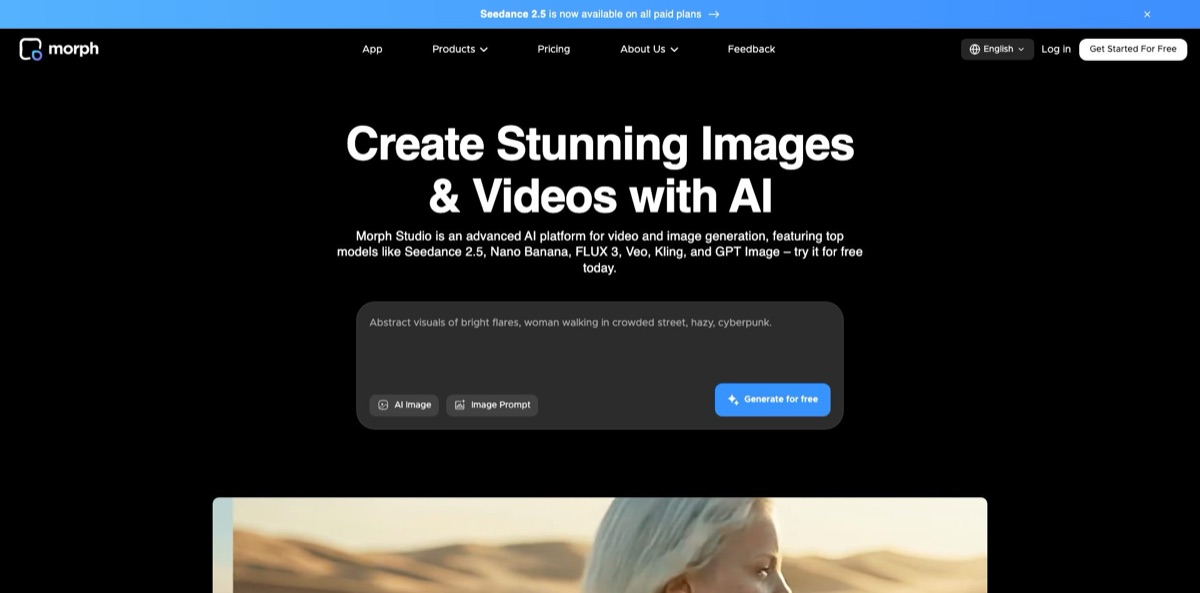
Morph Studio is a browser-based AI video platform run by Morph AI, a company founded in 2023 by a team from the Hong Kong University of Science and Technology. It started as a storyboard tool for AI filmmaking and now works as a multi-model studio: one credit balance gives you Seedance, Kling, Wan, Hailuo, MiniMax, Veo 3.1 and Hunyuan for video, Seedream, Nano Banana and GPT Image for stills, plus Morph’s own model for video style transfer. You get two workspaces, an Immersive Space for quick prompt-to-clip runs and an Open Canvas where shots are laid out and connected into a sequence. The weak spots are the thin free tier, steep credit costs on premium models and a short, critical trail of billing and support complaints. Pick it if you build short films or social clips shot by shot and want to compare several video models without separate subscriptions.
How to start using Morph Studio?
Go to morphstudio.com and click Get Started For Free. Sign-up runs through Google, Discord or email, and new accounts land on the Free plan with 75 credits a month. Your generations collect in the Library at app.morphstudio.com, and on the Free plan they are kept for 90 days, so download anything you want to keep. Expect an upgrade prompt soon after sign-up: the pricing code includes a new-user discount that is only offered within the first 24 hours.
Your first real job is usually Text to Video or Image to Video. Write a prompt that names the subject, the action, the camera move, the light and the visual style, because the site’s own guidance says detailed prompts beat short ones. Then choose a model and set the aspect ratio, resolution and duration. For image-to-video, uploads must be under 25 MB. Before you click Generate, check the credit cost shown for that model, since one clip can cost about 20 credits on an entry-level Wan model or more than 3,000 on Veo 3.1.
The part that sets Morph apart is the Open Canvas. Instead of one prompt box, you lay out shots, connect them and regenerate a single shot that does not work without touching the rest. From there you can send a clip into Video Style Transfer, which accepts uploads up to 10 seconds and under 50 MB, then pick a style such as Anime, Claymation, Lego or Comics and set the strength. For character work, AI Motion Control takes a reference image of your character plus a reference video of the motion you want.
Review the results before you spend more credits. Run the same prompt through two or three models and keep the best take, then finish it with the video upscaler, which goes up to 4K, or with lip sync and AI voiceover if the shot needs sound. Remember that commercial use only comes with paid plans, so anything made on Free is for personal projects.
Draft every shot on a cheap model first and only rerun the keepers on Seedance 2.5, Kling or Veo once the prompt is locked.
Who is it for?
AI filmmakers and short-film makers
You think in scenes, not single clips, and juggling ten browser tabs per shot slows you down. The canvas keeps every shot and its variations in one layout, so you can swap one weak take without rebuilding the sequence. You still need a regular editor for sound design and final timing.
Social media creators
You need vertical clips for TikTok, Reels and Shorts every week and want trend-ready looks such as anime or claymation. Text to Video, Image to Video and Video Style Transfer cover most of that from one account. Budget for paid credits, because the free allowance runs out after a test clip or two.
Model shoppers
Every month a new video model wins the benchmark race, and paying Kling, Google and ByteDance separately adds up. Morph puts more than twenty video models behind one balance and publishes a usage table per model. You can compare outputs side by side and keep only the subscription you actually use.
Marketers and e-commerce teams
Product photos need motion, new backgrounds and quick variations for ads. Image tools such as background removal and object removal feed straight into image-to-video, and paid plans include commercial use. Check strict content filters early if your products sit near sensitive categories.
Agencies pitching concepts
Clients want to see an idea moving before they approve a budget. A storyboard of short AI shots, restyled to match a mood board, makes a fast animatic for a pitch deck. Treat it as a proof of concept rather than final broadcast footage.
Video editors and VFX hobbyists
You already have footage and want to restyle it rather than generate from scratch. Video Style Transfer and the prompt-based AI Video Editor change the look, background or objects of existing clips. Style transfer’s 10-second upload limit means longer footage must be cut into pieces.
Morph Studio pricing
Morph Studio charges monthly subscriptions that come with a credit allowance, and every generation draws from that balance at a rate set by the model, duration and resolution. Annual billing takes 30% off. The pricing page includes a model usage table that estimates how many clips each plan buys, and the spread is wide: Basic’s 3,000 credits cover about 150 clips on the lightest Wan 2.2 model, about 30 on Morph’s own model, about 8 on Kling 3.0 and about 4 on Seedance 2.5. Failed video generations do not consume credits.
75 credits per month, text-to-video, image-to-video, text-to-image and Video Style Transfer, with assets kept for 90 days. The usage table estimates about one text-to-video clip a month on an entry-level Wan model, and commercial use is not included.
3,000 credits per month, all main generation modes, unlimited asset retention and commercial use. Veo 3.1 is not available at this level.
12,000 credits per month with unlimited retention and commercial use. This is the first plan where Veo 3.1 appears, at roughly 3 clips a month.
A slider on the pricing page moves Premier between 20,000 and 50,000 monthly credits, priced from $50 to $110 a month on monthly billing.
The fine print matters here. Credits run on a 30-day cycle and do not roll over, and extra credits bought separately expire on the same day as your plan. If you upgrade, you pay the new price, a new cycle starts that day and unused credits from the old plan are discarded. Downgrades take effect at the next cycle with no refund for the current one, and the terms state that subscriptions are nonrefundable. You can cancel at any time and keep access until the paid period ends.
Morph Studio key features
Multi-model video generation puts Seedance 2.5, Seedance 2.0, Kling 4.0 and 3.0, Wan 3.0, Hailuo 2.3, MiniMax H3, Veo 3.1, Hunyuan Video and Morph’s own model in one picker. Each model has its own strengths: the site points to Wan 3.0 for clips up to 30 seconds and MiniMax H3 for start- and end-frame guidance. You compare outputs inside one account and one credit balance instead of paying for each vendor.
The Open Canvas works as a visual storyboard
Shots sit side by side, can be connected into a sequence and regenerated one at a time, which is how Morph launched its filmmaking platform with Stability AI in 2024. Multi-shot projects stay organized, and one bad take never forces you to restart the whole video.
Video Style Transfer is Morph’s own video-to-video model
You upload a clip of up to 10 seconds, choose a preset such as Anime, Claymation, Cyberpunk, Lego, Yarn, Bronze or Minecraft, set the strength and add a prompt. Creators can restyle real footage or generated clips into a consistent look that most model resellers do not offer.
Seedance 2.5 runs with reference media
You can generate 4 to 30-second videos at 480p, 720p or 1080p and guide them with image, video or audio references, with a prompt required when audio is used. That gives you far more control over timing and composition than text alone.
AI Motion Control transfers movement from a reference video to a character image using Kling 3.0 Motion Control
Dance moves, gestures, walking or martial arts can be reused across different characters by swapping only the image.
The image toolkit covers text-to-image with Seedream 5.0 Pro, Nano Banana 2, Nano Banana Pro and GPT Image 2.5, plus background removal, object and text removal, hairstyle and clothes changes, headshots and transparent PNG output. Edited stills flow straight into image-to-video. You can prepare a clean first frame and animate it without exporting to another tool.
Finishing tools include a video upscaler up to 4K, lip sync from an uploaded audio track, video face swap, watermark removal, AI voiceover and AI music. Short clips can be polished and voiced in the same workspace. You will still want a desktop editor for long timelines and final sound mixing.
Morph Studio Pros & Cons
Pros
The model menu is the main draw. Seedance, Kling, Wan, Hailuo, MiniMax and Veo sit behind one login, and the published usage table lets you plan spend per model before you subscribe. The canvas adds a storyboard layer that pure model resellers lack, so you can build a sequence shot by shot and regenerate only what fails. Morph’s own style transfer model gives you a reason to stay beyond price, and the entry plan costs $8.40 a month on annual billing. Failed video generations are not charged, and every paid tier includes commercial use. Use it as a testing ground: compare two or three models on the same prompt, then commit credits to the winner.
Cons
The free plan is a demo, not a trial: 75 credits cover about one entry-level clip, and premium models stay locked. Credits expire every 30 days, upgrades discard unused credits, and subscriptions are nonrefundable, so a wrong plan choice costs real money. Veo 3.1 starts at Pro, and the usage table prices a Seedance 2.5 clip at about 750 credits, a quarter of Basic’s monthly allowance. Trustpilot shows only a handful of reviews, but the product-related ones are all one star and cite surprise charges, strict content rejections and slow support. The terms also let Morph use your inputs and outputs to train its models. Buy monthly first and confirm cancellation in writing before committing to an annual plan.
Use Morph Studio if you want…
- Compare Kling, Seedance, Veo and Wan on one prompt.
- Build short films shot by shot on a canvas.
- Restyle real footage into anime, claymation or comic looks.
- Animate product photos into vertical clips for social ads.
- Transfer dance or gesture motion onto your own character.
- Generate 30-second clips with image and audio references.
- Pay one subscription instead of several model vendors.
- Prepare pitch animatics before a real production budget.
Morph Studio alternatives
 RunwayRead review →
 PikaRead review →
 Kling AIRead review →
 PixVerseRead review →
 KreaRead review →
 OpenArtRead review →
 Leonardo.aiRead review →
Morph Studio Reviews
A Trustpilot reviewer says a monthly subscription was followed two days later by an unexpected annual charge, and that clips turned out to be 5 seconds long instead of the expected 10, with a refund request going nowhere.
An annual subscriber on Trustpilot reports slow processing, jobs that used more credits than planned or were rejected by strict content filters, inconsistent model results and support that never really answered.
An early-access user on the slashCAM video forum animated still photos and turned them into a comic style good enough for a small satirical short, but found the motion modest, faces occasionally warped and specific prompt details hard to get right.
An independent hands-on review on BioGPT.io calls the multi-model menu and node-style canvas genuinely useful, yet says the free credits covered roughly one 10-second clip and the entry model garbled on-screen text.
FAQ
Is Morph Studio free to use?
Yes, the Free plan gives you 75 credits a month, access to text-to-video, image-to-video, text-to-image and Video Style Transfer, and 90-day asset retention. That is enough for a test clip or two, not regular production.
Can I use Morph Studio videos commercially?
Commercial use is included on Basic, Pro and Premier. On the Free plan the terms limit you to personal, non-commercial use, and Morph does not claim ownership of your outputs.
Do unused credits roll over to the next month?
No. Credits run on a 30-day cycle and expire at the end of it, and extra credits bought separately expire on the same day as your subscription plan.
Do failed generations cost credits?
No, the pricing page states that a failed video generation does not consume any credits. Successful generations are charged at the model’s rate even if you dislike the result.
Can I cancel Morph Studio and get a refund?
You can cancel at any time and keep access until the end of the paid period. The terms say subscription payments are nonrefundable, and downgrades give no refund for the current cycle.
How long can Morph Studio videos be?
It depends on the model. Seedance 2.5 generates 4 to 30-second clips at up to 1080p and Wan 3.0 also reaches 30 seconds, while Video Style Transfer accepts uploads of up to 10 seconds.
Does Morph Studio use my uploads to train AI?
Yes, unless you agree otherwise with the company. The terms allow Morph to use inputs, outputs and interactions to train and improve its models and moderation systems, so avoid uploading confidential material.
Does Morph Studio have an API?
The public site does not list an API or developer documentation. Morph Studio works through the web app, and support and updates run through a feedback form and the company’s Discord community.
Similar tools
 AIAIAll-in-one AI studio that puts Veo, Sora, Kling, Seedance and other models behind one credit balance for video, images, music and voice.
 ToMoviee AIWondershare's AI creative studio that turns text prompts and images into short videos, pictures, music, sound effects and voiceovers.
 JXPMulti-model AI video and image studio that puts Seedance, Veo, Kling, Wan and other third-party engines behind one credit balance.