

MyLens AI
AI AssistantsUpdated November 12, 2026
AI presenter that turns your docs, links and recordings into visual presentations and walks each viewer through them one-on-one, answering from your sources.
We may earn a commission when you sign up through our links. It does not affect our reviews.
What is MyLens AI?
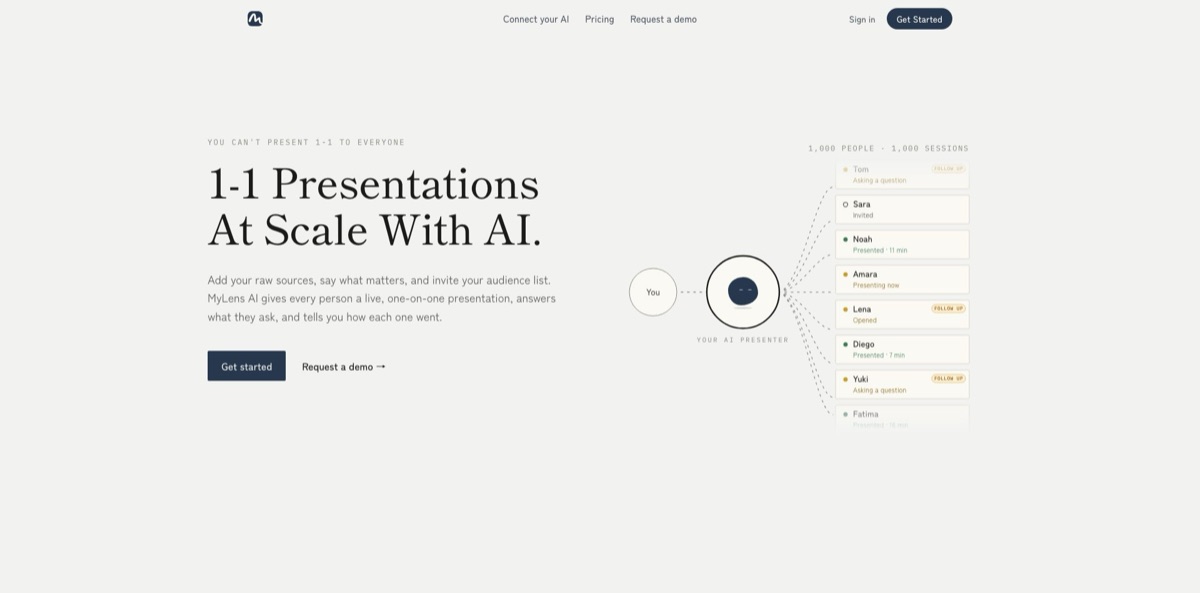
Built by Chicago-based DataMotto, MyLens AI began in 2023 as a generator of interactive timelines and diagrams and relaunched in October 2026 as an AI presenter for one-on-one sessions at scale. You add raw sources such as PDFs, Word files, slides, YouTube links or recordings, say what matters, and invite an audience. Each person opens a private link and gets a narrated visual walkthrough; when they ask a question, the AI answers from your files and can draw a new slide or layer on the spot. Afterwards you review every session individually. The older toolkit is still inside, with 65 visual formats and a Chrome extension. The weak spot is proof: the presenter is new and has almost no independent reviews yet. It fits sales, onboarding and training teams that explain the same material to many people.
How to start using MyLens AI?
Go to mylens.ai and click Get started. Sign-in runs through Auth0 and supports Google Sign-In, so you can sign up with an existing Google account. The Free plan gives you 15 AI credits and 3 live sessions a month, a small allowance meant for trying the workflow. Every AI action, such as creating a story, adding a design image or editing, draws on those credits, and chained actions cost more. If you would rather see the product with a person first, Request a demo books a call with the team.
Your first real project should be something you already explain over and over: a renewal update, an onboarding policy or a product walkthrough. Drop in the material you have. The homepage lists PDF, long text, Word, slides, YouTube, website links, Markdown, audio, images, spreadsheets, Google Drive files and pasted ChatGPT output, and you can mix several sources in one presentation. Then describe what matters and who the audience is. MyLens AI builds a themed visual presentation from it. Watch the source limit: the Free plan reads up to 10,000 words of source per visual, a PDF page or image counts as 100 words, and YouTube counts transcript words.
Next comes the setup screen that shapes the live experience. Review the slides the AI produced and adjust them by prompt, or edit the core visuals by hand if you are on Pro or above. The product demo shows a step where you choose the AI’s permissions before inviting anyone, and you can switch on AI narration so each slide explains itself out loud. Premium adds a Brand Kit that applies your logo, display name and accent color. Finally, add your audience list; each person receives a private link and code, and the presenter starts whenever they open it.
Before you invite customers or new hires, open a session yourself and ask the questions you dread. MyLens says the AI answers only from the files you added and, when the answer is not there, says so and flags the question for you, so check that this holds for your material. After real sessions, open the results view: it shows time spent, questions asked and who needs a follow-up for each person. Remember that each audience member counts as one live session per presentation per month, so internal test runs use up quota too.
Run your first presentation with three colleagues on the Free plan, which is exactly its monthly session allowance, and read every question they asked before scaling up.
Who is it for?
Sales teams
You give the same discovery-to-proposal walkthrough to every prospect and cannot be on every call. MyLens AI presents your offer to each prospect privately, answers scope questions from your own materials and shows you who engaged enough to deserve a follow-up.
Customer success managers
Renewal terms, pricing changes and product updates have to reach every account, one by one. Instead of booking dozens of identical calls, you set up one presentation and let each stakeholder go through it when they are ready, with their questions logged for you.
HR and people teams
New hires need the same careful onboarding, but few ask questions in a group session. A private presentation lets each person ask about benefits or policies in their own words, and you can see who stalled on which part.
Founders
Investor updates often land as long emails nobody reads closely. MyLens AI turns the update into a narrated visual brief each investor can question, and the session report tells you who spent time on the numbers.
Educators and trainers
A recorded lecture cannot answer back. Lessons built in MyLens AI respond to each learner at their own pace, and the education pages add cheatsheet and quiz makers built from the same source material.
Researchers and analysts
The original audience still benefits from the visual engine. Long reports, papers and YouTube videos become mind maps, timelines or tables with clickable citations, which makes dense reading faster to scan and easier to brief to others.
MyLens AI pricing
MyLens AI charges per workspace member, with three meters to watch. AI credits pay for generation and editing, and on paid plans each member’s credits pool into a shared workspace balance. Live sessions count audience members: each person counts once per presentation per month, and returning to the same presentation does not count again. The source limit caps how many words of source material the AI reads for each visual. Yearly billing is advertised at 40% off monthly. Prices below are in USD from the official pricing page on November 11, 2026.
15 AI credits and 3 live sessions a month, a 10K-word source limit, multiple sources per presentation and AI narration.
150 AI credits and 25 live sessions a month, manual editing, and the Plus features: no watermarks, web search and high-quality downloads.
450 AI credits, 100 live sessions, a 30K-word source limit, Brand Kit and priority support. MyLens marks it as the most popular plan.
2,000 AI credits, 500 live sessions, a 100K-word source limit, Deep Web Search that reads many websites and adds references, priority support and a customer success manager.
Contact sales for a team plan built around your volume.
MyLens AI key features
Presentations built from raw sources
You skip the deck and bring documents, notes, recordings, spreadsheets, links or YouTube videos, and the AI turns them into a themed visual presentation. Several sources can feed one presentation, so a contract, a call recording and a pricing sheet can sit behind the same story. You start from material you already have instead of a blank slide.
A private AI presenter for every viewer
Each person gets a link and code, and MyLens AI walks them through the slides live whenever they open it. Viewers can stop and ask anything on the slide, and the AI answers from your sources or builds a new visual or layer when words are not enough.
Per-person session results
After each session you see time spent, questions asked and who needs a follow-up, and an overview counts who was invited, who opened the link and who was presented to. That turns a one-way send into something you can measure. Sales and success teams get a list of warm contacts instead of guessing who read the attachment.
A library of 65 visual formats
The gallery covers mind maps, timelines, flowcharts, Gantt charts, Sankey flows, swimlane process maps, org trees, heatmaps and world maps. Visuals are clickable: you can expand nodes, ask for explanations, view citations back to the source and generate an infographic from any node. Mind maps export to PNG, PDF and PowerPoint.
AI narration and themes
Even the Free plan can add AI voice-over to story visuals, played during presentations and on shared pages. Themes are generated rather than picked from a fixed gallery, and Premium’s Brand Kit applies your logo and accent color across stories. A presentation can explain itself to someone who never met you.
A presentation layer for AI agents. MyLens runs an MCP server at mcp.mylens.ai with setup guides for ChatGPT, Claude, Cursor, Notion, GitHub Copilot CLI and VS Code. An agent can hand its research to MyLens and return a link to a narrated visual presentation in the same chat, and storyboards created this way start private. Connecting an agent is free, with paid plans needed only for higher limits.
Chrome extension for the open web
On any article, document or YouTube video, one click turns the content into a source-linked visualization, and the Citation option jumps to the exact passage or video moment. The extension supports more than 60 languages and lists about 10,000 users.
MyLens AI Pros & Cons
Pros
MyLens AI attacks a real scaling problem. Its own math compares 12 hours of 30-minute calls with 24 people against about 20 minutes of setup, and every viewer still gets a private walkthrough with room to ask questions. Answers are grounded in your files, and the AI is built to admit gaps and flag them instead of improvising. You also get per-person engagement data that a PDF attachment never gives you. The visual engine underneath is mature, with 65 formats, citations back to the source and narration even on the free tier. Pricing is published in full, and the data policy is plain: no model training on your content and export or deletion from account settings. Start with a document your audience already asks questions about.
Cons
The one-on-one presenter only launched in October 2026, so there is almost no independent evidence of how it handles real customers; the few public ratings describe the older visualization tool. Low tiers are tight: 3 live sessions on Free and 25 on Pro go quickly, and per-member pricing climbs to $200 a month on Business with monthly billing. SOC 2 is still listed as in progress, which can stall enterprise procurement, and all data sits in US data centers, something EU teams may need to clear with legal. The AI also knows only what you upload, so thin sources mean thin answers. Ask for the SOC 2 timeline and run a small pilot before inviting paying customers.
Use MyLens AI if you want…
- Give every prospect a private, narrated product walkthrough.
- Turn PDFs and recordings into presentations without building slides.
- Let viewers ask questions answered from your own documents.
- Track who opened, watched and questioned each presentation.
- Onboard new hires with the same consistent explanation.
- Send investors updates they can interrogate on their own.
- Convert long reports into mind maps with source citations.
- Visualize YouTube videos and articles straight from Chrome.
- Have ChatGPT or Claude present research as visuals.
MyLens AI alternatives


MyLens AI Reviews
A Product Hunt reviewer says the product improved faster than expected over a couple of months and calls the price fair, mentioning they use it alongside Google NotebookLM for research; their wish list is industry-specific templates.
Another Product Hunt reviewer found it easy to produce impressive timelines with little effort, but notes that results get better when you give the AI more explanation of what you want.
Chrome Web Store users rate the extension 4.6 out of 5 and mostly praise quick summaries of news, blogs and long articles, though the written reviews are brief and date from late 2024, before the presenter relaunch.
A newsletter for financial advisors reported that a 90-minute reading and note-taking task took about 15 minutes, crediting the drill-down sections and citations back to the source, while saying nothing about limitations.
FAQ
Is there a free version of MyLens AI?
Yes. The Free plan includes 15 AI credits and 3 live sessions a month, a 10,000-word source limit and AI narration. Paid plans remove watermarks and add manual editing, web search and high-quality downloads.
How does each viewer join a presentation?
You add your audience list and each person gets a private link and code. MyLens describes it as one person, one code, one conversation, and the AI presents whenever that person is ready.
What counts as a live session?
Each audience member counts once per presentation per month. If the same person returns to the same presentation, it does not count again.
Will the AI say things I would not say?
MyLens says every answer comes from the files you added. If the answer is not in your sources, the AI says so and flags the question for you to follow up.
Is my content used to train AI models?
No. The Trust Center says neither MyLens nor its AI partners (Google Gemini, OpenAI and Anthropic) train on your content. Data is encrypted and stored on AWS in the United States, a DPA is available to business customers, and SOC 2 is in progress.
Which file types can I use as sources?
PDF, Word, PowerPoint, Markdown, long text, images, CSV and Excel spreadsheets, audio, website links, YouTube videos and Google Drive files. You can combine several sources in one presentation.
Can I connect ChatGPT, Claude or Cursor to MyLens AI?
Yes. Add https://mcp.mylens.ai as a remote MCP server in a compatible tool and sign in. Connecting an agent is free, and its storyboards start private to your workspace.
Can I export what MyLens AI creates?
Yes. Mind maps export to PNG, PDF and PowerPoint, and presentations can be shared with a link. High-quality downloads without watermarks need a paid plan.
Similar tools
 FreedomGPTMulti-model AI app that puts hundreds of chat, image and video models, including its own censor-free Liberty models, behind one credit balance.
 ElephasPrivate desktop AI for Mac and Windows that answers questions from your own documents with page-level citations and hides personal details first.
 MagaiPaid AI workspace that puts ChatGPT, Claude, Gemini, Grok and dozens of image and video models in one chat, with memory and