

MyMap
AI AssistantsUpdated November 20, 2026
AI canvas that turns a prompt, PDF or YouTube link into editable mind maps, flowcharts, SWOTs, genograms and slides, with GPT, Claude and Gemini models.
We may earn a commission when you sign up through our links. It does not affect our reviews.
What is MyMap?
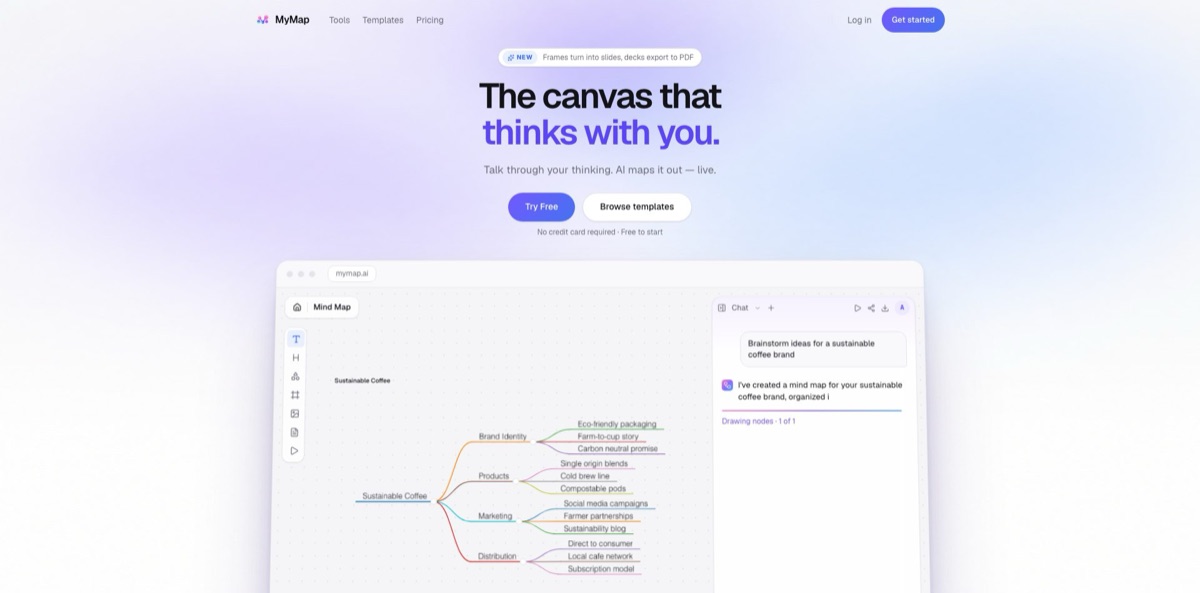
MyMap is an AI chat attached to an infinite canvas. You type a topic, paste notes or attach a PDF, Word file or YouTube link, and the assistant picks a diagram type and draws it as editable nodes instead of answering in paragraphs. A strategy question turns into a SWOT, a “why did this happen” turns into a fishbone, a process with a decision becomes a flowchart, and any framed area of the board can be presented as a slide. It removes the blank-canvas step of classic diagramming tools, where you pick a template and drag boxes before thinking anything through. The weak side is around the canvas rather than on it: the free tier is small, there is no documented API or integrations, and Trustpilot reviewers report trouble cancelling trials and reaching support. Pick it if you need a map to hand in, drafted from text you already have.
How to start using MyMap?
Open mymap.ai and click Try Free or Get started. You can type your first prompt before you have an account; when you send it, MyMap asks you to sign up with an email and a one-time code, or with Google, without leaving the page. The Free plan needs no credit card and gives you a small monthly credit allowance plus room for three editable maps. If you want to test the premium models, read the Pro offer you are shown carefully: one visit to the pricing page showed a $1 14-day trial on an annual plan, another a $5.90 first month on a monthly plan. Either way, put a renewal reminder in your calendar before you enter card details.
Start with material you already have rather than a blank idea. Paste meeting notes, attach a lecture PDF or drop in a YouTube link, then ask for a concrete result such as “Turn this lecture into a study map” or “Map the onboarding process across HR, IT and the manager.” You do not pick a diagram type first: MyMap reads the request, chooses the structure and places nodes on the canvas while the assistant writes. Under each answer you get follow-up chips like Explore another angle, Add more detail and Turn this into a presentation.
The composer at the bottom of the chat is the screen you will use most. It holds an Auto dropdown and a model picker, and you can switch models for each message. Free accounts get the economic models (DeepSeek V4 Flash, Gemini 3.7 Flash, Minimax M2.5, DeepSeek V3.2, Kimi K2.5); Pro and Max add GPT-5.6 Terra, Claude Opus 5, Claude Sonnet 5.5, Gemini 3.1 Pro and Grok 4.20. To change one part of a map, select a node and say what should change. The assistant rewrites that node and leaves the rest of the board alone, while dragging, renaming and rearranging by hand cost no credits.
Before you share anything, read every node: the terms of service state plainly that AI output is not guaranteed to be accurate or complete. Then frame the sections you want to show. Each frame becomes a slide you can present in the browser, and on paid plans the deck exports to PDF with one page per frame. Free accounts export PNG with a watermark, while Pro and Max get clean PNG and PDF. A share link gives anyone a read-only view and lets them copy the map onto their own canvas.
Who is it for?
Students and educators
Lecture slides, a PDF chapter or a YouTube recording turn into a revision map with key terms and recall questions. You skip the hour of copying headings into a mind map app and spend that time actually revising.
Process consultants
An interview transcript or a rough description becomes a swimlane diagram or SOP flow with roles in separate lanes and handoffs drawn in. You get a first draft for the client deck in one conversation and then fix the details by asking for changes on specific nodes.
Quality and compliance teams
MyMap has generators for A3 problem-solving reports, 5 Whys, fishbone diagrams and audit trees that fit on one page. Countermeasures, owners and due weeks can be added by chat, and the result exports to PDF for the certifier.
Family therapists
The genogram tool builds three-generation family charts with standard symbols, squares for males and circles for females, linked by marriage and parent-child lines. Instead of redrawing by hand after every session, you describe the change (“add a second marriage and two children”) and the chart updates.
Product managers and founders
SWOT analyses, business model canvases, agile roadmaps, feature priority matrices and ER diagrams for a SaaS schema come from one sentence each. It is a quick way to get a structured artifact into a meeting before anyone opens a design tool.
Researchers and writers
A Product Hunt reviewer used it to outline a long literature review, and the essay-outline prompts and concept map maker work the same way. Seeing sources and arguments as branches makes gaps easier to spot than in a linear outline.
MyMap pricing
Plans run on monthly AI credits. Credits are spent only when the AI generates or rewrites something, while editing, exporting and presenting are free. A prompt on a fast model such as DeepSeek V4 Flash or Gemini 3.7 Flash starts at one credit, and premium models use more depending on the model, the prompt and how much canvas context is sent. Unused credits do not roll over. Payments go through Paddle and subscriptions renew automatically.
The pricing page is not consistent between visits. On 19 November 2026 the server-rendered page showed Pro at $12/month billed annually with a $1 trial, 20 free credits and a 7-day money-back guarantee, while a browser visit the same day showed Pro at $20/month billed monthly with a $5.90 first month and 5 free credits. The homepage also says 5 free credits. Treat the checkout screen as the final word; the pricing FAQ itself says checkout confirms what you pay.
5 or 20 credits a month depending on the version of the page, refilled on the 1st, economic models only (DeepSeek V4 Flash, Gemini 3.7 Flash, Minimax M2.5, DeepSeek V3.2, Kimi K2.5), up to three canvas maps, PNG export with a watermark and no PDF export. Attachments (PDF, docs, images, YouTube), presenting and sharing are included. Check the credit figure in your account after signing up.
The monthly version reads “$5.90 today, then $20/month, cancel anytime”; the annual version reads “$1 today, 14-day trial, then $144/year” and claims a $96 yearly saving. Both include 1,000 credits a month refilled on your billing day, every premium model including GPT-5.6 Terra, Claude Opus 5, Claude Sonnet 5.5, Gemini 3.1 Pro and Grok 4.20, unlimited maps, PDF and clean PNG export by frame or whole map, and priority generation.
10,000 credits a month, the same models and exports as Pro, unlimited maps and the highest generation priority when servers are busy. You can cancel at any time.
There is no team, education or enterprise plan on the pricing page, and no seat-based billing.
MyMap key features
Prompt-picked diagram types
You describe the task and MyMap chooses the shape: mind map, flowchart, SWOT, fishbone, timeline, Gantt, Kanban, org chart, swimlane, concept map or genogram. The tools gallery lists 437 generators, including ERD, BPMN, UML, Sankey, empathy maps and business model canvases. You get the right structure without hunting through a template library first.
Node-level editing by chat
Select a node and say what should change, for example “add an owner and a due week to each countermeasure.” The assistant updates that node and keeps the rest of the board intact.
Attachments as source material
Upload a PDF, a Word document, images or a YouTube link, and the map is built from that content rather than from the model’s general knowledge. The same attachment types are available on every plan, including Free. It is the fastest route from a lecture or a brief to a structured overview.
Frames that become slides
Draw a frame around any part of the board and it turns into a slide you can present in the browser. On Pro and Max the deck exports to PDF, one page per frame. You keep one source of truth instead of rebuilding the map in a slide tool.
Per-message model choice
The composer lets you pick a model for every message, from economic models on all plans to GPT, Claude, Gemini and Grok models on Pro and Max. Credits per message scale with the model and the context.
Exports and share links
The homepage lists PNG, SVG, PDF, Markdown and a share link, for the whole map or any selection; Free PNGs carry a watermark and PDF needs a paid plan. A shared link is read-only, and viewers can copy the map onto their own canvas. That makes it easy to hand a map to a client or classmate without giving edit access.
Template gallery with real prompts
Templates such as a sustainable coffee brand mind map, a SaaS database schema, an A3 report and an agile quarterly roadmap show the original prompt next to the finished board. You can open one, keep editing or reuse the prompt for your own topic.
MyMap Pros & Cons
Pros
The output is a working document, not a picture: every node is editable text on an infinite canvas, and the same chat can produce a mind map, a flowchart, a timeline and slides on one board. You do not need to know which diagram type fits, because the assistant picks it from your sentence. Attachments cover the inputs students and consultants actually have, from PDFs and Word files to YouTube lectures. Editing, exporting and presenting never cost credits, and per-message model choice lets you mix cheap and premium models. One Product Hunt reviewer singles out the follow-up suggestions as a better way to brainstorm than a linear chat. Draft with an economic model and keep premium credits for the final pass.
Cons
Billing and support drag the product down. The Trustpilot page holds 12 reviews, all one-star, mostly about trials that could not be cancelled, unexpected annual charges and refund requests that went unanswered, and Product Hunt has similar complaints. The Free plan is tight at three maps, a watermark and no PDF, and the Pro offer itself changes between visits, from a $1 trial on an annual plan to a $5.90 first month on a monthly one. There is no documented API, no integrations and no team workspace. The privacy policy names only OpenAI as the AI processor while the model picker lists Anthropic, Google and xAI models. Pay with a card you can monitor and save every cancellation confirmation.
Use MyMap if you want…
- Turn lecture PDFs into revision mind maps quickly.
- Draft SWOT, fishbone and A3 diagrams from one sentence.
- Map cross-team processes into swimlanes for client decks.
- Build three-generation genograms by describing the family.
- Edit single diagram nodes by chatting instead of redrawing.
- Present framed sections of a board as slides.
- Summarize YouTube lectures as visual study maps.
- Switch between Claude, GPT and Gemini per message.
- Export clean PDF decks without opening design software.
MyMap alternatives



MyMap Reviews
Product Hunt users like how it turns research and brainstorming into a two-dimensional map, and one student found it useful for outlining a long literature review, though early on they wanted better export and customization options.
A Product Hunt reviewer praises the suggested follow-up questions after each answer, saying they help divergent brainstorming far more than a one-dimensional chat window; others call the interface clean and quick to learn.
The Trustpilot page has 12 reviews, all one-star, and most describe trials that could not be cancelled, charges that went through after cancelling and support or refund requests that got no reply.
A 2026 Trustpilot reviewer said generated output broke when the chat window was moved and that there was no undo, while another earlier reviewer could not find any way to delete the account and its data.
One paying user on Product Hunt called the product good but the management poor, saying the rename from SuperUs cost them their data and access while monthly billing continued.
FAQ
Is MyMap free to use?
Yes. The Free plan includes a small monthly credit allowance (different visits to the pricing page showed 5 and 20 credits), up to three editable maps and the economic models, with PNG export carrying a watermark. No credit card is required.
How do I cancel the Pro trial?
It depends on the offer you are shown. One version of the pricing page offers a 14-day trial for $1 that becomes a $144 annual subscription, another offers the first month for $5.90 and then $20/month. Cancel from Settings before the renewal date; the annual-plan version also lists a 7-day money-back guarantee, and refunds are handled under Paddle’s policy.
Which AI models does MyMap use?
Every plan gets economic models such as DeepSeek V4 Flash, Gemini 3.7 Flash, Minimax M2.5, DeepSeek V3.2 and Kimi K2.5. Pro and Max add premium models including GPT-5.6 Terra, Claude Opus 5, Claude Sonnet 5.5, Gemini 3.1 Pro and Grok 4.20.
What happens to my maps if I run out of credits or cancel?
Your maps stay available and you can keep editing them by hand until credits refill. After a paid period ends, all maps remain saved and your three newest maps stay editable.
Is my data used to train AI models?
The privacy policy says prompts and canvas context are sent to OpenAI, which does not train on API data, and that MyMap does not use your content for advertising or sell it. Data is stored with Supabase and hosted on Vercel, and may be processed in the United States or the EU.
Does MyMap have an API or integrations?
No public API or integration documentation is published on the official site. Content leaves MyMap through PNG, SVG, PDF and Markdown exports or a read-only share link.
Is MyMap the same product as MyMap.AI and SuperUs?
Yes. The product at mymap.ai now calls itself MyMap, and Product Hunt reviews refer to SuperUs as its earlier name.
Which languages does the MyMap site support?
The site switcher offers English, Traditional Chinese, Spanish, French, German, Italian, Japanese, Korean, Portuguese and Arabic.
Similar tools
 FirstupEnterprise employee communications platform with AI search, AI writing help and targeted delivery to app, email, intranet and signage.
 VapiDeveloper platform for building, testing and running voice AI agents that answer and place phone calls or talk to users inside apps.
 ChatPRDAI workspace for product managers that drafts PRDs and specs from your tools, reviews them like a CPO and feeds them to