
Nextify.ai
Marketing ToolsUpdated October 18, 2026
AI ad video generator that turns product images and scripts into UGC-style ads with avatars, voice cloning and batch variations for paid social.
We may earn a commission when you sign up through our links. It does not affect our reviews.
What is Nextify.ai?
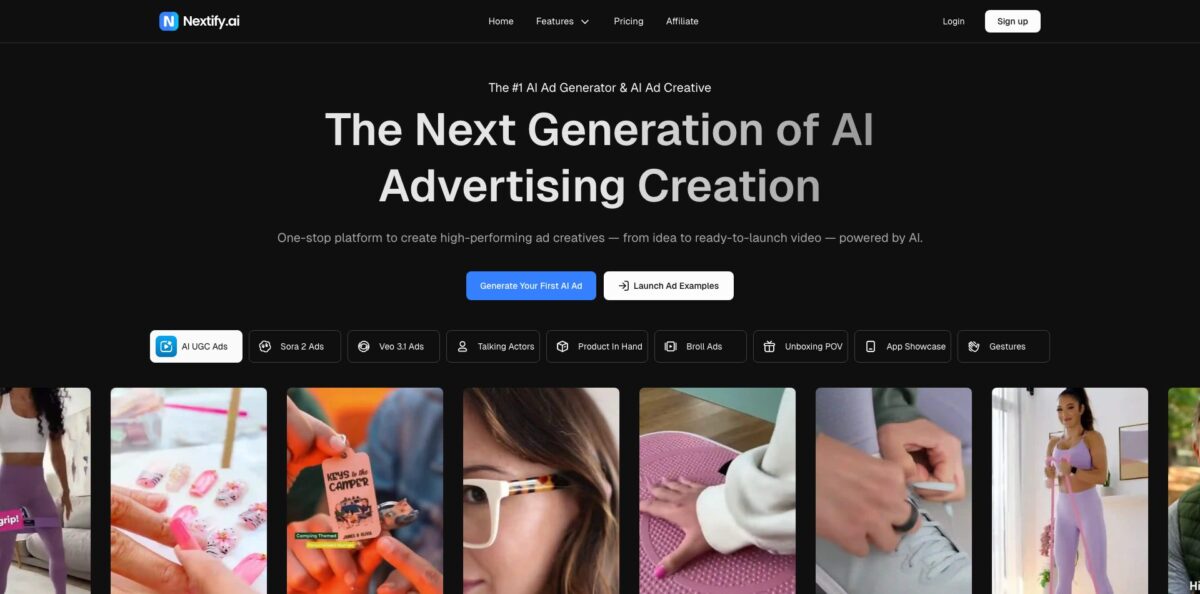
Nextify.ai is a browser-based ad studio that turns a product photo, a short brief or a reference clip into finished short-form video ads and static creatives. Under the hood it routes your request to third-party generation models such as Sora 2, Veo 3.1, Kling and Seedance, then wraps them in ad-specific workflows: AI-written scripts, a library of 1,000+ talking avatars with lip-sync in 40+ languages, voice cloning, product-in-hand demos, unboxing scenes and a cloner that rebuilds a winning ad around your own product. The problem it targets is creative fatigue on TikTok, Reels and Facebook, where media buyers need fresh variations every week and UGC creators are slow and expensive. The weak spot is control: editing tools are light, results can look templated, and credits disappear fast on premium models. It suits e-commerce sellers, dropshippers and small performance teams that test many hooks on a modest budget.
How to start using Nextify.ai?
Click Start for free on the homepage and register with your email. The free tier gives you 50 credits per month, which the pricing page says is enough for up to 2 videos or 25 images, all carrying a watermark and limited to the basic model. That is a sandbox for judging output quality, not for running live campaigns, so plan your first test carefully.
For a first real scenario, open the Video Workspace and choose Create Video Ad. Upload a clean product image, add a short prompt that describes the scene, the offer and the target buyer, and pick an ad type such as UGC, Product Demo, Talking Head, Unboxing, TVC Style or Customer Review. If you do not want to write the brief yourself, the auto-prompt option drafts conversion-focused copy from your product details, and you can edit it before submitting.
The setup screen is where most of your decisions happen. You choose an actor from the Actor Library (or a Quick Pick), the language, the aspect ratio, the generation model and the number of variations, with up to 10 per run. Before each generation, Nextify.ai shows how many credits the task will consume, and that number swings with the model, video length, resolution, avatar type and extras like voice cloning. Check it every time, because a premium model on a long clip costs far more than a quick 9:16 draft.
When the batch finishes, compare the versions side by side and look closely at hands, product labels, on-screen text and lip-sync, which are the usual failure points in AI video. Keep the strongest direction, regenerate weak scenes, and download the approved files in the ratio your ad platform needs. Paid plans remove the watermark and include commercial rights, so only upgrade once you have a creative you would actually spend money behind.
Who is it for?
Dropshippers and fast-testing sellers
You need to know within days whether a new product has legs, and shipping samples to creators kills that timeline. Nextify.ai builds unboxing, product-in-hand and talking-avatar ads from a single product photo, so you can launch tests the same afternoon and drop losers before they eat your budget.
Performance marketers and media buyers
Creative fatigue is your daily problem, and every winning ad starts dying after a couple of weeks. Batch generation and the video cloner let you produce new hooks, actors and formats around a proven concept, so the testing pipeline never runs dry.
E-commerce brand teams
Product launches, seasonal offers and marketplace listings all demand fresh visuals, usually from a team of one or two. Here you get video ads, static ads, listing images and B-roll from the same uploaded assets, which keeps campaigns visually consistent without a studio day.
Small creative agencies
Pitching clients with static storyboards rarely lands. You can turn a client’s product image and an approved reference into several rough video directions, show real options in the first meeting and refine the winner before committing to a live shoot.
Brands selling into several countries
Recording a native-speaking spokesperson for every market is slow and costly. The video translator keeps one avatar presenter and swaps the spoken language through text-to-speech or an uploaded audio track, with lip movement matched to the new language.
Faceless content creators
If you run TikTok or YouTube channels without appearing on camera, a cloned voice plus a custom avatar gives you a consistent presenter, so you can publish daily without filming.
Nextify.ai pricing
Every plan runs on monthly credits rather than per-video fees. A video or image costs a variable number of credits depending on the model, avatar, duration, resolution and add-ons, and the app shows the exact cost before each generation. Unused subscription credits do not roll over to the next billing cycle, and annual billing cuts the price by 30 to 40 percent.
50 credits per month for 1 user, enough for up to 2 videos or 25 images. Output carries a watermark and you only get the basic model.
1,000 credits per month for 1 user, up to 50 videos or 500 images, no watermark, access to all models, 1080p output and custom avatars.
3,000 credits per month for 1 user, up to 150 videos or 1,500 images, with the same feature set as Starter. This is the tier aimed at professional advertisers who test constantly.
The entry configuration includes 2 seats and 8,000 credits per month (up to 400 videos or 4,000 images). A slider lets you scale to 10 seats and up to 100,000 credits per month, with the price rising accordingly.
These credit packs never expire and do not auto-renew, which makes them useful for occasional bursts on top of a plan.
The pricing FAQ allows a refund request within 3 days of your first subscription purchase if you meet the eligibility criteria, while credit packs are non-refundable. The Terms of Service also require you to cancel at least five days before the renewal date to avoid the next charge.
Nextify.ai key features
AI video ad generator
You start from a product image plus text, a set of reference assets, or a pair of opening and closing frames, then choose a format such as UGC, Product Demo, Talking Head, TVC Style, Lifestyle, Pain Point Solution, Unboxing or Reaction. The system writes the script, picks motion and pacing, and can return up to 10 variations from one brief. You get a stack of testable directions instead of one ad you have to bet on.
Avatar library with lip-sync
More than 1,000 AI actors cover different ages, settings and niches, and they speak in 40+ languages with synced mouth movement and optional gestures. You can also create a custom presenter from a reference image and add speech emotion to change the energy of the delivery.
Voice cloning and text to speech
Upload or record a 30 to 60 second sample in a common audio format, and the cloned voice can read any script you type. Stability presets (Creative, Natural, Robust) and speed controls help tune the read, and the result pairs directly with an avatar for a full talking-head video. Founders who are already the face of their brand can keep their own voice in every ad without recording sessions.
Video cloner for winning ads
Upload a reference video and your product image, then choose Style Clone to follow the overall look or High Clone to stay close to the original composition and scenes. AI Auto-Prompt can fill in the selling points, and you can add an AI actor on screen. This shortens the path from spotting a competitor format that works to testing your own version of it.
Product-in-hand, B-roll and POV scenes
From one product photo, Nextify.ai generates hand-held demos, 360-degree spins, close-ups, unboxing clips and mobile app walkthroughs, drawing on 50+ scene templates and 100+ actors for the POV formats. Expect to check labels and hand positions carefully, since these are where AI video most often slips.
Static ad generator
Upload a product photo and the tool detects the category, extracts brand colors and suggests selling points, then composes image ads with text overlays in seven languages, including English, Spanish, French, German and Japanese. You can edit the recognized details and copy before generating, which keeps static and video creatives aligned in one workspace.
Video translator
Pick an avatar-led ad, enter a translated script in text-to-speech mode or upload a finished language track in speech-to-speech mode, and the presenter’s lip movement follows the new audio.
Nextify.ai Pros & Cons
Pros
The biggest strength is breadth in one subscription. Video ads, avatar presenters, voice cloning, static images, listing visuals and localization all draw from the same credit pool, so you are not juggling three tools and three bills. Access to several frontier video models means you can switch engines when one handles a product badly. Batch generation of up to 10 variations per brief fits how paid social actually works: you test many hooks and keep the few that convert. Paid plans include commercial rights and remove the watermark, and the transparent credit preview before each job helps you avoid surprise burn. Use the cloner on formats already performing in your niche to get usable tests faster.
Cons
Credit costs are hard to predict until you run real jobs, because premium models, longer clips and custom avatars each multiply consumption, and unused subscription credits expire every month. Third-party write-ups note that lip-sync can drift on longer videos and that editing controls are thinner than in a proper video editor, so heavily branded work may still need polishing elsewhere. Templated formats also risk looking like every other AI ad in the feed. The privacy policy allows user content to be used for training the models that power the service, which matters if you upload unreleased products. Keep sensitive launches out until you have read the policy closely.
Use Nextify.ai if you want…
- Turn one product photo into multiple video ads.
- Test new UGC-style hooks without hiring creators.
- Clone proven ad formats around your own product.
- Give your scripts a talking AI presenter with lip-sync.
- Narrate ads in your own cloned voice.
- Localize one avatar ad into several languages.
- Generate static image ads from the same assets.
- Refresh paid social creatives every week on a budget.
Nextify.ai alternatives


Nextify.ai Reviews
Early users on AI tool directories mostly praise the quality of the generated ads and the range of features, though about half of a small group of voters would not recommend it, citing a learning curve and few integrations.
Reviewers summarized by third-party comparison sites like how quickly a product input becomes a finished ad and how cheap each variation is compared with hiring creators, but say results work best under 30 seconds because lip-sync can drift on longer clips.
The free tier is seen as fine for a quick test, yet the watermark and tight credit cap mean you have to pay before running real campaigns, and the editing controls feel light for brand-heavy work.
FAQ
Is Nextify.ai free?
There is a free plan with 50 credits per month, enough for up to 2 videos or 25 images. Free output is watermarked and limited to the basic model, so live campaigns need a paid plan.
Can I use Nextify.ai videos in paid ads?
Yes. Paid subscribers get watermark-free output with full commercial rights, which covers ad campaigns, social media, product pages and other business use.
Do unused credits roll over?
No. Subscription credits reset each billing cycle. One-time credit packs ($50 for 1,250 credits) never expire, so they are the safer option for irregular workloads.
Which AI models does Nextify.ai use?
The platform integrates third-party video and image models, including Sora 2, Veo 3.1, Kling and Seedance. Paid plans include all models, while the free tier uses the basic model only.
How many languages do the avatars support?
Avatars speak 40+ languages with lip-sync. The static ad generator writes copy in seven languages, and the video translator can re-voice an avatar ad from a translated script or uploaded audio.
Can I clone my own voice and face?
Yes. Voice cloning needs a 30 to 60 second audio sample, and a custom avatar can be created from a reference image. Both can be combined into a personal digital presenter.
What is the refund policy?
You can request a refund within 3 days of your first subscription purchase if you meet the eligibility criteria. Credit packs are non-refundable, and you must cancel at least five days before renewal to avoid the next charge.
Is my uploaded content private?
The privacy policy says user content may be used to improve the service and train the models that power it. Avoid uploading confidential product material unless you are comfortable with that.
Similar tools
 AirOpsAI search platform that tracks how ChatGPT, Gemini and Perplexity cite your brand and runs agent workflows to create and refresh content.
 AdsLibraryChrome extension and web library for saving, organizing and sharing ads from Facebook, TikTok, Instagram and YouTube, with competitor ad tracking.
 JumaShared AI workspace for marketing teams and agencies that runs 700+ ready Flows to turn briefs and live ad data into finished