
NinjaChat
AI ChatUpdated November 11, 2026
All-in-one AI chat subscription that puts GPT, Claude, Gemini and 50+ other models, plus image and video generators, behind one account.
We may earn a commission when you sign up through our links. It does not affect our reviews.
What is NinjaChat?
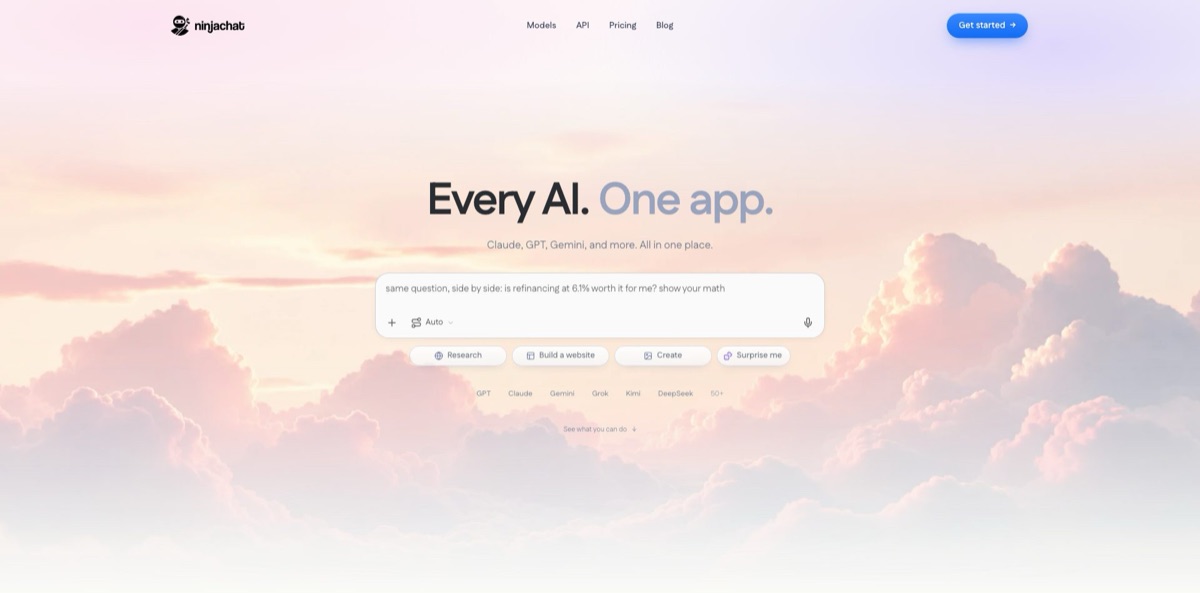
Think of NinjaChat as one subscription standing in front of other labs’ models. A single account reaches GPT 5.6, Claude Opus 5, Gemini 3.1 Pro, Grok 4.6, Kimi K3, DeepSeek V4 Pro and dozens more chat models, plus image and video generators such as Nano Banana, GPT Image 2, Veo 3.1, Kling 2.6 and Seedance 2.0, all paid for from monthly credit pools. It is operated by Helium Technologies, Inc. and labelled a product of the Bloon venture studio. The problem it removes is subscription sprawl: you switch models inside one thread, compare answers, or let Model Council merge several replies into one. The weak points are hard credit caps, a privacy policy that allows chats to be used for model training, and a poor billing reputation on Trustpilot. Pick it if you want breadth on a budget and read the cancellation terms first.
How to start using NinjaChat?
Open ninjachat.ai and click Get started. You can sign in with Google, Discord or Apple, or receive a one-time passcode by email, and some sign-ups also trigger a phone number check meant to block automated accounts. The iPhone and iPad app uses the same account, so chats sync between web and mobile. The pricing page lists no free plan; expect a very small trial allowance on the web and a 3-day free trial in the iOS app.
Your first real scenario should be a question you can judge, such as a contract clause or a bug you already fixed once. Type it into the “Ask ninja anything” box. The composer offers Auto, Research, Build a website and Create, and Auto picks a model for you. Then open the model picker and run the same prompt with Claude, GPT and Gemini; the product’s “Ask once. Three answers.” view puts the replies next to each other so you keep the one that fits. For anything you will act on, select Model Council in the picker. It fans the prompt out to several frontier models and returns one synthesis that marks where they agreed and where they split.
Next, set up the screens you will live in. Projects hold the files a task depends on (PDFs, spreadsheets, Google Drive files, voice memos, photos), and every chat inside a project already knows them, so you stop re-uploading the same brief. In Settings you decide whether Memory stays on, switch a conversation to Incognito so it is not saved to history or memory, and delete individual chats, the memory or the whole account. Connect Gmail, Google Calendar, Drive or Notion only if you want the ninja assistant to read them for specific tasks. Voice mode lets you pick a voice and talk instead of typing.
Before you rely on an answer or spend credits, check the work. Web search replies cite every line, so open the sources behind any figure you plan to reuse. In Studio, start from a template such as product photos, professional headshots, storyboards or talking portraits, and watch the credit counter: the number of creations per credit varies by model. If ninja builds you a web page, it goes live at a ninja.site link immediately, so review it before sharing. Upgrades, top-ups and cancellation all live in Settings.
Who is it for?
Subscription jugglers
You pay separately for ChatGPT Plus, Claude Pro and an image tool, and use each only a few times a week. NinjaChat folds them into one bill, and its own calculator sets $80 a month of separate US subscriptions against a single Starter plan. You give up some depth per model because of credit caps, but you get one history, one file store and one invoice.
Analysts and fact checkers
A single model’s confident answer is not enough when a number goes into a report. Side-by-side replies and Model Council show where models disagree, which is exactly where you need a primary source. Cited web search shortens the step from answer to evidence.
Creators and small marketers
You need product shots, posters, storyboards and short clips more than long essays. Studio puts 12 image and 11 video models behind shared credit pools, with templates that start from a single photo. Video credits are scarce on lower tiers, so plan clips before you generate.
Developers
You want many models behind one key without signing contracts with each lab. The API is OpenAI SDK compatible, routes with fallbacks and shows traces with tokens and actual cost per request. The MCP server also lets Claude, ChatGPT or Codex generate images and videos through NinjaChat.
Small companies rolling out AI
IT wants single sign-on and one invoice rather than personal cards on expense reports. The team plan supports Okta, Microsoft Entra, Google Workspace and any SAML or OIDC provider, and a data-processing agreement with no-training terms is available on request. Staff get every model without separate accounts.
NinjaChat pricing
Every individual plan includes every model, and the difference between tiers is the size of three monthly credit pools: chat, image and video. Credits used per request vary by model, and premium chat models also have separate usage limits. Plan credits refresh monthly and do not roll over, while one-time top-ups for chat, image or video credits never expire and are spent after your monthly allowance. Annual billing is paid up front and renews yearly until you cancel. Prices below come from the official pricing page and its structured data on November 10, 2026, in US dollars. The site is also testing a second, higher price ladder on part of its traffic, so the figure at your checkout can differ.
You get 1,500 chat credits, 50 image credits and 10 video credits a month, with access to GPT, Claude, Gemini and the rest of the catalog. Enough for occasional use and a few test images.
Limits rise to 5,000 chat credits, 150 image credits and 20 video credits a month. This is the plan the pricing page recommends for daily use.
You get 10,000 chat credits, 400 image credits and 35 video credits a month, and the yearly option saves 32% against monthly billing.
Each seat carries Pro allowances (5,000 messages, 150 images and 20 films a month), with single sign-on and one invoice; seats can be added or removed any time.
Custom. Volume seats, required single sign-on, directory sync, offboarding, invoiced billing, and a data-processing agreement with no-training terms in writing.
Published rates start at $0.01 per million input tokens for text and $0.05 per search query, and the API page advertises $0.50 of free usage to start.
NinjaChat key features
A catalog of 54 chat models in one picker
The models page lists chat models from OpenAI, Anthropic, Google, xAI, Moonshot, DeepSeek, Meta, Qwen, Mistral and others, and you can switch models in the middle of a conversation. New releases such as GPT-5.6 Sol appear on a “New on NinjaChat” shelf. You try a new frontier model the week it ships without opening another account.
Model Council for answers you will act on
It sends one prompt to a rotating panel of top models, compares their replies and returns a synthesis that flags agreement, disagreement and points to double-check. It is slower than a single model because it runs several models and a synthesis step.
Studio for images and video
Twelve image models (including Nano Banana, GPT Image 2, Seedream and Flux 2 Flex) and 11 video models (including Veo 3.1, Kling 2.6 and Seedance 2.0) share the plan’s credit pools. Templates cover product photos, headshots, sketch-to-UI, poster design, storyboards, product videos and talking portraits, and Reimagine changes only the part of an image you specify. You get a small creative suite without separate Midjourney or video subscriptions.
Research inside the thread
Live web search reads the pages for you and cites each line of the answer, YouTube videos can be found and summarized in the same chat, and Projects keep reference files available to every conversation in them. This keeps a research task in one place instead of a dozen tabs.
ninja, the assistant you text
It lives in NinjaChat, Telegram and Discord, uses the web on your behalf, remembers details you mention, and can watch for a restock or fare drop and message you first. It also builds web pages at live ninja.site links and, once you connect Gmail or Calendar, drafts replies that only go out when you press send.
Privacy controls with a catch
Chats are encrypted in transit and at rest, Incognito conversations are not saved to history or memory, and you can delete chats, memory or the whole account from Settings. However, the privacy policy allows submitted content to be used by NinjaChat and its AI providers to improve models; only connected-account data is excluded. Treat it as a consumer tool unless your company signs no-training terms.
API, router and MCP for builders
One OpenAI-compatible base URL covers chat completions, image and video generation and search across more than 200 models, with ninja/auto routing, provider fallbacks and per-request traces showing tokens and actual cost. The MCP server brings NinjaChat’s image, film and voiceover tools into Claude, ChatGPT and Codex. You can prototype across labs without managing a separate key for each one.
NinjaChat Pros & Cons
Pros
Price is the main draw. Starter at $9 a month billed yearly costs less than one standalone premium chatbot subscription, yet reaches Claude Opus 5, GPT 5.6 and Gemini 3.1 Pro plus image and video generators in the same thread. Side-by-side answers and Model Council turn a long model list into a practical cross-checking tool rather than a menu. The extras are broad for this price: Projects, multilingual voice chat, cited web search, a texting assistant on Telegram and Discord, team single sign-on and an OpenAI-compatible API. Start on Starter monthly, log how many chat and image credits a normal week consumes, and only then move up a tier.
Cons
Everything runs on credits, and premium chat models carry separate usage limits, so “every model included” does not mean unlimited flagship use. Video credits are thin, with 10 a month on Starter. The privacy policy lets NinjaChat and its AI providers use your messages and files to improve models unless your team signs no-training terms. Trustpilot reviewers report charges after cancellation and slow support, and annual plans are not refunded for the current year. Some App Store reviewers expected looser content rules and met the usual filters. Keep sensitive work out of it, and screenshot your cancellation confirmation.
Use NinjaChat if you want…
- Replace several AI subscriptions with one monthly bill.
- Compare GPT, Claude and Gemini answers side by side.
- Cross-check important answers with a council of models.
- Generate product photos and short videos from templates.
- Get cited answers from live web search in chat.
- Text an AI assistant from Telegram or Discord.
- Call many models through one OpenAI-compatible API key.
- Give a small team single sign-on to every model.
NinjaChat alternatives
 1min.AIRead review →
 MonicaRead review →
 ChatHubRead review →
 GlobalGPTRead review →
 Overchat AIRead review →
 OpenRouterRead review →
NinjaChat Reviews
App Store users who had been paying for several AI subscriptions say the bundle cut their monthly spend and the app is easy to use, with one calling the image and video generators and study tools worth the price.
Several App Store reviewers say the app was promoted to them as uncensored but refuses fictional violence and some image requests, and one annual subscriber wishes the money had gone to the original assistants instead.
Trustpilot reviewers rate it poorly, mostly over billing: charges that continued after cancelling, an annual plan charged in full by mistake and refund requests left without a reply, while the rare positive review praises the low price and model choice.
People trying the free chat on the web or in the app report hitting the limit after a single message and being sent straight to the paid plans.
Some paying iPhone users say the app kept asking them to subscribe after they had already paid, and the developer replied that a subscription sync issue had affected some accounts.
FAQ
Does NinjaChat have a free plan?
Not a permanent one. The pricing page lists only paid plans from $11 a month, or $9 a month billed yearly; the web app gives a small free allowance to start chatting, and the iOS app offers a 3-day free trial that becomes a paid subscription unless you cancel at least 24 hours before it ends.
Is NinjaChat the same as Ninja AI from NinjaTech?
No. NinjaChat at ninjachat.ai is operated by Helium Technologies, Inc. and branded as a Bloon product, while Ninja AI and SuperNinja come from NinjaTech AI at myninja.ai and ninjatech.ai. Their websites show no shared ownership.
Are my chats used to train AI models?
They can be. The privacy policy says the messages, images and files you submit, together with the responses, may be used by NinjaChat and its AI providers to improve models, while data from connected Gmail, Calendar, Drive or Notion accounts is excluded. Companies can request a data-processing agreement with no-training terms.
Do unused credits roll over?
No. Plan credits refresh each month and do not carry over. One-time top-up credits do not expire, and your monthly credits are always used first.
How do I cancel, and can I get a refund?
Cancel any time from Settings, or through your Apple ID if you subscribed in the App Store. Cancelling stops future renewals, but fees already billed, including the current year of an annual plan, are non-refundable except where a verified technical fault is involved.
Which AI models are included?
The models page lists 54 chat, 12 image and 11 video models, from GPT 5.6, Claude Opus 5 and Gemini 3.1 Pro to Veo 3.1 and Kling 2.6. Every plan includes them all, but credit cost per request depends on the model.
Does NinjaChat have an API?
Yes. It is OpenAI SDK compatible at www.ninjachat.ai/api/v1, covers chat, image, video and search, and charges a prepaid balance you top up from $5 plus an 8% service fee when you add credit.
Is there an iPhone app?
Yes. NinjaChat AI is on the App Store for iPhone and iPad running iOS 16 or later and had a 4.2 out of 5 rating from 214 US ratings on November 10, 2026. It uses the same account as the web app.
Similar tools
 Chat 4O AIAll-in-one AI workspace with GPT, Claude, Gemini and Grok chat plus image and video models like Veo, Kling and Nano Banana, paid
 LiveChatAIAI customer support agent trained on your website, docs and Q&As, with human live chat handoff, AI Actions, and WhatsApp, Slack and
 Kore.aiEnterprise agentic AI platform for building, governing and improving voice and chat AI agents for customer service, HR, IT and business processes.