

Octopus.do
Content CreationUpdated November 12, 2026
Visual sitemap builder that drafts page structure, block copy and SEO tags with AI, crawls existing sites and connects to ChatGPT, Claude and Figma.
We may earn a commission when you sign up through our links. It does not affect our reviews.
What is Octopus.do?
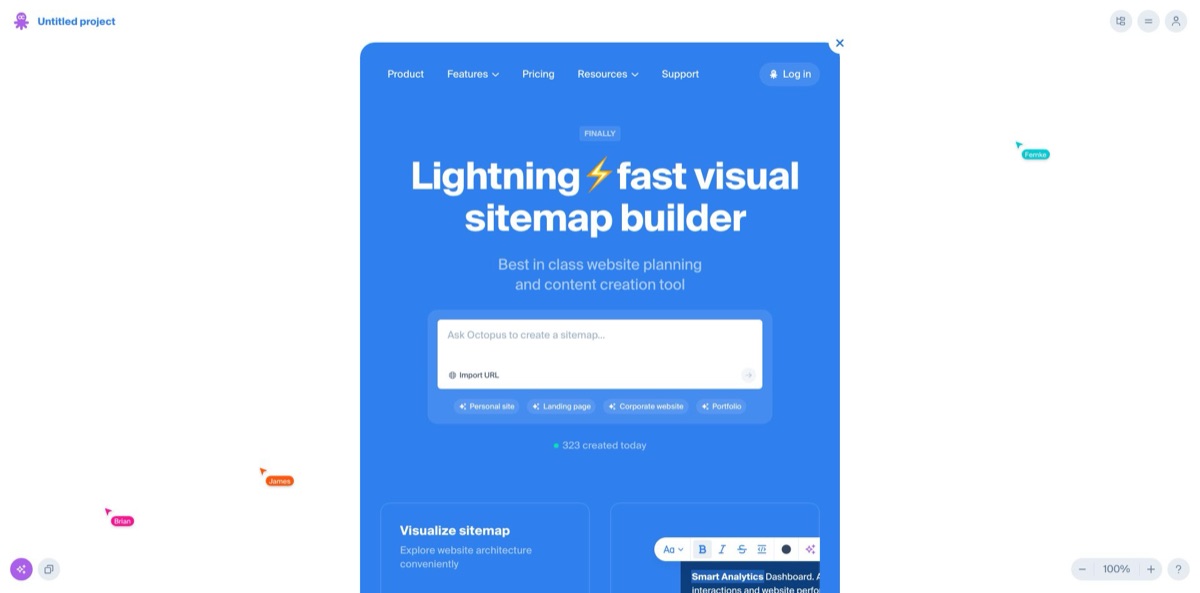
Built for the zero stage of a website project, Octopus.do is a browser-based planning tool centered on a visual sitemap: every page is a card, and inside each card you stack content blocks with lo-fi wireframes, text and SEO notes. Its AI layer turns a short description into a full page tree, drafts copy for blocks, writes title and description tags and translates pages, running on OpenAI’s API. A crawler rebuilds an existing site from its URL, while official apps for ChatGPT and Claude, plus an MCP server, let an AI agent edit the same sitemap you see on screen. The weak spot is depth. It plans structure and content well, but it is not a full wireframing or visual design tool, and AI drafts still need an editor. Pick it if you run discovery for websites and want structure, copy and client approval in one shared link.
How to start using Octopus.do?
Open octopus.do and press Try Octopus. The site states that no sign-up is required to begin, so you can sketch a structure before you create an account. The start screen gives you four routes: Crawl a website, Choose a template, Generate with AI, or Start from scratch. Register for the Free plan once you want to keep the work, and remember it holds one active project, so treat that first project as your sandbox.
For a first real scenario, choose AI Generate and describe the site in a few sentences: what the business does, who the audience is and which pages you already know you need. Octopus.do wraps your prompt in its own instructions, sends it to the AI service and returns a page tree with content blocks already placed. If you are planning a redesign, use Import URL instead. The crawler maps up to 300 pages on Free and 3,000 pages on paid plans, collects page names, URLs, titles and H1 headings, and lets you exclude paths or keywords you do not want in the project.
The main screen is the artboard. Click a page to open its blocks, pick wireframes from the library (Shift + click combines several on one block) and write in the content editor, which gained columns, tables and text alignment in the May 2026 editor update. The AI assistant changes tone or length, checks spelling, translates selected text and generates SEO tags for the whole project. Switch on SEO mode to edit Title, Description and H1 for each page, and on Pro or Team connect Google Analytics to see views, users and engagement time beside every page.
When the plan is ready, share a link and set access to view, comment or edit. Paid plans add guest comments for clients without an account and password protection. Generate a sitemap.xml on any plan, export PDF, PNG, CSV, XML or TXT on Pro and Team, or move the structure into Figma, WordPress or Webflow. The Publish option turns the sitemap into a simple document-style website, and its settings let you switch off search engine indexing before you send the link around.
Write a detailed prompt with your real page list and audience; the AI FAQ itself warns that vague prompts return good but less accurate structures.
Who is it for?
UX and information architects
You need to agree on navigation before anyone opens a design file. Octopus.do combines a mind-map style tree with wireframe blocks, arrows for internal links and user flows, and color tags to mark status. Stakeholders see the whole architecture on one canvas instead of in a spreadsheet.
Web agencies and freelancers
Discovery calls produce scattered notes, and clients keep adding pages after the quote. Pro adds per-page time estimates with hourly rates, guest comments and password-protected links. Reviewers on GetApp say per-page pricing helps clients understand what each page will cost them.
SEO specialists
Site migrations and audits start with knowing what already exists. The crawler pulls URLs, titles and H1s from a live site, SEO mode lets you rewrite meta tags page by page, and Google Analytics data shows which pages actually earn traffic before you cut or merge them.
Copywriters and content teams
Writing in a shared doc loses the link between copy and page structure. In Team projects the Copywriter role edits page content and SEO tags while the sitemap structure stays locked, and AI draft uses project data as context to fill empty blocks.
Founders and product owners
You have an idea and need a site plan before hiring a designer. Generate a first sitemap from a prompt, refine it on the Free plan, then hand a link to your agency or publish it as a simple website to test the message.
Developers and AI-agent users
You would rather describe a change than drag boxes. The MCP server works with Claude, Claude Code, Codex, Cursor, VS Code and ChatGPT, and a REST API with API-key or OAuth 2.1 access lets you build Octopus.do into your own tools.
Octopus.do pricing
Plans are priced by seats and active projects rather than AI credits. The AI assistant is available on every plan but marked as limited on Free, and the AI FAQ confirms that AI text drafts and AI-generated SEO tags work on Free too. Annual billing saves 15%, and all prices on the official page are in USD.
One user, one active project, unlimited project editors, 200 MB storage and crawling up to 300 pages. Wireframes, colors, SEO mode and the AI assistant are limited; sitemap.xml, embedding, the Figma plugin and WordPress export are included.
One user, eight projects, 10 GB storage and crawling up to 3,000 pages. Adds branding, symbols, Figma sync, Google Analytics, per-page estimates, PNG, PDF, TXT, CSV and XML export, activity history, password protection and guest comments.
Unlimited projects, 25 GB storage and every Pro feature, plus a team workspace, project folders, admin roles, members-only access, assign and resolve, anonymous editing, priority support and payment by invoice.
Custom pricing through the sales team, aimed at larger companies that need advanced security tools and controls.
There is no free trial of paid plans, but the pricing FAQ promises a full refund if you ask within 14 days of the first payment. Educational institutions can request a discount. If you cancel or downgrade, projects above the new plan limit are archived and come back when you renew.
Octopus.do key features
AI Generate builds a project from a text prompt
You describe the site, and the tool returns a page hierarchy with suggested content blocks, draft text and SEO meta tags. It replaces the blank-canvas hour at the start of every project. The vendor states that prompts, project data and AI outputs are not used to train AI models.
The AI assistant works inside the content editor and on the whole project
It drafts text for any block using project data as context, changes tone or length, fixes typos, translates pages and blocks, and recolors the project globally or block by block.
The crawler turns any reachable website into a sitemap project
It imports page names, URLs, titles and H1s, supports exclusion rules for paths and keywords, and can produce a visual project or a list view for reviewing metadata. Use it to audit a client’s current site before proposing a new structure.
The content brick method sits between a mind map and a wireframe
Each page holds stacked blocks drawn from a large wireframe library, while symbols let you edit a header or footer once and update it everywhere. Team workspaces can share a symbol library across projects, so repeated blocks stay consistent.
SEO mode and Google Analytics put search data on the sitemap
You edit Title, Description and H1 per page, then see views, users and engagement time from a connected Analytics property. A generated sitemap.xml can then be submitted to Google, Bing and other search engines.
Agent access through MCP, apps and API
Octopus.do has official apps in ChatGPT and Claude, a remote MCP server for other agents and a public REST API. Agents can create pages, restructure the tree in one atomic update and leave review notes, but they can only archive projects, never delete them. The ChatGPT app requires ChatGPT Plus or higher.
Export and Publish move the plan into production
The Figma plugin can generate a high-fidelity prototype with components built on variables, while WordPress export and a Webflow plugin carry content into a CMS. Publish turns the sitemap into a simple website you update with one click.
Octopus.do Pros & Cons
Pros
Octopus.do gets you from an idea or an existing URL to a shareable sitemap very quickly, and you can start without an account. AI Generate, the crawler and templates remove the empty-canvas problem, while block-level wireframes and content keep structure and copy in one view. Sharing is flexible: clients view or comment through a link, and Free still includes unlimited editors on its single project. The product is clearly maintained, with the changelog showing labels on arrows, sticky notes, project statuses and a compact layout shipped between October and November 2026. Agent access through MCP and the API is unusual in this category. Start each project with AI Generate or a crawl, then spend your time editing rather than drawing boxes.
Cons
The limits bite early. Free allows one active project, Pro tops out at eight projects for a single user, and Team is billed per seat, which Product Hunt users call a steep step for small teams. The AI assistant is limited on Free, and the pricing page does not publish exact AI quotas. AI structures can be generic, and the vendor itself advises checking results with specialists. Older reviews also mention restrictive export sizes for very large maps and sluggish performance with several editors at once. It is a planning tool, not a design suite, so high-fidelity work still happens in Figma. Test your largest real sitemap on Free before you commit to a yearly plan.
Use Octopus.do if you want…
- Generate a full website sitemap from a short prompt.
- Crawl a live site into an editable visual structure.
- Draft block copy and SEO tags inside the plan.
- Collect client comments on structure through one shared link.
- Estimate project cost per page with hourly rates.
- Edit sitemaps from ChatGPT, Claude or any MCP client.
- Push a finished plan into Figma, WordPress or Webflow.
- Publish a simple documentation site straight from a sitemap.
Octopus.do alternatives

Octopus.do Reviews
Reviewers on Capterra and GetApp say they can build complex sitemaps in minutes and share them with clients through restricted links, though one would like better zoom presets for framing a large map.
Capterra reviewers found export options restrictive for very large maps, which only fit A4 or A3 sizes, and one missed the ability to collapse branches of the tree.
GetApp reviewers credit symbols for editing many blocks at once and per-page pricing for keeping client scope clear, while one feels the Team price could be lower.
Product Hunt users call the free tier useful and the wireframe library broad for small and medium sites, but say it is less suited to large, high-budget projects.
One Product Hunt reviewer reported slow, jittery rendering and crashes when several people worked in the same project.
FAQ
Is Octopus.do free?
Yes. The Free plan has no time limit and includes one user, one active project, unlimited editors, 200 MB of storage and crawling up to 300 pages. AI text drafts and AI SEO tags are available on Free, with limits on the AI assistant.
Do I need an account to try it?
No. The site says you can start a project without signing up. You need a free account to keep projects, invite editors or connect the ChatGPT and Claude apps.
Is my data used to train AI models?
According to the AI FAQ, project data, prompts and AI-generated outputs are not used for AI model training. The AI features run on OpenAI’s API.
Can I import an existing website?
Yes. Paste a URL into the crawler and it builds a project with page names, URLs, titles and H1s. Free crawls up to 300 pages, and Pro and Team crawl up to 3,000.
Does Octopus.do integrate with Figma, WordPress and Webflow?
Yes. A Figma plugin exports the sitemap or artboards and can generate a high-fidelity prototype, Pro adds Figma sync for design previews, and you can export content to WordPress or use the Webflow plugin.
Is there an API or MCP server?
Yes. Octopus.do offers a public REST API with API-key or OAuth 2.1 authentication and a remote MCP server for Claude, Cursor, Codex, VS Code and other clients. There are also official apps in ChatGPT and Claude.
Is there a free trial or refund for paid plans?
There is no trial of Pro or Team, but you can request a full refund within 14 days of the first payment if the plan does not meet your needs.
What happens to my projects if I cancel?
You keep paid features until the end of the billing period. After that, projects above the Free limit are archived and reactivated automatically if you renew.
Similar tools
 RunableGeneral AI agent that turns one prompt into websites, slide decks, social carousels, videos and apps, with plugins and scheduled tasks.
 AISEOAI writing suite with a text humanizer, article and Outrank generators, AI detector and plagiarism checker, plus AI search visibility tools.
 GravityWriteAll-in-one AI content platform with 250+ writing tools, a long-form blog writer, image and video generation and a social media scheduler on