

OpenArt
Art GenerationUpdated October 5, 2026
OpenArt is a versatile AI creative hub featuring sketch-to-image tools, advanced upscaling, and professional editing for high-quality artistic assets.
We may earn a commission when you sign up through our links. It does not affect our reviews.
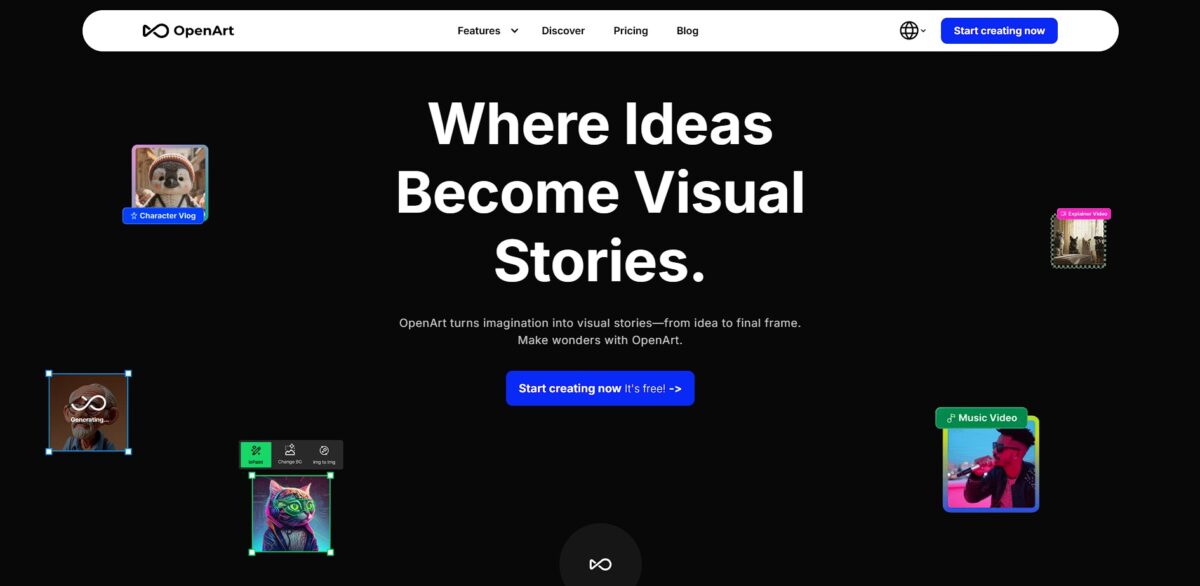
What is OpenArt?
OpenArt functions as a concentrated creative hub that bundles image generation with deep editing tools like sketch-to-image and creative upscaling. It relies on a variety of Stable Diffusion models, allowing you to train personal styles or swap between specific artist assets without wrestling with a local Python environment. The UI is built for speed, so iterating on a character’s clothing or lighting is easier than in the more chaotic Discord-based workflows. The result sits closer to usable, refined assets than raw AI output, which suits creators who need precise control over their final visuals. OpenArt works well for consistent character design, though the credit system can feel restrictive for high-volume batch testing. Use the Sketch-to-Image feature first to lock in your composition before burning credits on complex text prompts.
How to start using OpenArt?
Start by visiting openart.ai and logging in with a Google or Discord account. You avoid the headache of managing local Python dependencies or renting cloud GPUs because the heavy lifting happens on their servers. Onboarding is quick and drops you straight into a creation dashboard rather than a complex settings menu, so you can verify your prompt ideas immediately without a twenty-minute technical setup.
The “Create” tab serves as your primary workspace. You can choose between text-to-image or upload a rough sketch to guide the composition. Instead of guessing how a specific artist’s style might look, you can select pre-trained models or LoRAs from the sidebar. This visual selection helps you maintain consistent lighting and character details across different generations.
Try the “Sketch-to-Image” tool if you have a specific layout in mind but lack the drawing skills to execute it. You draw basic shapes, and the AI fills in the textures based on your description. While the default settings work for general concepts, you might need to adjust the “Prompt Adherence” slider if the results stray too far from your original sketch. That slider is what stops the AI from overriding your specific design choices with generic patterns.
Refine your results using the “Creative Upscaler” or inpainting features to fix small errors like messy fingers or background artifacts. You don’t have to restart the whole process; just highlight the area that looks off and describe the change you want. In practice, this iterative approach works well for character design but can feel slower when processing large batches of images. This granular editing cuts down the time spent clicking “generate” until the AI accidentally gets it right.
Who is it for?
Fashion Designers
Rough pencil silhouettes become textured fabric renders in seconds. The sketch-to-image tool handles draping better than standard text prompts, taking you from a quick hand-drawn idea to a client-ready visual.
Concept Artists
OpenArt creates consistent character sheets without the usual random variations. It uses a structured build system rather than relying on lucky prompt guesses. You can move a character through different scenes while keeping their face locked.
Architectural Visualizers
A few basic blocks or lines transform into photorealistic building exteriors. It excels at specific styles like “cyberpunk” or “brutalist” when guided by a reference sketch. That saves hours of 3D modeling just to test a lighting concept.
Social Media Managers
It turns basic brand logos into realistic mockups on shirts or signs. While it lacks the deep layer control of Photoshop, it generates high-engagement visuals much faster. Non-designers can produce polished assets for daily posting schedules.
Game Developers
Generate dozens of unique icons or props for UI testing. You can train a personal style model to ensure every inventory item looks like it belongs in the same world. Keeping a unified aesthetic across hundreds of small assets gets much easier.
AI Influencer Creators
It automates the production of realistic portraits for virtual personas. It maintains skin textures and facial structures better than simple Discord-based generators, giving you the convincing uniformity needed to build a believable digital following.
OpenArt pricing
OpenArt pricing operates on a credit-based subscription model. You pay for a monthly allowance rather than unlimited access, which ties your costs directly to how many images or videos you actually generate. This system keeps the entry price low for casual users but requires heavy creators to monitor their credit balance to avoid hitting a wall mid-project.
You get 40 one-time trial credits. This is strictly a sandbox for testing the interface and simple prompts without committing a cent. I noticed the credits don’t refresh daily, so once they’re gone, your trial ends.
This provides 4,000 credits. It covers roughly 4,000 standard images, which is plenty for a blogger or social media manager looking to replace stock photo costs.
You get 12,000 credits and more parallel generations. This matters because it lets you run multiple experiments at once, cutting down the time you spend staring at a loading bar.
Despite the name, you get 24,000 credits. It opens up higher limits for training personalized models, which is essential if you need to keep a specific character or product consistent across 100+ variations.
This is for agencies requiring 106,000 credits and priority support. You get significant discounts on extra credit packs if you’re churning out thousands of assets a week.
OpenArt key features
Sketch-to-Image transformation
Upload a rough pencil drawing and guide the AI to fill in textures or colors while keeping your original composition. This works well for artists who have a clear layout but want to skip the hours spent on manual rendering. Your creative intent stays intact while the technical execution is automated.
Creative Upscaling and enhancement
Increase resolution on blurry renders to 4K or higher without the typical plastic smoothing found in generic filters. I noticed the engine adds believable micro-details to skin and fabric rather than just stretching pixels. Your digital assets end up ready for print or large displays. Gotcha: High creativity settings can sometimes alter facial features slightly, so check the “Similarity” slider.
Integrated Image Editing toolkit
Select specific areas of a generated frame to swap objects or remove artifacts using a lasso tool. Instead of regenerating the entire scene, you can just fix a warped hand or change a character’s clothing color. That matters because it turns a “gamble” into a controlled iterative process.
Model Discovery and specialized training
Access a library of community-tuned Stable Diffusion models or train a personal style profile on your own work. It moves you past generic AI outputs toward a consistent brand aesthetic for game assets or marketing, so you keep a recognizable visual language across different projects.
Prompt Refinement and inspiration
Use the built-in search to find successful prompt strings from millions of existing images to see exactly how certain effects were achieved. It helps you understand which keywords trigger specific lighting or camera angles without constant trial and error. Less credit waste, since you get closer to the desired result on the first try. Choice rule: Study the prompt of an image you like rather than typing blind.
OpenArt Pros & Cons
Pros
OpenArt bypasses the technical wall of local Stable Diffusion setups by hosting diverse models and editing tools in a single browser tab. The sketch-to-image feature accurately follows hand-drawn silhouettes, allowing you to turn a ten-second pencil doodle into a textured render. This speed transforms the workflow for concept artists who need to test compositions without manual painting. Clear line art gets you the most predictable results from your sketches.
Cons
The credit-based system creates a friction point where every creative experiment has a literal cost. While the interface is fast, the sheer volume of niche models can lead to choice paralysis when you just need a standard output. You pay for this flexibility with a learning curve that requires monitoring your credit balance to avoid being cut off mid-project. Start with the free trial credits to gauge which specific model handles your art style before committing to a paid tier.
Use OpenArt if you want…
- Turn rough sketches into polished, professional artwork
- Train custom models on your unique artistic style
- Enhance and upscale images for high-quality printing
- Swap character faces while maintaining lighting and composition
- Edit specific image sections using precise magic brush tools
- Generate consistent assets for branding and marketing campaigns
- Experiment with diverse Stable Diffusion models in one tab
- Restore old or blurry photos with creative upscaling
OpenArt alternatives
 Leonardo.aiRead review →
 MidjourneyRead review →
 SeaArt.aiRead review →
 RunwayRead review →
 CivitaiRead review →
 Adobe FireflyRead review →
 Kling AIRead review →
 Krea AIRead review →
OpenArt Reviews
Best all-in-one platform I have used. The consistent character tool and built-in editor save me from jumping between three different apps just to finish one piece.
FAQ
Can I use the images I create for commercial purposes?
Yes, you can use any image you created on OpenArt for commercial purposes. Additionally, images generated by Stable Diffusion on the platform can be used for commercial projects without licensing.
Do unused monthly credits roll over to the next month?
No, monthly subscription credits do not roll over. They reset at the start of each billing cycle, so it is best to use your full allowance before the month ends.
Does OpenArt support adult content?
No, OpenArt restricts the generation of adult content. Prompts that violate safety filters will be flagged, and the system may block the generation of such images.
Can I create videos on the platform?
Yes, OpenArt supports AI video generation through its image-to-video feature and the One Click Story tool, which can generate clips up to 60 seconds long.
How long does it take to generate an image?
Most images are generated within a few seconds. However, higher resolution settings, complex models, or periods of high system traffic may increase the generation time.
Is there a mobile app available?
OpenArt currently operates as a web-based application. While it can be accessed via mobile browsers, it is optimized for desktop use, and a dedicated mobile app has not been released yet.
What happens if a generation fails?
In most cases where a generation fails due to a system error, the credits used for that action are automatically refunded to your account.
Can I remove the background from an image?
Yes, OpenArt includes a built-in background removal tool that allows you to create transparent backgrounds for your generated or uploaded images.
Similar tools
 CustomuseAI 3D creation platform that chains image, video and 3D models into node workflows for game-ready assets, Roblox items and scenes.
 VisualGPTCredit-based AI image and video studio that runs Nano Banana, GPT Image, Seedream, Flux and Kling for product photos, photo edits and
 LovartAI design agent that turns a chat brief into logos, social posts, product shots, slides and videos on one editable infinite canvas.