

OpenRouter
Developer ToolsUpdated October 5, 2026
OpenRouter is a unified API aggregator providing seamless access to hundreds of LLMs through a single integration endpoint.
We may earn a commission when you sign up through our links. It does not affect our reviews.
What is OpenRouter?
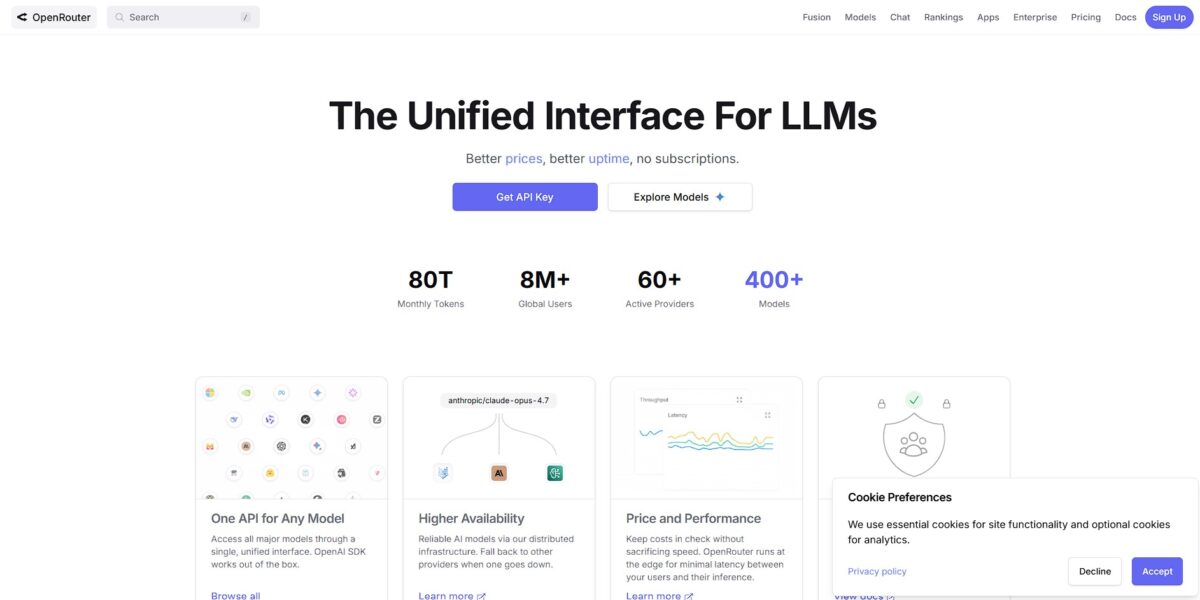
OpenRouter functions as a single API gateway that bridges your app to hundreds of large language models from dozens of providers like OpenAI, Anthropic, and Google. Instead of managing ten different billing accounts and SDKs, you integrate one standardized endpoint and swap models by changing a single string in your code. I noticed it handles the messy normalization of request formats and even offers automatic failover if a specific provider goes down. This prevents vendor lock-in and lets you benchmark GPT-4 against Claude or Llama 3 instantly without rewriting your backend. That matters because it reduces technical debt and keeps your stack flexible as model leaderboards shift weekly. It works well for rapid prototyping and multi-model production apps, though the extra hop adds a few milliseconds of latency. Check the “rankings” page on their site to see which models currently offer the best cost-to-performance ratio for your specific task.
How to start using OpenRouter?
Visit openrouter.ai and sign up with your email or a Google account. The dashboard is clean and lacks the usual enterprise clutter. The Keys section sits right in the sidebar, so you can jump straight to building without navigating a dozen menus.
Generate your first API key and name it something descriptive. Copy it once and store it safely in a password manager. For security, the interface hides the key right after creation, which prevents accidental exposure during screen shares or in public logs.
Plug the base URL and your key into your existing OpenAI SDK setup. You only need to change the endpoint to point to OpenRouter’s unified API. This allows you to test fifty different models by changing a single string in your config. There is no need to install twenty different provider libraries.
Set a credit limit or top up your balance with a few dollars to start. OpenRouter uses a unified credit system for all providers, including paid ones like Claude or GPT-4. Yes, you manage a separate wallet, but it stops surprise bills from multiple vendors and keeps expenses predictable across your entire AI stack.
Who is it for?
The Model Benchmark Junkie
If you spend your weekends comparing Llama 3 tokens against Claude 3.5 Sonnet, this is your playground. It provides a single point of entry to dozens of models without the headache of multiple API keys. You can pivot between providers based on real-time performance rather than brand loyalty.
The Frugal Indie Dev
It works well for builders who want to keep overhead low. You can route simple prompts to free models and reserve the expensive flagship ones for complex reasoning. Your monthly API bill stays predictable without sacrificing output quality.
The “Build-in-Public” Prototyper
It is the fastest way to get an LLM-powered app running without jumping through enterprise sales hoops. You top up with five dollars and start hitting endpoints immediately. Very little stands between a fresh idea and a functional MVP.
The Reliability Architect
If you’ve been burned by an OpenAI outage during a demo, you’ll value the automatic failover. It shifts requests to secondary providers if your primary choice goes offline. Your application stays functional even when major AI giants struggle with uptime.
The Open-Source Explorer
It provides access to niche, specialized models that aren’t available on mainstream platforms. You can test experimental weights or community-fine-tuned versions by changing a single string in your config. That puts the bleeding edge of the open-source community within reach without managing your own GPU clusters.
OpenRouter pricing
OpenRouter ditches the monthly subscription model in favor of a raw, pay-as-you-go credit system. You deposit funds via credit card or crypto and spend them across hundreds of models from different providers. It tracks usage down to the individual token, which stops you from overpaying for bulk seats your team doesn’t use. Your AI spend shifts from a fixed liability to a variable cost that scales with your traffic.
They carry rate limits like 20 requests per minute, but they are great for testing logic without burning through a balance. In short, you can prototype for free.
Prices typically match direct API costs from companies like Anthropic or OpenAI. You avoid the 15-20% markup common with other aggregators. So your margins stay predictable even when switching between expensive reasoning models and cheap flash versions.
This covers the convenience of one billing dashboard for 60+ providers. The trade-off is a small upfront cost for massive architectural flexibility.
You can connect your own provider keys to bypass OpenRouter’s balance. It is free for the first 1 million requests per month, then incurs a 5% fee. That way you keep your enterprise volume discounts while using OpenRouter’s unified API.
OpenRouter key features
Access hundreds of models through a single OpenAI-standardized API
You stop rewriting integration logic every time a better LLM drops. Your production agents are no longer locked into one vendor.
View a live leaderboard with real-world latency and cost stats
I noticed the price often drops below the provider’s direct rate due to bulk routing. You can switch to a cheaper endpoint instantly without touching code.
Implement automatic fallbacks to secondary providers if a primary API goes down
This prevents your app from breaking during common outages at Anthropic or OpenAI. Uptime stays high without manual monitoring.
Route requests to free or low-cost models based on specific prompt requirements
You can send simple summaries to Haiku while reserving Opus for complex reasoning. Your monthly API bill drops significantly as a result.
Standardize tool-calling and image processing across different model families
It translates diverse schemas into a predictable format for your functions. That saves hours of debugging finicky JSON outputs.
OpenRouter Pros & Cons
Pros
OpenRouter simplifies the fragmented LLM landscape by providing a single API endpoint for hundreds of models. You stop managing twenty different API keys and billing accounts. It handles provider failover automatically. If one host goes down, your app stays alive by routing to another, so production services remain stable during provider outages. In testing, latency remained competitive even with the extra hop. The pay-as-you-go model prevents wasted subscription fees for occasional testing. Use it to benchmark new releases like Llama or Claude without committing to a monthly plan.
Cons
The convenience comes with a 5.5% platform fee on top of base model costs. You also introduce a central point of failure and a third party that sees your prompt data. Some providers use aggressive quantization, which can degrade model reasoning compared to first-party APIs. That matters because your results might differ from official benchmarks. The interface occasionally feels overwhelming due to the sheer volume of choices. You also give up direct support from model creators in exchange for broader flexibility. Stick to direct APIs if you need maximum privacy and first-party SLAs.
Use OpenRouter if you want…
- Access 400+ LLMs through a single unified API.
- Switch models instantly without changing your code structure.
- Implement automatic failover for maximum application uptime.
- Benchmark performance across dozens of different AI providers.
- Consolidate billing for multiple AI services into one bill.
- Avoid vendor lock-in by routing to various LLM endpoints.
- Test niche or open-source models with zero setup overhead.
- Set granular credit limits to control multi-model API spending.
OpenRouter alternatives


OpenRouter Reviews
The unified API key is my biggest win. It’s much easier than juggling separate accounts for OpenAI and Anthropic, though I check providers carefully to avoid heavily quantized models.
I love the pay-as-you-go transparency. I put $10 in months ago and it’s still going, which is way better than a $20 monthly sub for a single model I use in bursts.
Great for benchmarking new releases like DeepSeek or Llama without a new integration. The 5.5% fee is a fair trade for the flexibility and simple failover logic.
Indispensable for dev work since I can swap models midstream. It can be hit-or-miss with latency during peak hours depending on which provider it routes to, though.
FAQ
Which models are available on OpenRouter?
OpenRouter provides access to over 400 models from dozens of providers including OpenAI, Anthropic, Google Gemini, Meta Llama, Mistral, and many open-source variants.
Is the OpenRouter API compatible with the OpenAI SDK?
Yes, OpenRouter uses an OpenAI-compatible API schema, allowing you to use existing OpenAI libraries by simply changing the base URL and adding your OpenRouter API key.
How does response caching work on OpenRouter?
By sending a specific header, you can enable edge caching that returns identical requests in milliseconds for free, skipping the provider call entirely.
Can I set usage limits for my API keys?
Yes, you can configure credit or token limits on individual keys to prevent unexpected costs and monitor specific application usage from the dashboard.
What happens if a specific model provider goes down?
OpenRouter offers automatic routing and fallbacks, meaning if your primary provider is unavailable, the request can be automatically redirected to another provider hosting the same model.
Does OpenRouter support streaming and tool calling?
Yes, OpenRouter supports Server-Sent Events for real-time streaming and forwards function calling parameters to any model that natively supports those capabilities.
Are there free models available on OpenRouter?
OpenRouter frequently features a selection of high-performance models available at zero cost for both input and output tokens, often including variants of Llama and Mistral.
Similar tools
 Novita AIDeveloper cloud with one API for 200+ open-weight AI models, plus GPU instances, dedicated endpoints and isolated sandboxes for AI agents.
 You.comDeveloper platform of web search, content extraction, cited research and model inference APIs that feed AI agents and RAG apps real-time web
 QodoAI code review platform that runs specialized agents on every pull request, enforces team rules and checks changes against tickets and linked