

Parseur
AI AutomationUpdated October 19, 2026
AI document and email parser that pulls fields and tables from PDFs, scans and emails and sends clean data to spreadsheets, apps and APIs.
We may earn a commission when you sign up through our links. It does not affect our reviews.
What is Parseur?
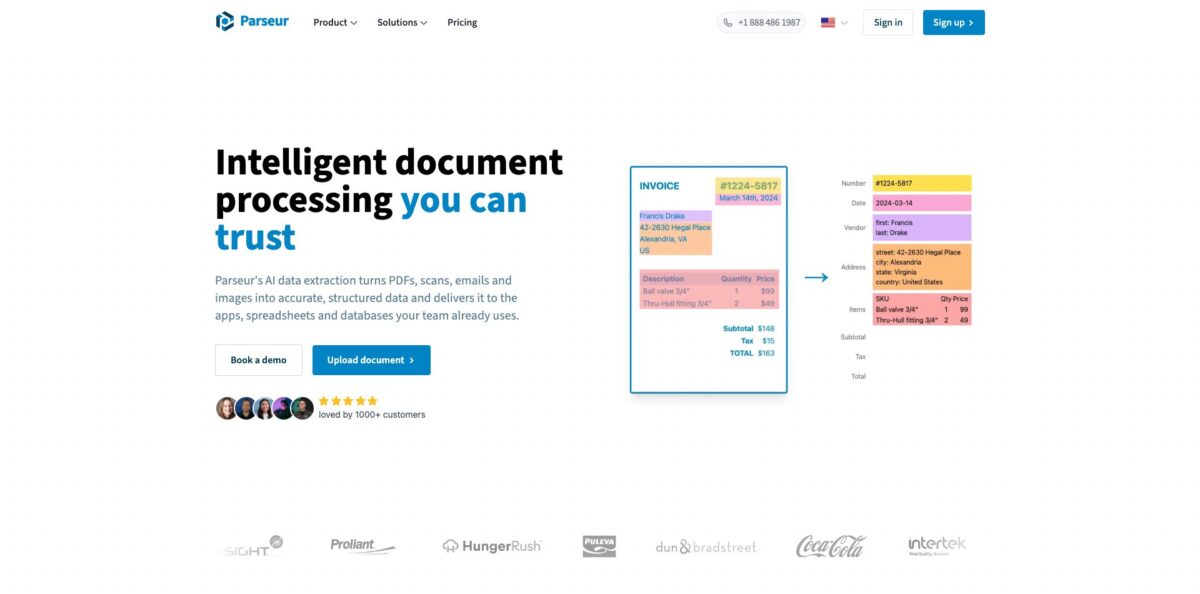
Parseur is a cloud tool that reads incoming emails, PDFs, scans and images and turns the values inside them into structured rows you can push to a spreadsheet, an automation platform or your own API. You describe each field in plain English, and one of three engines (Vision AI, Text AI or a classic template) pulls it out, including table line items that span several pages. It replaces the person who copies order numbers, invoice totals or lead details from an inbox into a CRM every afternoon. Every mailbox gets its own forwarding address, so documents can flow in without anyone touching them. The weak spot is cost at volume: billing is per page, unused credits expire, and long PDFs eat a quota fast. It suits operations teams and small businesses that handle hundreds or thousands of similar documents a month.
How to start using Parseur?
Sign up at app.parseur.com. The Free plan needs no credit card and gives you 20 pages every month, which is enough to try a real document type before you commit. Your first step inside the app is to create a mailbox. A mailbox is one self-contained workflow: it has its own list of fields, its own intake rules and its own unique address ending in @in.parseur.com. You can create as many mailboxes as you need at no extra cost, so keep one per document type, such as supplier invoices in one and web leads in another.
Next, feed the mailbox a sample. Drag and drop a PDF into the web app, or forward an email (with or without attachments) to the mailbox address. On the first upload Parseur proposes the fields it thinks you want, such as invoice number, date, vendor and total. You then edit that list, add or remove fields, and write a short instruction for each one. For repeating data like order lines, define a table field so every row becomes its own record instead of a merged block of text.
The settings that decide quality live at the field and mailbox level. Pick a format for each field: Text, Date, Time, Datetime, Number, Full name, Address or Choice. These formats normalise regional date orders and number separators, split names and addresses into parts, and flag values outside an allowed list. Mark key fields as required so a document with a missing total lands in Process Failed rather than slipping into your sheet. For long PDF bundles, set up document splitting or limit processing to specific pages so you do not burn credits on cover sheets.
Finally, decide where the data goes. You can download results as Excel, CSV or JSON, sync to Google Sheets on a schedule (typically hourly), or connect Zapier, Make, Power Automate or n8n for real-time triggers. Developers can send documents in and get results out through the REST API, with webhooks firing when a document is processed or fails. Before you switch on automatic forwarding from Gmail or Outlook, run ten or twenty real documents through and review each result in the app.
Who is it for?
Operations managers
Your team spends hours each week retyping order confirmations, booking emails or delivery notes into another system. Parseur reads those documents as they arrive and sends the values on, so staff move from data entry to checking exceptions. Expect a short setup period while you tune field instructions.
Real estate and lead-driven businesses
Leads arrive from portals and web forms as emails in different layouts. A mailbox can extract name, phone, property and budget from each one and push it straight to your CRM through Zapier or Make. Leads land in your pipeline within seconds instead of waiting for someone to copy them.
Finance and accounts payable staff
Supplier invoices come in as PDFs, scans and phone photos, each with its own layout. Vision AI handles varied formats and table line items without a template per vendor, and validation catches missing totals before export. You still review flagged documents, but you stop keying every line by hand.
Small business owners and solo operators
You need automation but have no developer. The web app is point-and-click, the Free plan covers 20 pages a month, and paid plans start at 100 pages. Watch the per-page model if your PDFs run long, because a ten-page file costs ten credits.
Developers and product teams
You want document extraction inside your own product without building and maintaining an OCR and LLM pipeline. The REST API is included on every plan, and webhooks return structured JSON with retries and delivery logs. That saves weeks of work on the edge cases a prototype never covers.
Recruiters and staffing agencies
CVs and applicant emails pile up in shared inboxes. Parseur can pull contact details and key fields into a spreadsheet or ATS, and Capterra lists staffing and HR among the industries where it is used. Your recruiters spend their time on calls instead of copying details.
Parseur pricing
Parseur charges by volume. One credit equals one processed page: every PDF page counts, while an email or a spreadsheet costs one credit regardless of length. You pick a plan by pages per month and pay monthly or annually; annual billing saves up to 25%, and its credits last the whole year instead of resetting each month. Unused credits expire at the end of the billing period, though you can buy top-up credits or turn on early auto-renewal if you run out. Prices below are the official USD list as of October 2026, excluding VAT.
20 pages per month, unlimited mailboxes and fields, AI and template engines, all export integrations and the API, one user and 90-day document retention. Support is AI and self-serve only.
Part of the Base tier: one user, one-year retention, chat and email support.
$89/month for 300 pages, or $828/year (about $69/month).
$129/month for 1,000 pages, or $1,188/year (about $99/month).
This is the top of the Base tier.
This starts the Scale tier, which adds Python post-processing, up to 100 users, unlimited retention, priority support and security and compliance reports.
from $899/month for 20,000 pages up to $8,499/month for 250,000 pages, with annual prices published up to the 100,000-page plan ($3,699/month or $33,588/year).
Custom. Up to 10 million pages a month, unlimited users, purchase orders, bank wire or reseller billing, custom terms and custom security questionnaires.
Parseur key features
Three parsing engines cover different document types
Vision AI reads pages as images with full layout context, including handwriting, checkboxes and stamps, while Text AI works on plain text such as emails. Templates give identical output on fixed machine-generated layouts, and Parseur picks the engine per document. You get AI flexibility for messy inputs and predictable results for forms that never change.
Email-first document capture gives every mailbox a unique @in.parseur.com address
You forward, CC or BCC messages there and choose whether to parse the body, the attachments or both, with sender allow and block lists. Over 25 file formats are accepted, from PDF and Word to Excel, images, .eml, Outlook .msg and zip archives that unpack automatically. That means one workflow can handle every channel a document might arrive through.
Table and line-item extraction turns each row of a table into its own record
It works across all three engines, supports variable row counts and handles tables that run over several pages. Spreadsheets are parsed as tables automatically. For invoices and orders, this is the difference between usable data and a block of text you still have to split.
Normalisation and validation clean values before they leave the app
Date and Number fields recognise regional formats like 1.234,56 and Indian lakh grouping, Full name and Address fields split into parts, and required or Choice rules flag bad values. Failed documents get a Process Failed status, an email alert and an optional webhook. Your downstream systems receive the same shape every time.
Built-in OCR runs on scans, phone photos and image-only PDFs and covers more than 200 languages, including handwriting
Pre-processing repairs tilted scans, broken encoding and corrupted PDFs before extraction. Files that already have a text layer skip OCR.
Exports and integrations include Excel, CSV and JSON downloads, a scheduled Google Sheets sync, native connectors for Zapier, Make, Power Automate and n8n, and real-time webhooks with retries and delivery logs. The REST API, documented at developer.parseur.com, is available on every plan, including Free. You can route data to thousands of apps without writing integration code.
Security and data residency suit regulated buyers
Data is processed and stored in the EU, the company states SOC 2 Type II compliance with HIPAA in progress, and it lists GDPR, CCPA and PDPA compliance plus annual third-party penetration tests. Encryption uses TLS 1.2+ in transit and AES-256 at rest, and retention can be set from one day upward per mailbox.
Parseur Pros & Cons
Pros
Accuracy and ease of setup are what users praise most. Capterra reviewers describe pulling data from hundreds of PDF pages with near-perfect results after general chatbots failed, and one team cut a three-hour process to 45 minutes. The AI engine adapts to new layouts without templates, yet templates remain for fixed forms. Every plan, even Free, includes unlimited mailboxes, all integrations and the API, so you can build the full workflow before paying. Support gets consistent praise for quick, useful replies, and the company grandfathers long-term customers on their original price. Build your first mailbox on the Free plan with real documents to see accuracy before you buy.
Cons
The per-page model is the most common complaint. Long PDFs consume credits quickly, unused pages expire at the end of each month or year, and several reviewers call the price steep for low or irregular volume. Some users say processing every page of a bundle wastes credits, although page ranges and splitting can be set manually. There is a learning curve, and features like calculated fields or conditional logic in prompts are not available yet. You cannot mix templates and AI on the same document, and Python post-processing and multi-user access start only at the $499 Pro plan. Set page limits in each mailbox and review your usage report after the first month.
Use Parseur if you want…
- Extract invoice totals and line items into spreadsheets.
- Turn lead emails into CRM records automatically.
- Parse email attachments without downloading them manually.
- Read scanned forms and handwriting with built-in OCR.
- Send parsed data to Zapier, Make or n8n.
- Add document extraction to your app through an API.
- Keep extracted data hosted inside the European Union.
- Replace manual copy-paste with forwarding rules and webhooks.
Parseur alternatives


Parseur Reviews
Users on Capterra say extraction from hundreds of PDF pages is close to fully accurate and much more reliable than asking ChatGPT, but pages that expire unused at the end of each period make the cost feel high.
A small operations team reports cutting a three-hour task to 45 minutes and liking the Make and Google integrations, while noting a learning curve and a lot of self-service setup on lower plans.
Reviewers like how the AI engine recognises recurring documents and gets them right on the first try, yet want to combine templates with AI and pick pages more flexibly to save credits.
Several users praise fast helpdesk replies and easy reprocessing of documents, and ask for calculated fields and conditional logic that the tool does not offer yet.
On TrustRadius, a reviewer says Parseur handles thousands of emails with varying layouts that other tools struggled with, and finds it easier to manage than Mailparser or Zoho.
FAQ
Does Parseur have a free plan?
Yes. The Free plan includes 20 pages per month, unlimited mailboxes and fields, both AI and template engines, all integrations and the API, with no credit card required.
How does Parseur count pages?
Each PDF page costs one credit, so a three-page PDF uses three credits. An email or a spreadsheet such as a CSV costs one credit regardless of length.
What happens when I run out of credits?
Parseur emails you at 90% usage. At 100%, new documents are marked Quota exceeded until you upgrade, buy top-up credits, enable early auto-renewal or wait for renewal, and you can then reprocess them.
Do I need templates to use Parseur?
No. Vision AI and Text AI work from plain-English field instructions and adapt to new layouts. Templates are optional for fixed layouts where you want identical output every time.
Which integrations does Parseur support?
You can export to Excel, CSV, JSON and Google Sheets, connect Zapier, Make, Power Automate and n8n, or use webhooks and the REST API. All of these are available on every plan.
Where is my data stored and is it secure?
Data is processed and stored in the European Union. Parseur states SOC 2 Type II compliance, GDPR, CCPA and PDPA compliance, TLS 1.2+ and AES-256 encryption, and HIPAA compliance in progress.
What languages can Parseur read?
Its OCR supports more than 200 languages, including handwriting, and the AI engines detect country-specific date and number formats from context.
Can I cancel my Parseur subscription at any time?
Yes. You can cancel in the app, and the plan stays active until the end of the current billing cycle with no further payments.
Similar tools
 GPT WorkspaceAI agent for Google Docs, Sheets, Slides, Gmail and Drive that edits your files, runs GPT formulas in bulk and automates routine
 FPT.AIVietnamese enterprise AI platform from FPT Smart Cloud for chatbots, call-center voicebots, document reading and eKYC that automate customer operations.
 Frigate NVROpen-source NVR that runs real-time AI object detection on your own hardware and sends camera events to Home Assistant and other MQTT